
CTL Chromebook J41
Updated on

Note: CTL discontinued the J41 and sold it only through K-12 procurement channels, so no mainstream tech outlet hands-tested it. No benchmark scores or hands-on impressions exist from independent testing.
CTL announced the CTL Chromebook J41 in February 2018, and Google’s Auto Update policy lists its release date as June 15, 2018. CTL (Computer Technology Link) builds hardware aimed squarely at school districts, and it positioned this 11.6-inch Apollo Lake machine for 1:1 classroom programs. Press coverage at the time came from Chrome Unboxed (Gabriel Brangers, February 7, 2018) and Liliputing, both of which wrote up CTL’s announcement without testing a unit.
| Pros | Cons |
|---|---|
| CTL rated the chassis for drops up to 70cm | Celeron N3350 is an entry-level Apollo Lake chip (PassMark ~1,112) |
| 180-degree hinge lays the screen flat | Base config ships 4GB RAM, soldered, no upgrade |
| Two USB-C ports plus two USB 3.0 Type-A | 16GB or 32GB eMMC fills quickly with offline content |
| CTL rated battery life at up to 10 hours | 1366x768 resolution on the standard matte panel |
| 2-way freight education warranty | No backlit keyboard |
| microSD slot for extra storage | Feature updates stopped at Chrome OS 126; security-only to June 2027 |
CTL Chromebook J41 Comparison Chart
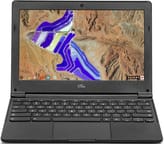 CTL Chromebook J41 | |
| Price | List Price: $274.00 Amazon Prices: |
| Model number | J41 |
| Performance Rating | 2.3 |
| Chromebook Plus | No |
| Processor | Dual-core 1.10 Ghz (max 2.40 Ghz) Intel Celeron N3350 |
| RAM | 4 GB |
| Internal Storage | 32 GB eMMC |
| Screen Size | 11.6" |
| Screen Resolution | 1366x768 |
| Screen Type | IPS |
| Touch Screen | No |
| Stylus / Pen | No Stylus Support |
| Dimensions width x length x thickness | 8.22 x 11.5 x 0.88 inches (208.79 x 292.1 x 22.35 mm) |
| Weight | 2.45 lbs (1.11 kg) |
| Backlit Keyboard | No |
| Webcam | HD |
| WiFi | 802.11 a/b/g/n/ac (2x2) |
| Bluetooth | Bluetooth 4.0 |
| Ethernet | No |
| Cellular Modem | No |
| HDMI | No HDMI |
| USB Ports | 2 USB 3, 2 USB-C |
| Thunderbolt Ports | No |
| Card Reader | microSD Card Reader |
| Battery | unknown |
| Battery Life | 10.0 hours |
| Fanless | No |
| Auto Update Expiration Date | June, 2027 |
Related Chromebooks
-
 Acer Chromebook 311 (AMD)The Acer Chromebook 311 (CB311-10H) is an 11.6-inch ChromeOS laptop on an AMD A4-9120C with 4GB of…
 -
 ASUS Chromebook C203XAThe ASUS Chromebook C203XA is a rugged 11.6-inch education laptop with a MediaTek MT8173C, an…
 -
 Acer Gateway Chromebook 311The Acer Gateway Chromebook 311 is an 11.6-inch 1366x768 ChromeOS laptop on an Intel Celeron N4500…
 -
 Lenovo Flex 3 ChromebookThe Lenovo Flex 3 Chromebook is a fanless 11.6-inch convertible with an IPS touchscreen, a MediaTek…
 -
 ASUS Chromebook Flip CR1The ASUS Chromebook Flip CR1 (CR1100FKA) is a rugged 11.6-inch education convertible on an Intel…
 -
 Dell Chromebook 3120The Dell Chromebook 3120 is a fanless 11.6-inch education Chromebook with an Intel N100, sold in…
Soldered 4GB and an entry Apollo Lake chip
The J41 shipped across a small range of Apollo Lake configurations. The base model, priced near $274, used Intel’s dual-core Celeron N3350 (1.1 GHz base, 2.4 GHz burst, Intel HD Graphics 500). CTL also listed a step-up build around the quad-core Celeron N3450 for districts that wanted more headroom. RAM came in 4GB or 8GB and storage in 16GB or 32GB of eMMC, all of it soldered, so a district chose its configuration at purchase and lived with it for the life of the fleet.
PassMark scores the N3350 at roughly 1,112 on its multi-thread CPU Mark. The figure describes the chip in PassMark’s database, since nobody benchmarked a J41, and it lines up with the workload CTL sold the machine for: Chrome tabs, Google Workspace, and classroom web apps. Heavy multitasking and demanding Android apps were never the target. The microSD slot is the practical answer to the small eMMC, since a 16GB or 32GB partition leaves little room once a few offline files and Android apps are installed.
A matte 11.6-inch panel in a drop-rated shell
An IPS touchscreen was an option on higher configurations; the standard J41 carried an 11.6-inch 1366x768 matte panel. The matte finish cuts glare from overhead fluorescent lighting, and in a classroom that counts for more day to day than the modest resolution.
CTL rated the chassis to survive drops from 70cm and built in a 180-degree hinge that lays the lid flat against the desk, both aimed at school IT rather than the spec sheet. Listed weight runs from about 2.45 to 2.54 pounds depending on configuration, light enough to move between classes. CTL backed the device with a 2-way freight education warranty, so the district pays no shipping in either direction on a warranty repair. That is a total-cost detail procurement officers weigh.
Dual USB-C alongside two full-size USB-A
The two USB-C ports handle charging and display output, so a district can standardize on USB-C power bricks and still drive an external monitor. The pair of full-size USB-A ports keeps older classroom peripherals (mice, label printers, charging carts) working without dongles.
Wireless is 802.11ac Wi-Fi in a 2x2 configuration with Bluetooth 4.0. There is no built-in Ethernet, so a wired connection needs a USB Ethernet adapter on one of the USB ports. CTL published a battery rating of up to 10 hours, a manufacturer figure with no measured result behind it; endurance in use depends on brightness, Wi-Fi load, and how hard the browser is working.
Security-only updates until June 2027
The Chrome OS device databases (cros.tech and chromebook.wiki) identify the J41 by its board codename whitetip, on the shared coral baseboard that a number of 2018 Apollo Lake Chromebooks were built on. That lineage gave it Android 9 app support and Linux apps with GPU acceleration, running on a 5.10.216 kernel. The board reached end of life at Chrome OS 126.
Google’s Auto Update policy lists the J41’s Auto Update Expiration as June 2027, with an asterisk. On Google’s table that asterisk marks the extended automatic updates window: the device reaches the June 2027 date only when extended updates are enabled, and support would have lapsed earlier without them. The J41 is already past its last feature update at Chrome OS 126 and is receiving security-only extended updates through that 2027 window. A device in this state still boots and runs, though it should not be treated as a current, fully patched machine, and a managed fleet would normally be retired before the AUE date.
Where these specs come from
No mainstream publication reviewed the CTL Chromebook J41, because CTL did not sell it that way. It went to school districts through procurement, not to reviewers or retail buyers, so there are no professional benchmark runs, battery tests, or hands-on impressions to cite. The specifications above come from CTL’s announcement and spec materials, the February 2018 write-ups at Chrome Unboxed and Liliputing, Google’s Auto Update policy page, and the community Chrome OS device databases. If you own one and want to see how its specs stack up against models that were tested, the Chromebook Comparison Chart is the place to start.
Frequently Asked Questions
Q: When does the CTL Chromebook J41 stop receiving updates?
A: Google’s Auto Update Expiration (AUE) table lists June 2027 for the J41, with an asterisk marking the extended automatic updates window, so the date applies only where extended updates are enabled. Feature updates stopped at Chrome OS 126, and security patches run through the 2027 window.
Q: Can I still buy a CTL Chromebook J41?
A: No. The J41 is discontinued and was sold to school districts through procurement rather than retail, so it never had a normal consumer sales channel and used units are uncommon.
Q: Why are there no reviews of the CTL Chromebook J41?
A: CTL (Computer Technology Link) sells K-12 hardware to school districts, not to retail buyers or reviewers. Chrome Unboxed and Liliputing covered CTL’s February 2018 announcement, but no mainstream outlet hands-tested a unit, so there are no independent benchmarks or hands-on reviews to cite.
Q: What configurations of the CTL Chromebook J41 were sold?
A: CTL offered the J41 with a dual-core Celeron N3350 or a quad-core Celeron N3450, 4GB or 8GB of RAM, and 16GB or 32GB of eMMC storage. The standard display was an 11.6-inch 1366x768 matte panel, with an IPS touchscreen available as an option on higher configurations.
Q: Could the CTL Chromebook J41 run Android and Linux apps?
A: Yes. The Chrome OS device databases list the J41 (board codename whitetip, on the coral baseboard) with Android 9 app support and Linux apps with GPU acceleration. Performance with demanding apps was limited by the entry-level Apollo Lake processor.
Q: Can I upgrade the RAM or storage in the CTL Chromebook J41?
A: No. The RAM and eMMC storage are soldered and cannot be upgraded. The microSD card slot is the only way to add storage.