
Dell Chromebook 11 CC11260
Published on

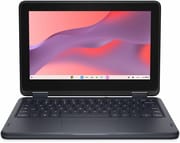
The Dell Chromebook 11 CC11260 is a small school laptop for K-12 classrooms, where drops, spills, and repair costs matter more than screen quality or speed. Dell sells it as a clamshell or a 2-in-1 convertible. The choice that matters most at purchase is memory, because the 4GB or 8GB on the board is soldered and stays that way for the life of the machine. ChromeOS updates run until the Auto Update Expiration date of June 2035.
Drop-rated and fanless, with a 1366x768 screen
| Pros | Cons |
|---|---|
| Chassis rated for 48-inch drops, with a spill- and tamper-resistant keyboard | 1366x768 resolution on every configuration |
| Fanless design makes no noise | Clamshell TN panels are rated at 220 nits with narrow viewing angles |
| ChromeOS updates until June 2035 | 64GB of eMMC storage on every configuration, with no card reader |
| Captive battery screws and simple disassembly for in-house repair | Soldered memory, so a 4GB unit stays at 4GB |
| Wi-Fi 6E and Bluetooth 5.4 | No backlit keyboard and no HDMI |
| Comfortable keyboard with generous travel | 720p webcam, and all USB ports sit on one side |
Related Videos
Dell Chromebook 11 CC11260 Comparison Chart
6 configurations
| Configuration | RAM | Screen | Performance | List price | Amazon price | Compare |
|---|---|---|---|---|---|---|
| Clamshell, 4GBX0YHW | 4 GB | 1366x768 | 1.7 | $500.00 | Details
| |
| Clamshell touch, 4GBPVM3J | 4 GB | 1366x768 touch | 1.7 | $520.00 | Details
| |
| Clamshell, 8GBJXD9C | 8 GB | 1366x768 | 2.8 | $600.00 | Details
| |
| Clamshell touch, 8GB372N9 | 8 GB | 1366x768 touch | 2.8 | $620.00 | Details
| |
| 2-in-1, 4GBTPVH4 | 4 GB | 1366x768 touch | 1.7 | $579.00 | Details
| |
| 2-in-1, 8GBKN1DR | 8 GB | 1366x768 touch | 2.8 | $679.00 | Details
|
Specs shared by every configuration
| Chromebook Plus | No |
|---|---|
| Processor | Quad-core 3.60 Ghz Intel Processor N150 |
| Internal Storage | 64 GB eMMC |
| Screen Size | 11.6" |
| Screen Resolution | 1366x768 |
| Stylus / Pen | No Stylus Support |
| Backlit Keyboard | No |
| Webcam | 720p |
| WiFi | Wi-Fi 6E (802.11ax) |
| Bluetooth | Bluetooth 5.4 |
| Ethernet | No |
| Cellular Modem | No |
| HDMI | No HDMI |
| USB Ports | 1 USB 3, 2 USB-C 2x USB-C 5Gbps with DisplayPort and charging, 1x USB-A 5Gbps |
| Thunderbolt Ports | No |
| Card Reader | No Card Reader |
| Battery | 3 cell, 45Wh, Li-ion |
| Battery Life | 13 hours |
| Fanless | Yes |
| Auto Update Expiration Date | June, 2035 |
Related Chromebooks
-
 Dell Chromebook 11 (3100)The Dell Chromebook 11 (3100) is a ruggedized 11.6-inch education Chromebook with rubber bumpers, a…
-
 Dell Chromebook 3120The Dell Chromebook 3120 is a fanless 11.6-inch education Chromebook with an Intel N100, sold in…
-
 Samsung Chromebook 4The Samsung Chromebook 4 is an 11.6-inch Celeron N4000 or N4020 Chromebook with 4GB of RAM, a…
-
 ASUS Chromebook CX1 (CX1101)The ASUS Chromebook CX1 (CX1101) is an 11.6-inch budget Chromebook with an Intel Celeron N4020, an…
-
 Acer Chromebook 311 C723The Acer Chromebook 311 C723 is an 11.6-inch education Chromebook built to MIL-STD-810H durability,…
-
 Acer Chromebook 311 C725An 11.6-inch rugged classroom Chromebook with MIL-STD 810H testing, a replaceable keyboard and…
Clamshell or 2-in-1, TN or IPS, 4GB or 8GB

All configurations use the same chip and 64GB of eMMC storage. The clamshell measures about 12 x 8.2 x 0.83 inches and weighs up to about 3.2 pounds. It comes with or without touch, and Dell’s tech specs list a TN panel with an anti-glare finish either way. The 2-in-1 adds a 360-degree hinge, a touchscreen on an IPS panel under Gorilla Glass, and a world-facing camera, and it grows to about 0.86 inches thick and 3.44 pounds.
Dell’s setup and specifications guide rates the clamshell panels at 220 nits and 45% NTSC color, with viewing angles of 40 degrees left and right. The IPS panel is the better choice for a machine that gets passed around a table or used in tablet mode.
The ports are two 5Gbps USB-C with DisplayPort Alt Mode, one 5Gbps USB-A, and a headset jack. The 65W adapter plugs into either USB-C port. There is no HDMI port, so a classroom projector needs a USB-C adapter, and there is no card reader to add storage. Wireless comes from an Intel AX211 card with Wi-Fi 6E and Bluetooth 5.4. Dell also offers an optional WWAN module, which pairs with a 1080p webcam in place of the standard 720p one, and 5G comes on an 8GB build.
The Intel Processor N150 has 4 cores and 4 threads, a 3.6 GHz boost clock, and a PassMark score of about 5,343, with passive cooling and no fan. Memory is LPDDR5 or LPDDR5x at 4800 MT/s in a single channel. One memory channel and four threads handle web apps, documents, and video, and 4GB leaves little room for Android or Linux apps. The 3-cell, 45Wh battery carries a 13-hour rating from Dell.
Reviewer Insights

PCMag
PCMag tested the 8GB 2-in-1 and scored it 3.5 out of 5, calling it “a competent entrant to the education market.” PCMag wrote that the laptop’s durability encourages casual handling, and that “it never complains nor does it show signs of wear.” The keyboard drew praise for its generous key travel and tactile feel (“Dell’s keyboard is a pleasant surprise”), while the touchpad was small but reliable.
PCMag’s main complaint was the screen. It found the colors muted and the brightness modest, said the glassy 2-in-1 finish produces a lot of reflections, and wrote that “The 1,366-by-768-pixel resolution feels like the 2000s.” At 3.44 pounds the convertible was less suited to tablet use and worked better in an easel position. The 720p webcam looked washed out, the 5MP world-facing camera was noticeably sharper, and the speakers sounded hollow.
In benchmarks the Dell ran close to the N100-based CTL Chromebook PX141EXT, matching it in WebXPRT 4, trailing slightly in PCMark, and beating it by a decent margin in Geekbench, while the Chromebook Plus models in the comparison were well ahead. PCMag’s video-loop battery test reached 7 hours 49 minutes, which it called disappointing, with the caveat that the test had to run from an external SSD because of the limited internal storage. PCMag still gave the CTL its Editors’ Choice among education Chromebooks, citing a better screen and a competitive price.
ChromebookParts.com
ChromebookParts.com, which sells Chromebook repair parts, unboxed and opened an 8GB touchscreen unit with a focus on repair. The bottom cover came off easily after nine screws that the reviewer thought were captive, heavy brackets cover the USB-C ports, the USB-A port, and the LCD cable, and the battery screws are captive. The reviewer gave it a five for repairability: “This is going to be a really easy device to repair.” The overall score, for a device going into students’ hands, was also a five.
The reviewer also said of the keyboard, “This might be the smoothest Chromebook keyboard that I’ve typed on.” The battery cable runs under the battery, and a replacement battery may not include one, so that cable can be a separate purchase. All the USB ports are on one side, and the reviewer wished for a USB-C port on the other side while noting it would add another point of failure.
What changed from the Chromebook 3120
The CC11260 gets two more years of updates than the older Dell Chromebook 3120, with June 2035 against June 2033. Wi-Fi 6E replaces Wi-Fi 6, Bluetooth moves from 5.2 to 5.4, and the battery grows from 42Wh to 45Wh. The 3120 uses the Intel N100, which scores about 5,305 on PassMark against 5,343 for the N150, a small gap.
Conclusion
This Chromebook fits schools and districts that buy for durability and plan to repair devices themselves, and parents buying a first laptop for a younger student. The 8GB configurations are the better long-term purchase because memory cannot be added later. The 2-in-1 suits classes that use touch and tablet mode, and its IPS panel avoids the narrow viewing angles of the TN clamshell.
It is a poor fit for anyone who cares more about the screen or speed than about ruggedness, because the 1366x768 panel is the weakest part of the machine on every configuration and the N150 trails the Chromebook Plus models PCMag compared it with. Those buyers can compare sharper screens and faster chips on the Chromebook comparison chart. A school that needs built-in HDMI has the HP Fortis G1i 14, which also has an N150 and the same June 2035 update date in a larger body.
Frequently Asked Questions
Does the Dell Chromebook 11 CC11260 use an Intel N100 or N150?
The Intel Processor N150, on every configuration of the CC11260. The N100 belongs to the older Dell Chromebook 3120.
Can I upgrade the memory or storage?
No. Both the memory and the 64GB of eMMC storage are onboard, and Dell rates the memory as non-upgradable. There is no card reader, so extra storage has to come through USB or the cloud.
When does the Dell Chromebook 11 CC11260 stop getting updates?
June 2035, for both the clamshell and the 2-in-1, according to Google’s Auto Update Expiration list.
Which configurations have a touchscreen?
Both 2-in-1 models have an IPS touchscreen. The clamshell comes with or without touch, and its panel is TN in both cases.
Can it connect to an external display?
Yes, through either USB-C port, since both support DisplayPort Alt Mode. There is no HDMI port, so an HDMI or DisplayPort screen needs a USB-C adapter or cable.