
HP Chromebook 14a (AMD)
Updated on

The HP Chromebook 14a (AMD) was HP’s first AMD-powered Chromebook when it launched in 2021. The AMD 3015Ce processor inside gave budget buyers an alternative to Intel-based models during its production run. This product has been discontinued and is no longer available for purchase. However, existing owners will continue to receive Chrome OS updates and security patches until June 2031. The 14a-nd series was available in several color options including Forest Teal, Mineral Silver, and Ceramic White, with variations in display type (HD, HD Touchscreen, and Full HD) across different model numbers.
HP Chromebook 14a (AMD) Comparison Chart
HP Chromebook 14a (AMD) | HP Chromebook 14a (AMD) | HP Chromebook 14a (AMD) | 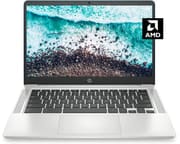 HP Chromebook 14a (AMD) | HP Chromebook 14a (AMD) | |
| Price | List Price: $349.99 Amazon Prices: | List Price: $349.99 Amazon Prices: | List Price: $349.99 Amazon Prices: | List Price: $299.99 Amazon Prices: | List Price: $349.99 Amazon Prices: |
| Model number | 14a-nd0090nr / 31U28UA | 14a-nd0060nr / 31U20UA | 14a-nd0040nr / 31U18UA | 14a-nd0010nr / 31U15UA#ABA | 14a-nd0070nr / 31U27UA |
| Performance Rating | 3.2 | 3.2 | 3.2 | 3.2 | 3.2 |
| Chromebook Plus | No | No | No | No | No |
| Processor | Dual-core 1.20 Ghz (max 3.00 Ghz) AMD 3015Ce Processor | Dual-core 1.20 Ghz (max 3.00 Ghz) AMD 3015Ce Processor | Dual-core 1.20 Ghz (max 3.00 Ghz) AMD 3015Ce Processor | Dual-core 1.20 Ghz (max 3.00 Ghz) AMD 3015Ce Processor | Dual-core 1.20 Ghz (max 3.00 Ghz) AMD 3015Ce Processor |
| RAM | 4 GB | 4 GB | 4 GB | 4 GB | 4 GB |
| Internal Storage | 32 GB eMMC | 32 GB eMMC | 32 GB eMMC | 32 GB eMMC | 32 GB eMMC |
| Screen Size | 14" | 14" | 14" | 14" | 14" |
| Screen Resolution | 1920x1080 | 1366x768 | 1366x768 | 1366x768 | 1920x1080 |
| Screen Type | anti-glare, 250 nits, HD | anti-glare, 250 nits, HD | anti-glare, 250 nits, HD | anti-glare, 250 nits, HD | anti-glare, 250 nits, HD |
| Touch Screen | No | No | Yes | No | No |
| Stylus / Pen | No Stylus Support | No Stylus Support | No Stylus Support | No Stylus Support | No Stylus Support |
| Dimensions width x length x thickness | 12.82 x 8.6 x 0.7 inches (325.63 x 218.44 x 17.78 mm) | 12.82 x 8.6 x 0.7 inches (325.63 x 218.44 x 17.78 mm) | 12.82 x 8.6 x 0.7 inches (325.63 x 218.44 x 17.78 mm) | 12.82 x 8.6 x 0.7 inches (325.63 x 218.44 x 17.78 mm) | 12.82 x 8.6 x 0.7 inches (325.63 x 218.44 x 17.78 mm) |
| Weight | 2.97 lbs (1.35 kg) | 2.97 lbs (1.35 kg) | 2.97 lbs (1.35 kg) | 2.97 lbs (1.35 kg) | 2.97 lbs (1.35 kg) |
| Backlit Keyboard | No | No | No | No | No |
| Webcam | 720p HD | 720p HD | 720p HD | 720p HD | 720p HD |
| WiFi | Realtek RTL8822CE 802.11a/b/g/n/ac (2x2) | Realtek RTL8822CE 802.11a/b/g/n/ac (2x2) | Realtek RTL8822CE 802.11a/b/g/n/ac (2x2) | Realtek RTL8822CE 802.11a/b/g/n/ac (2x2) | Realtek RTL8822CE 802.11a/b/g/n/ac (2x2) |
| Bluetooth | Bluetooth 5.0 | Bluetooth 5.0 | Bluetooth 5.0 | Bluetooth 5.0 | Bluetooth 5.0 |
| Ethernet | No | No | No | No | No |
| Cellular Modem | No | No | No | No | No |
| HDMI | No HDMI | No HDMI | No HDMI | No HDMI | No HDMI |
| USB Ports | 1 USB 2.0, 2 USB-C | 1 USB 2.0, 2 USB-C | 1 USB 2.0, 2 USB-C | 1 USB 2.0, 2 USB-C | 1 USB 2.0, 2 USB-C |
| Thunderbolt Ports | No | No | No | No | No |
| Card Reader | No Card Reader | No Card Reader | No Card Reader | No Card Reader | No Card Reader |
| Battery | 2 cell, 47Whrs, Li-ion | 2 cell, 47Whrs, Li-ion | 2 cell, 47Whrs, Li-ion | 2 cell, 47Whrs, Li-ion | 2 cell, 47Whrs, Li-ion |
| Battery Life | 10.0 hours | 10.0 hours | 10.0 hours | 10.0 hours | 10.0 hours |
| Fanless | No | No | No | No | No |
| Auto Update Expiration Date | June, 2031 | June, 2031 | June, 2031 | June, 2031 | June, 2031 |
Related Chromebooks
-
 HP Chromebook 14a (ne Series)The HP Chromebook 14a (ne series) is a 14-inch ChromeOS laptop on an Intel Celeron N4500 with 4GB…
 -
 HP Chromebook 14a (14a-nf series)The HP Chromebook 14a (14a-nf series) spans two tiers of the same chassis: an Amazon-exclusive…
 -
 ASUS Chromebook C424The ASUS Chromebook C424 boasts a crisp 14-inch FHD anti-glare display, durable spill-resistant…
 -
 Acer Chromebook 314 (CB314-4H/4HT)A budget-friendly 14-inch Chromebook with Intel Alder Lake-N processors, WiFi 6E, and software…
 -
 ASUS Chromebook C425The ASUS Chromebook C425 is a fanless 14-inch ChromeOS laptop on an Intel Core m3 with a 1920x1080…
 -
 Acer Gateway Chromebook 314The Acer Gateway Chromebook 314 is a 14-inch ChromeOS laptop on Acer's Chromebook 314 chassis with…
Capable web hardware held back by 4GB of RAM and 32GB of storage
AMD built the 3015Ce as a mobile chip for Chromebooks, and this was the first HP model to carry one. The dual-core design runs at a 1.2 GHz base clock and boosts to 2.3 GHz, which covers web browsing, document editing, and video streaming without drawing much power.
The chassis is plastic with a metallic finish that lifted its look above the sticker price. At 2.97 pounds it stayed portable enough for students and commuters, and a 720p webcam sits at the top of the display for video calls. The anti-glare coating cuts reflections, but 250 nits of brightness keeps it an indoor machine.
Two USB-C ports handle charging and data transfer, alongside a single USB-A port for older peripherals and a 3.5mm combo jack for headphones or speakers. There is no HDMI port, so an external display needs a USB-C to HDMI adapter. The lack of an Ethernet port also meant users who needed a wired connection had to use a USB Ethernet adapter. The 802.11ac WiFi (WiFi 5) with 2x2 MIMO provided reliable wireless connectivity, while Bluetooth 5.0 enabled connection to wireless peripherals and audio devices.
Storage stops at 32GB of eMMC on every variant, and it is soldered down with no card reader to fall back on. Anyone living in Google Drive and web apps had room to work; anyone storing media locally ran out fast. The 4GB of DDR4 RAM carried Chrome OS through typical workloads, though dozens of open tabs brought slowdown.
The 47Wh battery backs HP’s claimed 10-hour runtime under ideal conditions, with 5 to 7 hours the usual result once screen brightness and workload are accounted for. That covers a full school or work day at moderate use. Either USB-C port charges the laptop, so the cable can come in from whichever side suits the desk.
HP’s education and home pick at $250 to $350
HP’s move to AMD in 2021 was a shift for a lineup that, like the rest of the budget Chromebook market, ran on Intel Celeron silicon. The AMD 3015Ce offered comparable performance to Intel’s Celeron N4020 and N4120 chips with slightly different power and thermal characteristics.
The 14a-nd series competed directly against models like the Acer Chromebook 314, Lenovo Chromebook 3, and Samsung Chromebook 4. At a typical street price of $250-350 it went after education buyers and casual home users. HP marketed it to students and first-time Chromebook buyers who needed an affordable machine for basic productivity work.
Most model numbers shipped the 1366x768 panel, storage stopped at 32GB, and the keyboard had no backlight. It still served as a dependable entry point into the Chrome OS ecosystem for buyers who wanted a browser laptop and nothing more.
Coursework, email, and streaming were its ceiling
HP built this for students who needed a dependable machine for Google Docs, research, and online coursework. Casual users who browsed, checked email, streamed video, and ran social apps had enough here, and it made a workable second computer for kitchen recipes, quick searches, or kids’ homework.
Video editors, programmers, gamers, and anyone regularly working with large files needed to look elsewhere. The 4GB of RAM and the 32GB of storage do not support resource-intensive tasks, and the HD display falls short for color-critical work or long content-creation sessions. Keeping numerous applications and browser tabs open at once runs into the same memory ceiling.
Worth keeping in service until the 2031 cutoff
Web browsing, document work, video calls, and streaming all still run on this hardware. Chrome OS support extends until June 2031, which leaves owners several more years of updates and security patches. After that Auto Update Expiration date the device keeps working but stops receiving new features and security fixes.
The 14a-nd series has been discontinued, but HP kept working with AMD on Chromebook releases that followed it. Anyone shopping for a replacement can look at HP’s current Chromebooks or at what Acer, Lenovo, and Samsung ship in the same size, all of which have moved on to newer processors and better panels since 2021. To compare current models side by side, the Chromebook Comparison Chart lets you filter by specs and price to find the right fit.
Frequently Asked Questions
How long will the HP Chromebook 14a (AMD) receive Chrome OS updates?
Updates and security patches run until June 2031. That Auto Update Expiration (AUE) date leaves existing owners several more years of supported use. Past it, the device keeps working but won’t receive new features or security updates.
Can I expand the storage on the HP Chromebook 14a?
The internal 32GB eMMC storage cannot be upgraded, and this model does not include a card reader for expandable storage. Chrome OS integrates with Google Drive, providing cloud storage as an alternative to local storage. You can also use a USB drive connected to one of the available ports for additional file storage.
Was the HP Chromebook 14a (AMD) good for students?
Yes. At 2.97 lbs with a 10-hour battery, it was easy to carry between classes, and Chrome OS gave schools a secure, low-maintenance environment that worked with Google Workspace for Education. The 720p webcam covered video calls for remote learning sessions.
Could I connect the HP Chromebook 14a to an external monitor?
Yes, though you needed a USB-C to HDMI adapter since the Chromebook didn’t have a built-in HDMI port. Both USB-C ports supported video output, allowing connection to external displays. The AMD 3015Ce processor supported external displays at common resolutions for extended desktop or mirrored display setups.
Why is the HP Chromebook 14a (AMD) no longer available?
HP retired the 14a-nd model number as part of its normal product lifecycle. Released in 2021, it has been replaced by newer Chromebooks with updated processors and specifications. HP still sells 14-inch Chromebooks built on more recent hardware.
How did the AMD 3015Ce compare to Intel Celeron processors?
The AMD 3015Ce offered comparable performance to Intel Celeron N4020 and N4120 processors commonly found in budget Chromebooks. With its dual-core design running up to 2.3 GHz boost clock, it handled everyday Chrome OS tasks smoothly. The AMD chip was particularly efficient at video playback and basic productivity tasks.