
Lenovo Chromebook C340 11.6"
Updated on

Released in 2019, the Lenovo Chromebook C340 11.6” pairs an Intel Celeron N4000 processor with 4GB of RAM and 32GB of eMMC storage in a 2.65-pound convertible. The 360-degree hinge folds it into tablet, tent, and stand modes, the IPS panel is a touchscreen, and the fanless design runs silent. It is discontinued. Google extended Chrome OS support through June 2029 (originally June 2026), so surviving units still receive updates for basic tasks.
| Pros | Cons |
|---|---|
| 10+ hours of battery, enough for a school or work day on one charge | Display brightness is limited (~180 nits tested vs 250 nits claimed) |
| Four ports (2x USB-C, 2x USB-A 3.1) cover most peripherals without a dongle | 1366x768 leaves text looking soft at close range |
| IPS touchscreen keeps its colors at an angle, useful in tent mode | Wireless stops at WiFi 5 (802.11ac) and Bluetooth 4.2 |
| Aluminum lid in Sand Pink or Platinum Grey where plastic was the norm | No keyboard backlight for low-light typing |
| 2.65 lbs, light enough to carry between classes all day | 4GB RAM limits heavy multitasking (tabs reload after 16+) |
| Sat in the sub-$300 Chromebook bracket | 32GB of eMMC fills fast and pushes files to Drive |
Related Videos
Lenovo Chromebook C340 11.6" Comparison Chart
 Lenovo Chromebook C340 11.6" | 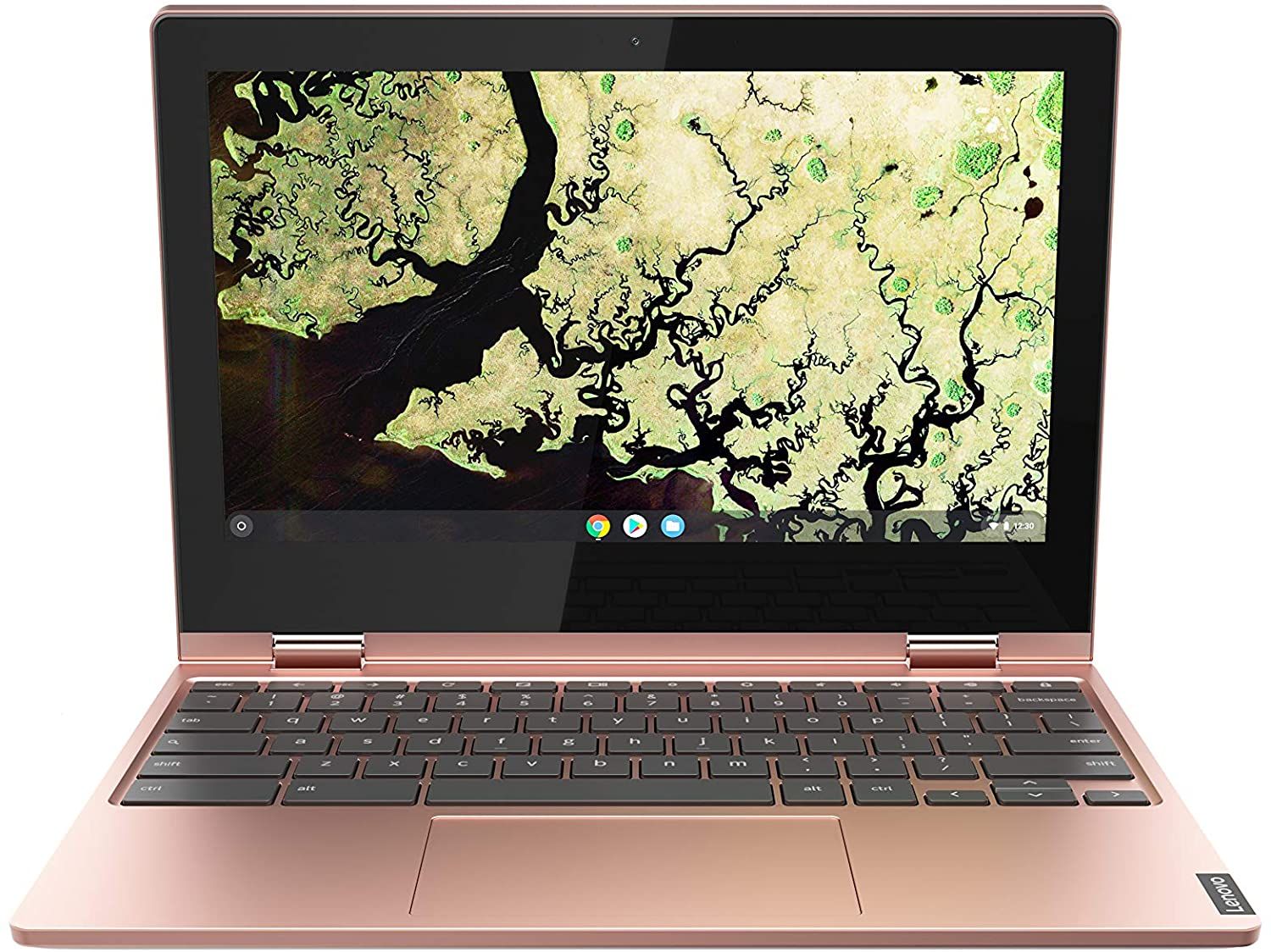 Lenovo Chromebook C340 11.6" | |
| Price | List Price: $179.99 Amazon Prices: | List Price: $299.00 Amazon Prices: |
| Model number | 81TA0000US | 81TA0007US |
| Performance Rating | 3.1 | 3.1 |
| Chromebook Plus | No | No |
| Processor | Dual-core 1.10 Ghz (max 2.60 Ghz) Intel Celeron N4000 Processor | Dual-core 1.10 Ghz (max 2.60 Ghz) Intel Celeron N4000 Processor |
| RAM | 4 GB | 4 GB |
| Internal Storage | 32 GB eMMC | 32 GB eMMC |
| Screen Size | 11.6" | 11.6" |
| Screen Resolution | 1366x768 | 1366x768 |
| Screen Type | IPS | IPS |
| Touch Screen | Yes | Yes |
| Stylus / Pen | No Stylus Support | No Stylus Support |
| Dimensions width x length x thickness | 11.42 x 8.19 x 0.7 inches (290.07 x 208.03 x 17.78 mm) | 11.42 x 8.19 x 0.7 inches (290.07 x 208.03 x 17.78 mm) |
| Weight | 2.65 lbs (1.2 kg) | 2.65 lbs (1.2 kg) |
| Backlit Keyboard | No | No |
| Webcam | 720p HD | 720p HD |
| WiFi | 802.11ac (2x2) | 802.11ac (2x2) |
| Bluetooth | Bluetooth 4.2 | Bluetooth 4.2 |
| Ethernet | No | No |
| Cellular Modem | No | No |
| HDMI | No HDMI | No HDMI |
| USB Ports | 2 USB 3, 2 USB-C (with power delivery and DisplayPort) | 2 USB 3, 2 USB-C (with power delivery and DisplayPort) |
| Thunderbolt Ports | No | No |
| Card Reader | microSD Card Reader | microSD Card Reader |
| Battery | 3 cell, 42 WHr, Lithium-ion | 3 cell, 42 WHr, Lithium-ion |
| Battery Life | 10.0 hours | 10.0 hours |
| Fanless | Yes | Yes |
| Auto Update Expiration Date | June, 2029 | June, 2029 |
Related Chromebooks
-
 Lenovo 300e Yoga Chromebook Gen 4The Lenovo 300e Yoga Chromebook Gen 4 is a rugged 11.6-inch education convertible with a MediaTek…
 -
 Lenovo Chromebook 3 11"The Lenovo Chromebook 3 11 is a fanless 11.6-inch Chromebook with an Intel Celeron N4020, 4GB of…
 -
 Acer Chromebook 311An 11.6-inch Chromebook with an Intel Celeron N4000, 4GB of RAM, a fanless chassis, and up to 10…
 -
 Acer Chromebook Spin 311The Acer Chromebook Spin 311 (CP311-2H) is an 11.6-inch budget convertible with an Intel Celeron…
 -
 ASUS Chromebook Flip C214The ASUS Chromebook Flip C214 is a rugged 11.6-inch education convertible with an Intel Celeron…
 -
 HP Fortis Flip G1m 11 inch ChromebookThe HP Fortis Flip G1m 11 inch Chromebook is a rugged convertible 2-in-1 built for K-12 classrooms,…
An Aluminum Lid and Four Ports on a Fanless 11.6-Inch Frame

Lenovo sold the C340 into the budget convertible market across a 2019-2021 production run. The 11.6” model struck a balance between portability and functionality. The lid is aluminum, at a price where all-plastic construction was the norm. Buyers chose between Platinum Grey and the distinctive Sand Pink, which Chrome Unboxed set against the “boring blacks” of other budget Chromebooks.
The Intel Celeron N4000 processor ran web browsing, document editing, and video streaming smoothly. The 4GB of RAM became a limiting factor when pushing beyond 15-16 open tabs, at which point Chrome OS would begin reloading background tabs to manage memory. Android app compatibility was solid, with most apps running without issue, though graphics-intensive games struggled on the integrated Intel UHD Graphics 600.
Two USB-C 3.1 Gen 1 ports with power delivery and DisplayPort support flank the sides, joined by two USB-A 3.1 ports, a microSD card reader, and a headphone/microphone combo jack. Four USB ports made peripheral connections easier without relying on adapters. Wireless stops at WiFi 5 (802.11ac 2x2) and Bluetooth 4.2, a generation behind WiFi 6. A USB Ethernet adapter plugs into either USB-A port when a wired connection is the more reliable option.
The 11.6-inch IPS panel delivered good color reproduction and viewing angles for its class, but the 1366x768 HD resolution showed its age even when new, and text appeared slightly fuzzy at close viewing distances. Lenovo claimed 250 nits; Android Central’s testing measured closer to 180 nits. That left the C340 hard to use outdoors or in brightly lit rooms. Indoors the display performed adequately, and the touchscreen responsiveness was excellent for navigating Chrome OS and Android apps.
Key travel is adequate for a device this thin, and the typing experience stays comfortable over a long session. The missing backlight was a notable omission at a price where competitors like the HP Chromebook x360 11 included one. The trackpad is reasonably sized and supports Chrome OS gestures, though some reviewers noted occasional precision issues when making fine cursor movements.
Reviewer Insights

Android Central Measured 180 Nits
Android Central awarded the Lenovo Chromebook C340 a 90% rating, calling it “practically perfect for the price.” Battery life stood out to the reviewer, who noted that users could expect 10+ hours of real-world usage. The review praised the updated port selection compared to Lenovo’s earlier Chromebook models, appreciating the inclusion of both USB-C and USB-A options. However, they measured display brightness at around 180 nits, significantly lower than Lenovo’s claimed 250 nits, making outdoor use challenging. The lack of keyboard backlighting was another noted compromise at this price point.
Chrome Unboxed on a Week Between Charges
Chrome Unboxed declared the C340 the “best Chromebook of 2019 in the $0-$300 category.” Multi-day battery performance came out of their testing, with one user reportedly charging on weekends and using the device throughout the week, often with 40% battery remaining by Friday. They praised the metal lid as providing a premium feel uncommon in budget Chromebooks, though they acknowledged the 17.9mm thickness made it “a little chunky” compared to thinner alternatives. The reviewer emphasized its value, noting it handled up to 16 tabs before RAM limitations caused tab reloading.
Android Authority: You get what you pay for
Android Authority titled their review “You get what you pay for.” They pointed out that the C340 faced stiff competition with “literally dozens of models available from a range of manufacturers in the $200 to $400 space.” The reviewer recommended the device specifically for middle schoolers and casual users who were not demanding about specs and performance. Their verdict: “$300 isn’t bottom-tier by any stretch, but the C340 doesn’t really manage to punch above its weight class in any significant way.”
Worth Keeping for Light Work Until June 2029
An IPS touchscreen, a 360-degree hinge, 10 hours of battery, and four USB ports still suit a student or a casual user who values portability over speed. The Intel Celeron N4000 and 4GB of RAM handle typical Chrome OS tasks competently, and anyone pushing past a dozen or so tabs will hit the ceiling quickly. Chrome OS updates extend through June 2029, so a unit sitting in a drawer still has years of security patches ahead of it.
The C340 sold against devices like the ASUS Chromebook Flip C214 and HP Chromebook x360 11, which offered similar specifications at comparable prices. Its aluminum lid, four USB ports, and battery life were what set it apart in the 2019-2021 budget market. Chromebook Plus devices have since raised the bar for display quality, performance, and AI features, and the 1366x768 panel shows that gap most clearly. To see how current Chromebooks stack up, visit our Chromebook comparison chart.
Frequently Asked Questions
How long did the Lenovo Chromebook C340 11.6” battery last?
Lenovo rated the C340 at 10 hours, and testing largely confirmed it. Android Central put real-world use at 10+ hours, and Chrome Unboxed noted one user who charged on weekends and had 40% remaining by Friday during off-and-on use.
Could the RAM or storage on the C340 be upgraded?
No. Both the 4GB of RAM and the 32GB eMMC are soldered. The microSD slot and USB drives extend storage, and Google Drive covers the rest; more RAM meant buying a different model.
Was the Lenovo Chromebook C340 good for students?
Yes, through middle school and into early high school. At 2.65 lbs with a durable build and all-day battery, it was practical for classroom use, and Google Docs, Classroom, and other education apps ran smoothly. The hinge folds flat for note-taking with a separately purchased stylus. College students with heavier multitasking needs found the 4GB RAM limiting when running multiple applications or browser tabs simultaneously.
How did the C340 compare to other 11-inch Chromebooks?
The aluminum lid (most competitors used all-plastic), the four ports (2x USB-C, 2x USB-A), and the IPS touchscreen were what separated it in its price range. Chrome Unboxed ranked it the best budget Chromebook of 2019 under $300, while Android Authority found it did not outperform competitors running the same Intel Celeron N4000 and 4GB of RAM.
When will the Lenovo Chromebook C340 stop receiving updates?
June 2029, according to Google’s official Auto Update Expiration (AUE) database. That is an extension of the original June 2026 date, and extended-support updates may reduce Android app support. The device keeps working after that, without security updates or new features.
Could the C340 run Android apps and Linux applications?
Both, within limits. Android apps from the Google Play Store ran well for productivity and entertainment, and Linux was available for command-line tools and desktop Linux software. The 4GB of RAM and the Celeron processor meant resource-intensive Android games and heavy Linux workloads like code compilation struggled.