
Lenovo IdeaPad Gaming Chromebook
Updated on

Lenovo entered the gaming Chromebook market in late 2022 with the IdeaPad Gaming Chromebook, a 16-inch machine built around streamed games rather than locally rendered ones. A 12th Gen Intel Core i5-1235U drives a WQXGA display running at 120Hz, and GeForce NOW and Amazon Luna came preinstalled. Google later upgraded the model to Chromebook Plus through a Chrome OS update. Lenovo has since discontinued it, so any unit on sale today is used or refurbished.
| Pros | Cons |
|---|---|
| 120Hz 2560x1600 display with a measured Delta-E of 1.28 (NotebookCheck) | Display drops to 60Hz on battery power with no override option (Chrome Unboxed) |
| Cloud gaming performance: 136 FPS in Cyberpunk 2077 via GeForce NOW (PCWorld) | No full-size HDMI port on a 16-inch chassis (Chrome Unboxed) |
| Excellent keyboard with 1.5mm travel and 100% antighosting for gaming (9to5Google) | Mediocre touchpad with poor responsiveness and requires excessive click pressure (9to5Google) |
| Tremendous battery life during cloud gaming sessions (9to5Google) | Plastic bottom chassis exhibits noticeable flex (Chrome Unboxed, PCWorld) |
| 4-zone RGB backlit keyboard with full numeric keypad (Chrome Unboxed) | 8GB RAM is soldered and non-upgradeable (NotebookCheck) |
| Professional design suitable for both work and gaming environments (Chrome Unboxed) | No touchscreen, which limits Android apps built for touch |
Related Videos
Lenovo IdeaPad Gaming Chromebook Comparison Chart
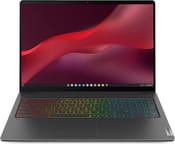 Lenovo IdeaPad Gaming Chromebook | |
| Price | List Price: $699.99 Amazon Prices: |
| Model number | 82V8000CUX |
| Performance Rating | 7.5 |
| Chromebook Plus | Yes |
| Processor | Deca-core 3.30 Ghz (max 4.40 Ghz) Intel Core i5-1235U |
| RAM | 8 GB |
| Internal Storage | 256 GB SSD |
| Screen Size | 16" |
| Screen Resolution | 2560x1600 |
| Screen Type | IPS |
| Touch Screen | No |
| Stylus / Pen | No Stylus Support |
| Dimensions width x length x thickness | 14.03 x 9.96 x 0.79 inches (356.36 x 252.98 x 20.07 mm) |
| Weight | 4.01 lbs (1.82 kg) |
| Backlit Keyboard | Yes |
| Webcam | 1080p FHD |
| WiFi | Wi-Fi 6E (802.11ax) |
| Bluetooth | Bluetooth 5.1 |
| Ethernet | No |
| Cellular Modem | No |
| HDMI | No HDMI |
| USB Ports | 2 USB 3, 2 USB-C (USB-C power delivery and DisplayPort 1.4) |
| Thunderbolt Ports | No |
| Card Reader | microSD Card Reader |
| Battery | 71 Whr, Li-ion |
| Battery Life | 11.0 hours |
| Fanless | No |
| Auto Update Expiration Date | June, 2032 |
Related Chromebooks
-
 Lenovo Chromebook Plus i 15A 15.3-inch Chromebook Plus with an eight-core Intel Core 3 N355, a numeric keypad, a fingerprint…
 -
 Acer Chromebook Plus 516 (CB516-1H)The Acer Chromebook Plus 516 (CB516-1H) is a 16-inch Chromebook Plus with an Intel Core i3-1315U, a…
 -
 Acer Chromebook Plus 516 GEThe Acer Chromebook Plus 516 GE is a cloud-gaming Chromebook with a 16-inch 2560x1600 120Hz…
 -
 Lenovo Chromebook Plus 2-in-1 14The Lenovo Chromebook Plus 2-in-1 14 is an aluminum 360-degree convertible with an Intel Core 3…
 -
 HP Chromebook Plus 15aThe HP Chromebook Plus 15a is a Chromebook Plus laptop with a 15.6-inch Full HD display, an Intel…
 -
 ASUS Chromebook Flip CX5 (CX5601)A large 16-inch 2-in-1 convertible Chromebook Plus with Thunderbolt 4 connectivity and a garaged…
A 120Hz Panel That Halves Its Refresh Rate on Battery

The exterior plays down the hardware inside. As Chrome Unboxed noted, “there’s not a ton of gaming aesthetic going on on the outside, and I kind of like that… you also can get work done on it and take it to the office and not feel a little ridiculous.” An anodized aluminum lid covers the top, while the plastic bottom chassis flexes more than the size of the machine suggests it should. At 4.01 pounds it stays portable for a 16-inch laptop, though it is not the lightest option in the category.
NotebookCheck measured a Delta-E of 1.28 for colors, full sRGB coverage, and a maximum brightness of 366 nits on the 2560x1600 IPS panel. PCWorld reached 136 FPS in Cyberpunk 2077 at Ultra settings with ray-tracing enabled through GeForce NOW Ultimate, which the 120Hz refresh rate can display in full. Unplug the machine and the panel falls back to 60Hz, with no software setting to override it, so streaming away from an outlet runs at half the refresh rate the display is capable of.
The keyboard carries 1.5mm of travel and 100% antighosting for both typing and gaming, with 4-zone RGB backlighting and a full-size numeric keypad. The touchpad draws the complaints. 9to5Google described “unsmooth movement out of the cursor” and found it took too much pressure to click. An external mouse solves that for cloud gaming, but the touchpad remains a drawback for general productivity work.
Connectivity runs to dual USB-C ports with DisplayPort and power delivery support, two USB-A 3.2 ports, a microSD card slot, and a 3.5mm audio jack. Leaving out a full-size HDMI port on a 16-inch chassis marketed toward gamers is an omission. Wi-Fi 6E with the Intel AX211 and Bluetooth 5.1 handle wireless, which matters most for keeping a game stream stable. A 1080p webcam with a privacy shutter covers video calls.
Reviewer Insights

A Gaming Laptop That Does Not Look Like One
Chrome Unboxed covered the machine at launch, with Robby Payne praising it as a cloud gaming machine while appreciating its versatility. He compared it favorably to the Acer 516 GE, noting that both target the high-refresh-rate gaming market but execute differently. “Lenovo makes great keyboards… lots of travel, lots of nice response and clickiness,” he observed, while testing the typing and gaming feel extensively. The RGB backlighting impressed him with its brightness, noting it was even more visible than Acer’s implementation. He was candid about the shortcomings, particularly the battery refresh rate limitation: “It feels like it goes down to like a 60Hz [on battery]… hopefully that’s an update that comes to Chrome OS.” He also expressed disappointment about the lack of HDMI and the flexible plastic bottom chassis, but ultimately came down in its favor for cloud gaming enthusiasts.
Long Streaming Sessions on One Charge
Cyberpunk 2077, Destiny 2, and The Witcher 3 all ran on the machine through NVIDIA GeForce Now, and Thunder E from Booredatwork built his review around those demonstrations. “Because it’s a gaming Chromebook, I get to access the gaming platforms I want… whether it’s Xbox Game Pass or GeForce Now,” he said. He emphasized the battery life advantage, noting that since the internal hardware doesn’t have to work as hard as a local GPU would, gamers can enjoy longer sessions. “I can game the way I want and I can also do it for quite a long amount of time,” he concluded, positioning the device as an excellent entry point into cloud gaming.
The Serviceable Internals Stop at the Soldered RAM
Chrome OS restricts virtualized applications to 60Hz rather than the full 120Hz capability, a limitation NotebookCheck’s review noted alongside the display’s color accuracy. NotebookCheck awarded the device an 83.4% score. They appreciated the serviceable design with accessible internals for storage upgrades, though noted the 8GB RAM is soldered and non-upgradeable. NotebookCheck wrote, “On paper, a 16-inch Chromebook with a 1600p full sRGB 120 Hz display sounds overkill,” but the execution proves worthwhile for both cloud gaming and productivity use cases.
A Cloud Gaming Dream With a Poor Trackpad
9to5Google described the machine as a device that “really hits the nail on the head” for cloud gaming, praising it as “a cloud gaming dream.” Their review called the battery life “absolutely tremendous” during cloud gaming sessions. They also praised the keyboard’s gaming-focused features including the 100% antighosting, and they found the trackpad difficult to click and drag.
136 FPS in Cyberpunk 2077 Through GeForce NOW
PCWorld awarded a 3.5/5 star rating and focused on demonstrating the potential of cloud gaming through benchmarks. PCWorld wrote, “You’d have to spend thousands for similar performance from a Windows laptop rendering the game locally,” after achieving 136 FPS in Cyberpunk 2077 at Ultra settings with ray-tracing via GeForce NOW Ultimate. They noted the plastic build quality and mushy keyboard action as areas needing improvement, along with a small touchpad that’s cramped for larger hands.
Still a Workable Cloud Gaming Machine on the Used Market
This machine helped prove that cloud gaming could be a viable use case for Chromebooks when it launched in 2022. That case is stronger now that Steam support has ended and cloud gaming is the primary path forward for PC titles on Chrome OS. The high-refresh display and the keyboard both hold up for long streaming sessions, and the device continues to receive Chrome OS updates through June 2032.
If you find a used or refurbished unit at a reasonable price, it still works for cloud gaming. The trackpad, the 60Hz cap on battery power, the missing HDMI port, and the soldered 8GB RAM all come with it, and those trade-offs were manageable at the original $699 price for someone who mainly wants to stream games.
To see how this Chromebook stacks up against other models, check out our Chromebook Comparison Chart for a side-by-side look at specs and features.
Frequently Asked Questions
Is the Lenovo IdeaPad Gaming Chromebook still available?
No. Lenovo discontinued it after its late 2022 release, so retailers no longer sell it new. Used and refurbished units turn up on the secondary market, and Chrome OS updates continue through June 2032.
Is the Lenovo IdeaPad Gaming Chromebook good for cloud gaming?
Yes. PCWorld achieved 136 FPS in Cyberpunk 2077 at Ultra settings with ray-tracing through GeForce NOW Ultimate. The 120Hz 2560x1600 display shows that motion in full, and GeForce NOW and Amazon Luna came preinstalled for cloud gaming out of the box.
Can I upgrade the RAM on the IdeaPad Gaming Chromebook?
No, the 8GB LPDDR4x RAM is soldered to the motherboard and cannot be upgraded. NotebookCheck confirmed this limitation in their technical review. The 256GB NVMe SSD is accessible through the bottom panel if storage upgrades become necessary.
Does the 120Hz display work on battery power?
The display drops to 60Hz on battery power to conserve energy, and no software setting overrides that behavior. Chrome Unboxed noted the limitation during testing. Keep the machine plugged in for the full 120Hz during cloud gaming.
What ports does the IdeaPad Gaming Chromebook have?
The device includes two USB-C ports (with DisplayPort 1.4 and power delivery), two USB-A 3.2 ports, a microSD card slot, and a 3.5mm audio combo jack. Notable omissions include HDMI and Ethernet ports, which Chrome Unboxed specifically criticized for a 16-inch gaming-focused device.
How long will the IdeaPad Gaming Chromebook receive updates?
Google’s Auto Update Expiration (AUE) policy sets the end of Chrome OS updates for this model at June 2032, counting from its 2022 release date.
How does the battery life hold up during cloud gaming?
Lenovo rates the battery at 11 hours for general productivity tasks. 9to5Google reported strong battery life during cloud gaming, and Booredatwork attributed that to streaming keeping the internal hardware from working as hard as a local GPU would.