

“Linux compatible.” “Works with Linux.” “Community supported.” These phrases mean different things to different vendors, and sometimes they mean almost nothing at all. A laptop that “works with Linux” might boot Ubuntu just fine but fail to resume from suspend one time in three. The trackpad might work but the gestures might not, and the fingerprint sensor might be listed as supported while requiring a firmware update that only ships for Windows.
The Framework Laptop 13 Pro, announced on April 21, 2026, sidesteps that ambiguity. It is the first laptop Framework has ever put through Canonical’s Ubuntu certification program, and Canonical has confirmed it passed. The certification process is a testing regimen with documented requirements, a maintenance commitment, and a defined scope.
The Framework 13 Pro is the current example, but the framework (lowercase) applies to any certified Linux laptop.
Canonical’s Certification Runs Hundreds of Hardware Tests
Canonical does not publish an exact test count, but their certification documentation describes hundreds of hardware compatibility tests organized across every major subsystem. The certification team runs through display and graphics testing (including 4K output, hot-plugging external monitors, and mirror/extended/single display modes), audio input and output at multiple volume levels, input device verification, power management (lid close and open suspend/wake cycles), LED indicator behavior, biometric systems like fingerprint readers, camera and webcam functionality, and storage device compatibility.
For the Framework 13 Pro specifically, several of those test categories hit hardware that historically trips up Linux laptops. The 2.8K touchscreen (2880x1920 at up to 120Hz) requires proper multitouch driver support and HiDPI scaling. The Intel Arc B390 integrated graphics need open-source driver support for both rendering and hardware video decode. The fingerprint sensor, which Framework’s community forums document as a known pain point on earlier models after suspend, has to pass resume-after-suspend testing to earn the certification.
Suspend and resume is a common failure mode for Linux laptops in daily use. Canonical’s test matrix explicitly includes lid-close-to-suspend and lid-open-to-resume cycles. If a laptop passes certification, Canonical has verified that this works. That is not a guarantee it will work forever, but it is a documented, repeatable test result rather than a forum post saying “it works for me.”
What Certification Does Not Cover
The certification is tied to a specific Ubuntu LTS release. The Framework 13 Pro is certified against Ubuntu 24.04 LTS, the current long-term support version. If you plan to run Fedora, NixOS, Arch, or even a newer Ubuntu release like 24.10 or 25.04, the certification is technically irrelevant to your experience. Those distributions may work perfectly well on the hardware; the point is that Canonical has not tested them and does not guarantee them.
The certification does not extend to third-party peripherals or docks. If you plug a Thunderbolt dock into the Framework 13 Pro and your external display does not work, that is outside the scope of what Canonical tested. The certification covers the laptop’s built-in hardware, not the accessories you connect to it.
Nor does it promise compatibility with community kernels. If you install a mainline kernel or a custom kernel build, you are outside the tested configuration. The hardware enablement (HWE) stack that Canonical tests against ships specific kernel versions tied to the LTS release cycle.
Those limits are what make the certification useful. You know exactly what has been tested and what has not, which is more than you can say for a product page that reads “supports Ubuntu.”
How Long the Support Lasts
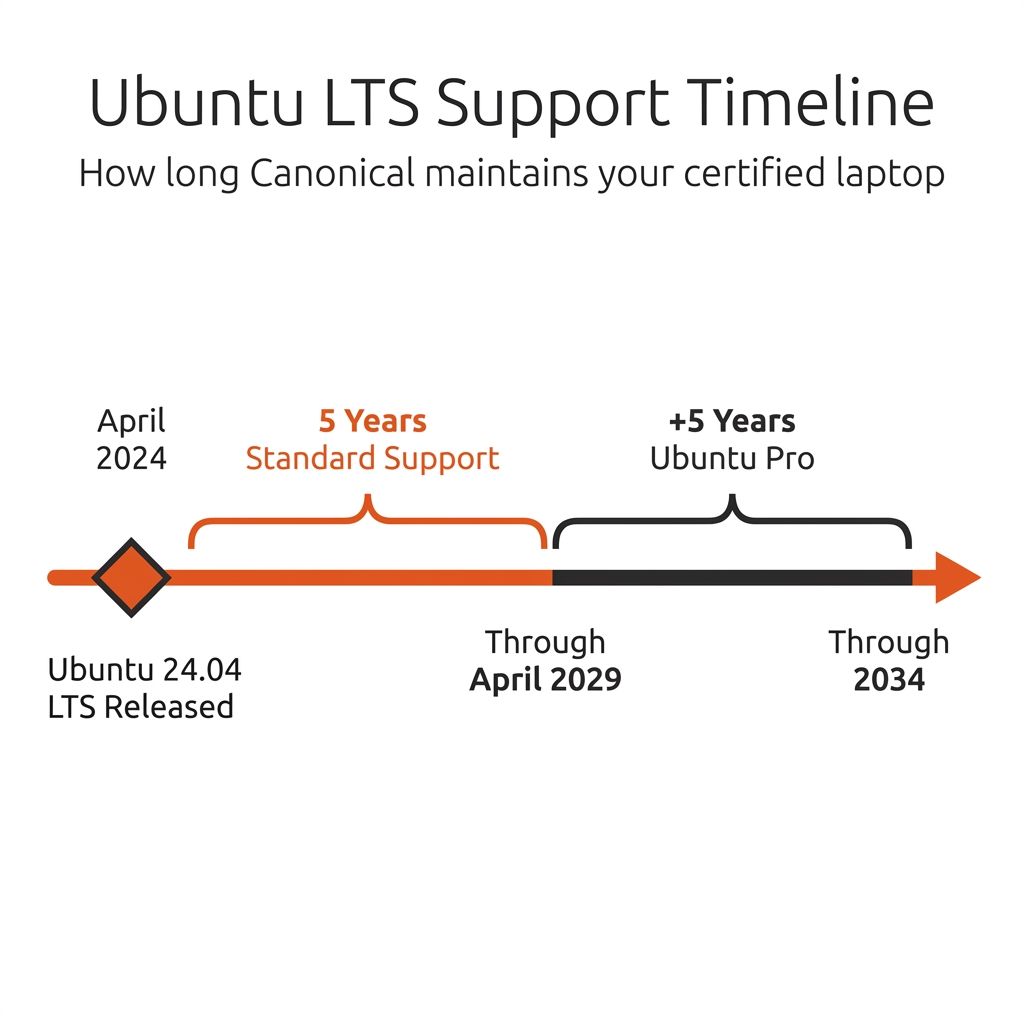
When Canonical certifies a device against an Ubuntu LTS release, they keep a physical unit of that hardware in their testing lab. On a regular cadence aligned with kernel stable release updates, they re-run the test suite against the certified hardware. If something breaks, they work to fix it before the update reaches a wider audience.
For Ubuntu 24.04 LTS, standard support runs through April 2029. That is five years of guaranteed regression testing against your specific laptop model. If you subscribe to Ubuntu Pro (free for personal use on up to five machines), the security maintenance window extends to ten years total, covering you through 2034.
A vendor who ships Ubuntu pre-installed might provide driver support for a year or two, then move on to newer models. Canonical’s certification program puts the maintenance responsibility on Canonical, not the laptop manufacturer, and ties it to a documented timeline rather than a business decision.
Framework 13 Pro Hardware
The Framework 13 Pro ships with an Intel Core Ultra X7 358H processor (up to 4.8GHz, 16 threads), Intel Arc B390 integrated graphics, a 13.5-inch 2.8K touchscreen at up to 120Hz with 700 nits of brightness, up to 64GB of LPCAMM2 LPDDR5X RAM, up to 2TB of PCIe 5.0 NVMe storage (or up to 8TB at PCIe 4.0), Wi-Fi 7, and a 74.45Wh battery that Framework claims delivers up to 20 hours of streaming video. It weighs 1.41kg without expansion cards or 1.44kg with four installed.
Early hands-on reports have been positive about the battery life. GloriousEggRoll, the Proton-GE developer, described getting “around two days of normal work” from a single charge. That kind of endurance on a Linux laptop is unusual; power management optimization has historically favored Windows.
Framework also seeded pre-release hardware to eight Linux distributions for testing (Debian, Fedora, Arch, NixOS, Linux Mint, openSUSE, CachyOS, and Bazzite), and partners with more than twenty across its broader Linux program. The community support extends well beyond Ubuntu: Fedora, Bazzite, NixOS, Arch, and Linux Mint all have community-maintained compatibility guides. The Arch Wiki page for the Framework Laptop 13 is already one of the more thorough hardware compatibility documents you will find for any laptop. But none of that community work carries Canonical’s testing commitment or maintenance window.
Certification vs. Community Support vs. Marketing
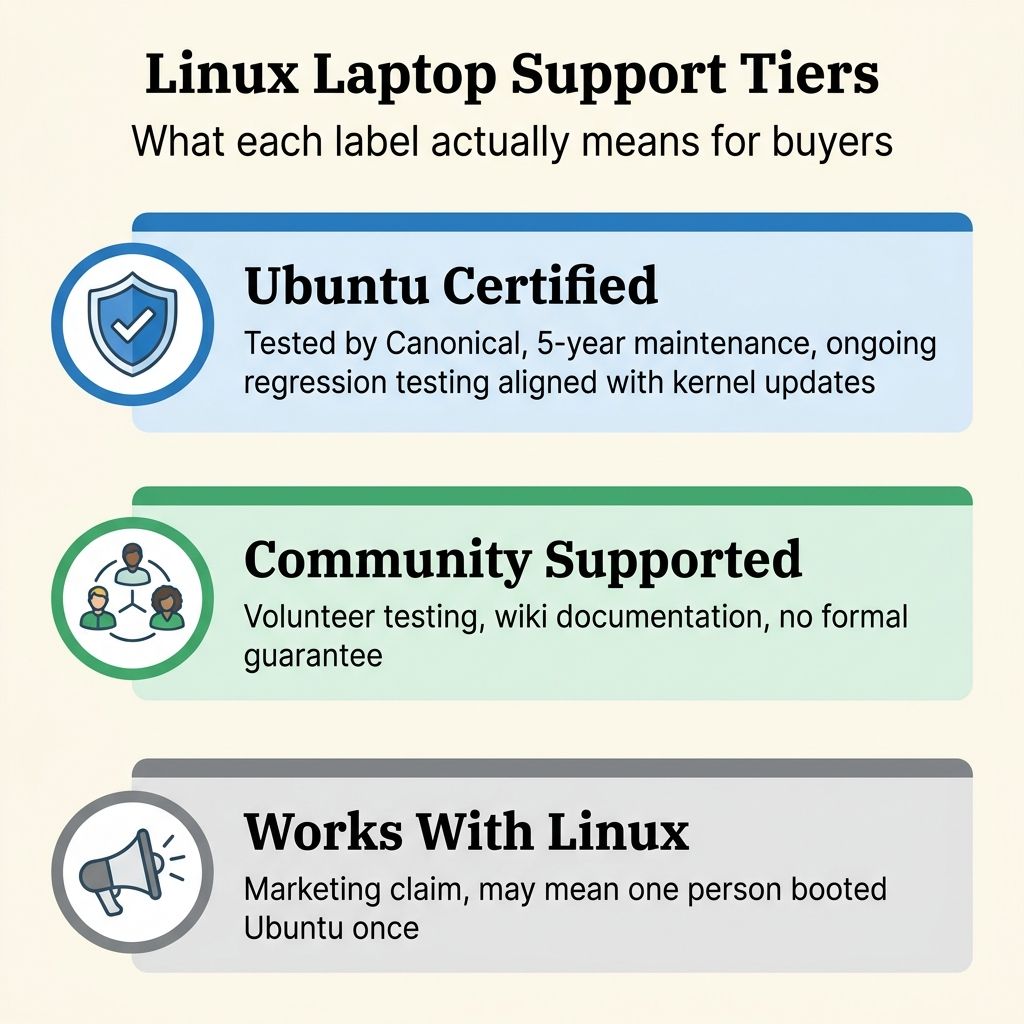
The Linux laptop market has three tiers of support.
Ubuntu Certified means Canonical engineers have tested hundreds of hardware scenarios, keep the device in their lab, and re-test against every security update for the life of the LTS release. You get a documented maintenance window and a tested configuration. The Framework 13 Pro and certain Lenovo ThinkPad models (like the ThinkPad T14 Gen 5 AMD) carry this label. The trade-off is that certification is tied to a specific Ubuntu LTS version and does not extend to other distributions.
Community supported means enthusiasts and distribution maintainers have tested the hardware and documented what works. This is what System76 effectively offers: they build their own hardware, ship it with Pop!_OS (their own Ubuntu-derived distribution), and maintain their own driver and firmware stack. There is no formal Canonical or Red Hat certification involved. The quality of community support varies enormously. For popular hardware like ThinkPads and Framework laptops, community support can be excellent. For obscure models, it can be a single forum post from 2023 saying “mostly works.”
“Works with Linux” on a product page is marketing copy that may or may not reflect actual testing. Some vendors mean it sincerely and have done internal QA. Others mean “someone in our office booted Ubuntu once.” There is no external verification, no published test matrix, and no maintenance commitment.
If you are running Fedora on a ThinkPad and you have been doing it for five years, community support and your own experience are more useful than a certification badge tied to Ubuntu. But if you are switching from Windows 10 and buying your first Linux laptop, the certification tells you that this specific combination of hardware and software has been tested by the people who build the operating system. That is worth knowing.
When Certification Matters Most (and Least)
New Linux users get the most out of certification, because they do not yet have the experience to troubleshoot hardware quirks on their own. It also matters when you need the laptop to work reliably for business and cannot afford to spend an afternoon fixing suspend issues, or when you want a guaranteed support window and predictable security updates without community dependency.
Experienced Linux users who run Arch or NixOS and consider troubleshooting part of the experience get less from it, as do people who already own the hardware and have confirmed that their distribution works on it. It is irrelevant if you do not plan to run Ubuntu, because the certification is scoped to a specific Ubuntu LTS version and nothing else.
Most buyers fall somewhere in the middle, and that is fine. Understanding the certification tells you what questions to ask. When a vendor says “Linux compatible,” you now know to ask: compatible according to whom, tested by whom, and maintained for how long.
Availability and Timing
The Framework 13 Pro starts shipping in June 2026, and as of this writing, Ubuntu configurations have sold out through August. Framework has noted that Ubuntu pre-built orders are outselling Windows configurations. This is Framework’s first laptop to offer Ubuntu as a pre-installed option.
If you are not in a rush, placing an order now and waiting for the September or October delivery window is reasonable. If you need a laptop sooner, the Lenovo ThinkPad T14 Gen 5 AMD is already available with Ubuntu certification, though it lacks Framework’s modular upgrade path and uses soldered RAM rather than LPCAMM2.
For readers who are evaluating Linux laptops more broadly, the certification database at ubuntu.com/certified lets you filter by form factor, release version, and manufacturer. It is a starting point for finding hardware that has been tested against your target Ubuntu version, and it is updated as new devices pass certification.
Linux Laptop Support Is Getting Tested and Documented
The Framework 13 Pro getting Ubuntu Certified is a data point in a larger shift. Framework’s broader Linux partner program, Canonical expanding their laptop certification program, and Ubuntu pre-built configurations outselling Windows on a mainstream laptop are all pieces of the same trend. Linux laptop support is moving from “technically possible with effort” to “tested, documented, and maintained.”
Not every Linux laptop experience is now problem-free, but the tools for evaluating which laptops will be are getting better.


