

For two years the advice on a Mac Mini external SSD was so consistent it barely needed repeating: buy the cheapest Mini you can, ignore Apple’s storage prices, and hang a fast drive off the back. Jeff Geerling built a following railing against Apple’s storage markup, TechRadar walked readers through the external-drive route, and every budget guide since 2024 leaned on the same starting assumption. That assumption was a $599 Mac Mini with 256GB of storage. In May 2026 Apple deleted it and made 512GB at $799 the new entry, a $200 jump Apple pinned on rising memory costs.
Then it changed again. On June 25, 2026 Apple raised prices across the lineup, with Tim Cook calling the memory shortage a hundred-year flood, and the Mac Mini ladder moved a second time. The 256GB model came back as the base, but at $799 rather than its old $599, and every tier above it stepped up with it. So the same $799 that bought a 512GB Mini in the spring now buys 256GB, and the M4 Pro base went from $1,399 to $1,599. That is the recompute this piece exists to do, because every canonical guide, Geerling and TechRadar included, is now two price changes out of date.
So the question is worth asking again, cleanly, for someone speccing an M4 today: is a Mac Mini storage upgrade still something you route around Apple, and if so, which drive do you actually pair with it in the middle of a memory price spike? This is a storage piece on purpose. These same price changes also inflated Apple’s memory ladder, and whether to bump 16GB to 24GB is a real decision, but it is a separate one. Here we are only settling the drive.
What Apple changed, and why the old guides now mislead
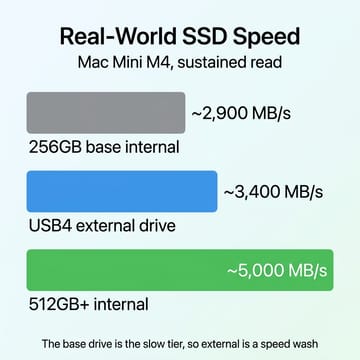
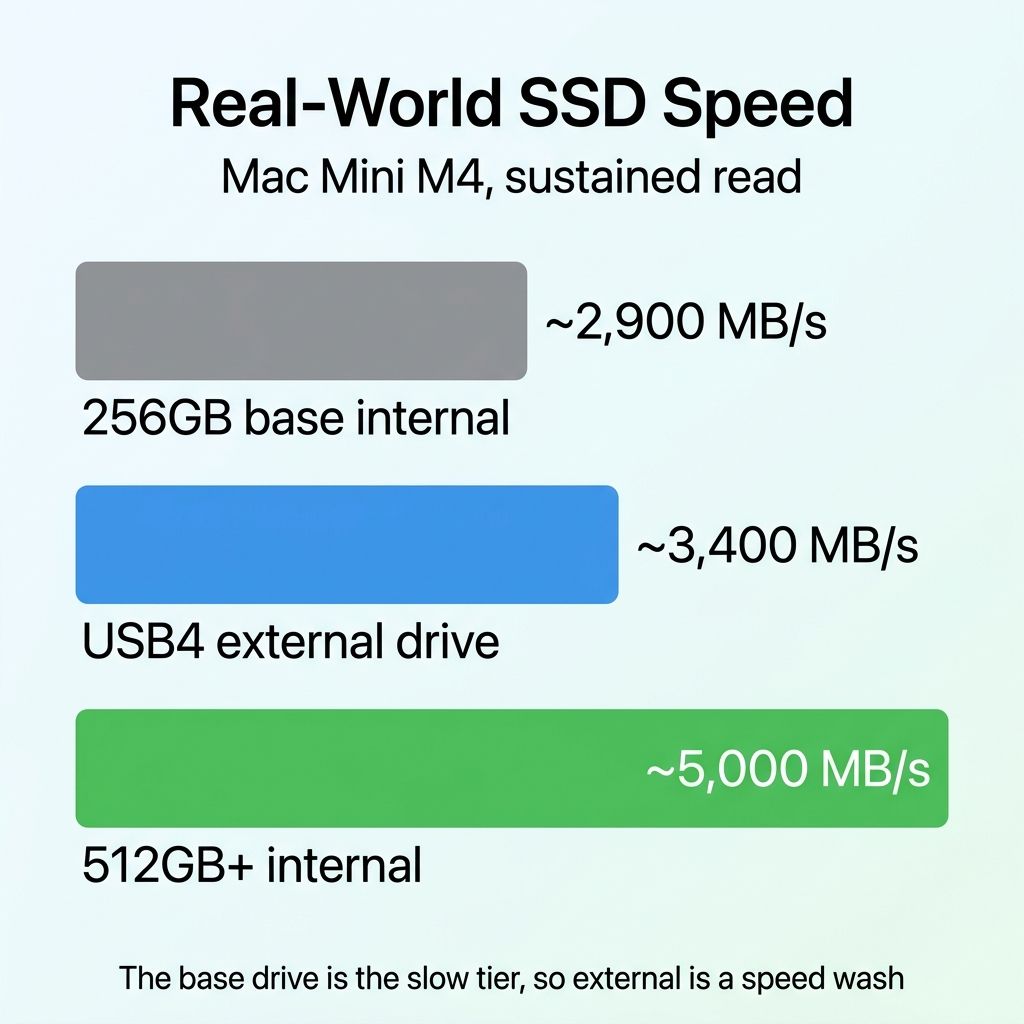
The judgment starts with the base drive itself. Teardowns of the M4 Mini (iFixit, AppleInsider, and applech2) show the 256GB module is built from two 128GB NAND chips, not the single chip that hobbled earlier base Macs, and it measures around 2,000 MB/s on writes and 2,900 to 3,000 MB/s on reads in third-party tests. That is noticeably slower than the larger configurations, which pair more NAND packages and land in the 5,000 MB/s range, but it is not the crippled single-chip drive of Apple’s past. Knowing those numbers is what lets you tell whether an external drive is a step up, a wash, or a step down.
For a stretch this spring, when 512GB at $799 was the only base, that call was easy: the internal drive was the fast one, so external was purely a capacity-and-cost move. Now that the 256GB tier is back as the entry point, the base buyer starts from the slow drive again, and a good external enclosure roughly matches it on reads and beats it on writes. The old cheaper-and-faster framing is defensible again for anyone who buys the base. The one thing that did not come back is the $599 price; you now get that slow base drive at $799.
The Mac Mini storage upgrade math in July 2026
Start with Apple’s own ladder for the standard M4 Mini, current as of July 2026 (Apple adjusts these without notice, so re-check apple.com before you buy). The 256GB base is $799, 512GB is $999, 1TB is $1,299, and 2TB is $1,799, figures that match AppleInsider’s price tracker and Apple’s own store. Reaching 512GB from the base costs $200, reaching 1TB costs $500, and reaching 2TB costs $1,000. Work that out per gigabyte of storage added and Apple runs from about $0.78 per gigabyte at the 512GB rung down to roughly $0.56 at the 2TB rung, so call it $0.55 to $0.80 depending on how far up you climb. That is meaningfully steeper than it was before the June increase.
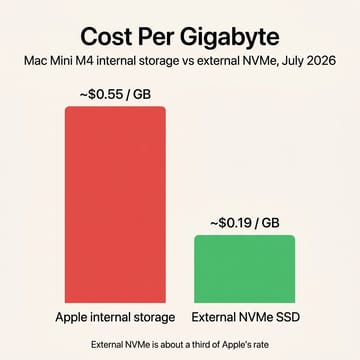
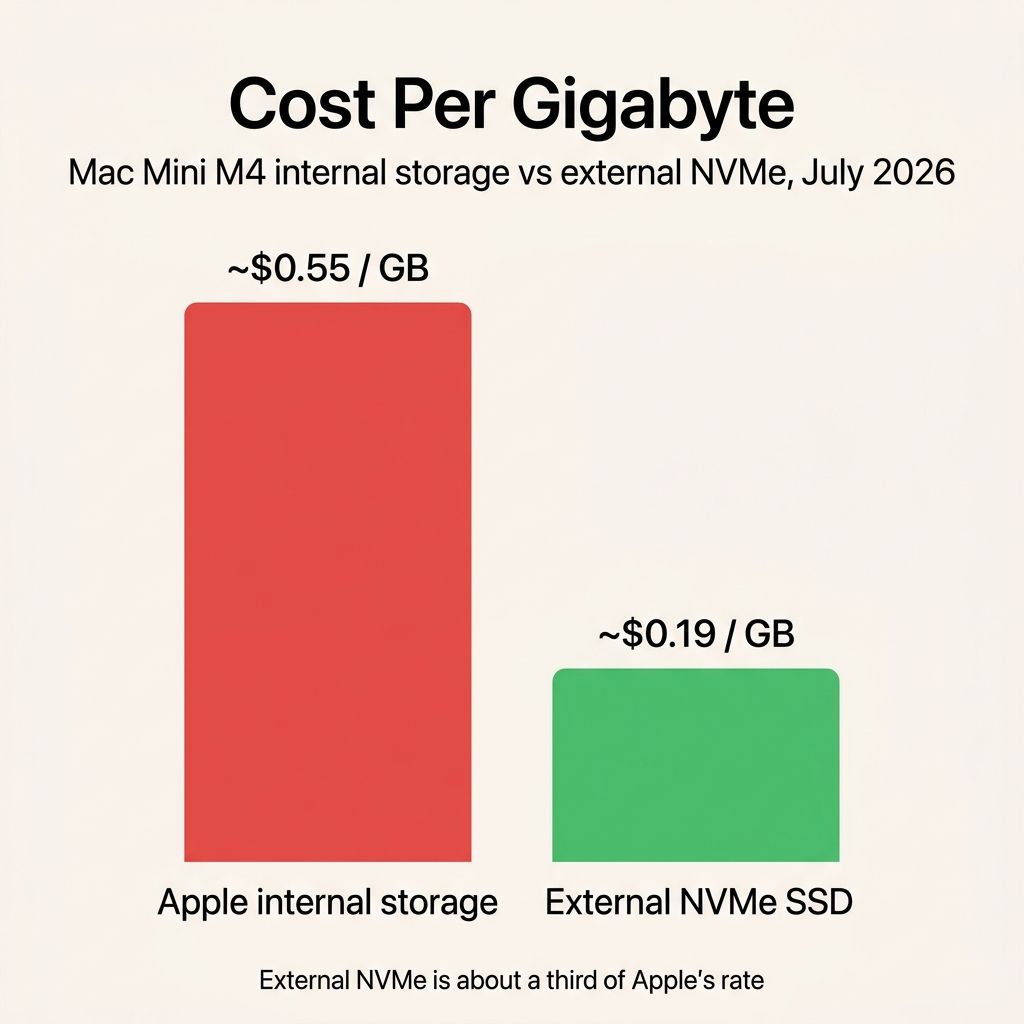
Now the external side. A 2TB Samsung 990 Pro listed at $389.99 at B&H in mid-July 2026, and the 2TB WD Black SN850X with heatsink sat just under it at $379.99. That is about $0.19 per gigabyte, and it already reflects the 2026 memory squeeze: both drives are priced well above their 2024 lows because the same NAND and DRAM shortage that pushed the Mini’s prices up has lifted retail SSDs too. Even after that spike, external storage runs at roughly a third of Apple’s per-gigabyte rate, and the gap only widens at 4TB and beyond, where Apple has no cheap tier and an external 4TB NVMe still does.
Put concrete numbers on a realistic build. A 2TB internal Mini costs $1,799. The 256GB base at $799, plus a 2TB 990 Pro and a decent USB4 enclosure, comes to roughly $799 plus $390 plus about $90, near $1,280, and it leaves you with about 2.25TB of total storage instead of 2TB, on a drive you can unplug, back up, or replace. You pay around $500 less, you get more total capacity, and none of the add-on is soldered to the logic board. Treat every price here as a mid-July 2026 snapshot; the memory market is moving week to week, so re-check before you commit.
The speed question people forget to recompute
This is where the reframing matters, because the answer swung back with the June change. With the 256GB drive as the base again, a good Thunderbolt drive roughly matches the internal on reads and pulls ahead on writes, so external is a speed wash for the base buyer rather than a downgrade. Step up to the 512GB or larger internal, which reads in the 5,000 MB/s range, and external becomes the slower volume instead. A quality USB4 or Thunderbolt 4 enclosure sustains somewhere around 3,000 to 3,800 MB/s in real use; OWC rates its Express 1M2 near 3,836 MB/s on a PC and closer to 3,189 MB/s on an Apple Silicon Mac, which is the number that matters here. So the speed verdict now depends entirely on which tier you buy, and that is the fact the older guides, each written for a single fixed base, cannot capture.
For the workloads this article’s readers actually run, that is fine. A media library, a Time Machine target, a scratch disk, or a headless server’s data volume does not care whether it reads at 3,000 or 5,000 MB/s; it cares about having the space at all. What you should not do is buy an external drive on the belief that it will make the machine feel quicker. It will not on a 512GB-or-larger Mini. If throughput is the goal, that argument now points back toward Apple’s internal drive, not away from it. One caution the older guides got right is not to confuse a USB4 or Thunderbolt enclosure with a cheap USB 3.2 Gen 2 one, which caps near 1,000 MB/s and turns a fast NVMe drive into a slow external. The enclosure spec matters as much as the drive.
There is a corollary worth stating plainly, because it decides what you keep internal. Whichever internal tier you buy is the volume that should hold macOS, your applications, and anything read and written constantly while you work. Leave your system and apps on the internal drive and treat the external as the library shelf: photos, video projects, virtual machine images, backups, media, and the bulk data a server serves. Trying to run the operating system or an active app bundle off an external volume reintroduces the friction the internal drive is there to remove, and it is the one arrangement where going external actively makes the machine worse. On a 256GB base especially, keep it disciplined, because macOS and a working set of apps will not leave much room to spare. Split the roles instead of moving everything off.
The stronger argument is replaceability, not wear
There is a durability angle here, and it is worth stating carefully so it does not overreach. The 2TB-class drives worth buying carry endurance ratings around 1,200 terabytes written, which is roughly 600 TBW per terabyte across the Samsung, WD, and Crucial lines. For a normal desktop that ceiling is effectively unreachable; you would spend decades getting there. So the reason to care is not that your internal SSD will wear out next year. It is that Apple’s internal drive is soldered and cannot be swapped when it eventually does fail, while an external NVMe is a part you can replace for a couple hundred dollars without touching the machine.
That distinction earns its keep for anyone running a Mini as an always-on box. A private AI server, a Plex host, or a database that logs constantly writes far more per day than desktop use does, and the endurance number is the one to watch before you commit a workload to any drive. Pushing that heavy, repetitive writing onto an external drive keeps the wear on the swappable component instead of the one you cannot service. For a headless server that never leaves the shelf, the external route is not a compromise; it is the more repairable design.
The enclosure is the hidden variable
If external storage has a catch in 2026, it is the enclosure, not the drive. The reason the numbers above hold is that they assume a well-built USB4 or Thunderbolt 4 enclosure with a real controller and enough metal to shed heat. Plenty of $30 enclosures use weaker chipsets, skip UASP, and thermally throttle under sustained writes, so a drive that should hold 3,000 MB/s drops to a fraction of that after a minute of load. That is the exact scenario that undercuts the reliability case, because a throttling, dropout-prone enclosure is worse than paying Apple. A cheap box also tends to be the part that fails first, dismounting mid-write in a way that a soldered internal drive never would.
So the enclosure is a real purchase, not an afterthought, and it is worth naming what a good one looks like. An all-in-one drive-plus-enclosure like the OWC Express 1M2 takes the guesswork out and carries the Apple Silicon speed rating cited above, at the cost of a higher sticker price. A separate aluminum USB4 enclosure from a maker like Acasis or Satechi lets you supply your own 990 Pro or SN850X and usually costs somewhere around $50 to $120 depending on whether it is a true 40 Gbps design. Whichever route you take, look for an aluminum body, a listed controller, and 40 Gbps USB4 or Thunderbolt support rather than a 10 Gbps USB 3.2 listing dressed up with the word “fast,” and the drive inside will actually deliver what its spec sheet promises.
So which Mac Mini should you buy?
The right answer splits by how you will use the machine, so here are three concrete calls rather than one.
If you are comfortable with a drive attached to the back, and most of this article’s readers are, buy the 256GB base at $799 and pair it with a 2TB Samsung 990 Pro or WD Black SN850X in a quality USB4 enclosure. It is the cheapest way into the lineup, and because the 256GB internal is again the slow tier, the external is a speed wash rather than a sacrifice. Keep macOS and your apps on the internal and let the external hold the library. You end up spending around $500 less than Apple’s 2TB internal while getting more total capacity on a drive you can replace or carry to another machine.
If you want one clean, fast internal volume and as little external fuss as possible, pay Apple to the 512GB tier at $999 and stop there. That is the fast drive and a comfortable floor for a desktop that holds its own working files, and the $200 over the base buys both the speed and the headroom the 256GB drive lacks. What you should not do is keep climbing, because Apple’s 1TB at $1,299 and 2TB at $1,799 are where the ladder turns punishing and an external drive wins decisively above 512GB.
If you are building an always-on server or personal cloud, take the 256GB base and point your heavy, constant writes at a large external drive so the soldered internal stays lightly used. This is the clearest case in the whole decision, because a headless box on a shelf never pays the tethered-drive friction that makes a desktop buyer hesitate, and its light system footprint fits the small base drive comfortably. It also gets the biggest benefit from replaceability, since a server writes more and a swappable wear-item is exactly what you want under a workload that runs unattended for years.
Mac mini with M4 chip
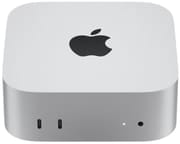
- +Fast 512GB and larger internal option
- +Thunderbolt for external storage
- +tiny footprint
- +excellent efficiency
- -256GB base is the slow tier and tight for a primary
- -storage and memory upgrades priced steeply
- -soldered internal drive
One thing this article deliberately does not do is tell you to wait. Whether an M5 refresh is worth holding out for is a separate timing question with its own answer. If you are buying an M4 now, the storage strategy is settled: go external for capacity, keep expectations realistic on speed, and spend the savings on a good enclosure instead of Apple’s markup.

