
Origimagic A1 Mini PC
Updated on

The Origimagic A1 Mini PC fits an AMD Ryzen 7 7840HS into a 4.37-inch square chassis small enough to mount behind a monitor. That processor brings eight Zen 4 cores and 16 threads running at up to 5.1GHz. Origimagic advertises the integrated AMD Radeon 780M as close to an entry-level discrete card like the GTX 1650, a claim no independent test of this unit backs. The USB4 port carries video output up to 8K.
Its OCuLink port allows a direct PCIe 4.0 x4 connection to external graphics cards without the bandwidth limitations of Thunderbolt or USB 4, so discrete graphics can be added later. The system ships with 32GB of DDR5 RAM (upgradeable to 64GB) and a 1TB NVMe SSD in the primary M.2 2280 slot, with a secondary M.2 2242 slot available for additional storage.
Pros and Cons
| Pros | Cons |
|---|---|
| 8-core Zen 4 Ryzen 7 7840HS, about 28,872 PassMark | Integrated graphics not suited to high-end AAA gaming |
| OCuLink port for full-bandwidth external GPU docks | Bottom-mounted intake fan: best operated on its included VESA stand or vertically |
| 32GB DDR5 RAM and 1TB NVMe SSD included | Mixed Amazon reliability reports; buyers warn of crashes on some units |
| USB4 (Type-C) with 8K@60Hz video output | No independent test coverage from the major mini PC publications |
| WiFi 6E and Bluetooth 5.2 | Secondary M.2 slot is the cramped 2242 size |
| 2.5G Ethernet, plus triple display support | Wi-Fi card swap means removing the internal plastic frame first |
| Two M.2 NVMe PCIe 4.0 slots (2280 + 2242) | Several owners report a cheap, unreliable Wi-Fi card |
Related Videos
Origimagic A1 Mini PC Comparison Chart
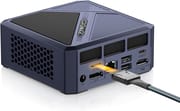 Origimagic A1 Mini PC | |
| Price | List Price: $469.99 Amazon Prices: |
| Version | 32GB/1TB/7840HS |
| Performance Rating | 5.7 |
| Operating System | Windows 11 Pro |
| Processor | Octa-core 3.80 Ghz (max 5.10 Ghz) AMD Ryzen 7 7840HS |
| GPU | Integrated AMD Radeon 780M |
| RAM | 32 GB DDR5 SO-DIMM, 2-channel (32GB DDR5 4800MHz (expandable to 64GB)) |
| Internal Storage | 1 TB NVMe SSD |
| Dimensions width x length x thickness | 4.37 x 4.37 x 1.57 inches (111 x 111 x 39.88 mm) |
| Weight | 2.62 lbs (1.19 kg) |
| WiFi | Wi-Fi 6E (802.11ax) |
| Bluetooth | Bluetooth 5.2 |
| Ethernet | 1 Ethernet port at 2.5 Gbps |
| HDMI | 1 Full-Size HDMI Port |
| DisplayPort | 1 DisplayPort |
| VGA | No VGA Ports |
| USB Ports | 4 USB 3, 1 USB-C (1 USB4) USB-C is USB4 with 8K@60Hz video output |
| Thunderbolt Ports | No |
| OCuLink | PCIe 4.0 x4 for eGPU |
| Internal SATA Ports | No SATA ports |
| Card Reader | No Card Reader |
| Headphone Jack | combo |
| Fanless | No |
| VESA Mount | Yes |
| In the Box | Mini PC, 19V/6.3A power adapter, HDMI cable, VESA mount bracket, user manual |
| Expandability | 32GB DDR5 SO-DIMM standard, supports up to 64GB across two slots. Two M.2 NVMe slots (2280 plus 2242) for storage expansion. OCuLink port enables external GPU docks at PCIe 4.0 x4 bandwidth. |
Related Mini PCs
-
 Beelink EQR7The Beelink EQR7 pairs an AMD Ryzen 7 7735U with a built-in power supply, dual Gigabit Ethernet,…
 -
 Beelink SER5 MAX (Ryzen 7 7735HS)The Beelink SER5 MAX pairs an 8-core Ryzen 7 7735HS and Radeon 680M graphics with 24GB of LPDDR5,…
 -
 BOSGAME M4The BOSGAME M4 pairs an AMD Ryzen 7 8745HS with 32GB of DDR5, an OCuLink port for an external GPU,…
 -
 BOSGAME P3 LiteThe BOSGAME P3 Lite pairs an AMD Ryzen 7 6800H and Radeon 680M graphics with dual 2.5G Ethernet,…
 -
 GMKtec NucBox K16The GMKtec NucBox K16 is a CNC-aluminium mini PC on the AMD Ryzen 7 7735HS with Radeon 680M…
 -
 GMKtec Nucbox K2The GMKtec Nucbox K2 is a compact AMD Ryzen 7 7735HS mini PC with Radeon 680M graphics, DDR5 to…
Performance and Connectivity
The A1 is at its best on productivity work. Eight Zen 4 cores and 16 threads cover multiple browser tabs, office applications, and creative software at once. Video editing, photo processing, and light 3D work fall to the integrated Radeon 780M, which is not a substitute for a discrete card.
For gaming, the 780M means 1080p with detail settings turned down. No measured frame-rate results for the A1 exist, so there is no figure to quote for a demanding title like Cyberpunk 2077 on this machine. The OCuLink connection lets users add an external GPU later for more demanding gaming or professional graphics work.
USB4 supports high-bandwidth peripherals and video output up to 8K at 60Hz. WiFi 6E handles wireless and the 2.5G Ethernet port handles wired connections; several owners report the bundled Wi-Fi card is unreliable and run Ethernet instead. The system can drive up to three displays simultaneously through HDMI 2.0, DisplayPort 1.4, and the USB4 port.
Airflow and Placement
The intake fan sits on the bottom of the chassis, and that is the design’s main compromise. Resting the unit flat on a desk restricts airflow. Origimagic ships a VESA-mount bracket in the box that doubles as a vertical stand, and the bottom feet provide only minimal clearance. Mount it to the back of a monitor, stand it on its side using the included bracket, or set it on a mesh laptop riser. Users who keep it flat on a closed surface for extended gaming sessions may see throttling. One Amazon buyer reported the system restarting under demanding programs while temperatures stayed below 60°C, and another described crashes starting about a month in.
The second M.2 slot accepts only the smaller 2242 form factor, and because it sits directly above the fan opening on the underside of the board, there is no room for a heatsink on the drive. That makes it best suited to a secondary archive or scratch disk rather than a high-write workload.
BIOS Options
Auto Power On brings the system back up after a power cut, and Wake on LAN starts it remotely over the network. Both matter for a machine left running unattended as a home server. A separate Power Performance setting trades peak speed for quieter, lower-power operation.
Reviewer Insights
Coverage of the Origimagic A1 is thin. The major mini PC publications (NotebookCheck, Tom’s Hardware) have not tested it, and several of the English-language clips that surface for the model are short, AI-narrated spec recitals with no hands-on footage. Two independent hands-on sessions do exist, one in English and one in Japanese, and neither measured wattage, noise in dB, or frame rates. Origimagic also sells a separate “A1 Pro” built on the Ryzen 9 7940HS. This page covers the 7840HS A1, not the A1 Pro.
Carey Holzman built up and tested an A1 on a live stream, starting from a barebones unit bought used on eBay and fitting his own DDR5 memory and NVMe drive. Running Cinebench R23 multi-core with the BIOS left in its balanced power mode, he logged 15,788 against the 15,885 Origimagic publishes, and guessed the manufacturer had tested in performance mode; idle CPU temperatures sat near 34 to 35 degrees C and the hottest reading during the torture run was 88.1 degrees C, which he was comfortable with for a mobile chip. His complaints are about the internals rather than the speed: the secondary M.2 2242 slot is one “I find that personally to be worthless,” and reaching the Wi-Fi card means taking the plastic frame off first, so “that’s not very easy to change, but at least it’s changeable.” He noted the fan “is quite quite noticeable when it’s really under an intense workload” but added “I find this very acceptable.” He came away positive overall, saying “The fact it’s got Oculink is a really nice touch” and calling it a “good first experience” with a brand he had not handled before.
The other hands-on review is in Japanese, from the DNSguitar channel’s use review of the Origimagic A1, titled for the Ryzen 7 7840HS and Radeon 780M. Its takeaways are qualitative rather than benchmarked. The reviewer calls the 32GB of bundled memory unusual at this price, noting machines in this class “usually” ship with 16GB. He flags the thermal layout as the unit’s weakness: because the intake fan sits only on the bottom, he judges airflow poor and recommends standing the A1 vertically on the included bracket rather than laying it flat. On graphics, he relays that the Radeon 780M is reckoned to land roughly in GTX 1000-to-1600-series territory, framing it as something he had read rather than measured himself. He also raises a software caution: the factory Windows 11 Pro image let him skip the network and Microsoft-account step in a way a clean Microsoft installer does not, and a clean reinstall left fewer pre-loaded apps, so he suggests reimaging on arrival. He bought his unit for roughly 60,000 to 70,000 JPY, in line with the US list price.
For chip context, the Ryzen 7 7840HS is a 2023 Zen 4 mobile part (8 cores, 16 threads, up to 5.1GHz) that posts a PassMark multi-thread score of about 28,872. In mid-2026 that still reads as a capable mid-tier figure, comfortably ahead of the low-power N-series and Ryzen U chips common in budget mini PCs, though it now sits below current Zen 5 and Strix Point parts. Origimagic’s own listings advertise that the 7840HS “beats” the newer Ryzen 7 8745HS and that the 780M runs “30% higher than a 1050 Ti” and near a GTX 1650 to 1660. Treat those as vendor claims; no independent test on this unit backs them.
Amazon buyers are the only sizeable feedback source on this machine. The value case is the recurring praise. Verified buyer Amy wrote that “the specs are hard to beat for the price,” did “a clean Windows 11 install with no driver issues,” and found it stable in early use, while verified buyer danny m. uses it as a living-room gaming box and reports Call of Duty: Black Ops and Tekken 7 running well at 1440p. Several owners flag a weak Wi-Fi card: verified buyer The Crawdad called it “very cheap and faulty,” resetting the system “3-4 times a day in order for it to reconnect,” and danny m. hit the same problem before switching to a wired connection. The more serious reports are stability failures under load: verified buyer Robert Lamphere said “higher-demand programs, including games and graphics, caused the system to restart” (while noting it “never overheated, remaining below 60°C”), and verified buyer SHWP described constant crashes and blue screens that began about a month in.
Buy it for OCuLink, not for the graphics claims
The Origimagic A1 is a strong fit for users who specifically want OCuLink in a small chassis at this price. Casual gamers get 1080p with settings turned down today and the option to bolt on an eGPU later. Use our Mini PC comparison chart to see how it stacks up against alternatives.
Heavy 3D rendering and maxed-out gaming settings need a discrete card instead. The A1 has a fan, so anyone who needs silence should look at fanless alternatives. If long-term reliability and English-language support matter more, a Beelink, Minisforum, or ASUS NUC sits at a similar price.
Frequently Asked Questions
What operating system comes with the Origimagic A1?
The Origimagic A1 comes with Windows 11 Pro pre-installed. One reviewer noted the factory image exposed an option to bypass the network/Microsoft-account requirement that does not appear on a clean Microsoft installer; a fresh Windows 11 install on arrival is a reasonable precaution.
Can I upgrade the RAM and storage?
Yes. The two DDR5 SO-DIMM slots support up to 64GB total. The primary M.2 2280 NVMe slot ships with a 1TB drive and is easily replaced; a secondary M.2 2242 slot is also available for additional storage, though its smaller size and proximity to the fan opening limit drive choices.
What is OCuLink and why does it matter?
OCuLink is a high-bandwidth connection standard that allows direct PCIe connectivity to external devices, most notably graphics cards. Unlike USB 4 or Thunderbolt, OCuLink provides higher bandwidth (PCIe 4.0 x4) for eGPU setups with less performance overhead. It is not hot-swappable, so the eGPU dock typically attaches before boot.
How many displays can the Origimagic A1 support?
The A1 supports up to three displays simultaneously through its HDMI, DisplayPort, and USB-C video outputs. The USB-C port runs USB4 and supports up to 8K resolution at 60Hz.
Is the Origimagic A1 suitable for gaming?
The Radeon 780M integrated graphics targets 1080p with detail settings turned down, and no measured frame-rate results exist for the A1 itself. For heavier games, plan on pairing the A1 with an OCuLink eGPU dock, which connects at PCIe 4.0 x4.
How loud is the cooling system, and does bottom-fan placement matter?
The A1 is actively cooled, and no measured noise figures exist for it. Placement matters more. The intake is on the bottom of the chassis, so flat on a closed desk surface the machine can throttle; the included VESA bracket or a vertical stand avoids that.