
AWOW TX33
Updated on

The AWOW TX33 represents an interesting entry in the budget mini PC market, offering a compact Windows 10 Pro system for users with basic computing needs. Powered by the Intel Celeron N3350 processor from Intel’s Apollo Lake generation, this diminutive system measures just 4.7 inches square and barely over an inch thick, making it one of the most compact mini PCs available. While its modest specifications place it firmly in the entry-level category, the TX33 has found its niche among users seeking simple solutions for web browsing, light office work, and digital signage applications.
AWOW, a Chinese technology company that emerged in the mini PC market during the mid-2010s, designed the TX33 to appeal to budget-conscious consumers who need a full Windows experience without the bulk or cost of traditional desktops. The inclusion of Windows 10 Pro rather than the Home edition provides access to features like BitLocker encryption and Remote Desktop, adding value for small business users. However, potential buyers should understand that this is not a system designed for demanding workloads or multitasking.
Detailed Insights

The AWOW TX33’s design philosophy centers on extreme compactness and simplicity. At just 4.7 x 4.7 x 1.16 inches and weighing only 0.55 pounds, this mini PC can disappear behind a monitor or tuck into the smallest workspace. The unit features an active cooling solution with a small fan that keeps the Celeron N3350 running within thermal limits, though users should expect some audible noise during sustained workloads. Build quality is typical for this price point, with a plastic chassis that feels adequate but not premium.
The Intel Celeron N3350 processor at the heart of the TX33 is a dual-core chip from Intel’s Apollo Lake family, running at a base frequency of 1.1 GHz and boosting to 2.4 GHz when thermal headroom allows. This processor earned a CPU Mark score of approximately 1,112, placing it firmly in the entry-level tier suitable for basic productivity tasks. The 6GB of DDR4 RAM represents an unusual configuration that provides slightly more breathing room than typical 4GB systems, though the memory is soldered and cannot be upgraded. Storage comes via a 64GB eMMC drive, which is adequate for the operating system and a handful of applications but fills quickly with user data.
Connectivity options on the TX33 reflect its budget positioning with a practical selection of ports. The unit includes one HDMI port for display output alongside a VGA port for connecting legacy monitors, making it useful in environments with older display equipment. Two USB 3.0 ports handle high-speed peripherals while two USB 2.0 ports manage keyboards, mice, and other basic accessories. A microSD card slot provides easy file transfer capabilities, and the inclusion of both WiFi 5 (802.11ac) dual-band wireless and Gigabit Ethernet ensures flexible networking options. Bluetooth 4.2 rounds out the wireless connectivity for peripherals like wireless mice and keyboards.
One of the TX33’s most practical features is its M.2 2280 SATA expansion slot, allowing users to add up to 1TB of additional SSD storage. This addresses the most significant limitation of the 64GB base storage configuration and transforms the system from a cramped Windows installation to a more usable setup with room for applications and files. The absence of VESA mounting hardware in the box means users wanting to attach the unit behind a monitor will need to source a compatible mount separately, though the compact dimensions make this straightforward with universal VESA adapters.
Pros and Cons
| Pros | Cons |
|---|---|
| Extremely compact 4.7-inch square footprint | Modest performance from Celeron N3350 |
| Full Windows 10 Pro license included | Limited 64GB eMMC base storage |
| M.2 SATA slot for storage expansion | 6GB RAM soldered and not upgradeable |
| Both HDMI and VGA video outputs | No VESA mount included in box |
| Low price point | Fan noise audible under load |
| Gigabit Ethernet and WiFi 5 | Not suitable for demanding applications |
AWOW TX33 Comparison Chart
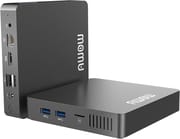 AWOW TX33 | |
| Price | List Price: $129.99 Amazon Prices: |
| Version | 6GB/64GB/Intel N3350 |
| Performance Rating | 2.4 |
| Operating System | Windows 10 Pro |
| Processor | Dual-core 1.10 Ghz (max 2.40 Ghz) Intel Celeron N3350 |
| GPU | Integrated Intel UHD Graphics |
| RAM | 6 GB |
| Internal Storage | 64 GB |
| Dimensions width x length x thickness | 4.7 x 4.7 x 1.16 inches (119.38 x 119.38 x 29.46 mm) |
| Weight | 0.55 lbs (0.25 kg) |
| WiFi | Wi-Fi 5 (802.11ac) |
| Bluetooth | Bluetooth 4.2 |
| Ethernet | 1 Ethernet port at 1 Gbps |
| HDMI | 1 Full-Size HDMI Port |
| DisplayPort | No DisplayPort |
| VGA | 1 VGA Port |
| USB Ports | 2 USB 2.0, 2 USB 3 |
| Thunderbolt Ports | No |
| OCuLink | No |
| Internal SATA Ports | No SATA ports |
| Card Reader | microSD Card Reader |
| Headphone Jack | combo |
| Fanless | No |
| VESA Mount | No |
| In the Box | Mini PC, Power Adapter, User Manual |
| Expandability | M.2_SATA_2280 SSD, USB hard drive |
Related Mini PCs
-
 AWOW AK10The AWOW AK10 is an Intel N100 mini PC with 8GB of soldered DDR5, a 256GB SSD in an M.2 slot that…
 -
 iKOOLCORE R2The iKOOLCORE R2 is a palm-sized networking mini PC with four 2.5GbE ports (three Intel i226-V, one…
 -
 NIMO Mini PCThe NIMO Mini PC is a 0.73-pound aluminum mini PC assembled in the USA with an Intel N100, triple…
 -
 ACEMAGIC S1 Mini PCThe ACEMAGIC S1 is a compact Intel N95 mini PC with 16GB of DDR4, dual M.2 slots, dual gigabit…
 -
 Beelink ME MiniThe Beelink ME Mini is a 99mm-cube NAS box built on the Intel N150 with 12GB or 16GB of RAM, six…
 -
 Beelink Mini S13A roughly $200 mini PC built around the Intel N150 with 16GB DDR4, dual M.2 PCIe 2280 slots, dual…
Frequently Asked Questions
Can I upgrade the RAM in the AWOW TX33?
Unfortunately, no. The 6GB of DDR4 RAM is soldered directly to the motherboard and cannot be upgraded. This is a common cost-saving measure in budget mini PCs at this price point.
What operating systems can the AWOW TX33 run?
The TX33 comes with Windows 10 Pro pre-installed. Users have reported success running various Linux distributions, though performance varies depending on the desktop environment. Gnome runs acceptably while lighter environments like XFCE have shown compatibility issues.
Is the AWOW TX33 suitable for gaming?
The TX33 is not designed for gaming beyond very basic titles. The Intel Celeron N3350 and its integrated Intel HD Graphics 500 can handle casual games like card games or puzzle titles but will struggle with anything more demanding.
Can I connect dual monitors to the AWOW TX33?
Yes, the TX33 includes both HDMI and VGA video outputs, allowing you to connect two displays simultaneously. This makes it useful for basic dual-monitor setups in office environments.
Is the AWOW TX33 fanless?
No, the TX33 uses active cooling with a small fan. While this helps manage temperatures under load, the fan can be audible during sustained processing tasks.
Conclusion
The AWOW TX33 fills a specific niche in the mini PC market as an ultra-compact, low-cost Windows system for users with modest computing needs. Its combination of a compact 4.7-inch form factor, full Windows 10 Pro license, and expandable storage via M.2 SATA makes it a practical choice for digital signage, basic web browsing stations, or secondary computers where space and cost matter more than raw performance.
The system’s limitations are significant but predictable at this price point. The soldered 6GB RAM, modest 64GB eMMC storage, and entry-level Celeron N3350 processor mean this is not a system for multitasking, content creation, or any demanding workloads. Users who understand these constraints and have appropriate expectations will find the TX33 delivers reasonable value. Those needing more capability should look to systems with Celeron N5095/N100 or better processors, upgradeable RAM, and larger base storage configurations. Check our mini PC comparison chart to find models that fit your needs.