
BOSGAME B100
Updated on

The BOSGAME B100 is a budget mini PC from the white-label brand BOSGAME, built on the Intel N100 (four cores, up to 3.4GHz). It covers everyday tasks like web browsing, office work, and media playback, with 16GB of DDR4 and a 512GB M.2 NVMe SSD. The chip is entry-level: fine as a low-power desktop or home server, and short of anything CPU-heavy.
At 4.96 x 4.41 x 1.61 inches and 0.86 pounds, it is small and easy to tuck away. It ships with Windows 11 Pro and covers the basics on connectivity: two HDMI ports plus a USB-C that carries data, video, and power delivery (so up to three displays), a 2.5GbE port, Wi-Fi 5, and Bluetooth 4.2. A VESA mount is in the box for attaching it behind a monitor.
| Pros | Cons |
|---|---|
| Very low price (~$160 to $200) and low power | Entry-level N100; struggles under real CPU load |
| 16GB RAM and a 512GB NVMe; triple-display output | Single-channel RAM holds back the iGPU |
| Dual HDMI plus USB-C (data, video, PD 3.0) | Bundled SSD is slow and one owner’s failed at 9 months |
| 2.5GbE wired networking | Single M.2 slot; no SATA, no SD reader |
| Compact, light (0.86 lb), with a VESA mount | Dated Wi-Fi 5 and Bluetooth 4.2 |
| Runs Windows 11 Pro and Linux | Active cooling, not fanless |
BOSGAME B100 Comparison Chart
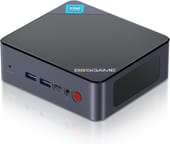 BOSGAME B100 | |
| Price | List Price: $199.00 Amazon Prices: |
| Version | 16GB/512GB/Intel N100 |
| Performance Rating | 4.9 |
| Operating System | Windows 11 Pro |
| Processor | Quad-core 3.40 Ghz (max 3.40 Ghz) Intel Processor N100 |
| GPU | Integrated Intel UHD Graphics |
| RAM | 16 GB |
| Internal Storage | 512 GB |
| Dimensions width x length x thickness | 4.96 x 4.41 x 1.61 inches (125.98 x 112.01 x 40.89 mm) |
| Weight | 0.86 lbs (0.39 kg) |
| WiFi | Wi-Fi 5 (802.11ac) |
| Bluetooth | Bluetooth 4.2 |
| Ethernet | 1 Ethernet port at 2.5 Gbps |
| HDMI | 2 Full-Size HDMI Ports |
| DisplayPort | No DisplayPort |
| VGA | No VGA Ports |
| USB Ports | 4 USB 3, 1 USB-C (1x USB-C 3.2 supports Data+Video+PD 3.0) |
| Thunderbolt Ports | No |
| OCuLink | No |
| Internal SATA Ports | No SATA ports |
| Card Reader | No Card Reader |
| Headphone Jack | combo |
| Fanless | No |
| VESA Mount | Yes |
| In the Box | 1x BOSGAME B100 Mini PC, 1x VESA mount, 1x 1.5M HDMI cable, 1x Power adapter, 1x User manual |
| Expandability | Supports up to 2TB M.2 SSD |
Related Mini PCs
-
 BOSGAME B95The BOSGAME B95 is a low-cost Intel N95 mini PC with 16GB of DDR4, a 512GB M.2 SSD, 2.5Gb Ethernet,…
 -
 BOSGAME E3Budget Alder Lake-N95 mini PC with 16GB DDR4, a 512GB NVMe SSD, 2.5Gbps Ethernet, dual HDMI plus…
 -
 Bmax B4 PlusThe BMAX B4 Plus is an Intel N100 mini PC with a 2.5-inch SATA drive bay next to its M.2 slot, so a…
 -
 Bmax B4 UltraThe Bmax B4 Ultra is an ultra-compact mini PC featuring Intel's N150 processor, 12GB LPDDR5 RAM,…
 -
 CyberGeek Nano A1The CyberGeek Nano A1 is a compact Intel N100 mini PC with Windows 11 Pro, Wi-Fi 6, dual HDMI 4K…
 -
 DreamQuest Pro Mini PCThe DreamQuest Pro Mini PC is a budget Intel N95 box (16GB or 32GB RAM, 512GB or 1TB SSD) with dual…
Single-channel RAM and one M.2 slot cap what it can grow into
The N100 is a quad-core Alder Lake-N chip rated to 3.4GHz; one owner quoted below logged about 3.3GHz on all four cores during a Plex library scan. With Intel UHD graphics it handles 4K video playback and basic graphical tasks, enough for a home-entertainment or productivity box and short of gaming. It pairs 16GB of single-channel DDR4 with a 512GB M.2 NVMe SSD; the M.2 slot takes up to 2TB, but there is no SATA or 2.5-inch bay, so that one slot is the only storage path.
The USB-C port carries data, video, and PD 3.0, so it can be the third display output alongside the two HDMI ports.
Reviewer Insights
The B100 is a roughly $160 to $200 box built on Intel’s Processor N100, the quad-core Alder Lake-N chip that anchors most budget minis from the 2023 generation. The N100 lands at a PassMark multi-thread score around 5,643, which is entry-level in 2026; newer N150 and N355 parts, and any low-power Ryzen, pull clearly ahead. No major outlet (NotebookCheck, Tom’s Guide, TechRadar) has bench-tested this specific SKU, and the YouTube results for it are dominated by AI-voiced slideshows with no real measurements. Two independent owners published their own numbers.
Nelson Minar: 7W at idle and a bundled SSD that died at nine months
Nelson Minar bought the B100 as a cheap Linux box and logged its power and thermal figures. At idle the whole system “seems to draw about 7W … the CPU package is using 2W of that,” and a full stress-ng load on all cores pushed it to “19W, CPU package at 11W” (a number that includes a 3W laptop drive he had installed). Under stress-ng the chip held 61C while staying pinned at “10.6W and 2900MHz”; a heavier Plex library scan peaked “around 76C, 14W, and 3300Mhz or more on all 4 cores.” He measured the bundled SSD reading about 500 MByte/sec and identified the memory as “DDR4-3200 but it’s a single module (not a dual channel pair) and it’s CL 22,” the single-channel setup that holds back the integrated graphics. On noise he wrote that he “can’t hear the fan when it’s idle” and that under load “it’s not very loud,” though the top-mounted exhaust means “you can’t put anything on top of it.” In an August 2024 update he reported “the cheap SSD in this thing failed after 9 months.”
PassMark rated the stock SSD at under half a budget Kingston drive
An independent buyer at Lonewolf Online ran the same BOSGAME N100 box (the hardware sold as the B100, down to its HighRel-branded 512GB NVMe SSD) through PassMark PerformanceTest 11.1 and Cinebench 2024. The N100 returned a Cinebench R24 multicore score of 189 points, which the reviewer noted “beats the Surface Book 2’s score (158),” alongside an overall PassMark PerformanceTest rating of 1430.5. The stock SSD scored a PassMark disk rating of 17,184 against 36,819 for a budget Kingston NV3, so the reviewer swapped it for a 1TB drive. On power, the reviewer measured the machine at “8W at idle and peaked at 24W under stress testing” with WiFi, Ethernet, Bluetooth and a monitor attached, versus a gaming rig that idled at 75W. The B100 is “an excellent option” for “a low-cost development machine, home server, or general-purpose mini PC,” with the caveat to “be prepared to tweak drivers and maybe upgrade the SSD.”
Customer Reviews
The machine averages 4.4 stars across a small pool of 8 Amazon ratings. Verified buyer Bo confirmed the power story directly, reporting that “the box sleeps at 1 watt, idles at 6 watts, and about 25 watts when pushed 100%” and noting the clock ceiling several owners hit: “The CPU never hits 3.4 gig it shows 2.9 gig at 100% cpu,” which he shrugged off as “not a big deal.” Verified buyer Malcolm B deployed several units for a business, running them through a KVM switch, and wrote that “16gb ram works great for my application in stock trading,” ending with “Highly recommend!”
One reviewer catalogued the exact components (an Intel I226-V 2.5G controller, 16GB of 3200MHz DDR4, a HighRel 512GB SSD, and a RealTek 8822CE WiFi card) and warned that the chip shows its limits even under light load: “Opening the Task Manager spikes the CPU to 100% for about 15 seconds. A single active Microsoft Edge tab hits 80-90%.” His view was that the B100 is “better suited as a ‘more powerful than a Raspberry Pi’ host” for a Linux server than as an everyday Windows desktop, and he flagged that a clean Windows install “was not able to pick up any of the drivers for this BOSGAME B100 system,” forcing a manual download from the BOSGAME website. Another buyer turned it into a retro game console, swapping in a 1TB SSD and loading Batocera, and reported “I’m able to run pretty much anything up to PS2 at 1080p without any issues” with Bluetooth controllers pairing cleanly.
Read more owner reviews on Amazon.
Buy it as a Linux server or media box, and budget for an SSD swap
The B100 makes sense as a cheap, low-power box for web browsing and office work, and as an entry-level self-hosting server for Docker containers and lightweight services. The 0.86-pound chassis and bundled VESA mount let it hide behind a monitor in a home office, and its 2.5GbE port keeps a NAS or a local media library on a fast wired link. If your employer is pushing a cloud desktop instead, our comparison of Windows 365 Cloud PCs versus mini PCs weighs a budget box like this against a thin client.
The cheap bundled SSD is the part to watch, since one owner’s died at nine months, so budget for a replacement drive if you lean on it. With one M.2 slot and no SATA bay, that swap is also the only storage upgrade the machine offers. To compare it with other models, use Starry Hope’s Mini PC Comparison Chart.
Frequently Asked Questions
1. Can the BOSGAME B100 handle 4K video playback?
Yes. Intel UHD Graphics handles 4K video playback, so it works for streaming high-definition content or anchoring a home entertainment setup.
2. Is the RAM upgradeable on the BOSGAME B100?
No. The 16GB of DDR4 sits in a single-channel configuration and is not upgradeable. That covers everyday tasks; if you need more memory for intensive applications, look at other mini PCs like the Beelink EQ12.
3. Does the BOSGAME B100 support dual monitors?
Two HDMI ports run dual monitors at the same time, which suits multitasking or an extended desktop. The USB-C port carries video as well, for a third screen.
4. What type of storage expansion does the BOSGAME B100 support?
Expansion is limited to the single M.2 slot, which takes a PCIe 3.0 NVMe SSD of up to 2TB. There is no SATA port and no 2.5-inch drive bay.
5. Is the BOSGAME B100 fanless?
No. It uses active cooling, which can produce noise during operation. If you need silent operation, consider a fanless alternative like the MINIX NEO Z100 0dB.
6. Can I mount the BOSGAME B100 behind a monitor?
Yes. A VESA mount ships in the box, so the machine can hang off the back of a compatible monitor and free up desk space.
7. What’s included in the box with the BOSGAME B100?
The package holds the mini PC, a VESA mount, a 1.5M HDMI cable, a power adapter, and a user manual.
8. Does the BOSGAME B100 have a built-in SD card reader?
No SD card reader is built in. Moving files off a card means an external reader on one of the USB ports.