
GEEKOM A6
Updated on

The GEEKOM A6 represents a compelling option in the crowded mini PC market, delivering genuine desktop-class performance in a remarkably compact package that’s actually smaller than Apple’s Mac Mini. Powered by AMD’s Ryzen 7 6800H processor with integrated Radeon 680M graphics, this little aluminum box handles everything from office productivity to creative work in Adobe’s suite to light gaming without breaking a sweat. What makes the A6 particularly attractive is its positioning as GEEKOM’s value-oriented option, coming in at well under $500 for the base configuration while still packing premium build quality and a comprehensive port selection that includes USB4, WiFi 6E, and 2.5 Gigabit Ethernet.
Pros and Cons of the GEEKOM A6
| Pros | Cons |
|---|---|
| Premium aluminum construction feels substantial and durable | RAM speed limited to DDR5-4800 despite having 5600MHz sticks |
| Extremely compact footprint at 4.43” x 4.43” x 1.46” | Secondary M.2 slot limited to 2242 SATA drives |
| Comprehensive port selection including USB4 at 40Gbps | Fan becomes noticeably audible under heavy loads |
| Easy upgrade access via bottom panel (RAM and storage) | USB-C ports don’t support power delivery |
| Includes VESA mount and HDMI cable in the box | Older Zen 3+ architecture vs newer 7000/8000 series |
| Impressive 3-year warranty coverage | No Thunderbolt certification despite USB4 |
Related Videos
GEEKOM A6 Comparison Chart
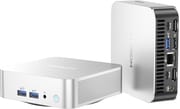 GEEKOM A6 | GEEKOM A6 | |
| Price | List Price: $499.00 Amazon Prices: Loading prices... | List Price: $579.00 Amazon Prices: Loading prices... |
| Version | 16GB/512GB | 32GB/1TB |
| Perfomance Rating | 7.7 | 8.4 |
| Operating System | Windows 11 Pro | Windows 11 Pro |
| Processor | Octa-core 3.20 Ghz (max 4.70 Ghz) AMD Ryzen 7 6800H | Octa-core 3.20 Ghz (max 4.70 Ghz) AMD Ryzen 7 6800H |
| GPU | Integrated AMD Radeon 680M | Integrated AMD Radeon 680M |
| RAM | 16 GB | 32 GB |
| Internal Storage | 512 GB | 1 TB |
| Dimensions width x length x thickness | 4.43 x 4.43 x 1.46 inches (112.52 x 112.52 x 37.08 mm) | 4.43 x 4.43 x 1.46 inches (112.52 x 112.52 x 37.08 mm) |
| Weight | 0.99 lbs (0.45 kg) | 0.99 lbs (0.45 kg) |
| WiFi | Wi-Fi 6E (802.11ax) | Wi-Fi 6E (802.11ax) |
| Bluetooth | Bluetooth 5.2 | Bluetooth 5.2 |
| Ethernet | 1 Ethernet port at 2.5 Gbps | 1 Ethernet port at 2.5 Gbps |
| HDMI | 2 Full-Size HDMI Ports | 2 Full-Size HDMI Ports |
| DisplayPort | No DisplayPort | No DisplayPort |
| VGA | No VGA Ports | No VGA Ports |
| USB Ports | 1 USB 2.0, 4 USB 3, 1 USB 4, 2 USB-C | 1 USB 2.0, 4 USB 3, 1 USB 4, 2 USB-C |
| Thunderbolt Ports | No | No |
| Internal SATA Ports | No SATA ports | No SATA ports |
| Card Reader | SD Card Reader | SD Card Reader |
| Headphone Jack | combo | combo |
| Fanless | No | No |
| VESA Mount | Yes | Yes |
| In the Box | Mini PC, user manual, metal VESA mount bracket, mounting screws, power cable, 120W power adapter, HDMI cable | Mini PC, user manual, metal VESA mount bracket, mounting screws, power cable, 120W power adapter, HDMI cable |
| Expandability | RAM upgradable to 64GB (2x SO-DIMM DDR5-4800). Storage expandable via second M.2 2242 SATA slot. | RAM upgradable to 64GB (2x SO-DIMM DDR5-4800). Storage expandable via second M.2 2242 SATA slot. |
Related Mini PCs
-
 GEEKOM Mini IT13Meet the GEEKOM Mini IT13: a space-efficient powerhouse with up to an Intel Core i9-13900H, 64GB…
 -
 GEEKOM GT15 Max AIThe GEEKOM GT15 Max AI packs Intel's Core Ultra 9 285H processor with 99 TOPS of combined AI…
 -
 ACEMAGIC M1 (Ryzen 7 6800H)The AMD-powered ACEMAGIC M1 brings Ryzen 7 6800H performance and Radeon 680M graphics to a compact…
 -
 ACEMAGICIAN S3AA high-performance mini PC featuring the AMD Ryzen 7 8745HS processor with Radeon 780M graphics,…
 -
 Paladin WO4The Paladin WO4 packs the AMD Ryzen 7 7735U processor with Radeon 680M graphics into an…
 -
 KAMRUI Hyper H1 11 ProA compact gaming-capable mini PC featuring AMD Ryzen 7 6800H, DDR5 memory, dual M.2 slots, and…
Detailed Insights into the GEEKOM A6

The GEEKOM A6’s design language immediately conveys premium intentions, with its entire chassis constructed from anodized aluminum alloy that gives it real heft and a premium feel in the hand. At just 4.43 inches square and barely 1.5 inches tall, it occupies less desk space than a typical paperback book, yet manages to incorporate meaningful ventilation throughout the enclosure. The included IceBlast cooling system directs airflow efficiently through multiple channels before expelling heat through the rear, keeping temperatures manageable even during sustained loads. Under typical office workloads, the system operates quietly enough to disappear into the background, though extended stress testing by CNX Software revealed CPU temperatures reaching 95 degrees Celsius without thermal throttling, and fan noise climbing to around 45 decibels at peak load.
The AMD Ryzen 7 6800H at the heart of the A6 represents the previous generation of AMD mobile processors, built on the Zen 3+ architecture with 8 cores and 16 threads capable of boosting to 4.7 GHz. While it lacks the efficiency improvements of newer Ryzen 7000 and 8000 series chips, the 6800H remains a capable performer that benchmarks competitively against many current offerings. CNX Software’s testing revealed Cinebench R23 scores of 1,511 single-core and 11,750 multi-core, with PassMark reporting an overall score of 6,066. The integrated Radeon 680M graphics with 12 RDNA2 compute units handles 4K video playback smoothly, supports up to four independent displays, and can even manage light gaming at reduced settings in titles like CS:GO, Valorant, and GTA V.
The connectivity options on the A6 punch well above its price class, starting with a full USB4 port running at 40 Gbps that supports both DisplayPort Alt Mode and external GPU enclosures for those wanting to expand gaming capabilities later. You get two HDMI 2.0 ports for monitor connections, a USB-C 3.2 Gen 2 port, and a total of four USB-A ports split between USB 3.2 and USB 2.0 speeds. Network connectivity impresses with WiFi 6E via a MediaTek MT7922 chip and a Realtek 2.5 Gigabit Ethernet port that CNX Software measured at an excellent 1.57 Gbps uploads and 1.40 Gbps downloads. The front panel includes a full-size SD card reader that photographers and content creators will appreciate, along with a 3.5mm combo audio jack.
Reviewer Insights on the GEEKOM A6

ETA PRIME’s Perspective
ETA PRIME provides an enthusiastic assessment of the GEEKOM A6, immediately impressed by its premium construction and compact form factor. “I love this premium design that they’ve come up with,” he notes while examining the aluminum chassis. “When I say mini PC, I mean these A series from GeekCom are coming in at an absolutely tiny form factor.” His teardown reveals straightforward upgrade access with just four screws on the bottom panel, though he points out an important caveat about the RAM: “This does come with two 5600 sticks, but it can only run up to 4,800. I do think that’s going to hold the iGPU back here.” Despite this limitation, ETA PRIME recommends the A6 as a solid value proposition for users who don’t need the absolute latest processor generation.
Chigz Tech Reviews Analysis
Chigz Tech Reviews delivers a detailed unboxing and teardown that highlights the A6’s practical advantages for everyday users. He notes the impressively fast 10-second boot time from a cold start and appreciates the Kingston PCIe Gen 4 NVMe drive included with the system. His examination of the port layout emphasizes the quad 4K display support achieved through the dual HDMI and dual USB-C outputs. “You can swap this drive out for up to a 4 TB drive,” he explains while discussing storage upgrade options, though he cautions about the WiFi antenna cable that requires careful handling during disassembly.
Robtech’s Value Assessment
Robtech takes a more critical eye to the A6’s value proposition, acknowledging GEEKOM’s pitch as the best value option while questioning whether premium features justify the older processor choice. He highlights the 3-year warranty as a standout feature that “is more than most vendors offer” and confirms the clean Windows 11 Pro installation passed malware scans. However, he notes some annoyances like the glued rubber feet that complicate upgrades and the lack of power delivery support on the USB-C ports. His benchmark testing shows single-core performance trailing newer AMD chips but competitive multi-core and video encoding performance.
Written Review Coverage
Professional tech publications have given the GEEKOM A6 consistently positive marks. TechRadar awarded it 4.5 out of 5 stars, praising its “ultra-compact mini PC with plenty of power for creative applications” while noting the premium pricing and noisy fans under load. Tom’s Guide similarly scored it 4.5 out of 5, specifically calling out its advantages over Apple’s Mac Mini M4 in both size and price while appreciating the quad monitor support and full-sized ports.
Windows Central offered the highest score at 4.65 out of 5, emphasizing its reliability for daily Windows workloads and cloud gaming capability. CNX Software’s detailed technical review provided comprehensive benchmark data, noting excellent networking performance while acknowledging the CPU temperature concerns and loud fan operation under sustained stress.
Customer Reviews of the GEEKOM A6
Amazon customers have responded positively to the GEEKOM A6, with ratings holding steady at 4.4 stars across nearly 1,500 reviews combined between the standard and Aurora Edition variants. The most common praise centers on the build quality that exceeds expectations for the price point, with many buyers specifically noting how the aluminum construction gives the unit a premium feel absent from cheaper plastic competitors. Performance receives consistent approval for office tasks, media consumption, and even light content creation, with satisfied customers reporting smooth 4K video editing and Adobe suite usage.
The primary complaints echo professional reviewers’ observations about fan noise during demanding tasks. Several customers mention needing to adjust their expectations for a unit this compact, accepting some acoustic compromise in exchange for the small footprint. A smaller subset of reviews mention initial driver issues with the AMD graphics that were resolved through Windows updates, suggesting early buyers may have encountered teething problems that have since been addressed. Overall sentiment reflects strong value appreciation, with many customers explicitly comparing the A6 favorably to more expensive alternatives from competitors and Apple.
Conclusion
The GEEKOM A6 earns its place as a serious contender for anyone seeking a compact, capable Windows desktop that won’t dominate their workspace or budget. It’s particularly well-suited for home office users who need reliable performance for productivity applications, web conferencing, and media consumption, as well as creative professionals who want Adobe suite capability without the bulk of a traditional desktop. The combination of USB4 support and external GPU compatibility also makes it an interesting choice for users who might want to add discrete graphics later for more serious gaming.
However, buyers focused primarily on gaming or those who need absolute peak performance should probably look toward GEEKOM’s higher-end A7 or A8 models with newer processors, or consider competitors with current-generation silicon. The RAM speed limitation and older Zen 3+ architecture do leave some performance on the table compared to the latest offerings, and the 2242 SATA limitation on the secondary M.2 slot may frustrate users wanting to add high-speed storage expansion. For those intrigued by what the A6 offers, comparing it against alternatives using Starry Hope’s Mini PC Comparison Chart can help determine whether its specific combination of features and price meets your needs.
Frequently Asked Questions
What processor and graphics does the GEEKOM A6 use?
The GEEKOM A6 features an AMD Ryzen 7 6800H processor with 8 cores and 16 threads, capable of boosting up to 4.7 GHz. It uses integrated AMD Radeon 680M graphics with 12 RDNA2 compute units, which handles 4K video playback, creative applications, and light gaming without requiring a dedicated GPU.
Can I upgrade the RAM and storage in the GEEKOM A6?
Yes, the GEEKOM A6 supports user upgrades by removing four screws on the bottom panel. RAM can be upgraded to 64GB using two SO-DIMM DDR5-4800 slots. Storage expansion includes the primary M.2 2280 PCIe 4.0 slot (up to 4TB) and a secondary M.2 2242 SATA-only slot for additional drives.
How many monitors can the GEEKOM A6 support?
The GEEKOM A6 supports up to four independent displays at 4K resolution. You can connect monitors using the two HDMI 2.0 ports on the rear panel, plus the USB4 and USB-C ports which both support DisplayPort Alt Mode for video output.
Does the GEEKOM A6 support external GPUs?
Yes, the USB4 port on the GEEKOM A6 supports external GPU enclosures at 40 Gbps bandwidth. This allows you to connect an eGPU for improved gaming or professional graphics work. However, note that the USB-C ports do not support power delivery, so the eGPU enclosure will need its own power source.
Is the GEEKOM A6 good for gaming?
The GEEKOM A6 handles light to medium gaming reasonably well thanks to the Radeon 680M integrated graphics. Esports titles like CS:GO and Valorant run smoothly, and even GTA V is playable at reduced settings. For more demanding games, you can connect an external GPU via the USB4 port to significantly boost graphics performance.
What networking options does the GEEKOM A6 offer?
The GEEKOM A6 includes WiFi 6E wireless networking via a MediaTek MT7922 chip, Bluetooth 5.2 for peripheral connectivity, and a 2.5 Gigabit Ethernet port using a Realtek controller. Testing by CNX Software showed excellent network performance with 1.57 Gbps uploads and 1.40 Gbps downloads over Ethernet.
How loud is the GEEKOM A6 during operation?
Under normal office workloads, the GEEKOM A6 operates quietly at around 39-40 dBA, which is barely noticeable in most environments. However, during heavy sustained loads like rendering or stress testing, fan noise increases to 41-45 dBA, which becomes audible. Multiple reviewers note this as one of the system’s few drawbacks.
What’s included in the GEEKOM A6 box?
The GEEKOM A6 comes with the mini PC unit, a user manual, a metal VESA mount bracket with mounting screws, a power cable, a compact 120W power adapter, and an HDMI cable. The inclusion of the VESA mount is particularly useful for mounting the system behind a monitor to free up desk space.