
GMKtec EVO-X3
Published on

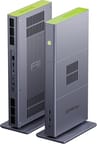
The GMKtec EVO-X3 stands the company’s Strix Halo mini PC on its edge. Where the EVO-X2 was a squat flat box, the X3 is a 13.9-inch tall metal slab barely an inch and a half thick, sitting upright in a flat metal foot, with the whole narrow top edge given over to a perforated lime-green intake cap. The silicon underneath is unchanged: the same AMD Ryzen AI Max+ 395 with 16 Zen 5 cores, 32 threads, a Radeon 8060S packing 40 RDNA 3.5 compute units, and an XDNA 2 NPU that GMKtec rates at 50 TOPS on its own and 126 TOPS across the whole system. What changed is the box around it and the ports on the back. The X3 adds an OCuLink connector for a PCIe Gen4 x4 external GPU link, and drops the X2’s DisplayPort output, its SD card reader, and its second 2.5GbE jack to make room. Memory is fixed at 128GB of LPDDR5X-8000 soldered to the board, of which up to 96GB can be assigned to the integrated GPU.
Pros and Cons
| Pros | Cons |
|---|---|
| OCuLink gives a physical PCIe Gen4 x4 link to an external GPU | OCuLink is not plug-and-play and does not support hot-plug |
| 128GB of LPDDR5X-8000 with up to 96GB addressable by the iGPU | Memory is soldered, so the capacity you buy is permanent |
| Radeon 8060S sustains 1440p AAA gaming without a discrete card | Priced far above the EVO-X2 it replaces |
| Full-metal CNC chassis with a vertical stand included | Only one 2.5GbE port, down from two on the EVO-X2 |
| 140W package boost settling near 115W sustained | Wi-Fi 7 radio is capped at 160MHz channels, not 320MHz |
| Dual M.2 2280 PCIe 4.0 x4 slots to 16TB | No DisplayPort output and no card reader |
Related Videos
GMKtec EVO-X3 Comparison Chart
 GMKtec EVO-X3 | GMKtec EVO-X3 | |
| Price | List Price: $3,799.99 Amazon Prices: Loading prices... | List Price: $3,999.99 Amazon Prices: |
| Version | 128GB / 2TB | 128GB / 4TB |
| Performance Rating | 8.1 | 8.1 |
| Operating System | Windows 11 Pro | Windows 11 Pro |
| Processor | Sixteen-core 3.00 Ghz (max 5.10 Ghz) AMD Ryzen AI Max+ 395 | Sixteen-core 3.00 Ghz (max 5.10 Ghz) AMD Ryzen AI Max+ 395 |
| GPU | Integrated AMD Radeon 8060S | Integrated AMD Radeon 8060S |
| RAM | 128 GB LPDDR5X (128GB LPDDR5X-8000 unified, soldered) | 128 GB LPDDR5X (128GB LPDDR5X-8000 unified, soldered) |
| Internal Storage | 2 TB NVMe SSD | 2 TB NVMe SSD |
| Dimensions width x length x thickness | 13.9 x 7.32 x 1.61 inches (353.06 x 185.93 x 40.89 mm) | 13.9 x 7.32 x 1.61 inches (353.06 x 185.93 x 40.89 mm) |
| Weight | 5.07 lbs (2.3 kg) | 5.07 lbs (2.3 kg) |
| WiFi | Wi-Fi 7 (802.11be) | Wi-Fi 7 (802.11be) |
| Bluetooth | Bluetooth 5.4 | Bluetooth 5.4 |
| Ethernet | 1 Ethernet port at 2.5 Gbps | 1 Ethernet port at 2.5 Gbps |
| HDMI | 1 Full-Size HDMI Port | 1 Full-Size HDMI Port |
| DisplayPort | No native DisplayPort; video out via HDMI 2.1 and USB4 | No native DisplayPort; video out via HDMI 2.1 and USB4 |
| VGA | No VGA Ports | No VGA Ports |
| USB Ports | 1 USB 2.0, 2 USB 3, 1 USB-C (1 USB4) Rear: 1x USB4 Type-C (40Gbps, video out), 1x USB-A 3.2 Gen2. Front: 1x USB-A 3.2 Gen1, 1x USB-A 2.0. | 1 USB 2.0, 2 USB 3, 1 USB-C (1 USB4) Rear: 1x USB4 Type-C (40Gbps, video out), 1x USB-A 3.2 Gen2. Front: 1x USB-A 3.2 Gen1, 1x USB-A 2.0. |
| Thunderbolt Ports | No | No |
| OCuLink | PCIe Gen4 x4 for an eGPU; no hot-plug | PCIe Gen4 x4 for an eGPU; no hot-plug |
| Internal SATA Ports | No SATA ports | No SATA ports |
| Card Reader | No Card Reader | No Card Reader |
| Headphone Jack | combo | combo |
| Fanless | No | No |
| VESA Mount | No | No |
| In the Box | Mini PC, vertical stand and screws, rubber feet, HDMI cable, power adapter, manual | Mini PC, vertical stand and screws, rubber feet, HDMI cable, power adapter, manual |
| Expandability | 128GB LPDDR5X soldered (not upgradeable). Dual M.2 2280 PCIe 4.0 x4 slots, 16TB max. OCuLink PCIe Gen4 x4 for an external GPU. | 128GB LPDDR5X soldered (not upgradeable). Dual M.2 2280 PCIe 4.0 x4 slots, 16TB max. OCuLink PCIe Gen4 x4 for an external GPU. |
Related Mini PCs
-
 GMKtec EVO-X1 ProThe GMKtec EVO-X1 Pro moves the compact EVO-X1 chassis to AMD's Ryzen AI 9 HX 470, with 64GB of…
 -
 GMKtec EVO-X2The GMKtec EVO-X2 is a 3.6-pound upright mini PC built on the AMD Ryzen AI Max+ 395 with Radeon…
 -
 Beelink GTR9 ProA high-performance AI Mini PC featuring the AMD Ryzen AI Max+ 395 processor with 126 AI TOPS, 128GB…
 -
 BOSGAME M5The BOSGAME M5 puts the 16-core AMD Ryzen AI Max+ 395 and its Radeon 8060S graphics in a metal…
 -
 Mac Studio (2026)Apple's 7.7-inch square pro desktop with memory fixed at purchase. The M5 Max model covers photo,…
 -
 NIMO Mini PC AMD Ryzen AI Max+ 395The NIMO Mini PC packs the flagship AMD Ryzen AI Max+ 395 with 16 Zen 5 cores and Radeon 8060S…
Vertical chassis, OCuLink, and 128GB of soldered memory
The chassis measures roughly 13.9 by 7.3 by 1.6 inches without the stand and weighs about five pounds. Standing upright, the chassis presents only its 1.6-inch edge to the desk, while the tall interior gives GMKtec room for a cooler it could not fit in the older flat-box design. GMKtec’s spec table lists triple heat pipes and three fans, though ETA PRIME described the cooler as a dual-fan design. Level1Techs, handling the machine, described air being drawn in through the top and exhausted out the back, with a further fan on the side panel. The body is CNC-machined metal in gray with the green accents, and a fine dust filter mesh sits behind the vent slots.
Port selection is the sharpest departure from the EVO-X2. The front face carries a USB-A 3.2 Gen1 port, a USB-A 2.0 port, a 3.5mm combo audio jack, and the power button. The back holds HDMI 2.1 rated for 8K at 60Hz, a full-function USB4 Type-C port running 40Gbps with video output, one more USB-A 3.2 Gen2, a single 2.5GbE jack on a Realtek RTL8125BG controller, the barrel DC input, and the OCuLink connector. There is no DisplayPort, no SD card reader, and no second Ethernet port, all three of which the EVO-X2 had. Wireless is Wi-Fi 7 and Bluetooth 5.4. That leaves two video outputs total, so multi-monitor setups past a pair of displays need a USB4 dock rather than the machine’s own ports.
Adding OCuLink changes what the machine can do more than any other part of the redesign. The connector carries PCIe electrically rather than tunneling it over USB, so a four-lane Gen4 link runs at the full 8 GB/s in each direction with none of the protocol overhead a Thunderbolt or USB4 eGPU enclosure adds. On a chip like Strix Halo, whose integrated graphics are strong but whose memory bandwidth is the ceiling on local inference, an external card with its own fast VRAM is an upgrade path worth having. OCuLink is a server-side connector, GMKtec’s own documentation says the machine must be powered off before connecting or disconnecting, and there is no USB fallback if the dock misbehaves.
Both shipping configurations use the same 128GB of LPDDR5X-8000, differing only in whether the pre-installed drive is 2TB or 4TB. Storage sits in two M.2 2280 PCIe 4.0 x4 slots that accept up to 8TB each, though hitting the 16TB ceiling means pulling the pre-installed drive rather than just filling the empty slot. Power modes are exposed in firmware as silent, balanced, and performance, rated by GMKtec at 54W, 85W, and a 140W peak, and the BIOS also carries a manual fan curve and a VRAM allocation setting that goes up to 96GB, with AMD’s Adrenalin software offering finer steps down to half a gigabyte.
The chip itself deserves context, because Strix Halo parts have been shipping since early 2025 and the EVO-X3 launched in mid-2026 on the same silicon. AMD’s Ryzen AI Max 400 series, codenamed Gorgon Halo, arrived in the interim, and Starry Hope’s read is that Gorgon Halo is a rename rather than a generational jump: same Zen 5 cores, same RDNA 3.5 graphics, same XDNA 2 NPU, with a 192GB memory ceiling as the one addition. Tom’s Hardware, covering the EVO-X3’s announcement in June 2026, noted GMKtec stayed on the 395 rather than moving to the 495 and reported the entry price as far steeper than the EVO-X2’s.
Reviewer Insights
ETA PRIME
ETA PRIME ran the EVO-X3 through a full first-look in Windows and returned to it later with SteamOS installed. He was blunt about the silicon: “The new X3 is powered by the AMD Ryzen AI Max Plus 395. We’ve seen this before. It’s an absolute monster.” He set the machine to performance mode in the BIOS, split the 128GB pool evenly between system memory and VRAM, and watched the package power hit GMKtec’s rated peak before settling well below it. “It’s got that 140 W boost, but it kind of sustains at around 115, 116,” he said. He also noted that the AMD CBS menu is absent from the firmware, so the TDP cannot be raised manually from the BIOS as it can on some competing Strix Halo boxes.
His measured numbers land where the platform usually does. Cinebench R24 returned 114 single-core and 1,893 multi-core; Geekbench 6 came in at 3,081 single and 22,314 multi; 3DMark Time Spy scored 11,388, against a desktop RTX 4060 he placed around 10,300 to 10,600 and whose GPU alone draws up to 115W. A 70-billion-parameter DeepSeek R1 model ran at three tokens per second on his setup, slower than an M4 Max, but the other machines in his comparison could not finish the test at all because the model would not fit in their memory. Gaming at 1440p held up: Forza Horizon 6 averaged in the low 90s at ultra with no upscaling, Cyberpunk 2077 landed around 74 with FSR 2.1 at quality, and Black Myth Wukong sat near 83.
He recorded a 66C average APU temperature during 1440p gaming and an 83C maximum across all of his testing, and concluded that “This little cooling system here is doing a really good job, and it never sounds like a jet engine.” Total system draw from the wall measured 11W at idle, 18W during 4K video playback, and around 147W in AAA gaming, all in performance mode. He liked the form factor for what it is, saying “I’m a sucker for these mini PCs with vertical stands,” but landed on the same complaint the port list invites: “I think they could have added a little more IO around back here.”
In the SteamOS follow-up he ran official SteamOS 3.9 rather than the shipped Windows install, and reported better frame rates than he had previously measured on similar Strix Halo hardware and credited recent SteamOS and Mesa driver work. “In the past, we’ve tested with a very similar system, but I never saw the kind of frame rates that we’re getting out of this thing,” he said, adding that “this thing is ripping through games at 1440p. It’s actually really impressive what this thing’s doing.” Spider-Man 2 averaged in the high 80s at 1440p very high with FSR at quality, Elden Ring held a steady 60 maxed out with no upscaling, and Forza Horizon 6 ran near 78 at 1440p ultra. He did not oversell it. The iGPU still runs into a wall on VRAM-heavy titles, since the shared LPDDR5X cannot match dedicated GDDR6 bandwidth, and he was blunt about the price: “We’ve seen absolutely ridiculous prices on these PCs powered by the CPU, and this one’s really no different.”
Level1Techs
Wendell at Level1Techs approached the EVO-X3 as an inference platform rather than a gaming box, and spent most of his time on the parts that decide how it performs on language models. His AIDA64 run measured 118 GB/s of memory bandwidth with latency near 144 nanoseconds, and he put that figure in context: “That is about as much as a quad-channel Threadripper system.” The unit he received used Micron memory running at 8000 MT/s and shipped with a Crucial P310 2TB PCIe Gen4 drive, a component choice he approved of by name.
He was specific about what the 140W ceiling buys. Token generation on Strix Halo is bound by memory speed rather than compute, so, as he put it, “the 140 W is not going to help you there. It’ll help you with prompt processing speed.” On the CPU side he rated the 16 Zen 5 cores above the 20 cores in NVIDIA’s DGX Spark for general compute work. In LM Studio on Windows he reported 40 to 60 tokens per second on 70-billion-parameter models at four and six-bit quantization, and close to 60 tokens per second running a Qwen quant through AMD’s Lemonade stack.
His criticisms were specific. The single Realtek 2.5GbE port drew the sharpest line: “2 and 1/2 gigabit in this day and age, GMK Tech didn’t learn from Evo X2.” The MediaTek RZ717 Wi-Fi 7 radio runs 160MHz channels rather than 320MHz. And the default thermal behavior needs attention, since “the balanced configuration can leave a little bit to be desired on thermals” and, in the fan menu, “By default, it will not go the full fan speed until you hit 95. That’s too hot for me, so I like to adjust this.” With a more aggressive curve set, he found the acoustics reasonable: “this thing basically stays inaudible in almost every scenario. When you’re using more than 100 watts, you can definitely hear fan noise. It’s more whooshing of air than high-pitched whine.”
OCuLink was what drew him to the machine. He connected both an NVIDIA RTX 5060 Ti and an AMD R9 700 through an OCuLink dock, mixing CUDA and ROCm runtimes on one host, and explained why the connector matters: “This is truly four lanes of PCIe Gen 4 because it is physically PCIe Gen 4.” He was equally clear about who it is for, calling it a server connector and warning that “It’s not a connector that’s meant for mass consumption.” On value, he placed the EVO-X3 at the low end of the Strix Halo market rather than the high end, describing it as “one of the least expensive Strix Halo machines you can get” against comparable 128GB configurations.
A 128GB inference box you can bolt a GPU onto
The buyer this suits wants 128GB of unified memory for local model work and an expansion path off the box when the integrated GPU runs out of room. OCuLink is the feature that justifies the redesign, and no amount of USB4 tunneling matches four physical lanes of PCIe Gen4. The cooling appears to answer the fan-noise complaint Tom’s Hardware raised against the EVO-X2, since both reviewers described a machine that stays quiet until it is working hard, and the full-metal vertical chassis is a clear step up in build.
The case against it is the price of what did not change. Memory is soldered, so the configuration you buy is permanent, the Wi-Fi 7 radio is a half-width implementation, and the rear I/O is thin for a machine this size, with one Ethernet port where the previous generation had two. The chip is the same Ryzen AI Max+ 395 that has been shipping since early 2025, at a price well above what the EVO-X2 launched at, so much of what you are paying for is the chassis and the OCuLink port.
If you are weighing this against the rest of the platform, Starry Hope’s guide to running large language models on Strix Halo covers where the bottlenecks sit, and the Mini PC comparison chart puts the EVO-X3 next to every other box in the catalog. Buyers who mainly want the memory pool and can live without OCuLink should compare it directly against the EVO-X2, which offers more memory tiers and a second 2.5GbE port at a lower position in the range.
Frequently Asked Questions
What is the difference between the GMKtec EVO-X3 and the EVO-X2?
Both use the same AMD Ryzen AI Max+ 395 processor and Radeon 8060S graphics. The EVO-X3 is a full redesign of the enclosure: a vertical CNC metal slab about 14 inches tall with a triple heat-pipe cooler, where the EVO-X2 is a flat box. The X3 adds an OCuLink port for an external GPU and drops the X2’s DisplayPort output, SD card reader, and second 2.5GbE port. The X2 also sells in more memory tiers, while the X3 ships only with 128GB.
Can I upgrade the RAM in the GMKtec EVO-X3?
No. The 128GB of LPDDR5X-8000 is soldered to the board, which is what allows it to run at 8000 MT/s as a unified pool shared by the CPU, GPU, and NPU. Storage is upgradeable through two M.2 2280 PCIe 4.0 x4 slots that take drives up to 8TB each.
How much memory can the EVO-X3 give to the GPU?
Up to 96GB of the 128GB pool can be allocated as VRAM. The allocation is set either in the BIOS under the graphics configuration menu or from AMD’s Adrenalin software in Windows, and reviewers reported that recent Windows builds handle the unified pool well enough that pre-allocating a fixed split is no longer always necessary.
What does the OCuLink port on the EVO-X3 do?
It exposes four lanes of PCIe Gen4 directly, giving roughly 8 GB/s in each direction to an external GPU dock without the tunneling overhead of a USB4 or Thunderbolt enclosure. The dock and cable are sold separately. GMKtec’s documentation states there is no hot-plug support, so the machine has to be powered off before connecting or disconnecting a device.
How many displays can the EVO-X3 drive?
Two directly, through the HDMI 2.1 output rated for 8K at 60Hz and the full-function USB4 Type-C port, which carries video alongside its 40Gbps of data bandwidth. There is no DisplayPort connector on the chassis, so driving more than two monitors requires a USB4 dock or a display that supports daisy chaining.
Is the GMKtec EVO-X3 loud under load?
Both reviewers who tested it described it as quiet for the power involved. ETA PRIME said the cooling never sounds like a jet engine and recorded a 66C average APU temperature during 1440p gaming with an 83C peak across all testing. Level1Techs found it effectively inaudible below about 100W, with audible airflow rather than fan whine above that, though he recommended setting a more aggressive fan curve in the BIOS because the default profile does not reach full speed until 95C.
Does the EVO-X3 run Linux?
GMKtec lists Ubuntu and Linux alongside the pre-installed Windows 11 Pro, and ETA PRIME installed official SteamOS 3.9 on a second drive and reported working Wi-Fi, Bluetooth, and audio. Level1Techs said Linux testing with GPUs attached is his own plan for the machine, though the benchmarks shown in his video run in Windows. The MediaTek Wi-Fi 7 adapter is the component most likely to need attention, since its driver support varies by kernel version.