
GMKtec Nucbox G2 Mini PC
Updated on

The GMKtec Nucbox G2 is a palm-sized Intel N100 mini PC, 3.42 inches square and 1.55 inches thick. It runs Windows 11 Pro on 12GB of soldered DDR5, and the integrated Intel UHD graphics cover office work and media playback, plus older and indie games. Anything heavier runs into the N100 ceiling, so it fits a desk corner or a small always-on server and not much beyond that.
Pros and cons
| Pros | Cons |
|---|---|
| Palm-sized, and 9-10W at idle | N100 ceiling; too slow for AAA gaming or heavy work |
| Triple 4K-60Hz display (dual HDMI plus USB-C) | 12GB RAM is soldered; no upgrades |
| Dual 1GbE LAN and Wi-Fi 6 | M.2 slot is SATA, slower than NVMe |
| Easy-access M.2 slot (up to 2TB) | More heat and fan noise under load |
| USB-C power input; VESA mount in the box | USB ports can’t power high-draw drives (use a powered hub) |
| Runs Windows 11 Pro and Linux | One M.2 slot, so no second drive |
Related Videos
GMKtec Nucbox G2 Mini PC Comparison Chart
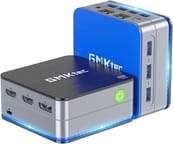 GMKtec Nucbox G2 Mini PC | GMKtec Nucbox G2 Mini PC | GMKtec Nucbox G2 Mini PC | |
| Price | List Price: $219.99 Amazon Prices: | List Price: $249.99 Amazon Prices: | List Price: $219.99 Amazon Prices: |
| Version | 12GB/256GB/Intel N100 | 12GB/512GB/Intel N100 | 12GB/1TB/Intel N100 |
| Performance Rating | 2.8 | 2.8 | 2.8 |
| Operating System | Windows 11 Pro | Windows 11 Pro | Windows 11 Pro |
| Processor | Quad-core 3.40 Ghz (max 3.40 Ghz) Intel Processor N100 | Quad-core 3.40 Ghz (max 3.40 Ghz) Intel Processor N100 | Quad-core 3.40 Ghz (max 3.40 Ghz) Intel Processor N100 |
| GPU | Integrated Intel UHD Graphics | Integrated Intel UHD Graphics | Integrated Intel UHD Graphics |
| RAM | 12 GB | 12 GB | 12 GB |
| Internal Storage | 256 GB | 512 GB | 1 TB |
| Dimensions width x length x thickness | 3.42 x 3.42 x 1.55 inches (86.87 x 86.87 x 39.37 mm) | 3.42 x 3.42 x 1.55 inches (86.87 x 86.87 x 39.37 mm) | 3.42 x 3.42 x 1.55 inches (86.87 x 86.87 x 39.37 mm) |
| Weight | unknown | unknown | unknown |
| WiFi | Wi-Fi 6 (802.11ax) | Wi-Fi 6 (802.11ax) | Wi-Fi 6 (802.11ax) |
| Bluetooth | Bluetooth 5.2 | Bluetooth 5.2 | Bluetooth 5.2 |
| Ethernet | 2 Ethernet ports at 1 Gbps | 2 Ethernet ports at 1 Gbps | 2 Ethernet ports at 1 Gbps |
| HDMI | 2 Full-Size HDMI Ports | 2 Full-Size HDMI Ports | 2 Full-Size HDMI Ports |
| DisplayPort | 1 DisplayPort (Type-C DP 1.4) | 1 DisplayPort (Type-C DP 1.4) | 1 DisplayPort (Type-C DP 1.4) |
| VGA | No VGA Ports | No VGA Ports | No VGA Ports |
| USB Ports | 3 USB 3, 1 USB-C | 3 USB 3, 1 USB-C | 3 USB 3, 1 USB-C |
| Thunderbolt Ports | No | No | No |
| OCuLink | No | No | No |
| Internal SATA Ports | No SATA ports | No SATA ports | No SATA ports |
| Card Reader | No Card Reader | No Card Reader | No Card Reader |
| Headphone Jack | combo | combo | combo |
| Fanless | No | No | No |
| VESA Mount | Yes | Yes | Yes |
| In the Box | Mini PC, Power Adapter, VESA Mount with Screws, Blue Mini PC Cover Lid, HDMI Cable, User Manual | Mini PC, Power Adapter, VESA Mount with Screws, Blue Mini PC Cover Lid, HDMI Cable, User Manual | Mini PC, Power Adapter, VESA Mount with Screws, Blue Mini PC Cover Lid, HDMI Cable, User Manual |
| Expandability | Supports up to 2TB M.2 2242 SATA SSD | Supports up to 2TB M.2 2242 SATA SSD | Supports up to 2TB M.2 2242 SATA SSD |
Related Mini PCs
-
 GMKtec G10The GMKtec G10 is a budget mini PC with an AMD Ryzen 5 3500U, two M.2 slots, 2.5G Ethernet, three…
 -
 GMKtec G11Budget AMD Ryzen Embedded mini PC built for 24/7 duty, with dual 2.5GbE, WiFi 6E, dual M.2 slots,…
 -
 Bmax B4 PlusThe BMAX B4 Plus is an Intel N100 mini PC with a 2.5-inch SATA drive bay next to its M.2 slot, so a…
 -
 Bmax B4 UltraThe Bmax B4 Ultra is an ultra-compact mini PC featuring Intel's N150 processor, 12GB LPDDR5 RAM,…
 -
 BOSGAME B100The BOSGAME B100 is a budget Intel N100 mini PC with 16GB of DDR4, a 512GB NVMe SSD, dual HDMI plus…
 -
 BOSGAME B95The BOSGAME B95 is a low-cost Intel N95 mini PC with 16GB of DDR4, a 512GB M.2 SSD, 2.5Gb Ethernet,…
The SSD is the only part you can change
The Intel N100 is a quad-core Alder Lake-N chip that runs up to 3.4 GHz, capable of office work and media, with light content creation about its limit. The 12GB of DDR5 is soldered and cannot be expanded, though it leaves headroom for everyday multitasking. Storage is a single M.2 2242 slot, shipping with 256GB, 512GB, or 1TB depending on the build and taking an SSD of up to 2TB. It is a SATA slot, so drive speeds sit below the NVMe drives in pricier boxes.
The port set is wide for the size. Wi-Fi 6 and Bluetooth 5.2 handle wireless, and the wired side is two 1GbE LAN ports, three USB 3.2 ports, and a USB-C port that carries DisplayPort 1.4 and accepts power. Between the two HDMI ports and that USB-C it drives up to three displays. The internals are easy to reach for the SSD swap, and a VESA mount is in the box for attaching it behind a monitor.
Reviewer Insights
Team Pandory: the small shell still has a fan and drives 4K 60Hz
Team Pandory’s review called the machine “surprisingly light” and “pocketable.” They pointed to the VESA mount and the changeable lids as a touch of customization, and to a port selection that includes USB 3.2 and dual HDMI 2.0. A box this small still supports 4K at 60Hz, and it still has a fan inside it for cooling.
Their unit came with 12GB of DDR5 RAM and a 1TB SSD, which Team Pandory found generous. They noted the GPU’s ability to handle low-requirement games, although they mentioned a desire for additional USB ports. Idle power draw on Windows 11 Pro sat at 9-10 watts. Team Pandory concluded that the Nucbox G2 is worth its price for students, families, and emulation enthusiasts, though they cautioned about its limitations in 3D gaming performance.
Robtech: all plastic, and hotter and louder under load
Robtech’s review lauded the G2 for its compactness and USB-C power feature. The build quality is deemed good despite being made entirely of plastic. The design allows for easy access to its internals, and it comes with Windows 11 pre-installed. Robtech highlights the Intel N100 CPU’s adequacy for office work, 4K media playback, retro gaming, and its capability to handle video editing tasks.
Benchmark tests reveal solid single-core performance, but the multi-core performance lags slightly behind the fastest N100 CPU tested by Robtech. The graphics performance stands out, while the small chassis contributes to higher temperatures and more noise under load. Robtech concludes that the Nucbox G2 offers portability and good performance, with the caveat of soldered RAM and limited space for additional storage.
TechDweeb planned to keep it as a lower-spec gaming machine
TechDweeb treated the G2 as an ultra-compact budget box (around $170 with coupons) and was surprised by how well the Intel N100 held up. He found it smooth for 4K playback and everyday desktop work, with even basic photo and 1080p video editing across multiple layers staying responsive, and its Intel UHD graphics fine for indie and older titles though not the latest demanding games. He planned to keep it as a dedicated machine for lower-spec gaming and rated it worth its price for anyone with light needs.
John found Xbox emulation better than on his older AMD systems
John from Complete Technology Solutions Computers and Gaming tested the machine as a retro gaming computer in his review. He started out skeptical because of the N100 processor and came away pleasantly surprised by the system’s performance, particularly in Xbox emulation, which he finds significantly better than his previous AMD systems.
John appreciates the easy access to the internals and the active cooling system, which ensures stability during gaming. He concludes that the Nucbox G2 exceeds his expectations for an N100-based system and is suitable for both office applications and retro gaming.
Customer Reviews
Amazon buyers who rate it well say the unit is small and quiet, the Intel N100 handles media streaming and light desktop work without strain, and Linux installs cleanly. B. Ralston, a verified buyer, confirmed the triple-display claim, writing “it says triple 4k 60Hz display, and that’s no false boast. That’s exactly what I’m running and it has no trouble with it.” Klodnito and other verified owners reported running Ubuntu day to day, and several used the G2 as a streaming box next to the TV or as a small server.
The most concrete complaint is about USB power. Joel Yates, a verified buyer who rated it four stars, noted “the USB ports are unable to power some devices such as external disk drives. Problem is easily handled with an externally powered USB hub.” B. Ralston also flagged that the onboard Bluetooth did not work under Linux and needed a USB dongle to fix. Buyers planning to attach external drives or several power-hungry accessories should budget for a powered hub.
A cheap 4K media and retro-gaming desktop for light workloads
Buy it for web browsing, office work, 4K media, and retro or indie gaming at a low price and a low power draw, with a triple-display setup and a USB-C power input that suits a tidy desk. Skip it if you expect to add RAM later, want NVMe drive speeds, or plan on high-end gaming and heavy content creation, because the N100 and its UHD graphics are entry-level and the lone M.2 slot is SATA. If you want upgradeable RAM in a similar N100 box, look at the GMKtec NucBox G3 or the Beelink Mini S12 Pro. Starry Hope’s Mini PC Comparison Chart puts its specs beside the rest of the catalog.
Frequently Asked Questions
What operating system does the GMKtec Nucbox G2 Mini PC come with?
It ships with Windows 11 Pro pre-installed. Buyers also report installing Linux on it, with Ubuntu the common choice.
Can I upgrade the RAM on the Nucbox G2?
No. The 12GB of DDR5 is soldered to the board, so there is no upgrade path.
Does the Nucbox G2 support dual monitors?
Yes. The two HDMI ports and the USB-C port, which carries DisplayPort 1.4, drive up to three displays at 4K 60Hz.
Is the storage on the Nucbox G2 expandable?
The single M.2 2242 slot takes a SATA SSD of up to 2TB, and the internals are easy to reach for the swap.
Can I use the Nucbox G2 for gaming?
Indie and older titles run smoothly on the Intel UHD graphics. The latest graphically demanding games are beyond it.
Does the Nucbox G2 have Wi-Fi and Bluetooth connectivity?
Wi-Fi 6 and Bluetooth 5.2 are built in. One Linux owner found the Bluetooth needed a USB dongle before it worked.
Is the Nucbox G2 fanless?
No. A fan and active cooling hold performance steady under load.
What ports are available on the Nucbox G2?
Three USB 3.2 ports, two HDMI 2.0 ports, two 1Gbps LAN ports, a 3.5mm audio jack, and a USB-C port that carries DisplayPort 1.4 and accepts power.
Can I mount the Nucbox G2 behind a monitor?
A VESA mount comes in the box, so it can sit behind a monitor and keep the desk clear.