
GMKtec NucBox M2
Updated on

The GMKtec NucBox M2 runs an Intel Core i7-11390H that boosts to 5.00 GHz in a chassis small enough to hide behind a monitor. Windows 11 Pro is pre-installed, so it reaches the desktop with Microsoft’s current features and security updates already in place. Storage is a 1TB NVMe drive, and the board takes dual-channel DDR4 SODIMM memory even though it ships with a single stick.
The case measures 4.48 inches wide, 4.17 inches long, and 1.67 inches thick, and the port selection does not shrink with it. There are USB 3.2 ports, HDMI, an audio jack, 2.5GB Ethernet LAN, and a USB-C port that carries DisplayPort video. A VESA mount comes in the box for mounting the machine behind a display.
| Pros | Cons |
|---|---|
| Core i7-11390H keeps up with multitasking and emulation | Integrated Intel Iris Xe Graphics limits gaming potential |
| Small enough to mount behind a monitor | Ships with one memory stick, so it starts single-channel |
| Windows 11 Pro pre-installed | Heavy graphics work needs an external GPU |
| Swift 1TB NVMe storage | Absence of Thunderbolt port |
| 2.5GB Ethernet LAN and WiFi 6 both on board | Fan gets loud under heavy load |
| Stays silent at light workloads | |
| VESA mount included |
Related Videos
GMKtec NucBox M2 Comparison Chart
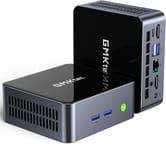 GMKtec NucBox M2 | GMKtec NucBox M2 | |
| Price | List Price: $599.99 Amazon Prices: | List Price: $639.99 Amazon Prices: |
| Version | 16GB/1TB/Intel Core i7-11390H | 32GB/1TB/Intel Core i7-11390H |
| Performance Rating | 3.6 | 4.0 |
| Operating System | Windows 11 Pro | Windows 11 Pro |
| Processor | Quad-core 2.90 Ghz (max 5.00 Ghz) Intel Core i7-11390H | Quad-core 2.90 Ghz (max 5.00 Ghz) Intel Core i7-11390H |
| GPU | Integrated Intel Iris Xe Graphics | Integrated Intel Iris Xe Graphics |
| RAM | 16 GB | 32 GB |
| Internal Storage | 1 TB | 1 TB |
| Dimensions width x length x thickness | 4.48 x 4.17 x 1.67 inches (113.79 x 105.92 x 42.42 mm) | 4.48 x 4.17 x 1.67 inches (113.79 x 105.92 x 42.42 mm) |
| Weight | unknown | unknown |
| WiFi | Wi-Fi 6 (802.11ax) | Wi-Fi 6 (802.11ax) |
| Bluetooth | Bluetooth 5.2 | Bluetooth 5.2 |
| Ethernet | 1 Ethernet port at 2.5 Gbps | 1 Ethernet port at 2.5 Gbps |
| HDMI | 2 Full-Size HDMI Ports | 2 Full-Size HDMI Ports |
| DisplayPort | USB-C supports DisplayPort | USB-C supports DisplayPort |
| VGA | No VGA Ports | No VGA Ports |
| USB Ports | 1 USB 2.0, 3 USB 3, 1 USB-C (USB-C supports DisplayPort and data transfer) | 1 USB 2.0, 3 USB 3, 1 USB-C (USB-C supports DisplayPort and data transfer) |
| Thunderbolt Ports | No | No |
| OCuLink | No | No |
| Internal SATA Ports | No SATA ports | No SATA ports |
| Card Reader | No Card Reader | No Card Reader |
| Headphone Jack | combo | combo |
| Fanless | No | No |
| VESA Mount | Yes | Yes |
| In the Box | Mini PC, Power adapter, VESA mount, HDMI cable, Manual | Mini PC, Power adapter, VESA mount, HDMI cable, Manual |
| Expandability | Supports addition of an M.2 SATA drive | Supports addition of an M.2 SATA drive |
Related Mini PCs
-
 GMKtec NucBox M6The GMKtec NucBox M6 pairs an AMD Ryzen 5 6600H with Radeon 660M graphics, up to 32GB of DDR5, two…
 -
 GMKtec M8The GMKtec M8 is a compact mini PC with an AMD Ryzen 5 PRO 6650H, an OCuLink port for an external…
 -
 ACEMAGICIAN AM06 Pro Mini PCThe ACEMAGICIAN AM06 Pro is a compact AMD Ryzen mini PC (Ryzen 7 5700U or 5800U) with Radeon Vega…
 -
 Beelink SER3The Beelink SER3 pairs an AMD Ryzen 7 3750H (Radeon Vega 10) with dual 4K HDMI output and extensive…
 -
 Beelink SER5 (5500U)The Beelink SER5 (5500U) is a Ryzen 5 5500U mini PC with 16GB of DDR4 in two slots (64GB max), a…
 -
 BOSGAME E7The BOSGAME E7 pairs a 6-core Intel Core 3 100U with two Gigabit Ethernet ports and triple 4K@60Hz…
One memory stick installed, with room for a second
The Intel Core i7-11390H is a quad-core chip that peaks at 5.00 GHz, which is what lets a machine this size keep up with intensive applications and heavy multitasking. The 1TB NVMe drive is the boot disk, and a second M.2 slot takes an M.2 2242 SATA drive when the first one fills up.
It ships with one DDR4 SODIMM stick and runs single-channel, and the board supports dual-channel, so a second DDR4 SODIMM stick is the cheapest upgrade on offer here. The case opens for that swap without much effort.
Ports include USB 3.2, USB-C, HDMI, and 2.5GB Ethernet, with WiFi 6 and Bluetooth 5.2 for wireless. The fan stays quiet through everyday work and only becomes audible under demanding loads.
Reviewer Insights
Team Pandory’s review on YouTube calls the GMKtec NucBox M2 an “emulation beast” on the strength of the Intel i7 11390H and its 5GHz peak. They note that “this M2 has a quad-core i7 processor, with a max speed of 5GHz. That is pretty good,” rating the chip favorably.
Windows 11 Pro comes pre-installed and activates once the machine is online. The 1TB NVMe drive delivers fast storage speeds, and although the system is ready for dual-channel memory, it comes with only one RAM stick. Team Pandory notes, “So now with dual channel memory, we get a higher and much more stable frame rate.”
The Intel GPU is a limiting factor for GPU-intensive tasks, with performance in games like Grand Theft Auto V not substantially better than the N100 chipset. An external GPU is suggested for those needing more graphical power.
Team Pandory praises the silent fan and the ease of upgrading the internals, recommends the NucBox M2 for emulation and general computing tasks, and hopes future models will come with dual-channel memory and an additional NVMe slot. Their full review is on Team Pandory’s YouTube channel.
A hands-on review from the TECH Genius YouTube channel walks through the same i7-11390H configuration with 16GB of RAM and a 512GB SSD. Running a Cinebench multi-core stress test, the reviewer noted that the fan stayed quiet and often did not spin up at all, while CPU temperatures climbed into the high 90s and briefly to around 110C, which he judged acceptable (“not too hot”) rather than alarming. He then drove two monitors and ran Adobe Photoshop without trouble, coming away pleased with the everyday performance. The full review is on TECH Genius’ YouTube channel.
Customer Reviews
Mike M., a verified buyer, wrote “For something so small, it’s got a lot of power and speed,” and noted it drove three displays without issue. One verified buyer, Ben, described a power supply failing after about two months, and said the manufacturer replaced the unit and reimbursed his return shipping.
Nicholas L., a verified buyer who rated it four stars, cautioned that the CPU is not built for heavy loads and that “Under heavy loads you will hear the fan. Can get loud at times.” Another verified buyer, robv14000, praised the speed at first but reported the machine became unusable after a Windows update and complained that the documentation was unclear and that the manufacturer did not reply when he tried to contact them about adding an SSD.
Best suited to emulation and everyday desktop work
The i7-11390H has enough headroom for demanding emulation titles. Owners running a digital audio workstation or juggling a lot of windows get a machine that stays quiet while doing it.
Integrated Intel Iris Xe Graphics is the limit for high-end gaming and video editing, and that work wants a dedicated or external GPU instead. If you need integrated Radeon graphics, consider the GMKtec Nucbox M5 Plus as an alternative. Budget for a second RAM stick as well if you want the memory running dual-channel.
Users can compare Mini PCs using Starry Hope’s Mini PC Comparison App for alternatives or less expensive options.
Frequently Asked Questions
What operating system does the GMKtec NucBox M2 come with?
The NucBox M2 is pre-installed with Windows 11 Pro, which activates once you connect to the internet.
Can I upgrade the RAM on the GMKtec NucBox M2?
Yes. It ships with one DDR4 SODIMM stick, and adding a second puts the memory into dual-channel mode.
Does the GMKtec NucBox M2 have a fan, and is it noisy?
There is a fan. It stays silent during light use and spins up only when the workload calls for it.
What type of storage does the GMKtec NucBox M2 use, and can it be expanded?
A 1TB NVMe drive handles the boot volume, and a second M.2 slot accepts an M.2 SATA drive for more capacity.
What kind of graphics does the GMKtec NucBox M2 have?
It features integrated Intel Iris Xe Graphics, which is suitable for everyday tasks and emulation but less for modern gaming or video editing.
Can the GMKtec NucBox M2 handle dual displays?
The NucBox M2 can manage dual displays through its HDMI ports and USB-C port, which also supports DisplayPort.
What are the connectivity options available on the GMKtec NucBox M2?
The NucBox M2 offers WiFi 6, Bluetooth 5.2, 2.5GB Ethernet LAN, USB 3.2, HDMI, and a USB-C port that supports DisplayPort and data transfer.
Is the GMKtec NucBox M2 suitable for gaming?
The NucBox M2 can handle emulation and less demanding games well, but for more modern games, consider using an external GPU for enhanced performance.
Does the GMKtec NucBox M2 come with a VESA mount?
A VESA mount is included, enabling you to attach the mini PC to a monitor and keep the desk clear.
What is included in the box with the GMKtec NucBox M2?
Inside the box, you’ll find the Mini PC, a power adapter, a VESA mount, an HDMI cable, and a manual.