
Intel NUC 11
Published on

The Intel NUC 11 is Intel’s Panther Canyon mini PC, released in Q1 2021. The tall 4x4 H chassis covered here sells in two CPU tiers: the NUC11PAHi5 built on the 11th Gen Core i5-1135G7, and the step-up NUC11PAHi7 with the Core i7-1165G7. Both share the same 117 x 112 x 51 mm body with a 2.5-inch drive bay (the feature the slim and Qi-charging siblings drop to save height), the same Iris Xe graphics, two Thunderbolt 3 ports, full HDMI 2.0b, Mini DisplayPort 1.4, 2.5GbE, and Wi-Fi 6, so the CPU tier is the main decision. Intel discontinued the Panther Canyon SKU pages after ASUS took over the NUC line in 2023, so new stock now arrives through resellers like GEEK+, while the underlying Intel kit, three-year warranty, and BIOS are unchanged. The kit suits everyday productivity, home-server, and thin-client duty.
Pros and cons
| Pros | Cons |
|---|---|
| Two Thunderbolt 3 ports with DisplayPort 1.4 alt mode | Older Tiger Lake silicon; no Core Ultra NPU or DDR5 |
| 2.5GbE via Intel I225-V plus Intel Wi-Fi 6 AX201 (Bluetooth 5.2) | Wi-Fi card is soldered (not user-upgradeable) |
| Drives up to four displays, including one 8K via DP 1.4 | Single M.2 slot caps fast-tier storage at one NVMe drive |
| Tall H chassis adds a 2.5-inch SATA bay alongside M.2 NVMe | Barrel-plug DC input rather than USB-C PD |
| Aluminum top with metal frame and standard NUC serviceability | Intel discontinued the line; future BIOS updates are unlikely |
| Three-year Intel kit warranty plus VESA mount included | Mostly sold through resellers (GEEK+, others) with mixed RAM/SSD configurations |
Related Videos
Intel NUC 11 Comparison Chart
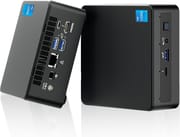 Intel NUC 11 | Intel NUC 11 | |
| Price | List Price: $689.00 Amazon Prices: Loading prices... | List Price: $739.00 Amazon Prices: |
| Version | 16GB/512GB/i5-1135G7 (GEEK+ build) | 32GB/1TB/i7-1165G7 (GEEK+ build) |
| Performance Rating | 3.5 | 4.0 |
| Operating System | Windows 11 Pro | Windows 11 Pro |
| Processor | Quad-core 2.40 Ghz (max 4.20 Ghz) Intel Core i5-1135G7 | Quad-core 2.80 Ghz (max 4.70 Ghz) Intel Core i7-1165G7 |
| GPU | Integrated Intel Iris Xe Graphics | Integrated Intel Iris Xe Graphics |
| RAM | 16 GB DDR4 SO-DIMM, 2-channel (DDR4-3200 SODIMM, 64GB max via 2 slots) | 32 GB DDR4 SO-DIMM, 2-channel (DDR4-3200 SODIMM, 64GB max via 2 slots) |
| Internal Storage | 512 GB M.2 NVMe SSD | 1 TB M.2 NVMe SSD |
| Dimensions width x length x thickness | 4.41 x 4.61 x 2.01 inches (112.01 x 117.09 x 51.05 mm) | 4.41 x 4.61 x 2.01 inches (112.01 x 117.09 x 51.05 mm) |
| Weight | 1.43 lbs (0.65 kg) | 1.43 lbs (0.65 kg) |
| WiFi | Wi-Fi 6 (802.11ax) | Wi-Fi 6 (802.11ax) |
| Bluetooth | Bluetooth 5.2 | Bluetooth 5.2 |
| Ethernet | 1 Ethernet port at 2.5 Gbps | 1 Ethernet port at 2.5 Gbps |
| HDMI | 1 Full-Size HDMI Port | 1 Full-Size HDMI Port |
| DisplayPort | 1 DisplayPort (Mini DisplayPort 1.4; additional DP 1.4 over each USB-C/Thunderbolt 3 port (4 displays total)) | 1 DisplayPort (Mini DisplayPort 1.4; additional DP 1.4 over each USB-C/Thunderbolt 3 port (4 displays total)) |
| VGA | No VGA Ports | No VGA Ports |
| USB Ports | 3 USB 3, 2 USB-C Front: 1x USB-A 3.2 Gen 2, 1x USB-C Thunderbolt 3. Rear: 2x USB-A 3.2 Gen 2, 1x USB-C Thunderbolt 3. | 3 USB 3, 2 USB-C Front: 1x USB-A 3.2 Gen 2, 1x USB-C Thunderbolt 3. Rear: 2x USB-A 3.2 Gen 2, 1x USB-C Thunderbolt 3. |
| Thunderbolt Ports | 2 | 2 |
| OCuLink | No | No |
| Internal SATA Ports | 1 SATA port, includes 2.5" drive bay (1x 2.5-inch SATA 6.0 Gb/s bay (tall H chassis only)) | 1 SATA port, includes 2.5" drive bay (1x 2.5-inch SATA 6.0 Gb/s bay (tall H chassis only)) |
| Card Reader | SD Card Reader | SD Card Reader |
| Headphone Jack | front | front |
| Fanless | No | No |
| VESA Mount | Yes | Yes |
| In the Box | NUC 11 unit, 90W AC adapter, US AC cord, VESA mount and screws, M.2 and drive screws, regulatory and quick-start documentation | NUC 11 unit, 90W AC adapter, US AC cord, VESA mount and screws, M.2 and drive screws, regulatory and quick-start documentation |
| Expandability | Up to 64GB DDR4-3200 (2x SODIMM, no ECC). 1x M.2 2280 PCIe Gen 4 x4 plus 2.5-inch SATA bay. Wi-Fi 6 AX201 module is soldered. | Up to 64GB DDR4-3200 (2x SODIMM, no ECC). 1x M.2 2280 PCIe Gen 4 x4 plus 2.5-inch SATA bay. Wi-Fi 6 AX201 module is soldered. |
Related Mini PCs
-
 Beelink SER3The Beelink SER3 pairs an AMD Ryzen 7 3750H (Radeon Vega 10) with dual 4K HDMI output and extensive…
 -
 Beelink SER5 (5500U)The Beelink SER5 (5500U) is a Ryzen 5 5500U mini PC with 16GB of DDR4 in two slots (64GB max), a…
 -
 Blackview MP100 (Ryzen 5 7430U)A 5-inch-square Ryzen 5 7430U mini PC with 16GB of DDR4, a 512GB SSD, room for two more drives, and…
 -
 Bmax MaxMini B11 ProA palm-sized office mini PC with an Intel Core Ultra 5 115U, 16GB of soldered LPDDR5, a 512GB SSD…
 -
 BOSGAME E5The BOSGAME E5 is a versatile mini PC powered by the AMD Ryzen 3 5300U processor. With dual 2.5GbE…
 -
 BOSGAME E6 ECOThe BOSGAME E6 ECO is a 5-inch Wildcat Lake mini PC with the Intel Core 3 304, 12GB of soldered…
Two CPU tiers share one serviceable metal chassis

The NUC 11 measures 4.61 x 4.41 x 2.01 inches and weighs roughly a pound and a half once you have RAM and storage installed. Construction follows the long-running Intel NUC formula: a brushed-metal top, a perforated side intake, a small CPU fan exhausting toward the rear, and a metal cage that keeps the whole unit stiffer than the plastic shells common to lower-cost mini PCs. The front face carries a USB-A 3.2 Gen 2 port, a USB-C Thunderbolt 3 port, a combo headphone/microphone jack, the power button, an SDXC card reader with UHS-II support, and the consumer-infrared sensor. The rear adds two more USB-A 3.2 Gen 2 ports, a second Thunderbolt 3 USB-C port, HDMI 2.0b, Mini DisplayPort 1.4, 2.5-gigabit Ethernet, a Kensington security slot, and the 19 V DC barrel jack. Pop the bottom plate off with the four captive screws and you get full access to two DDR4-3200 SODIMM slots, an M.2 2280 PCIe Gen 4 x4 slot, and the SATA bay that the tall H chassis is named for. The i5 and i7 kits match each other down to the last port; only the processor differs.
The base tier is the Intel Core i5-1135G7, a four-core/eight-thread Tiger Lake-U chip with a 4.2 GHz boost and a configurable 28 W TDP in this kit, which scores roughly 9,800 on PassMark’s multi-thread test. The step-up NUC11PAHi7 swaps in the Core i7-1165G7: still four cores and eight threads, but a 4.7 GHz boost and 96 Iris Xe execution units rather than 80, which buys more sustained-load and graphics headroom. Either chip covers everyday productivity: office suites with plenty of browser tabs, video conferencing, light photo edits in Lightroom, 4K media playback, and casual gaming at 720p with Iris Xe doing the lifting. ETA Prime’s tear-down and benchmark run of the Tiger Canyon NUC Pro, which uses the same i5-1135G7 in a sibling Intel kit, makes the case that the 11th Gen i5 is the platform’s sweet spot if you are willing to load it with dual-channel RAM and lift the BIOS power limit. ETA Prime warned that, “make sure you run this in dual channel because it will make a world of difference when it comes to GPU performance,” and that under sustained load, “this fan does have to ramp up to keep that CPU cool.”
Both tiers carry Intel’s I225-V 2.5GbE NIC and a Wi-Fi 6 AX201 module with Bluetooth 5.2. The four-display ceiling (HDMI 2.0b plus Mini DP 1.4 plus DisplayPort 1.4 alt mode over each Thunderbolt 3 port) covers digital-signage and trading-desk setups on either chip. Expandability runs to 64GB of DDR4-3200 across two SODIMM slots, one M.2 2280 NVMe drive on PCIe Gen 4 x4, and the 2.5-inch SATA bay, which pushes total storage into the multi-terabyte range once a fast NVMe boot drive is stacked with a slower bulk SATA SSD. The Mini PC Comparison Chart lines the NUC 11 up against its successors and modern alternatives like the ASUS NUC 14 Pro.
Reviewer Insights

ETA Prime: dual-channel memory is what frees up Iris Xe
ETA Prime’s hands-on with Intel’s Tiger Canyon i5-1135G7 NUC runs the same Tiger Lake-U processor and Iris Xe Graphics in a sibling Intel mini PC chassis, so the CPU, GPU, and memory subsystem behave the same way, even though the Tiger Canyon Pro Kit is the vPro business cousin of the consumer NUC11PAH. He noted, “this is beating out the 4800U that I recently tested and it’s just below the new 5800U with these 3DMark tests,” which lines up with PassMark’s read of the i5-1135G7 as a competent low-power chip for everyday productivity and light 1080p gaming. His advice carries to either tier. Run the RAM in dual channel or Iris Xe performance goes unused, lift the BIOS power limit where the thermal headroom allows, and expect the fan in any of these small Intel kits to be audible under heavy load.
NotebookCheck found a metal cage and a soldered Wi-Fi card
NotebookCheck’s full lab review of the NUC11PAQi7 covers the slim Q-chassis sibling of the NUC 11 in its i7 trim. Their verdict, titled “Tiger Lake Done Right,” makes the case that the Panther Canyon generation was the cleanest 11th-gen NUC: PCIe Gen 4 storage, a 2.5GbE NIC that was uncommon in 2021, an SD card reader more than twice as fast as the Hades Canyon predecessor, and a metal cage that “provides superior build quality compared to most mini PCs.” Their numbers map onto the NUC11PAHi7 tier, since both run the same i7-1165G7; the i5 tier sits a notch below on CPU and is otherwise identical. NotebookCheck’s platform-level limits carry across the whole line: the Wi-Fi card is soldered, the H and Q chassis still use a proprietary AC adapter rather than USB-C PD, the SD slot is not spring-loaded, and they warned that “the proprietary AC adapter is still required to power the NUC as neither of the USB-C ports support power-in.”
DrTech: some kits ship without a power cord
DrTech’s unboxing and walkthrough of the NUC11PAHi7 is a useful chassis tour for either tier, since the i5 and i7 share the tall H chassis, VESA bracket, dual Thunderbolt 3 ports, SDXC card reader, and customisable power-button LED. His warning applies to every Panther Canyon SKU: “not all the SKUs of the new NUC come with a power cord included, so you might need to grab a separate power cord with a male C5 connector.” Check a third-party reseller’s listing before ordering, so the kit does not arrive without a cord.
Outside Panther Canyon, Linus Tech Tips’ tour of the NUC 11 Extreme Beast Canyon covers Intel’s gaming-class 8-liter sibling. Linus pointed out that the Beast Canyon “is the small form factor PC, but doesn’t want to actually build one… [it is] well, an absolute beast.” A full-size GPU fits in that machine, and you pay for it both in dollars and in fan noise.
Customer Reviews
Across 26 ratings on Amazon, the Intel NUC 11 averages 4.8 stars, with 83 percent landing at five stars and the rest split between four- and three-star scores. The recurring praise is for a small, quick machine: a verified buyer named Matt called it “compact, and fast. Awesome bang for your buck,” and a verified buyer named zeke, who runs three NUCs at home and at school, said the unit “appears to be well-built with what seems to be decent quality RAM and system disk” and that performance is “clearly fast.” Carol, also a verified buyer, reported that dual booting “went very well” and that it “Performs very well.” Two of them flag omissions worth checking before you order. zeke noted there is no built-in mic like older NUC models had, and Matt warned “No VGA port, so make sure you have your adaptors if you need them.”
A non-verified reviewer (dt & kt) ran into an upgrade snag, writing that “the hidden partition is not large enough for the Windows 11 upgrade, it keeps failing.” The harshest account comes from Pete T., a verified buyer who gave three stars after his first unit arrived dead on arrival and a replacement “died last night” after eight months; in an update he added that the seller reached out, and the machine unexpectedly powered back on, so he planned to keep using it. That is one reliability complaint in a sample of 26 ratings, and the kit carries a three-year Intel warranty.
Read more owner reviews on Amazon.
Buy the i7 for sustained work, the i5 for everything else
The Intel NUC 11 is the right pick for buyers who want an Intel-engineered mini PC with full serviceability, dual Thunderbolt 3, 2.5GbE, and the option of pairing a fast NVMe drive with a bulk 2.5-inch SATA SSD in one tiny chassis. It fits home labs, media servers, light virtualization hosts, multi-monitor productivity desks, and digital signage, where the small footprint, VESA mount, and three-year Intel kit warranty matter more than the latest Core Ultra silicon.
Between the two tiers, the i5-1135G7 (NUC11PAHi5) is the value choice for everyday productivity, light photo work, and casual gaming, while the i7-1165G7 (NUC11PAHi7) is worth the step up if you need the higher single- and multi-thread headroom for sustained workloads such as video transcoding, multi-VM hosts, or four-display productivity setups. The comparison chart above lines up both configurations side by side with their current reseller prices. Buyers who want the newest platform, an integrated NPU for on-device AI, DDR5, USB-C power input, or a single-vendor warranty path should look at the ASUS NUC 14 Pro or the ASUS NUC 14 Essential instead. Gamers who specifically need a discrete GPU in a NUC form factor will be better served by the NUC 11 Extreme Beast Canyon or a current-generation small-form-factor build with a proper PCIe slot.
Frequently Asked Questions
What processors does the Intel NUC 11 come with?
The H-chassis NUC 11 ships in two tiers. The NUC11PAHi5 uses the Intel Core i5-1135G7 (4 cores, 8 threads, 4.20 GHz max turbo, around 9,800 on PassMark’s multi-thread test) with Iris Xe Graphics at 80 EUs. The NUC11PAHi7 steps up to the Core i7-1165G7 (4 cores, 8 threads, 4.70 GHz max turbo) with a higher multi-thread score and 96 Iris Xe execution units. Both are 11th Gen Tiger Lake-U chips in the same chassis.
Can I upgrade the RAM in the NUC 11?
Yes. The NUC 11 has two DDR4-3200 SODIMM slots, supports up to 64GB total, and uses standard dual-channel non-ECC memory. Open the bottom plate with the four captive screws, swap the modules, and you are done. Resellers like GEEK+ typically ship the i5 build with 16GB and the i7 build with 32GB pre-installed.
What ports does the NUC 11 have?
The front carries one USB-A 3.2 Gen 2 port, one USB-C Thunderbolt 3 port, a combo headphone/microphone jack, an SDXC UHS-II card reader, and a consumer-IR sensor. The rear adds two more USB-A 3.2 Gen 2 ports, a second USB-C Thunderbolt 3 port, HDMI 2.0b, Mini DisplayPort 1.4, 2.5-gigabit Ethernet (Intel I225-V), and a 19 V DC barrel jack. The port layout is identical on the i5 and i7 tiers.
How many monitors can the NUC 11 drive?
Intel rates Panther Canyon for up to four simultaneous displays. You can use the HDMI 2.0b output, the Mini DisplayPort 1.4 output, and DisplayPort 1.4 alt mode over each of the two Thunderbolt 3 USB-C ports, with support for a single 8K display via DP 1.4 if your monitor accepts it.
Does the NUC 11 take both an M.2 SSD and a 2.5-inch drive?
The tall H chassis takes both, which is the reason to pick it over the slim NUC11PAKi5 or the Qi-charging NUC11PAQi5. It adds one 2.5-inch SATA 6.0 Gb/s drive bay alongside the single M.2 2280 PCIe Gen 4 x4 NVMe slot, so a fast NVMe boot drive can run with a bulk SATA SSD for storage. Both the i5 and i7 builds work this way.
Is the NUC 11 still supported by Intel?
Intel discontinued the Panther Canyon SKU pages after handing the NUC product line to ASUS in 2023. Existing units still ship with the three-year Intel kit warranty, though new BIOS updates or features are unlikely. New stock arrives through resellers like GEEK+ rather than directly from Intel.
How does the NUC11PAHi5 compare to the NUC11PAHi7?
Same chassis, same I/O, same memory and storage subsystem; the only difference is the processor. The NUC11PAHi5 uses the four-core/eight-thread Intel Core i5-1135G7 with a 4.20 GHz max turbo and a PassMark multi-thread score around 9,800. The NUC11PAHi7 steps up to the i7-1165G7 with a 4.70 GHz max turbo, a higher PassMark multi-thread score, and 96 Iris Xe execution units instead of 80. For productivity, light photo work, and casual gaming, the i5 holds its own; for sustained multi-VM hosting or four-display workloads, the i7 is the safer pick.