
KAMRUI CK10 Mini PC
Updated on

Note: KAMRUI has discontinued the CK10, and none of the three configurations below is sold new any more. The specs and reviewer notes on this page describe the machine as it shipped. Anyone shopping for a current equivalent can compare live options in Starry Hope’s Mini PC Comparison Chart.
The KAMRUI CK10 Mini PC ran Windows 11 Pro on an Intel Core i5-12450H, a chip with eight cores and 12 threads that clocked up to 4.4 GHz. The base build paired that with 16GB of DDR4 SODIMM memory and a 512GB M.2 NVMe SSD, so boot and application load times stayed short. Graphics came from the processor’s integrated Intel UHD block, which covers everyday work and lighter games. The case is just under 5 inches square and weighs slightly over a pound, small enough to sit out of the way behind a monitor.
| Pros | Cons |
|---|---|
| Small enough to VESA-mount behind a monitor | Limited to integrated Intel UHD Graphics |
| Eight-core i5-12450H keeps office multitasking smooth | Second M.2 slot supports SATA only, not NVME |
| 16GB of DDR4 and a 512GB NVMe drive as shipped | Not suited for high-end modern gaming |
| Dual HDMI plus VGA covers modern and legacy monitors | |
| Drives three displays without a dock |
Related Videos
KAMRUI CK10 Mini PC Comparison Chart
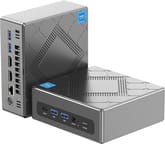 KAMRUI CK10 Mini PC | KAMRUI CK10 Mini PC | KAMRUI CK10 Mini PC | |
| Price | List Price: $439.00 Amazon Prices: | List Price: $549.99 Amazon Prices: | List Price: $499.99 Amazon Prices: |
| Version | 16GB/512GB/Intel i5-12450H | 16GB/512GB/Intel i7-11390H | 32GB/512GB/Intel i5-12450H |
| Performance Rating | 4.3 | 3.6 | 4.7 |
| Operating System | Windows 11 Pro | Windows 11 Pro | Windows 11 Pro |
| Processor | Octa-core 3.30 Ghz (max 4.40 Ghz) Intel Core i5-12450H | Quad-core 2.90 Ghz (max 5.00 Ghz) Intel Core i7-11390H | Octa-core 3.30 Ghz (max 4.40 Ghz) Intel Core i5-12450H |
| GPU | Integrated Intel UHD Graphics | Integrated Intel UHD Graphics | Integrated Intel UHD Graphics |
| RAM | 16 GB | 16 GB | 32 GB |
| Internal Storage | 512 GB | 512 GB | 512 GB |
| Dimensions width x length x thickness | 4.96 x 4.96 x 1.96 inches (125.98 x 125.98 x 49.78 mm) | 4.96 x 4.96 x 1.96 inches (125.98 x 125.98 x 49.78 mm) | 4.96 x 4.96 x 1.96 inches (125.98 x 125.98 x 49.78 mm) |
| Weight | 1.03 lbs (0.47 kg) | 1.03 lbs (0.47 kg) | 1.03 lbs (0.47 kg) |
| WiFi | Wi-Fi 6 (802.11ax) | Wi-Fi 6 (802.11ax) | Wi-Fi 6 (802.11ax) |
| Bluetooth | Bluetooth 5.2 | Bluetooth 5.2 | Bluetooth 5.2 |
| Ethernet | 2 Ethernet ports at 1 Gbps | 2 Ethernet ports at 1 Gbps | 2 Ethernet ports at 1 Gbps |
| HDMI | 2 Full-Size HDMI Ports | 2 Full-Size HDMI Ports | 2 Full-Size HDMI Ports |
| DisplayPort | No DisplayPort | No DisplayPort | No DisplayPort |
| VGA | 1 VGA Port | 1 VGA Port | 1 VGA Port |
| USB Ports | 4 USB 3, 1 USB-C | 4 USB 3, 1 USB-C | 4 USB 3, 1 USB-C |
| Thunderbolt Ports | No | No | No |
| OCuLink | No | No | No |
| Internal SATA Ports | 1 SATA port, includes 2.5" drive bay (Supports DIY 2.5in SATA SSD/HDD) | 1 SATA port, includes 2.5" drive bay (Supports DIY 2.5in SATA SSD/HDD) | 1 SATA port, includes 2.5" drive bay (Supports DIY 2.5in SATA SSD/HDD) |
| Card Reader | No Card Reader | No Card Reader | No Card Reader |
| Headphone Jack | combo | combo | combo |
| Fanless | No | No | No |
| VESA Mount | Yes | Yes | Yes |
| In the Box | Mini PC, user manual, mounting bracket, necessary screws, HDMI cable, power supply cable | Mini PC, user manual, mounting bracket, necessary screws, HDMI cable, power supply cable | Mini PC, user manual, mounting bracket, necessary screws, HDMI cable, power supply cable |
| Expandability | expandable storage up to two additional terabytes with SATA HDD or SSD, two M.2 SSD slots, one taken by default SSD | expandable storage up to two additional terabytes with SATA HDD or SSD, two M.2 SSD slots, one taken by default SSD | expandable storage up to two additional terabytes with SATA HDD or SSD, two M.2 SSD slots, one taken by default SSD |
Related Mini PCs
-
 KAMRUI AM06PRO Mini PCThe KAMRUI AM06 Pro is a budget mini PC built on the AMD Ryzen 5 5500U (6 cores, 12 threads), with…
 -
 KAMRUI E3BThe KAMRUI E3B is a 5-inch-square AMD mini PC sold in Ryzen 7 PRO 5875U, Ryzen 7 5825U, Ryzen 5…
 -
 Beelink SER3The Beelink SER3 pairs an AMD Ryzen 7 3750H (Radeon Vega 10) with dual 4K HDMI output and extensive…
 -
 Beelink SER5 (5500U)The Beelink SER5 (5500U) is a Ryzen 5 5500U mini PC with 16GB of DDR4 in two slots (64GB max), a…
 -
 BOSGAME E7The BOSGAME E7 pairs a 6-core Intel Core 3 100U with two Gigabit Ethernet ports and triple 4K@60Hz…
 -
 BOSGAME P4 UltraA compact Ryzen 7 7730U mini PC with dual 2.5GbE LAN, Wi-Fi 6E, two PCIe 3.0 M.2 slots, and a…
Two M.2 slots, a SATA tray, and a VGA port for older monitors
Two HDMI ports, a VGA port, four USB 3.0 ports and a USB Type-C port cover displays and peripherals, and the VGA output means an older monitor still works without an adapter. Wireless is WiFi 6 and Bluetooth 5.2. That mix of outputs is what let the machine double as a home office desktop, a media box feeding a television, or a console for less graphically intensive games.
Two M.2 slots sit inside, one already holding the default SSD, and a 2.5-inch SATA SSD or HDD can be added for up to two more terabytes. A VESA mount and the necessary screws come in the box, so the machine can hang off the back of a display and free up desk space in a streamlined triple monitor setup.
Multitasking is where the eight-core chip pays off, with browser tabs, office documents and a video stream running together without stalling, and the NVMe boot drive keeps application launches quick. The Intel UHD Graphics will not run the latest AAA titles at high settings, though older games and console emulators run fine, which suits casual players and retro gaming fans.
Reviewer Insights
The CK10 shipped across more than one processor. This page leads with the Intel Core i5-12450H, a 12th-generation Alder Lake chip with 8 cores, 12 threads, and a PassMark multi-thread score of 17,442. A second configuration on this page used the 11th-generation Core i7-11390H (4 cores, 8 threads, PassMark 10,325); both figures are PassMark CPU Mark values. Two of the most detailed independent reviews tested a third variant, an 11th-generation Core i5-11320H, a quad-core Tiger Lake part that sits in the same tier as the i7-11390H and well below the eight-core i5-12450H. Their measured numbers describe that quad-core variant, not the i5-12450H this page leads with. By 2026 all of these are older mobile silicon. The i5-12450H is still a competent productivity chip, comfortably ahead of the low-power N100-class parts in many current budget mini PCs, while the 11th-generation quad-cores are now roughly five-year-old designs.
Retro Gaming Guy on Batocera emulation and Steam hiccups
Retro Gaming Guy is the one reviewer here who tested the headline i5-12450H configuration, and he confirmed it on camera as the “Intel 12th generation i5 12450 processor which has eight cores 12 threads and offers speeds of up to 4.4 gigahertz” with Intel UHD Graphics. He ran no benchmark software and no FPS counters, so his read is a hands-on experience report rather than measured testing. He called the CK10 “an amazing option for a mini gaming PC,” then put it through emulation in Batocera across original PlayStation, PS2, PS3, original Xbox, GameCube, Nintendo Switch and Wii U, reporting that the machine handled everything Batocera offered with no audio issues or screen tearing. On the Steam side he played Tekken 7 and Asphalt 9 Legends and said the machine “can definitely handle modern-day AAA games,” while being candid that “here and there you’ll notice … a hiccup in the gameplay experience with AAA titles,” which he framed as expected for a mini PC and “still very much playable.”
Four days of editing work on the machine left him calling the dual HDMI ports “absolutely a home run” for multi-display video editing, and he singled out the VGA port as a rare and useful touch for older monitors. He declined to quote a price, saying mini PC pricing moves “up and down” by 50 to 75 dollars on a near-weekly basis. His verdict was that the CK10 is a “viable option” for retro emulation and Steam gaming alike. Watch the full review here.
FishBee Productions on 4K editing and the Forza frame rate
Brian from FishBee Productions ran the most complete set of benchmarks, but on the 11th-generation quad-core CK10, which he identified on camera as a Core i5-11320H rather than the i5-12450H this page leads with. His numbers are the ceiling for that older quad-core variant. In Geekbench (he did not state the version) the unit scored “about 2000 for single core, 6000 for multi-core … and just under 11000 for compute score,” which he noted beat the Ryzen 5 KAMRUI he had reviewed on single and multi-core and was “quite a bit better on all scores” than an older i7 AceMagician box. He also ran 3DMark Time Spy, reporting it “pretty comparable to the Ryzen 5 version.”
On real workloads the quad-core held up better than he expected. He edited 4K video in Adobe Premiere with the timeline showing no lag “when scrubbing back and forth,” and played back 4K YouTube “with only a couple dropped frames.” Rocket League ran cleanly “at 30 or 60 frames per second, 1080p resolution,” but the Forza Horizon 5 built-in benchmark “was pretty low at only 25 frames per second,” even if it “still seemed to run pretty smooth.” His thermal read was qualitative, saying the box “didn’t seem to get too hot after playing several games” (no temperature or decibel figure was measured). He priced it at “just over 300 in the United States” and called it “one of the better ones that I’ve tested on the channel.” Check out FishBee Productions’ performance review.
Mike Dixon found the second M.2 slot rejects NVMe drives
Mike Dixon’s written review for The Gadgeteer also tested an 11th-generation quad-core CK10, listed in his spec table as an “Intel 11th Gen i5-11320H (3.20GHz to 4.50GHz)” with “Intel Iris Xe Graphics” and Bluetooth 4.2, again not the i5-12450H or the UHD/WiFi 6 configuration. He wrote that “the 4 Core, 8 Thread processor runs at 3.2 to 4.5GHz and scores 5120 on the Geekbench5 tests,” and judged that “the i5 multi-core process performed fantastically for everything I threw at it.” That Geekbench 5 multi-core figure lines up with the roughly 6000 Brian reported, corroborating the quad-core variant across two testers.
Dixon’s testing leaned on productivity rather than games. He connected a “Samsung 32-inch 4K monitor” and reported the CK10 drove it “at 3840x2160 @ 60 Hz without a problem,” ran Autodesk Fusion 360 CAD that he had doubts about but found “ran flawlessly,” and reported 3D printer slicing and rotating 3D objects at 4K both “performed very well.” He named the one hardware gotcha precisely, the second M.2 slot that “only supports SATA drives and not NVME,” so his Samsung EVO Plus NVMe SSD did not work in it. He praised the “quick and easy setup,” flawless 5GHz WiFi despite a worrying boot sticker, and “quiet and powerful” operation, while noting that “the lack of a dedicated GPU means that it probably wouldn’t be great for gaming.” His bottom line, at a review-date price of $369.99, was that the CK10 “outperformed my expectations” and “for an average user … would probably do everything they need it to.” Read Mike Dixon’s full review on The Gadgeteer.
Joseph Kim placed it in the living room and the kids’ room
Joseph Kim’s video is an unboxing and setup walkthrough rather than a performance test, recorded with help from his young daughter, so it carries no benchmarks or game testing at all. He confirmed the model on the bottom label as a CK10 with 16GB of RAM, 512GB of storage and an Intel Core i5, calling it “a laptop grade of CPU.” He was blunt about where it fits: “it is not going to be a Powerhouse, so you can’t expect it to do heavy gaming or heavy Graphics work, but it is perfect for living room PC or kids PC or your small office PC,” and earlier judged it adequate for streaming, a living room PC, and kids’ play.
Most of the video is spent opening the chassis and demonstrating the SATA expansion tray and the spare M.2 slot, with Kim emphasizing maintainability. Because the monitor, keyboard and storage are all separable, he valued being able to swap parts over time rather than replacing a whole laptop. He planned to hand the CK10 to his children for games and homework while keeping them offline, concluding it was a manageable, upgradeable fit for that role. Watch Joseph Kim’s setup walkthrough.
Customer Reviews
Across 22 ratings on Amazon, the KAMRUI CK10 Mini PC averages 3.8 stars, with roughly 63 percent of buyers leaving five stars and close to 30 percent landing at one or two. The positive reviews focus on speed, quiet operation, value, and a clean Windows install. Heiko, a verified buyer, wrote that “it works perfectly out of the box. Unlike most manufacturers there is NO BLOATWARE.” Several owners use it as a media-center or home-server box and were happy with the size and the included VESA mount. One verified buyer who streams in their entertainment center did note the CPU “tempts got pretty hot quickly” until they disabled turbo settings in the BIOS.
A verified buyer named Kalebunga reported the unit “Completely died today” after light use, the adapter showing a power fault, and another verified buyer who bought several for a medical office said the hard drive “fails after serveral months.” The operating system also did not match the listing for more than one buyer. Verified reviewer conroy campbell reported units that “arrive with Win 10 Home not PRO as advertise,” a complaint a separate reviewer echoed about Windows 11 Home shipping instead of Pro. Buyers who hit hardware trouble generally praised KAMRUI’s support for swapping units and issuing refunds, so an owner facing a drive or power fault has somewhere to turn.
Still useful for home office and retro gaming, but out of production
Owners have a machine that handles everyday work, media playback, retro emulation up through the PS3 era, and light Steam gaming. The measured testing above marks the practical ceiling at roughly 30 to 60 FPS in Rocket League at 1080p, about 25 FPS in a heavier title like Forza Horizon 5, and Geekbench 5 multi-core in the low-5000s on the 11th-generation quad-core unit. A multi-display desk gets dual HDMI plus the rare VGA port, and the SATA tray and spare M.2 slot make storage easy to grow.
KAMRUI has since discontinued this model, so it is no longer a current buying recommendation. For anyone maintaining one, the second M.2 slot accepts SATA drives only, not NVMe, and the DDR4-and-single-NVMe layout marks this as an early-2020s design. Dixon and FishBee Productions both found modern high-end games beyond the integrated graphics.
Readers weighing whether a local Windows mini PC makes more sense than a cloud-based subscription setup can compare the two in Windows 365 vs mini PC. Buyers shopping today for a similar small, quiet desktop can use Starry Hope’s Mini PC Comparison Chart to find a current model with newer silicon and stronger graphics.
Frequently Asked Questions
Can I upgrade the RAM on the KAMRUI CK10 Mini PC?
Yes. The CK10 has two DDR4 SODIMM slots and takes up to 32GB of RAM.
What type of storage expansion options are available on the CK10?
Two M.2 SSD slots, one supporting NVMe and the other SATA only, plus a bay for a 2.5-inch SATA SSD or HDD.
Does the KAMRUI CK10 support multiple monitors?
Yes. Two HDMI 2.0 ports and one VGA port drive a triple display setup for multitasking and extended desktops.
What operating system does the CK10 Mini PC come with?
Windows 11 Pro. More than one buyer reported receiving a Home edition instead, so check the edition on arrival.
Is the KAMRUI CK10 suitable for gaming?
Not for high-end titles. The Intel UHD Graphics and Intel Core i5-12450H Processor handle older console-grade games, casual games, and some modern titles with adjusted settings.
How does the CK10’s connectivity perform?
Dual-band WiFi 6, Bluetooth 5.2, four USB 3.0 ports, a USB Type-C port, and two Ethernet ports.
Can I mount the KAMRUI CK10 behind a monitor?
Yes. A VESA mount is included, so the machine attaches to the back of a monitor for a space-saving setup.
Is it easy to access the internals of the CK10 for upgrades?
Yes. Four screws on the bottom open the case for access to the RAM and SSD slots.
Does the CK10 have a fan, and is it noisy?
It is not fanless; a cooling fan sits inside. The Gadgeteer’s review described its operation as quiet and powerful.
What comes in the box with the KAMRUI CK10 Mini PC?
The Mini PC itself, a user manual, a mounting bracket with the necessary screws, an HDMI cable, and a power supply cable.