
KAMRUI Essenx E1
Updated on

The KAMRUI Essenx E1 runs either an Intel Processor N97 or an Intel Processor N150, both quad-core parts with a maximum clock speed of 3.60 GHz. That is enough silicon for web browsing, office work, and media playback, and Windows 11 Pro is installed before the machine ships.
Configurations start at 8GB of DDR4 memory with a 256GB SSD and reach 16GB paired with a 1TB drive. The chassis measures 3.94 x 3.94 x 1.18 inches, and a VESA bracket comes in the box to hang it behind a monitor or on a wall rather than parking it on the desk.
| Pros | Cons |
|---|---|
| 3.94-inch square chassis fits behind a monitor | One SO-DIMM slot, so memory runs single channel |
| Windows 11 Pro installed before it ships | Bluetooth 4.2 rather than the newer 5.0 |
| Two HDMI ports drive two displays at once | No SD card reader |
| M.2 2280 slot takes NVMe PCIe3.0 or SATA SSDs up to 2TB | No bay for a 2.5-inch SATA drive |
| VESA bracket, HDMI cable, and power adapter included | Wi-Fi 5 rather than Wi-Fi 6 |
| Noise measured 38 dBA at its loudest in AndroidPCtv’s testing | One Ethernet port at 1Gbps |
| 16GB DDR4 and a 512GB SSD on the middle configurations | Not built for 3D gaming or video rendering |
KAMRUI Essenx E1 Comparison Chart
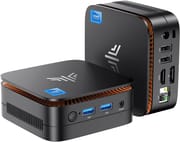
5 configurations
| Configuration | Processor | RAM | Storage | Performance | List price | Amazon price | Compare |
|---|---|---|---|---|---|---|---|
| 8GB/256GB/Intel N150 | N150 | 8 GB | 256 GB | 2.7 | $189.99 | Details
| |
| 16GB/512GB/Intel N97 | N97 | 16 GB | 512 GB | 3.1 | $299.97 | Details
| |
| 16GB/512GB/Intel N150 | N150 | 16 GB | 512 GB | 3.1 | $459.99 | Details
| |
| 16GB/1TB/Intel N150 | N150 | 16 GB | 1 TB | 3.1 | $256.49 | Details
| |
| 16GB/256GB/Intel N97 | N97 | 16 GB | 256 GB | 3.1 | $251.99 | Details
|
Specs shared by every configuration
| Operating System | Windows 11 Pro |
|---|---|
| GPU | Integrated Intel UHD Graphics |
| Dimensions width x length x thickness | 3.94 x 3.94 x 1.18 inches (100.08 x 100.08 x 29.97 mm) |
| Weight | unknown |
| WiFi | Wi-Fi 5 (802.11ac) |
| Bluetooth | Bluetooth 4.2 |
| Ethernet | 1 Ethernet port at 1 Gbps |
| HDMI | 2 Full-Size HDMI Ports |
| DisplayPort | No DisplayPort |
| VGA | No VGA Ports |
| USB Ports | 2 USB 2.0, 2 USB 3 2 x USB 3.0, 2 x USB 2.0 |
| Thunderbolt Ports | No |
| OCuLink | No |
| Internal SATA Ports | No SATA ports |
| Card Reader | No Card Reader |
| Headphone Jack | combo |
| Fanless | No |
| VESA Mount | Yes |
| In the Box | Mini PC, 1x Mounting Bracket, 1*HDMI Cable, 1*Power Adapter, 1*Instruction Manual |
| Expandability | 1 x DDR SO-DIMM Slot, 1 x M.2 2280 Slot. |
Related Mini PCs
-
 KAMRUI AK1 Plus Mini PCThe KAMRUI AK1 Plus is a budget Intel N95 mini PC (also sold with N97 and N100 chips) with dual…
 -
 KAMRUI AK1PLUS (Intel N5030 / N5095)The N5030 and N5095 builds of the KAMRUI AK1PLUS pair an older Pentium Silver or Celeron chip with…
 -
 AWOW AK10The AWOW AK10 is an Intel N100 mini PC with 8GB of soldered DDR5, a 256GB SSD in an M.2 slot that…
 -
 Beelink Mini SA compact Celeron N5095 mini PC with dual 4K HDMI outputs, a swappable M.2 SSD plus a 2.5-inch…
 -
 Bmax B1 PlusThe Bmax B1 Plus is an ultra-budget mini PC on Intel's 2016 Celeron J3355, with 6GB of soldered…
 -
 CHUWI HeroBox (2023)The CHUWI HeroBox (2023) is an Intel N100 mini PC with 8GB of LPDDR5, a 256GB M.2 drive, a 2.5-inch…
One memory slot and one M.2 bay set the ceiling
Intel UHD Graphics is enough for 4K video playback and ordinary desktop work, not for gaming or professional graphics. The single SO-DIMM slot means memory always runs in single channel, which costs some throughput against a dual-channel machine, and 16GB of DDR4 is as far as the capacity goes.
The 512GB M.2 NVMe SSD in the middle configurations boots quickly and leaves room for a working set of files, and the M.2 2280 slot accepts drives up to 2TB once that fills. There is no bay for a 2.5-inch SATA drive and no SD card reader, so the one M.2 slot is the only place an internal drive goes. Anything beyond it has to hang off a USB port.
Two HDMI Type-A ports drive a pair of displays at once, and two USB 3.0 and two USB 2.0 ports cover keyboards, mice, and external drives. Wired networking runs over a single Ethernet port at 1Gbps, while Wi-Fi 5 and Bluetooth 4.2 handle the wireless side without reaching the current Wi-Fi 6 and Bluetooth 5.0 standards.
Reviewer Insights
Two reviewers tested it, one on each processor option.
AndroidPCtv’s Kim tested the Intel N150 build (16GB/512GB) in January 2025. Power draw measured 8W at idle and about 12W in normal use, peaking at 29W under load, while the unit pulls 0.9W when off. The CPU sat near 40°C at idle and topped out at 71°C (69°C while gaming) as it held 2.8 GHz under sustained load. Noise capped at 38 dBA; in Kim’s words, “At idle you can hear almost nothing and in games it is audible, but not much more noise rises in all scenarios.” On raw speed Kim wrote that “the performance as we see is somewhat higher than the Intel N100, about 15%, but we can not expect miracles.” The shipped drive was a “somewhat slow” M.2 2280 SATA SSD rather than the faster NVMe the slot can accept, and the 16GB of DDR4-2666 ran in single channel. The unit decoded AV1, VP9 and HEVC up to 4K60 in hardware and streamed Netflix and YouTube at 4K.
On gaming Kim was blunt that the Intel UHD graphics (24 execution units, up to 1.0 GHz) is “suitable for games in 1080p or 720p quality, it is not suitable for games with a lot of 3D load,” with League of Legends running at “a fairly spare frame rate” and Fortnite where “we do not have a good experience.” The N150 is a 2025 Twin Lake refresh that lands at a PassMark multi-thread score near 5,343, close to the older N97’s 5,791. The N150 is a mild update to the N100 line.
Andrew Comeau of Life Beyond Tech bought the N97 version (16GB/256GB) during a 2025 Prime Day sale for $139.98 and pressed it into service as a desktop replacement after his tower died. After a couple of days of near-exclusive use he wrote, “I’ve been using it almost exclusively for two days now and can’t see much difference between its performance and that of a full-size PC. It starts in seconds,” with the only hitch a Camtasia video render he could not measure against another machine. On value he wrote, “the Essenx would be a great deal even at twice the price. For a machine under $150 that frees up so much space and uses less power than a regular PC, I’m very impressed.” He hit rough edges along the way: first-boot Windows updates took about an hour and a half, the machine briefly forgot his Wi-Fi network across reboots until he cleared stale entries under Manage Known Networks, and a DisplayPort monitor was stuck at low resolution until he swapped a VGA adapter for a proper HDMI-to-DisplayPort cable.
Customer Reviews
A verified buyer named Qpgmr installed Linux Mint and reported “The box is completely silent and heat management kept temps from every rising, even during heavy loads like encoding video while simultaneously installing large apps.”
A verified buyer named dbsox, after a couple of weeks of use, wrote that “The PC boots very quickly and has plenty of power for web browsing (lots of tabs open) and email.” Reviewer Mr. G, a verified purchaser, noted it “runs incredibly smooth” for such a small unit after three months.
Read more owner reviews on Amazon.
A quiet Windows box for browsing and office work
It is a compact, affordable box for light to moderate workloads, and the VESA bracket keeps it out of sight in a home office or behind a television. Windows 11 Pro comes preinstalled, and the M.2 2280 slot leaves room to grow storage. Memory runs in one channel and the graphics are integrated, so gamers, video editors, and anyone who needs more than the N97 and its UHD Graphics can give should look elsewhere.
Wi-Fi 6 and an SD card reader are both absent, and anyone who needs either can weigh the KAMRUI Essenx E2 instead.
Starry Hope’s Mini PC Comparison Tool lines these specs up against other models side by side.
Frequently Asked Questions
Can the RAM in the KAMRUI Essenx E1 be upgraded?
One DDR SO-DIMM slot is accessible, so the module can be swapped for a larger one. Memory runs in single channel either way, which is where it trails a dual-channel machine.
What type of storage expansion is supported?
An M.2 2280 slot takes NVMe PCIe 3.0 or SATA SSDs up to 2TB. There is no bay for a 2.5-inch SATA drive and no built-in SD card reader, so that slot is the only internal option.
Can it drive two monitors?
Yes. Two HDMI Type-A ports run two displays at the same time, either mirrored or as an extended desktop.
Is it suitable for gaming?
Not for modern titles. The Intel UHD Graphics handles basic graphical tasks and 4K video playback, but it lacks the headroom that graphically intensive games need.
What’s included in the box?
The Mini PC itself, a VESA mounting bracket, an HDMI cable, a power adapter, and an instruction manual. Everything needed to mount it behind a monitor and plug in a display is there from the start.
Does it have Wi-Fi and Bluetooth?
Wi-Fi 5 and Bluetooth 4.2, both a generation behind the current standards. Anyone who needs faster wireless throughput or better range will want to plan on the Ethernet port or a USB adapter.
Is it fanless?
No. A fan does the cooling, though it stays quiet enough for a room where noise is a concern.
Can it handle video editing or 3D rendering?
No. The Intel Processor N97 and its integrated graphics are built for web browsing, office work, and media playback, and heavier rendering work belongs on a machine with a discrete GPU.