
KAMRUI Essenx E3
Updated on

The KAMRUI Essenx E3 is a compact mini PC that brings surprising versatility to the budget segment of the market. Powered by the AMD Ryzen 5 3500U processor, this small form factor computer offers quad-core processing power with eight threads, making it well-suited for everyday productivity tasks, web browsing, and media consumption. What sets the Essenx E3 apart from many competitors in its price range is the inclusion of dual Gigabit Ethernet ports, a feature typically reserved for higher-end or specialized networking devices. This makes it an attractive option for users who need network redundancy or want to set up a basic router or firewall configuration without spending on enterprise hardware.
Pros and Cons of the KAMRUI Essenx E3
| Pros | Cons |
|---|---|
| Dual Gigabit Ethernet ports for network flexibility | Older WiFi 5 and Bluetooth 4.2 wireless standards |
| Triple 4K display support via HDMI, DisplayPort, and USB-C | AMD Ryzen 5 3500U is a 2019-era processor |
| Compact 5-inch square footprint with VESA mount included | Only one RAM slot limits dual-channel memory |
| Upgradable RAM up to 32GB and storage up to 4TB | No 2.5-inch SATA bay for additional storage |
| Budget-friendly pricing under $250 | Limited professional review coverage |
| USB 3.2 Gen 2 ports for fast peripheral connections | Single M.2 slot for storage expansion |
KAMRUI Essenx E3 Comparison Chart
 KAMRUI Essenx E3 | |
| Price | List Price: $239.00 Amazon Prices: Loading prices... |
| Version | 16GB/512GB/Ryzen 5 3500U |
| Performance Rating | 5.3 |
| Operating System | Windows 11 Pro |
| Processor | Quad-core 2.10 Ghz (max 3.70 Ghz) AMD Ryzen 5 3500U |
| GPU | Integrated Radeon RX Vega8 Graphics |
| RAM | 16 GB |
| Internal Storage | 512 GB |
| Dimensions width x length x thickness | 5.04 x 5.04 x 1.63 inches (128.02 x 128.02 x 41.4 mm) |
| Weight | unknown |
| WiFi | Wi-Fi 5 (802.11ac) |
| Bluetooth | Bluetooth 4.2 |
| Ethernet | 2 Ethernet ports at 1 Gbps |
| HDMI | 1 HDMI Port |
| DisplayPort | 1 DisplayPort |
| VGA | No VGA Ports |
| USB Ports | 1 USB 2.0, 3 USB 3, 1 USB-C |
| Thunderbolt Ports | No |
| Internal SATA Ports | No SATA ports |
| Card Reader | No Card Reader |
| Headphone Jack | combo |
| Fanless | No |
| VESA Mount | Yes |
| In the Box | Mini PC, power adapter, VESA mounting bracket, HDMI cable, instruction manual |
| Expandability | RAM upgradable to 32GB via 1x DDR4 SO-DIMM slot, storage expandable via M.2 2280 NVMe slot up to 4TB |
Related Mini PCs
-
 KAMRUI Pinova P2 Mini PCThe KAMRUI Pinova P2 Mini PC delivers solid performance with its AMD Ryzen 3 4300U processor and…
 -
 KAMRUI AK1 Pro Mini PCHarness the power and versatility of the KAMRUI AK1 Pro Mini PC, boasting an Intel Celeron N5105,…
 -
 MINISFORUM UN1250The MINISFORUM UN1250 packs Intel's 12-core i5-1250P processor into a palm-sized chassis,…
 -
 Beelink SER3The Beelink SER3 offers a compact form factor with AMD Ryzen 3 3200U power, dual 4K HDMI output,…
 -
 Bmax B4 PlusThe BMAX B4 Plus Mini PC delivers Intel N100 performance with a unique 2.5-inch SATA expansion bay…
 -
 Bmax B4 UltraThe Bmax B4 Ultra is an ultra-compact mini PC featuring Intel's N150 processor, 12GB LPDDR5 RAM,…
Detailed Insights into the KAMRUI Essenx E3

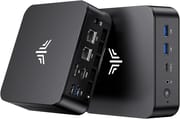
The KAMRUI Essenx E3 features a square design measuring 5.04 x 5.04 x 1.63 inches, making it compact enough to mount behind a monitor using the included VESA bracket or tuck away on a desk with minimal footprint. The all-black chassis maintains a professional appearance that blends seamlessly into home office or business environments. Build quality appears solid based on the metal and plastic construction typical of mini PCs in this category. Port accessibility is thoughtfully arranged with connections on both the front and rear panels, though specific layout details vary by production batch.
Performance expectations should be set appropriately for the AMD Ryzen 5 3500U, which was released in 2019 as a mobile processor for laptops. With a base clock of 2.1 GHz and boost up to 3.7 GHz, the quad-core, eight-thread chip handles office applications, video streaming, and light multitasking without issue. The integrated Radeon Vega 8 graphics can manage basic video editing and casual gaming at lower settings, though this is not a machine designed for demanding graphical workloads. The PassMark CPU benchmark score of approximately 6,831 places it in the basic tier of mini PC processors, suitable for everyday computing rather than intensive productivity work.
Connectivity options on the Essenx E3 are genuinely impressive for its price point. The dual Gigabit Ethernet ports stand out as a highlight, enabling uses as a network bridge, basic firewall, or simply providing redundant network connections for reliability. Triple 4K display output through HDMI 2.0, DisplayPort 1.4, and USB-C gives users flexibility in multi-monitor setups. The three USB 3.2 Gen 2 ports deliver fast data transfer speeds for external drives and peripherals, while the single USB 2.0 port handles legacy devices. WiFi 5 and Bluetooth 4.2 are functional but dated standards that may matter for users who prioritize wireless performance.
Customer Reviews of the KAMRUI Essenx E3

Amazon customers have responded positively to the KAMRUI Essenx E3, with the product earning a 4.5-star rating based on 314 reviews at the time of this writing. Users frequently praise the compact size and quiet operation, noting that the built-in fan keeps the system cool without generating distracting noise. The dual LAN ports receive particular attention from networking enthusiasts who appreciate having this feature at a budget price point, with several reviewers successfully using the Essenx E3 as a pfSense or OPNsense firewall appliance. This makes it a compelling choice for Linux on Mini PCs projects.
Common praise also centers on the straightforward setup process and Windows 11 Pro pre-installation, which allows users to be productive immediately without dealing with activation hassles. The VESA mount is frequently mentioned as a thoughtful inclusion that helps create a clean desk setup. Some reviewers note the value proposition is strong compared to building a comparable system from scratch or purchasing higher-priced alternatives with similar specifications.
On the critical side, some customers point out that the Ryzen 5 3500U processor shows its age compared to newer AMD and Intel chips available in 2025. A few users mention the single RAM slot as a limitation for those who want to maximize memory bandwidth through dual-channel configuration. The older WiFi 5 standard occasionally draws criticism from users with WiFi 6 routers who cannot take full advantage of their network speeds. Overall, the consensus suggests the Essenx E3 delivers appropriate performance for its price category while acknowledging it is not suitable for demanding workloads.
Conclusion
The KAMRUI Essenx E3 positions itself as a capable budget mini PC for users with specific needs that align with its strengths. The dual Gigabit Ethernet ports make it particularly attractive for home networking projects, small business deployments requiring network redundancy, or anyone looking to build an inexpensive firewall or router solution. The triple 4K display support adds versatility for multi-monitor productivity setups, while the compact dimensions and included VESA mount enable clean, space-efficient installations.
That said, prospective buyers should enter with clear expectations. The AMD Ryzen 5 3500U is a competent but aging processor that handles everyday tasks well but will struggle with demanding applications. The WiFi 5 and Bluetooth 4.2 wireless standards are functional but dated compared to current alternatives. Storage expansion is limited to the single M.2 slot without a 2.5-inch bay option. For users primarily focused on web browsing, document editing, video streaming, and basic productivity, the Essenx E3 delivers solid value at its price point.
For those looking to compare options, Starry Hope’s Mini PC Comparison Chart provides a valuable resource for evaluating the Essenx E3 against alternatives with different processors, connectivity options, and price points.
Frequently Asked Questions
Can the KAMRUI Essenx E3 be used as a home router or firewall?
Yes, the dual Gigabit Ethernet ports make the Essenx E3 well-suited for running firewall software like pfSense or OPNsense. Many Amazon reviewers specifically purchased this mini PC for home networking projects and report successful deployments. The AMD Ryzen 5 3500U provides sufficient processing power for routing duties in most home and small office environments.
How many monitors can the KAMRUI Essenx E3 support simultaneously?
The Essenx E3 supports up to three displays simultaneously through its HDMI 2.0, DisplayPort 1.4, and USB-C with video output. All three connections support 4K resolution, making this mini PC suitable for multi-monitor productivity setups without requiring additional hardware.
Is the RAM upgradable in the KAMRUI Essenx E3?
Yes, the Essenx E3 has one DDR4 SO-DIMM slot that supports up to 32GB of RAM. The unit comes with 16GB pre-installed. Note that having only one memory slot means you cannot enable dual-channel memory mode, which may slightly impact performance in memory-intensive applications.
What storage expansion options does the Essenx E3 offer?
The Essenx E3 includes one M.2 2280 NVMe PCIe 3.0 x4 slot that supports drives up to 4TB capacity. The pre-installed 512GB SSD can be replaced or upgraded. Unlike some competitors, this model does not include a 2.5-inch SATA bay for additional internal storage, so expansion is limited to the single M.2 slot or external drives.
Is the KAMRUI Essenx E3 fanless or does it have active cooling?
The Essenx E3 uses active cooling with a built-in fan. Customer reviews consistently note that the fan operates quietly during normal use, with noise levels remaining unobtrusive for desktop environments. The active cooling helps maintain stable temperatures during sustained workloads.
What operating system comes pre-installed on the KAMRUI Essenx E3?
The Essenx E3 comes with Windows 11 Pro pre-installed and activated. Users can immediately begin using the system without additional software purchases or activation steps. The Pro version includes features like BitLocker encryption and Remote Desktop that are not available in Windows 11 Home.
Can the KAMRUI Essenx E3 be VESA mounted behind a monitor?
Yes, KAMRUI includes a VESA mounting bracket in the box. The compact 5-inch square dimensions make it easy to attach behind most monitors with VESA mount patterns, creating a clean all-in-one style setup while keeping desk space free for other uses.