
KAMRUI Pinova P2 Mini PC
Updated on

The KAMRUI Pinova P2 Mini PC represents a compelling option for users seeking an affordable yet capable compact desktop solution. Built around the AMD Ryzen 3 4300U processor with Zen 2 architecture, this mini PC delivers performance that outpaces many budget competitors while maintaining a remarkably small footprint. The included 16GB of DDR4 RAM and 512GB NVMe SSD provide ample resources for everyday productivity, web browsing, and media consumption without the typical lag associated with entry-level systems.
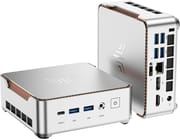
What sets the Pinova P2 apart from similarly priced alternatives is its impressive triple 4K display capability. Using the HDMI 2.0, DisplayPort 1.4, and USB-C ports simultaneously, you can drive three independent 4K monitors at 60Hz, making this an attractive choice for users who need multiple screens for work or entertainment. The compact silver chassis measures just over five inches square and under two inches tall, allowing it to disappear behind a monitor with the included VESA mount or sit unobtrusively on a desk.
Pros and Cons of the KAMRUI Pinova P2 Mini PC
| Pros | Cons |
|---|---|
| Triple 4K display support for multi-monitor setups | Ships without operating system (Windows 11 Ready) |
| Excellent expandability up to 64GB RAM and 4TB storage | AMD Ryzen 3 4300U lacks SMT (4 cores/4 threads) |
| USB 3.2 Gen2 ports with 10Gbps transfer speeds | Not suitable for gaming beyond very light titles |
| Compact VESA-mountable design saves desk space | Limited professional review coverage available |
| Quiet cooling system for distraction-free work | Bluetooth version may be 5.0 rather than 5.2 on some units |
| Strong value at under $250 price point | No Thunderbolt connectivity |
Related Videos
KAMRUI Pinova P2 Mini PC Comparison Chart
 KAMRUI Pinova P2 Mini PC | |
| Price | List Price: $237.49 Amazon Prices: Loading prices... |
| Version | 16GB/512GB |
| Perfomance Rating | 5.2 |
| Operating System | No OS |
| Processor | Quad-core 2.70 Ghz (max 3.70 Ghz) AMD Ryzen 3 4300U |
| GPU | Integrated AMD Radeon Graphics |
| RAM | 16 GB DDR4 |
| Internal Storage | 512 GB |
| Dimensions width x length x thickness | 5.05 x 5.05 x 1.73 inches (128.27 x 128.27 x 43.94 mm) |
| Weight | 1.87 lbs (0.85 kg) |
| WiFi | Wi-Fi 6 (802.11ax) |
| Bluetooth | Bluetooth 5.2 |
| Ethernet | 1 Ethernet port at 1 Gbps |
| HDMI | 1 Full-Size HDMI Port |
| DisplayPort | 1 DisplayPort (DP 1.4) |
| VGA | No VGA Ports |
| USB Ports | 2 USB 2.0, 2 USB 3, 1 USB-C |
| Thunderbolt Ports | No |
| Internal SATA Ports | No SATA ports |
| Card Reader | No Card Reader |
| Headphone Jack | combo |
| Fanless | No |
| VESA Mount | Yes |
| In the Box | Mini PC, power adapter, HDMI cable, VESA mounting bracket, screws, user manual |
| Expandability | RAM expandable up to 64GB (dual SO-DIMM), storage expandable up to 4TB total (M.2 + 2.5-inch SATA) |
Related Mini PCs
-
 KAMRUI AK1 Pro Mini PCHarness the power and versatility of the KAMRUI AK1 Pro Mini PC, boasting an Intel Celeron N5105,…
 -
 KAMRUI AK2 Plus Mini PCThe KAMRUI AK2 Plus Mini PC packs an Intel N100 processor, 16GB DDR4, and a 512GB SSD into a…
 -
 Beelink SER3The Beelink SER3 offers a compact form factor with AMD Ryzen 3 3200U power, dual 4K HDMI output,…
 -
 Bmax B4 PlusThe BMAX B4 Plus Mini PC delivers Intel N100 performance with a unique 2.5-inch SATA expansion bay…
 -
 Bmax B4 UltraThe Bmax B4 Ultra is an ultra-compact mini PC featuring Intel's N150 processor, 12GB LPDDR5 RAM,…
 -
 BOSGAME B100Compact yet powerful, the BOSGAME B100 features Intel UHD Graphics for 4K playback, dual HDMI for…
Detailed Insights into the KAMRUI Pinova P2
The physical design of the Pinova P2 emphasizes practicality without sacrificing aesthetics. The silver aluminum-style chassis measures 5.05 x 5.05 x 1.73 inches and weighs just under two pounds, making it genuinely portable for users who need to move their workstation between locations. The front panel provides convenient access to USB 3.2 ports and the headphone jack, while the rear houses the display outputs, additional USB ports, and gigabit Ethernet. KAMRUI includes a VESA mounting bracket in the box, allowing the unit to attach directly to compatible monitors for a nearly invisible desktop setup.
Under the hood, the AMD Ryzen 3 4300U processor delivers respectable performance for its class. Based on the Zen 2 architecture with four cores running at up to 3.7GHz, it handles office applications, web browsing with numerous tabs, video conferencing, and 4K media playback without breaking a sweat. The integrated AMD Radeon graphics with 5 compute units provides adequate capability for video acceleration and basic photo editing, though serious gaming or content creation will require more powerful hardware. The PassMark score of approximately 7,335 places it comfortably above Intel N-series processors found in many competing budget mini PCs.
Connectivity and expansion options exceed expectations at this price point. The WiFi 6 wireless networking delivers improved speeds and reduced latency compared to older standards, while Bluetooth connectivity handles wireless peripherals and audio devices. For storage expansion, the Pinova P2 offers dual upgrade paths: users can install a larger M.2 NVMe drive (up to 2TB) or add a 2.5-inch SATA SSD or HDD for additional capacity. The dual SO-DIMM slots accept up to 64GB of DDR4 RAM, providing substantial headroom for future upgrades. The gigabit Ethernet port ensures reliable wired connectivity for situations where wireless performance is insufficient.
Customer Reviews of the KAMRUI Pinova P2
Amazon customers have given the KAMRUI Pinova P2 strong marks, with an average rating of 4.4 out of 5 stars from over 1,700 reviews. The most common praise centers on the mini PC’s value proposition, with buyers appreciating the performance-per-dollar ratio compared to both traditional desktops and competing mini PCs. Many users specifically mention the quiet operation, noting that fan noise remains minimal even during extended use, which makes the Pinova P2 suitable for bedroom offices or living room media center applications.
Several reviewers highlight the triple display capability as a standout feature, particularly for remote workers who transitioned from single-monitor setups. The HDMI, DisplayPort, and USB-C video outputs work simultaneously without issues according to multiple customer reports. Some users have successfully connected ultrawide monitors and achieved smooth 4K playback for streaming services. The VESA mount accessory receives frequent positive mentions, with customers appreciating that KAMRUI includes it rather than selling it as an add-on.
Common criticisms focus on the absence of a pre-installed operating system, which requires users to install Windows 11 themselves or pay for a license separately. This arrangement may frustrate less technical buyers who expect a ready-to-use experience out of the box. A smaller number of reviews mention that the Bluetooth connectivity occasionally drops or requires re-pairing, though this appears to be an isolated issue rather than a widespread defect. Overall, the customer consensus positions the Pinova P2 as an excellent budget mini PC for productivity and media consumption, with most buyers expressing satisfaction with their purchase.
Conclusion
The KAMRUI Pinova P2 Mini PC occupies an appealing niche for budget-conscious users who need capable hardware without paying premium prices. Its AMD Ryzen 3 4300U processor delivers meaningful performance improvements over Intel Celeron and N-series alternatives, while the generous connectivity options and expansion paths provide flexibility for various use cases. The triple 4K display support is particularly noteworthy at this price point, making the Pinova P2 an attractive choice for multi-monitor productivity setups.
Ideal users for this mini PC include home office workers handling everyday productivity tasks, students needing a compact desktop for studies and research, and anyone building a media center or HTPC setup. The combination of quiet operation, VESA mounting capability, and strong 4K playback performance makes it well-suited for living room or bedroom installations. Users who prioritize low noise levels and small footprints over raw power will find the Pinova P2 meets their needs effectively.
Those who should consider alternatives include gamers seeking playable frame rates in modern titles, content creators working with video editing or 3D rendering software, and users who require a pre-installed operating system without additional purchase. For buyers in those categories, stepping up to a Ryzen 5 or 7-based mini PC would provide substantially better performance for demanding workloads. For a broader comparison of available options, check out Starry Hope’s Mini PC Comparison Chart to find the right balance of performance, features, and price for your specific requirements.
Frequently Asked Questions
Does the KAMRUI Pinova P2 come with Windows installed?
No, the KAMRUI Pinova P2 ships without an operating system pre-installed. It is Windows 11 Ready, meaning you can install Windows 11 yourself (you will need to purchase a license separately) or install a free Linux distribution. This approach keeps the purchase price lower but requires some technical knowledge to set up.
Can the KAMRUI Pinova P2 support three monitors at the same time?
Yes, the Pinova P2 supports triple 4K display output at 60Hz using the HDMI 2.0, DisplayPort 1.4, and USB-C ports simultaneously. This makes it an excellent choice for users who need multiple monitors for productivity or want to create an immersive workstation setup.
How much RAM and storage can I add to the KAMRUI Pinova P2?
The Pinova P2 offers impressive expansion options. RAM can be upgraded to 64GB using the two SO-DIMM slots (DDR4), though buyers should be aware that DRAM prices have climbed sharply and may affect upgrade costs. Storage expansion includes one M.2 slot supporting drives up to 2TB and a 2.5-inch SATA bay for an additional SSD or HDD, allowing up to 4TB total storage capacity when combined.
Is the KAMRUI Pinova P2 good for gaming?
The Pinova P2 is not designed for gaming beyond very light titles or older games. The integrated AMD Radeon graphics can handle basic games and retro emulation, but modern 3D games will not run well. If gaming is a priority, consider a mini PC with a more powerful processor like the Ryzen 5 5600U or 7 5800H series, such as the Beelink SER5 MAX, with faster integrated graphics.
Can I mount the KAMRUI Pinova P2 behind my monitor?
Yes, KAMRUI includes a VESA mounting bracket in the box. The compact size (5.05 x 5.05 x 1.73 inches) and light weight (under 2 lbs) make it ideal for mounting behind VESA-compatible monitors, creating a clean, space-saving setup with minimal visible cables.
How loud is the KAMRUI Pinova P2 during operation?
The Pinova P2 is designed for quiet operation. While it is not fanless, the cooling system keeps noise to a minimum during typical use. Customer reviews consistently praise the low noise levels, making it suitable for quiet environments like bedrooms, living rooms, or open office spaces.
What processor does the KAMRUI Pinova P2 use?
The Pinova P2 is powered by the AMD Ryzen 3 4300U processor, which features 4 cores and 4 threads with a boost clock up to 3.7GHz. It uses the Zen 2 architecture and includes integrated AMD Radeon graphics with 5 compute units. This processor delivers solid performance for office work, web browsing, and media playback.
Does the KAMRUI Pinova P2 support WiFi 6?
Yes, the Pinova P2 includes WiFi 6 (802.11ax) wireless networking for faster speeds, better range, and improved performance in congested network environments. It also includes Bluetooth connectivity for wireless peripherals and a gigabit Ethernet port for wired connections.