
Beelink SER5 MAX Mini PC
Updated on

The Beelink SER5 MAX Mini PC runs an AMD Ryzen 7 5800H processor in most configurations; a later 24GB/500GB build uses the Ryzen 7 6800U with Radeon 680M graphics and 24GB of soldered LPDDR5 memory. Windows 11 Pro comes pre-installed. The Ryzen 7 5800H models take up to 64GB of DDR4 RAM, and it ships with 500GB to 1TB of NVMe storage depending on the configuration, swappable for a drive up to 2TB. Integrated AMD Radeon Graphics drives up to three 4K displays at 60Hz. Wi-Fi 6 and Bluetooth 5.2 cover the wireless side.
Pros and Cons
| Pros | Cons |
|---|---|
| Compact design supporting three 4K displays | Noticeable fan noise under heavy load |
| Strong AMD Ryzen 7 5800H processor | Demanding games run at the lowest settings for about 30 fps |
| Upgradable RAM and storage | Plastic body with a metal bottom plate |
| Wi-Fi 6 and Bluetooth 5.2 | Potential slow QLC NVMe write speeds during heavy loading |
Related Videos
Beelink SER5 MAX Mini PC Comparison Chart
5 configurations
| Configuration | Processor | RAM | Storage | GPU | List price | Amazon price | Compare |
|---|---|---|---|---|---|---|---|
| 32GB/1TB/Ryzen 7 5800H | Ryzen 7 5800HCPU Mark 20,423 | 32 GB | 1 TB | AMD Radeon Graphics | $499.00 | Details
| |
| 32GB/512GB/Ryzen 7 5800H | Ryzen 7 5800HCPU Mark 20,423 | 32 GB | 512 GB | AMD Radeon Graphics | $479.00 | Details
| |
| 16GB/1TB/Ryzen 7 5800H | Ryzen 7 5800HCPU Mark 20,423 | 16 GB | 1 TB | AMD Radeon Graphics | $459.00 | Details
| |
| 16GB/512GB/Ryzen 7 5800H | Ryzen 7 5800HCPU Mark 20,423 | 16 GB | 512 GB | AMD Radeon Graphics | $439.00 | Details
| |
| 24GB/500GB/Ryzen 7 6800U | Ryzen 7 6800UCPU Mark 20,653 | 24 GB | 500 GB | AMD Radeon 680M | $299.00 | Details
|
Specs shared by every configuration
| Operating System | Windows 11 Pro |
|---|---|
| Dimensions width x length x thickness | 4.96 x 4.45 x 1.65 inches (125.98 x 113.03 x 41.91 mm) |
| Weight | unknown |
| WiFi | Wi-Fi 6 (802.11ax) |
| Bluetooth | Bluetooth 5.2 |
| Ethernet | 1 Ethernet port at 1 Gbps |
| HDMI | 1 Full-Size HDMI Port |
| DisplayPort | 1 DisplayPort |
| VGA | No VGA Ports |
| USB Ports | 1 USB 2.0, 3 USB 3, 1 USB-C Type-C port supports data and video |
| Thunderbolt Ports | No |
| OCuLink | No |
| Internal SATA Ports | 1 SATA port, includes 2.5" drive bay |
| Card Reader | No Card Reader |
| Headphone Jack | combo |
| Fanless | No |
| VESA Mount | Yes |
| In the Box | Mini PC, 2 x HDMI Cables, Power Adapter, VESA Mount with Screws, User Manual |
Related Mini PCs
-
 Beelink EQR7The Beelink EQR7 pairs an AMD Ryzen 7 7735U with a built-in power supply, dual 2.5GbE, and 16GB or…
-
 Beelink SER5 MAX (Ryzen 7 7735HS)The Beelink SER5 MAX pairs an 8-core Ryzen 7 7735HS and Radeon 680M graphics with 24GB of LPDDR5,…
-
 BOSGAME M4The BOSGAME M4 pairs an AMD Ryzen 7 8745HS with 32GB of DDR5, an OCuLink port for an external GPU,…
-
 BOSGAME P3 LiteThe BOSGAME P3 Lite pairs an AMD Ryzen 7 6800H and Radeon 680M graphics with dual 2.5G Ethernet,…
-
 GMKtec EVO-X1The GMKtec EVO-X1 is a Ryzen AI 9 HX-370 mini PC with Radeon 890M graphics, 32GB of soldered…
-
 GMKtec NucBox K16The GMKtec NucBox K16 is a CNC-aluminium mini PC on the AMD Ryzen 7 7735HS with Radeon 680M…
Design, Ports, and Upgrades

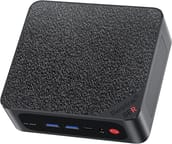
The chassis is primarily plastic with a metal bottom plate, and a fabric-like material covers the top. It measures 4.96 x 4.45 x 1.65 inches. Mesh sides feed air to the dual-fan cooling system. The fan is the recurring complaint in the reviews below: Robtech ties the extra noise to the 54-watt configuration.
The rear carries three USB 3.2 ports and one USB 2.0 port, plus HDMI 2.0, DisplayPort 1.4, Gigabit Ethernet, and a combo headphone jack. A USB-C port handles both data transfer and video output. HDMI, DisplayPort, and USB-C together drive three displays at 4K and 60Hz. The included VESA mount puts the machine behind a monitor or TV instead of on the desk.
The Ryzen 7 5800H runs 8 cores and 16 threads, with base clocks of 3.2 GHz boosting to 4.4 GHz. On the 5800H models the two DDR4 SODIMM slots are easy to reach and take up to 64GB, and NVMe storage goes to 2TB. A 2.5-inch SATA bay adds a second drive without displacing the primary one. The stock NVMe drive is a Crucial P3 Plus, fine for most tasks, though its QLC design can slow down during heavy write loads. The Wi-Fi module is swappable.
Reviewer Insights

Robtech on the CPU gains and the noise trade-off
Robtech starts with the Ryzen 5800H CPU’s 54-watt configuration, which outperforms the SER5 Pro. The plastic body with its metal bottom plate is acceptable in that review, though an all-metal chassis would be the preference. DisplayPort replaces one of the Pro’s two HDMI outputs. Inside sit AZW-branded memory and a Crucial P3 Plus NVMe drive.
Robtech puts the SER5 MAX 20% ahead of the Pro model in multi-core CPU workloads, and about 13% behind the latest Ryzen CPUs. The integrated graphics come off as dated, barely improved over the Pro, while CPU-bound workloads gain the most: Robtech saw a clear frame-rate jump in Valorant and 10 to 15 percent in emulators, with no change in Forza, Elden Ring or God of War. Higher power consumption and fan noise are the cost of that extra performance, and both count as drawbacks in the review. Robtech notes it sells at the price the Pro launched at, but calls it a late arrival with newer-generation chips at the same price. Robtech’s review
TechMishka on upgradability and TDP headroom
TechMishka describes the Beelink SER5 MAX as a “mini PC masterpiece,” offering Ryzen 7 performance at a competitive price. Airflow through the mesh sides, the port selection, and a case that opens easily for access to the internal components are the highlights. Running the CPU at its full TDP lifts performance, and the integrated GPU benefits too.
1080p gaming and multimedia tasks are within reach, but the video notes that video editing and other intensive tasks may be limited by the absence of a dedicated GPU. TechMishka calls the fan noise a drawback, though it can be managed in the BIOS. The verdict is a good buy for those seeking Ryzen 7 performance with reasonable power consumption, but not an upgrade worth making for current SER5 Pro owners, where the performance increase is marginal. TechMishka’s review
FishBee Productions on everyday performance and cooling
Brian from FishBee Productions rates the Beelink SER5 MAX strong for everyday tasks such as video editing, graphic design, and gaming. The build quality and design draw praise, the fabric-like material on top included, along with the Geekbench and 3DMark Time Spy results, 4K video playback, and gaming frame rates.
Brian finds that the dual-fan cooling keeps heat in check without much noise. The SER5 MAX is marketed as an upgrade from the SER5 Pro with a 10% performance boost, but in Brian’s tests it performed nearly identically to the Pro model. It still lands among the better mini PCs Brian has tested. FishBee Productions’ review
EVO Tech on gaming frame rates
EVO Tech ran a 15-game benchmark test on the integrated Radeon graphics. At the lowest settings and native 1080p with no upscaling, Forza Horizon 5 held close to a 60 fps average and Shadow of the Tomb Raider gave a consistent 30 fps. Borderlands 3 averaged 41 fps, and Metro Exodus, at the lowest settings and full 1080p, stayed in the teens.
Built for editing and multitasking across three 4K displays
Video editing, graphic design, and heavy multitasking are what the 8 cores and 16 threads are for, and three 4K displays give that work room to spread out.
Gaming enthusiasts and anyone who needs silent operation will do better elsewhere. Starry Hope’s Mini PC Comparison app covers the alternatives.
Frequently Asked Questions
What operating system does the Beelink SER5 MAX Mini PC come with?
Windows 11 Pro comes pre-installed.
Can I upgrade the RAM on the Beelink SER5 MAX?
On the Ryzen 7 5800H models, yes: they take up to 64GB with two DDR4 SODIMM modules.
Does the Beelink SER5 MAX support multiple monitors?
It supports up to three 4K displays at 60Hz through its HDMI, DisplayPort, and USB-C outputs.
Is the storage on the Beelink SER5 MAX expandable?
Yes, the NVMe SSD is expandable up to 2TB, and the Mini PC also includes a 2.5” SATA bay for additional storage. Default storage capacity is 500GB, 512GB, or 1TB.
What kind of cooling system does the Beelink SER5 MAX use?
The Mini PC uses a dual-fan design to cool the CPU and system components.
How does the Beelink SER5 MAX handle gaming?
It manages casual gaming and some AAA titles at 1080p, but high-end gaming is past what the integrated AMD Radeon Graphics can do.
Is the Beelink SER5 MAX fanless?
No, it has a dual-fan cooling system to manage the heat from the Ryzen 7 processor.