
MINISFORUM UN1290
Updated on

The MINISFORUM UN1290 represents exceptional value in the high-performance mini PC market, packing a powerful 14-core Intel Core i9-12900HK processor into a compact 5-inch square chassis. With support for up to three 4K displays, 2.5 Gigabit Ethernet, WiFi 6E, and impressive expandability options, this mini PC targets power users, developers, and home theater enthusiasts who need desktop-class performance without the bulk. The UN1290 stands out for its excellent Linux compatibility, with reviewers noting that the mature Alder Lake platform delivers better performance under Linux than Windows in single-core benchmarks. Whether you choose the barebone configuration for custom builds or the fully-loaded 32GB/1TB variant, the UN1290 offers a compelling balance of performance, connectivity, and value.
Pros and Cons of the MINISFORUM UN1290
| Pros | Cons |
|---|---|
| Powerful 14-core/20-thread i9-12900HK processor with 5.0 GHz boost | Uses DDR4 memory instead of newer DDR5 standard |
| Triple 4K@60Hz display support via HDMI, DisplayPort, and USB-C | No Thunderbolt or USB4 support |
| Excellent Linux compatibility with mature Alder Lake drivers | Rear USB ports are only USB 2.0 |
| 2.5GbE networking and WiFi 6E connectivity | Integrated graphics limit modern AAA gaming |
| Includes VESA mount, HDMI cable, and SATA adapter | Single Ethernet port limits advanced network configurations |
| Advanced COLD WAVE 1.5 liquid metal cooling system | Bottom access panel requires removing rubber feet |
Related Videos
MINISFORUM UN1290 Comparison Chart
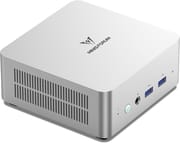 MINISFORUM UN1290 | MINISFORUM UN1290 | MINISFORUM UN1290 | |
| Price | List Price: $299.00 Amazon Prices: Loading prices... | List Price: $489.00 Amazon Prices: Loading prices... | List Price: $509.00 Amazon Prices: Loading prices... |
| Version | Barebone | 32GB/512GB | 32GB/1TB |
| Performance Rating | 8.2 | 8.9 | 8.9 |
| Operating System | Windows 11 Pro | Windows 11 Pro | Windows 11 Pro |
| Processor | Fourteen-core 3.80 Ghz (max 5.00 Ghz) Intel Core i9-12900HK | Fourteen-core 3.80 Ghz (max 5.00 Ghz) Intel Core i9-12900HK | Fourteen-core 3.80 Ghz (max 5.00 Ghz) Intel Core i9-12900HK |
| GPU | Integrated Intel UHD Graphics | Integrated Intel UHD Graphics | Integrated Intel UHD Graphics |
| RAM | 0 GB (No RAM or storage included - install your own) | 32 GB DDR4 SO-DIMM | 32 GB DDR4 SO-DIMM |
| Internal Storage | 0 GB | 512 GB | 1 TB |
| Dimensions width x length x thickness | 5 x 5 x 2.15 inches (127 x 127 x 54.61 mm) | 5 x 5 x 2.15 inches (127 x 127 x 54.61 mm) | 5 x 5 x 2.15 inches (127 x 127 x 54.61 mm) |
| Weight | 1.26 lbs (0.57 kg) | 1.26 lbs (0.57 kg) | 1.26 lbs (0.57 kg) |
| WiFi | Wi-Fi 6E (802.11ax) | Wi-Fi 6E (802.11ax) | Wi-Fi 6E (802.11ax) |
| Bluetooth | Bluetooth 5.2 | Bluetooth 5.2 | Bluetooth 5.2 |
| Ethernet | 1 Ethernet port at 2.5 Gbps | 1 Ethernet port at 2.5 Gbps | 1 Ethernet port at 2.5 Gbps |
| HDMI | 1 Full-Size HDMI Port | 1 Full-Size HDMI Port | 1 Full-Size HDMI Port |
| DisplayPort | 1 DisplayPort (DisplayPort 1.4) | 1 DisplayPort (DisplayPort 1.4) | 1 DisplayPort (DisplayPort 1.4) |
| VGA | No VGA Ports | No VGA Ports | No VGA Ports |
| USB Ports | 2 USB 2.0, 2 USB 3, 1 USB-C USB-C supports DisplayPort Alt Mode and Power Delivery. 2x USB 3.2 Gen2 (10Gbps) on front, 2x USB 2.0 on rear. | 2 USB 2.0, 2 USB 3, 1 USB-C USB-C supports DisplayPort Alt Mode and Power Delivery. 2x USB 3.2 Gen2 (10Gbps) on front, 2x USB 2.0 on rear. | 2 USB 2.0, 2 USB 3, 1 USB-C USB-C supports DisplayPort Alt Mode and Power Delivery. 2x USB 3.2 Gen2 (10Gbps) on front, 2x USB 2.0 on rear. |
| Thunderbolt Ports | No | No | No |
| Internal SATA Ports | 1 SATA port, includes 2.5" drive bay (SATA 3.0 6.0Gb/s, includes SATA adapter cable) | 1 SATA port, includes 2.5" drive bay (SATA 3.0 6.0Gb/s, includes SATA adapter cable) | 1 SATA port, includes 2.5" drive bay (SATA 3.0 6.0Gb/s, includes SATA adapter cable) |
| Card Reader | No Card Reader | No Card Reader | No Card Reader |
| Headphone Jack | combo | combo | combo |
| Fanless | No | No | No |
| VESA Mount | Yes | Yes | Yes |
| In the Box | UN1290 mini PC, 120W power adapter, HDMI cable, VESA bracket and screws, SATA adapter cable, user manual | UN1290 mini PC, 120W power adapter, HDMI cable, VESA bracket and screws, SATA adapter cable, user manual | UN1290 mini PC, 120W power adapter, HDMI cable, VESA bracket and screws, SATA adapter cable, user manual |
| Expandability | 2x DDR4 SO-DIMM slots (max 64GB, 3200 MT/s dual-channel), 1x M.2 2280 PCIe 4.0 NVMe SSD slot (up to 2TB), 1x 2.5-inch SATA HDD bay (SATA 3.0 6.0Gb/s) | 2x DDR4 SO-DIMM slots (max 64GB, 3200 MT/s dual-channel), 1x M.2 2280 PCIe 4.0 NVMe SSD slot (up to 2TB), 1x 2.5-inch SATA HDD bay (SATA 3.0 6.0Gb/s) | 2x DDR4 SO-DIMM slots (max 64GB, 3200 MT/s dual-channel), 1x M.2 2280 PCIe 4.0 NVMe SSD slot (up to 2TB), 1x 2.5-inch SATA HDD bay (SATA 3.0 6.0Gb/s) |
Related Mini PCs
-
 MINISFORUM Venus UN1265Introducing the MINISFORUM Venus UN1265 Mini PC: a powerhouse in a pint-sized package. Equipped…
 -
 MINISFORUM UM680/UM760/UM870 SlimCompact yet powerful, the MINISFORUM UM680/UM760/UM870 Slim Series packs AMD Ryzen processors, up…
 -
 Minisforum AtomMan X7 TiThe Minisforum AtomMan X7 Ti is a premium mini PC featuring the Intel Core Ultra 9 185H processor,…
 -
 ASUS NUC 14 ProThe ASUS NUC 14 Pro marks ASUS's debut as the new steward of the legendary NUC line, pairing…
 -
 GMKtec K1Compact, powerful, and user-upgradable, the GMKtec K1 Mini PC packs a punch with an AMD Ryzen 7…
 -
 GMKtec M3 UltraThe GMKtec M3 Ultra packs a powerful 14-core Intel i7-12700H processor into a palm-sized chassis,…
Detailed Insights into the MINISFORUM UN1290

The MINISFORUM UN1290 features a compact 5 x 5 x 2.15 inch aluminum chassis with a volume of just 0.9 liters, roughly 1/40th the size of a traditional desktop tower. Despite its small footprint, the UN1290 packs serious hardware with the Intel Core i9-12900HK processor featuring 14 cores (6 performance + 8 efficiency), 20 threads, and a boost clock of up to 5.0 GHz. The included 120W power adapter ensures the processor can sustain high clocks under demanding workloads, while the COLD WAVE 1.5 cooling system with liquid metal thermal compound keeps temperatures in check even during extended use.
Connectivity is comprehensive for a mini PC of this size. The front panel provides two USB 3.2 Gen 2 ports running at 10Gbps alongside a 3.5mm combo audio jack, while the rear houses one HDMI 2.0 port, one DisplayPort 1.4 port, one USB-C port with DisplayPort Alt Mode and Power Delivery support, two USB 2.0 ports, a 2.5 Gigabit Ethernet port, and the power input. All three video outputs support 4K resolution at 60Hz, enabling triple-monitor productivity setups. The USB-C port is particularly versatile, supporting video output, high-speed data transfer, and can even power the unit through compatible USB-C chargers.
Expansion options set the UN1290 apart from more locked-down competitors. The system supports up to 64GB of DDR4-3200 RAM across two SO-DIMM slots, uses a single M.2 2280 PCIe 4.0 NVMe SSD slot for primary storage with speeds up to 5000 MB/s, and includes a 2.5-inch SATA bay for additional mass storage. The included VESA mounting bracket allows the UN1290 to be tucked behind a monitor, creating a clean all-in-one style setup. MINISFORUM thoughtfully includes an HDMI cable and SATA adapter cable in the box, along with a pre-installed heatsink on the M.2 slot.
Reviewer Insights on the MINISFORUM UN1290

Lee PSP Video’s Perspective
Lee PSP Video provides one of the most comprehensive reviews of the UN1290, including a detailed teardown and multi-OS testing. The reviewer notes that “it just struck me as really good value for an i9, a terabyte of storage and 32 gig of RAM.” He successfully tested Windows 11, ChromeOS Flex, Ubuntu, and Batocera (for retro gaming), with all operating systems running smoothly. The inclusion of a pre-installed SSD heatsink and VESA mount impressed him: “I always like when you get a monitor mount so we can basically make a very smart TV or an all-in-one computer.” He concludes that the UN1290 is “overall, really good value for money” and highly recommends it for office work, heavy multitasking, and home theater use.
Elevated Systems’ Linux Analysis
Elevated Systems takes a unique approach by positioning the UN1290 as “the best out of the box Linux experience.” The reviewer deliberately chose the 12th-generation Intel platform over newer 13th/14th-gen processors because the mature Alder Lake drivers are thoroughly tested and stable across Linux distributions. Testing Ubuntu 24.04 LTS, Manjaro, and Fedora 40, he found that “the UN1290 handles Linux exceptionally well with no hardware or software incompatibilities.” Most impressively, his benchmarks showed that “Linux on Alder Lake delivers better performance than Windows,” with Geekbench 6 single-core scores around 2700-2800 under Linux versus approximately 2400 under Windows. For developers and Linux enthusiasts, this mature driver support makes the UN1290 a particularly compelling choice.
Chase Brogan’s Gaming Focus
Chase Brogan tested the UN1290’s gaming and emulation capabilities extensively. While he praised the “exceptional cooling” that keeps the device cool even after hours of use, he sets realistic expectations: “This can handle everything that you throw at it in terms of emulation gaming,” covering N64, GameCube, Wii U, and Switch emulation flawlessly. However, “if you’re looking for a triple-A gaming experience, you probably want to avoid this mini PC.” Modern titles like Halo Infinite exhibited graphical issues and screen tearing with the integrated Intel Iris Xe graphics.
According to Electronikz, who awarded the UN1290 an 8.5/10 score, the system “provides lightning-fast performance for demanding applications” while noting its suitability for “video editing and gaming” within the limits of integrated graphics. Seraphim Gate tested the UN1290 as a Proxmox virtualization host, praising its i9 processor as “ideal for virtualization tasks, office work, and demanding workloads like light rendering” while noting that the single 2.5GbE port limits its suitability for advanced network configurations.
Customer Reviews of the MINISFORUM UN1290
Amazon customers have rated the MINISFORUM UN1290 4.1 out of 5 stars based on 118 reviews, reflecting generally positive reception with some common themes emerging. Users consistently praise the exceptional value proposition, noting that an Intel Core i9 processor with 32GB RAM and 1TB storage at this price point is remarkable. Many customers highlight the build quality and compact form factor, appreciating how the unit can disappear behind a monitor with the included VESA mount.
Power users and developers frequently mention the UN1290’s suitability for their workflows. Software developers appreciate the multi-core performance for compiling code, running virtual machines, and containerized workloads. Home theater enthusiasts value the silent operation and triple 4K display support, using it to drive large TVs and secondary monitors simultaneously. The expandability options receive frequent praise, with several customers upgrading to 64GB RAM and adding secondary SSDs in the 2.5-inch bay.
Common criticisms center on the thermal management under sustained heavy loads. While the cooling system prevents throttling, some users report the unit can run warm during extended rendering or compilation tasks. A few customers noted the bottom-mounted access panel design is inconvenient for upgrades, requiring removal of the rubber feet to access RAM and storage. Some users also wished for a second Ethernet port for network-intensive applications or routing tasks.
Conclusion
The MINISFORUM UN1290 occupies a sweet spot in the mini PC market, delivering genuine desktop-class Intel Core i9 performance in a compact, well-connected package. Its particular strength lies in productivity workloads, software development, and home theater applications where the 14-core processor, triple 4K display support, and excellent Linux compatibility truly shine. The barebone option at around $299 represents exceptional value for builders who want to supply their own memory and storage, while the fully configured 32GB/1TB variant at $509 offers plug-and-play convenience.
Those seeking a gaming-focused system should look elsewhere, as the integrated Intel Iris Xe graphics cannot keep pace with modern AAA titles. Similarly, users requiring Thunderbolt connectivity or multiple Ethernet ports may find the UN1290’s port selection limiting. However, for its target audience of power users, developers, and media enthusiasts, the UN1290 delivers impressive performance, mature driver support, and thoughtful design touches like the included VESA mount and SSD heatsink.
For those looking to compare the MINISFORUM UN1290 with similar high-performance mini PCs, Starry Hope’s Mini PC Comparison Chart provides a valuable resource for finding the perfect match for your specific needs and budget.
Frequently Asked Questions
What processor variants does the MINISFORUM UN1290 use?
The UN1290 ships with either an Intel Core i9-12900HK or i9-12900H processor, selected randomly during manufacturing. Both variants feature 14 cores (6 performance + 8 efficiency), 20 threads, and boost clocks up to 5.0 GHz. The 12900HK has a slightly higher TDP allowing for sustained higher performance, but in practice both deliver excellent results in this chassis.
Can the MINISFORUM UN1290 support three monitors?
Yes, the UN1290 supports up to three independent 4K displays at 60Hz simultaneously. You can connect monitors via the HDMI 2.0 port, DisplayPort 1.4 port, and USB-C port (using DisplayPort Alt Mode). This makes it excellent for productivity workflows requiring multiple screens.
How much RAM can I install in the MINISFORUM UN1290?
The UN1290 supports up to 64GB of DDR4-3200 RAM across two SO-DIMM slots. The pre-configured models come with 32GB (2x16GB) in dual-channel configuration. The barebone version ships without RAM, allowing you to choose your own configuration.
Is the MINISFORUM UN1290 good for Linux?
The UN1290 is considered one of the best mini PCs for Linux thanks to its 12th-generation Intel Alder Lake platform. The mature hardware means drivers are fully integrated into modern Linux kernels with no compatibility issues. Reviewers have tested Ubuntu, Manjaro, Fedora, and ChromeOS Flex with excellent results, and benchmarks show the i9-12900HK actually performs better under Linux than Windows.
Can the MINISFORUM UN1290 be used for gaming?
The UN1290 handles retro gaming and emulation excellently, including GameCube, Wii, and Switch emulation. However, it uses integrated Intel Iris Xe graphics which cannot run modern AAA games at playable settings. If gaming is your primary use case, consider a mini PC with dedicated graphics instead.
What storage expansion options does the UN1290 offer?
The UN1290 offers excellent storage expandability with one M.2 2280 PCIe 4.0 NVMe SSD slot (supporting up to 2TB drives) and one 2.5-inch SATA bay for additional HDD or SSD storage. The M.2 slot includes a pre-installed heatsink for thermal management, and MINISFORUM includes a SATA adapter cable in the box.
Does the MINISFORUM UN1290 include a VESA mount?
Yes, MINISFORUM includes a VESA mounting bracket and screws with the UN1290. This allows you to mount the mini PC behind a VESA-compatible monitor, creating a clean all-in-one style setup that saves desk space.
What is the difference between the barebone and configured UN1290 versions?
The barebone version ($299) includes the UN1290 with processor, cooling, and all connectivity but no RAM, storage, or operating system - you supply these yourself. The configured versions include 32GB DDR4 RAM and either 512GB ($489) or 1TB ($509) NVMe SSD with Windows 11 pre-installed. The barebone option offers better value if you already have compatible components.