
MOREFINE M6S Mini PC
Updated on

The MOREFINE M6S Mini PC runs a full Windows 11 Pro install from a shell that measures 2.83 inches on a side. Intel’s 12th Gen Alder Lake N100 processor and 12GB of DDR5 memory drive it, which covers office work, web browsing, 4K playback, and emulation of older consoles. The size sets the rest of the machine: cooling headroom, wireless generation, and memory are all fixed by what fits inside that shell, and none of them can be changed later.
| Pros | Cons |
|---|---|
| 2.8-inch square shell that Robtech called pocketable | 38dBA under load, at a higher pitch than larger N100 boxes (Robtech) |
| 12GB of DDR5 at 4800MHz, which Mini PC Reviewer credits for responsive multitasking | Memory is soldered, so 12GB is the ceiling |
| A BIOS change from 25W to 30W adds about 20% multi-core (Robtech) | Wi-Fi 5 only, no Wi-Fi 6 |
| Dual HDMI 2.0 outputs drive two 4K displays at 60Hz | Bluetooth 4.2 reported as inconsistent (Mini PC Reviewer) |
| NVMe Gen3 x2 SSD in a replaceable M.2 2242 slot | 41W peak draw under load (Robtech) |
| Windows 11 Pro preinstalled | Failures after three to four months in some reports (Mini PC Reviewer) |
Related Videos
MOREFINE M6S Mini PC Comparison Chart
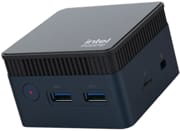 MOREFINE M6S Mini PC | |
| Price | List Price: $159.99 Amazon Prices: |
| Version | 12GB/512GB/Intel N100 |
| Performance Rating | 2.8 |
| Operating System | Windows 11 Pro |
| Processor | Quad-core 3.40 Ghz (max 3.40 Ghz) Intel Processor N100 |
| GPU | Integrated Intel UHD Graphics |
| RAM | 12 GB |
| Internal Storage | 512 GB |
| Dimensions width x length x thickness | 2.83 x 2.83 x 1.77 inches (71.88 x 71.88 x 44.96 mm) |
| Weight | unknown |
| WiFi | Wi-Fi 5 (802.11ac) |
| Bluetooth | Bluetooth 4.2 |
| Ethernet | 1 Ethernet port at 1 Gbps |
| HDMI | 2 Full-Size HDMI Ports |
| DisplayPort | No DisplayPort |
| VGA | No VGA Ports |
| USB Ports | 3 USB 3, 1 USB-C Type-C port is for charging |
| Thunderbolt Ports | No |
| OCuLink | No |
| Internal SATA Ports | No SATA ports |
| Card Reader | microSD Card Reader |
| Headphone Jack | combo |
| Fanless | No |
| VESA Mount | No |
| In the Box | mini PC, manual, HDMI and power supply |
| Expandability | Upgradeable M.2 SSD |
Related Mini PCs
-
 MOREFINE M6 (2024)The MOREFINE M6 (2024) is a 0.75-inch-thick Intel N200 mini PC with 16GB of soldered LPDDR5, a…
 -
 MOREFINE M9 Mini PCThe MOREFINE M9 is a 4.4-inch Intel N100 mini PC with Windows 11 Pro, one DDR4 SO-DIMM slot, two…
 -
 ACEMAGIC S1 Mini PCThe ACEMAGIC S1 is a compact Intel N95 mini PC with 16GB of DDR4, dual M.2 slots, dual gigabit…
 -
 Beelink Mini S13A roughly $200 mini PC built around the Intel N150 with 16GB DDR4, dual M.2 PCIe 2280 slots, dual…
 -
 Bmax B6The Bmax B6 is a small 10th-gen Intel mini PC sold with a Core i3-1000NG4, i5-1030NG7, or…
 -
 GMKtec NucBox G5The GMKtec NucBox G5 is a palm-sized Intel N97 mini PC with 12GB of LPDDR5, dual HDMI 2.0 (4K60),…
Dual 4K HDMI and a 30W BIOS mode in a palm-sized shell

The chassis measures 2.83 x 2.83 x 1.77 inches and weighs 1.19 pounds. It is aluminum alloy, which doubles as a heat spreader for the internal cooling system. Even at that size the port set covers dual HDMI 2.0 outputs, three USB 3.0 ports, Gigabit Ethernet, a microSD card reader, and a combo headphone jack. The USB-C port is for charging, not data, so every peripheral goes on the Type-A side.
Robtech’s Cinebench R23 testing put the multi-core score at 2,439 with the default 25W power limit, and at 2,955 after raising the limit to 30W in the BIOS. That is roughly a 20% gain in exchange for higher temperatures and more fan noise. The quad-core, quad-thread N100 handles office productivity, multi-tab browsing, and 4K video playback with AV1 decode, and Robtech ran PlayStation 2, GameCube, and Wii emulation on it at playable framerates.
Wireless is a generation behind: Wi-Fi 5 (802.11ac) and Bluetooth 4.2, which works but leaves nothing in reserve on a congested network. The two HDMI 2.0 outputs drive dual 4K displays at 60Hz, enough for a two-monitor desk setup. Storage runs through a single M.2 2242 slot that takes either an NVMe or a SATA drive, so the bundled 512GB SSD can be swapped for something larger. There is no 2.5-inch bay, which the chassis has no room for.
Under sustained load at 25W, CPU temperatures peak around 78°C, rising to 85°C at the 30W setting. The cooling solution measures about 38dBA under load, and Robtech described its pitch as higher than that of larger N100 mini PCs, so it is audible in a quiet room during long tasks. At light workloads the aluminum case carries enough of the heat that the fan stays out of the way.
The unit tucks behind a television or inside a signage or kiosk cabinet where a full-size mini PC will not go, and it travels in a laptop bag without adding meaningful weight. The preinstalled Windows 11 Pro license brings BitLocker encryption and group policy support, which matters when the machine is deployed in an office.
Reviewer Insights

Robtech: strong emulation performance with a higher-pitched fan
Robtech reviewed the M6S as a retro gaming and emulation machine. He says “it’s really impressive we can have a PC this pocketable,” and calls the unit “a really nice retro gaming emulation box” capable of running PlayStation 2, GameCube, and Wii titles at playable speeds, a machine that can travel between locations.
Robtech demonstrates that accessing the BIOS and increasing the power limit from 25W to 30W yields approximately 20% better multi-core performance, a boost available to anyone comfortable with minor configuration changes. Temperatures and power draw rise with it. On the I/O, he says that “considering its small size, I think the port selection is decent.”
Robtech also names the compromises. The fan produces a higher-pitched noise compared to larger N100 mini PCs, which may be noticeable in quiet settings. Power consumption peaks at 41W under load. The WiFi 5 module, while functional, represents older technology. His verdict is still positive: “the M6S is a unique miniature mini PC and it’s great,” recommended for buyers who prioritize portability and novelty over raw performance per watt.
Mini PC Reviewer flags Bluetooth drops and early failures
Mini PC Reviewer describes the machine as a “compact power hub” suitable for remote workers, students, and home theater enthusiasts. The publication highlights the DDR5 RAM running at 4800MHz as a meaningful performance advantage over competitors using slower memory, contributing to responsive multitasking in productivity scenarios. The dual 4K display support receives praise for enabling productive multi-monitor workflows despite the system’s small size.
Bluetooth connectivity is flagged as inconsistent, with connection drops and pairing issues. The publication also reports device failures after three to four months of light use for some buyers, and suggests that the aggressive miniaturization may push thermal and component limits in ways that affect longevity.
Customer Reviews
A verified buyer named TT, who runs it as a Plex media center, wrote “After it parks its CPU cores it idles at a very low energy draw and it serves perfectly for the current use case.” Michael Patterson, a verified buyer who bought one to replace his parents’ old PC, called it “a powerful computer for the price and size” but flagged the limits (his USB count differs from the three Type-A ports the spec sheet lists): “there are only 2 USB ports and its not good for modern gaming.” Poul, another verified buyer, described it as an “Awesome replacement for old mac-mini.”
The negative reviews name specific problems. Verified buyer Mark Thompson reported his unit failed within a year: “it didn’t even last a year, as it just now quit on me. The blue light comes on, but there is no display.” A 3-star reviewer, DiCaprio, hit two issues: the preinstalled Windows 11 Pro would not activate without a school or work Microsoft account, and over a long uptime test “the machine shut down itself multiple times,” plus “significant lags” connecting Bluetooth peripherals.
Pick it for the 2.8-inch footprint
Every limit on this machine comes from the 2.83-inch shell: soldered memory, Wi-Fi 5, a 38dBA fan, and a single M.2 2242 slot. The N100 inside is the same chip larger boxes use, and the 30W BIOS mode recovers most of what the small chassis gives up in sustained multi-core work, so the processor is rarely the thing that decides this purchase. Only one build exists, 12GB of memory with a 512GB SSD, and swapping that drive is the one upgrade the chassis allows.
At roughly $160 it makes sense when a 2.83-inch box is a hard requirement and the workload stays light, whether that is streaming to a television or running as a low-power always-on server. Given the Bluetooth and early-failure reports, plan to test the unit inside the return window. The Mini PC Comparison Chart shows how its specs line up against other N100 machines.
Frequently Asked Questions
Can I upgrade the RAM in the MOREFINE M6S?
No. The 12GB of DDR5 memory is soldered to the motherboard, which is how the machine fits into a 2.83-inch shell. If you expect to need more than 12GB, a larger mini PC with socketed modules, such as the Beelink EQ12, is the safer buy.
Is the MOREFINE M6S good for gaming?
Robtech ran PlayStation 2, GameCube, and Wii titles on it at playable framerates. Verified buyer Michael Patterson found it “not good for modern gaming,” and light indie or older titles are the realistic ceiling.
How many monitors can the MOREFINE M6S support?
The two HDMI 2.0 ports each drive a 4K display at 60Hz, and both outputs work at once for an extended desktop.
What storage upgrade options are available?
One M.2 2242 slot, which accepts either an NVMe or a SATA drive, so the bundled 512GB SSD can be replaced with something larger. The 2242 length is shorter than the common 2280 size, so check the label before buying a replacement.
How does the MOREFINE M6S compare to other Intel N100 mini PCs?
Larger N100 machines such as the Beelink EQ12 or the GMKtec NucBox G2 have more room for ports and cooling, so pick the M6S when a 2.8-inch footprint is the requirement you cannot move on.
Is Bluetooth reliable on the MOREFINE M6S?
The radio is Bluetooth 4.2, Mini PC Reviewer flagged connection drops and pairing issues, and verified buyer DiCaprio reported “significant lags” with Bluetooth peripherals. Keep wired alternatives on hand, or test pairing inside the return window.