

Every time you upload audio to a cloud transcription service, you are sending your voice to someone else’s servers. Meeting recordings, medical notes, legal dictation, client interviews: all of it passes through infrastructure you do not control, processed by companies whose privacy policies change with the quarter. For many people, that trade-off is fine. For a growing number of consultants, solo practitioners, and small business owners, it is not.
The alternative has gotten practical. OpenAI’s Whisper is an open-source speech recognition model that runs entirely on local hardware, and the optimized faster-whisper implementation makes it fast enough for real-world use on a mid-range mini PC. No subscriptions, no API keys, no internet connection required. A mini PC drawing 10-15 watts at idle costs roughly $16-24 per year in electricity at US average rates. That is less than a single month of most cloud transcription plans.
Why Your Transcription Should Stay Local
The practical case for local transcription comes down to three things: privacy, cost, and availability. Privacy is the obvious one. If you are transcribing therapy sessions, client meetings, or confidential interviews, keeping that audio on your own hardware is not paranoia; it is basic operational security. No data processing agreements to review, no breach notifications to worry about, no third-party subprocessors in jurisdictions you did not choose. For regulated industries like law, healthcare, and financial services, it is often the only defensible option.
Cost is where the math gets interesting. Cloud transcription services typically charge between $0.006 and $0.36 per minute, depending on the provider and features. Deepgram charges around $7.70 per 1,000 minutes on its pay-as-you-go plan. If your team transcribes ten hours of audio per month, that adds up to roughly $55 annually per user, and premium providers with speaker diarization or real-time streaming charge considerably more. A budget mini PC costs $150-250 as a one-time purchase, and after that your only ongoing cost is electricity. For any office doing regular transcription, the payback period is measured in months. The same break-even thinking shows up across local AI in general, and our look at when local beats cloud walks through where a one-time purchase wins out over a recurring bill.
Availability is the underappreciated advantage. Your local transcription service works during internet outages, on air-gapped networks, and in locations with unreliable connectivity. It also eliminates API rate limits and the latency of uploading large audio files. Drop a two-hour meeting recording into a local folder, and the transcript appears a few minutes later without touching the internet. For consultants who travel or work on client sites with restrictive network policies, that matters.
Understanding the Whisper Lineup
Whisper comes in several sizes, and picking the right one for your hardware is the most important decision you will make. The model lineup ranges from the 39-million-parameter “tiny” variant to the 1.55-billion-parameter “large-v3,” with dramatically different accuracy, speed, and resource requirements at each tier. Here is what actually matters for a mini PC deployment:
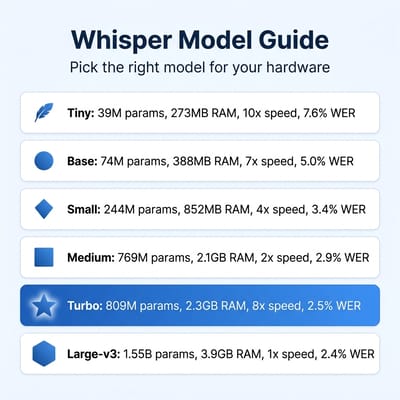
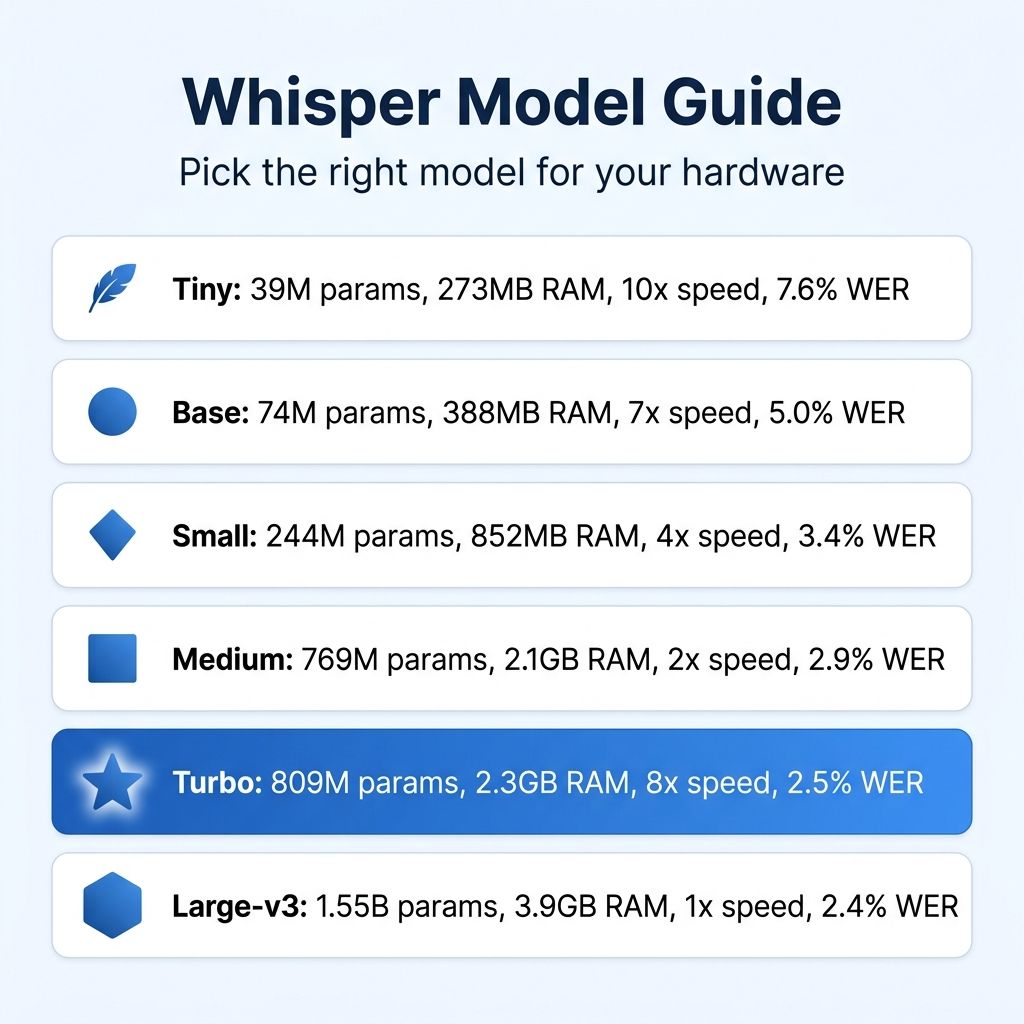
The tiny and base models (39M and 74M parameters) need less than 400 MB of RAM and run comfortably on almost anything, including a $120 N100 mini PC. They are fast but noticeably less accurate, with word error rates around 5-8% on clean English audio. Fine for quick-and-dirty transcription of clearly spoken recordings, but they struggle with accents, background noise, and technical vocabulary.
The small model (244M parameters) hits a practical sweet spot for budget hardware. At roughly 1 GB of RAM and a word error rate in the 3-4% range on clean English, it delivers useful accuracy while remaining fast on an 8-core processor. With faster-whisper’s CTranslate2 optimization and INT8 quantization, the small model runs comfortably faster than real-time on a modern Ryzen chip.
The medium model (769M parameters, ~2.1 GB RAM) sits between small and turbo, but for most mini PC deployments it is the model to skip. Turbo delivers similar accuracy at much higher speed, which is why most modern guides recommend jumping straight from small to turbo if your hardware can handle it.
The turbo model deserves special attention. It is a distilled version of large-v3 that cuts the decoder from 32 layers to 4, achieving 8x the speed of large while retaining most of its accuracy (2.5% WER versus 2.4%). At 809M parameters and roughly 2.3 GB of RAM, turbo is the model to target if your hardware can handle it. It is the single best trade-off between quality and performance for a dedicated transcription service.
The large-v3 model (1.55B parameters, ~3.9 GB RAM, 2.4% WER) is the accuracy champion, but it runs slowly on CPU-only hardware. Unless you have workstation-class hardware like the DGX Spark or are willing to attach an external GPU, the turbo model will serve you better in practice.
Whisper is no longer the undisputed champion for English transcription. NVIDIA’s Canary model now beats Whisper on English word error rates in several benchmarks, and Parakeet TDT is significantly faster for English-only workloads. But Whisper still has the largest ecosystem of tools, the broadest multilingual support (99+ languages), and the widest range of optimized implementations. For an office that needs to handle multiple languages or integrate with existing tools, Whisper remains the pragmatic choice.
Matching Hardware to Workload
The beauty of running Whisper on a mini PC is that you do not need expensive hardware. The key is matching the right model to the right processor. Here is a practical breakdown of three hardware tiers, each corresponding to a different workload:
Budget tier ($150-250): An Intel N100 or N150 mini PC with 16 GB of RAM handles the tiny, base, and small models comfortably. Expect the small model to transcribe at roughly real-time speed (one minute of audio takes about one minute to process). That is fine for batch transcription of meetings or podcasts where you are not waiting for results immediately. These low-power mini PCs draw as little as 6-10 watts at idle and 15-20 watts under a transcription workload, low enough to run as an always-on office appliance.
Mid-range ($250-400): A Ryzen 7 mini PC like the Beelink EQR7 with its 8-core, 16-thread Ryzen 7 7735HS gives you enough muscle to run the small model faster than real-time and the turbo model at roughly real-time. The dual Gigabit Ethernet ports make it a natural fit for a shared office server that handles transcription alongside other workgroup services.
Beelink EQR7
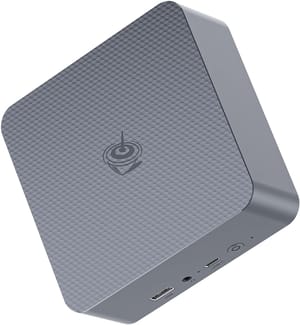
- +Dual Ethernet
- +8-core Ryzen 7
- +dual M.2 slots
- +compact
- -Soldered RAM (not upgradeable)
- -no USB4
- -Gigabit only (not 2.5GbE)
Performance tier ($400-700): For the turbo or large-v3 model with faster-than-real-time performance, look at something like the Beelink SER9 PRO+ with its Ryzen 7 H 255 processor and 32 GB of LPDDR5X. The extra memory bandwidth helps noticeably with larger models, and USB4 plus 2.5 GbE connectivity make it a capable hub for a more ambitious transcription setup that serves multiple users. If you are also weighing options for local LLMs beyond Whisper, our mini PC guide for local AI covers how memory bandwidth and RAM costs factor into that decision.
Beelink SER9 PRO+
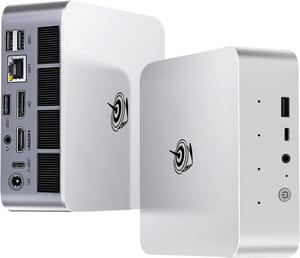
- +Ryzen 7 H 255
- +32GB LPDDR5X
- +USB4
- +2.5GbE
- +dual M.2
- -Soldered RAM
- -higher price point
- -overkill for small models
A brief note on GPUs: you do not need one for Whisper on a mini PC. The faster-whisper library with CTranslate2 is optimized for CPU inference, and the small and turbo models run well without any GPU acceleration. If you are a power user who wants to run large-v3 at speed, the GMKtec NucBox M7 has an OCuLink port for connecting an external GPU, but that is firmly in enthusiast territory.
Picking the Right Whisper Tool
Once you have the hardware, you do not need to write any code to get started. Several open-source projects wrap Whisper in a friendly interface, and the right choice depends on who is using it and how.
For individual dictation
Handy is a free, open-source desktop app that runs Whisper (and NVIDIA’s faster Parakeet model) entirely on your machine. Mac, Windows, and Linux are all supported, and it does exactly one thing well: push-to-talk transcription. Press a keyboard shortcut, speak, release, and your words appear wherever your cursor is. No server to manage, no configuration files. We covered Handy in our notes section, but the short version is that it is the right tool if your use case is dictation rather than batch transcription of recorded audio.
On Mac specifically, MacWhisper is a polished paid alternative with an intuitive batch workflow for meeting recordings. Either option will get you transcribing within minutes of install.
For batch transcription and meetings
Whisper-WebUI wraps faster-whisper in a Gradio web interface with file upload, speaker diarization, subtitle export (SRT and VTT), and real-time progress tracking. It runs as a Docker container, which keeps deployment on a mini PC clean and reproducible. Follow the Docker instructions in the project README, then point your browser at your mini PC’s IP on port 7860. Anyone on your office network can drop in an audio file and get back a transcript a few minutes later.
For voice assistants
If your office uses smart speakers or you are building voice controls into a workspace, Home Assistant’s Wyoming integration connects a local Whisper instance directly to voice assistants like the Home Assistant Voice Preview Edition. That gives you private voice control over meetings, calendars, and connected devices without any cloud dependency. The hardware requirements are the same as for batch transcription: a mini PC running the small or turbo model handles voice commands with minimal latency.
For scripting and automation
Developers who want to wire Whisper into custom workflows (a script that watches a shared folder, a Slack bot that transcribes voice memos, a CRM plugin that attaches transcripts to call logs) should look at faster-whisper’s Python API directly. The project README has working examples, and community projects like whisperX add word-level timestamps and forced alignment on top for richer use cases like interview transcription with precise word timing.
The Desktop and Server Question
The two approaches, desktop app and self-hosted server, are complementary rather than competing. A desktop tool like Handy handles the “I am composing an email and want to dictate a paragraph” use case for a single person at their own machine. A mini PC running Whisper-WebUI handles the “our office recorded a two-hour client interview and needs a full transcript with timestamps and speaker labels” use case for a whole team.
Many small businesses will want both: Handy on each employee’s laptop for individual dictation, and a shared Whisper server on a mini PC in the office for longer recordings and meeting transcripts. Security-minded teams should note that neither option phones home. Both run entirely on hardware you control, and neither needs a live internet connection after the model files are downloaded.
A $449 Mini PC Costs $24 a Year to Run
Here is the math for running a mid-range transcription setup. A Beelink EQR7 costs roughly $449. Electricity at US average rates for a mini PC drawing 15 watts continuously runs about $24 per year. That is your total ongoing cost: no per-minute charges, no subscription tiers, no overage fees.
Compare that to cloud transcription at $7-8 per 1,000 minutes. If your office transcribes more than about 16 hours of audio in the first year, the mini PC has already paid for itself. Every hour after that is effectively free. For a small business that regularly transcribes client meetings, or a journalist who records interviews, the economics are not even close.
Setup takes an hour or two with any of the tools above, depending on how much polish you want. After that, it just runs. Drop files in a folder or point a browser at the office server, and get transcripts back. That is the kind of quiet infrastructure that pays for itself on the first billable hour it saves.


