

For years, the standard advice for anyone wanting to write code on a Chromebook has been to enable Linux, wrestle with Crostini, and accept that you’re working inside a container that occasionally forgets it exists. That changed on March 18, 2026, when Google announced full-stack vibe coding in AI Studio: a browser-based experience that pairs the new Antigravity coding agent with native Firebase integration. You describe what you want to build in plain English, and Gemini’s models handle the implementation. The entire workflow runs in a Chrome tab, which means Google AI Studio on a Chromebook needs nothing more than a browser and an internet connection.
Google’s official post on X pulled in tens of thousands of likes and millions of views. For Chromebook users specifically, prototyping does work in the browser, while production deployment bills by token.
Google AI Studio’s Antigravity Builds Full Apps From Text Prompts
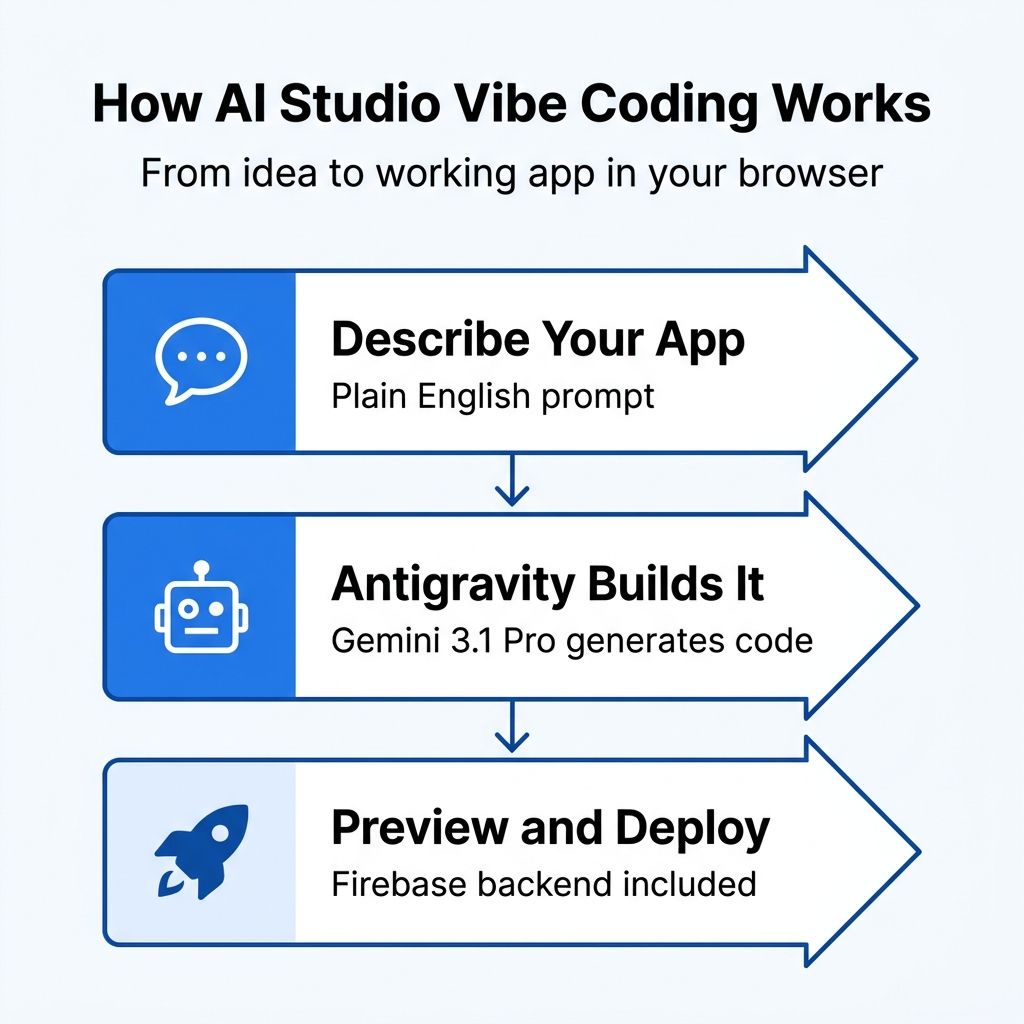
Antigravity, an AI pair programmer, generates working code in React, Angular, or Next.js. You tell it what you want (a recipe organizer, a multiplayer game, a project management tool) and it scaffolds and builds the whole application. What sets it apart from earlier AI coding tools is the backend integration. When your app needs a database, the agent detects this automatically and, after you approve a Firebase integration, provisions Cloud Firestore; it wires up Firebase Authentication for user login and installs libraries like Framer Motion and Shadcn for animations and UI components, without you touching a package manager.
The Demo Apps Use Real Infrastructure
Google demonstrated this with several example applications:
- A multiplayer laser tag game with real-time leaderboards
- A collaborative 3D particle visualization using Three.js
- A recipe organizer powered by Gemini models
They involve WebSocket connections, persistent data storage, user authentication, and third-party API integration, the kind of infrastructure that would normally take a professional developer days to set up. A new Secrets Manager lets you store API credentials for services like payment processors or Google Maps, which means apps built this way can interact with the broader web ecosystem rather than existing in isolation.
Google claims its teams have built hundreds of thousands of apps using this system during internal testing.
Hardware Specs Barely Matter for This Workflow
The historical Chromebook development story has always been one of workarounds. Enable Linux in settings, install a code editor, set up Node.js, configure a local server, and hope your device has enough RAM to handle the container overhead alongside Chrome. It works, but it’s the kind of setup that makes sense for developers who already know what they’re doing, not for students or anyone exploring coding for the first time.
Google AI Studio sidesteps all of that. Because the coding environment runs entirely in Google’s cloud and renders in your browser, your Chromebook’s hardware specifications become largely irrelevant to the development experience. A $250 Chromebook with 4GB of RAM can access the same Antigravity agent as a premium laptop. The processing happens on Google’s servers, and your device just needs to display the result and handle text input. This is the same dynamic that makes Google’s own Gemini AI features work well on Chromebook Plus devices.
Local Dev Tools Still Do Not Run
Chromebooks were designed from day one around the premise that the browser is enough. Software development has long been the clearest counterexample. You can’t run Visual Studio Code natively, you can’t install Docker without Linux, and large projects won’t compile locally. AI Studio leaves those specific limitations in place and moves the entire development process into the browser instead.
The Browser Interface Tops Out Around Single-Page Apps
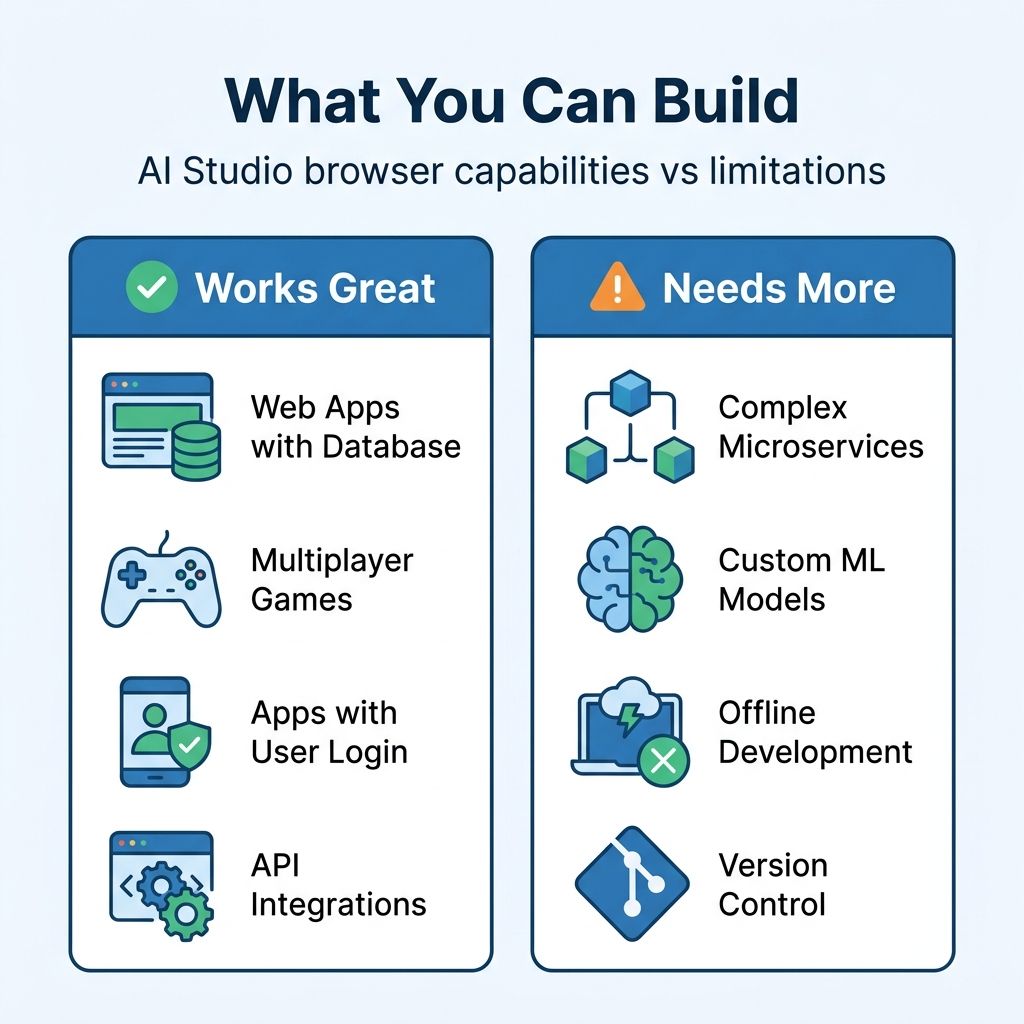
The tool excels at prototyping and building straightforward web applications: the kind of app that has a frontend, a database, maybe some authentication, and interactions with a few APIs. For a non-developer turning an idea into a working prototype, this makes building accessible.
The apps generated through AI Studio’s browser interface are essentially single-page applications with Firebase backends. That’s powerful, but it’s not the same as building a complex microservices architecture, working with custom machine learning models, or developing anything that requires fine-grained control over server infrastructure. For those workflows, Google offers Antigravity as a standalone desktop IDE with deeper capabilities, but that’s a locally installed application, which on a Chromebook would circle back to the Linux container approach.
Costs Start at Deployment
AI Studio is free for prototyping and testing. But deploying to production means using the Gemini API or Vertex AI, both of which bill by token for the models you call. A student experimenting with app ideas pays nothing. A startup trying to ship a product will accumulate costs that scale with usage. Google is building a pipeline from free experimentation to paid production, which is a smart business model but one that users should understand from the start.
Coding Comes Off the Can’t-Do List, With Limits
I’ve written before about the things Chromebooks struggle with: professional creative software, serious gaming, specialized industry applications. Software development has always been on that list with a large asterisk. You could technically write code on a Chromebook through Linux, but the experience ranged from awkward to painful depending on your project’s complexity and your device’s hardware.
AI Studio shrinks that asterisk without erasing it. A small business owner building a web app to manage inventory no longer needs to learn about package managers, build tools, and deployment pipelines, and a computer science teacher no longer needs to worry about whether the school’s Chromebooks can handle a Linux development environment. And a hobbyist with an app idea can turn it into something functional without a separate computer.
This shift parallels what happened when Google Docs made office productivity viable in the browser. Google Docs never replaced Microsoft Office for every use case. But for the vast majority of document-writing needs, it proved that the browser was enough. AI Studio makes a similar argument for simple web apps, a tier of software development that is enough to matter for the audience Chromebooks already serve.
Browser-Based Development Was Already Growing
Browser-based development environments like Replit, StackBlitz, and GitHub Codespaces have been chipping away at the “you need local tools” assumption for years. Google adds the AI layer that makes the browser-based approach accessible to people who don’t already know how to code. Replit is powerful but still assumes you understand programming concepts. StackBlitz is fast but still expects you to write JavaScript.
For Chromebook users, this expanding ecosystem of browser-based tools means the argument for buying a more expensive laptop “in case you need to code someday” gets weaker. The combination of AI Studio for building apps and Gemini for research and writing creates a platform that handles more real-world workflows than the browser-only stereotype allows.
There Is No Offline Mode
If you need to work without internet access, AI Studio offers nothing. Code generation and the Firebase integration both run on Google’s servers, so the whole workflow stops when the connection does. For users in areas with spotty connectivity, or for anyone who needs to work regardless of network conditions, that rules it out.
Google AI Studio Is Worth Trying Now
Navigate to aistudio.google.com in Chrome, sign in with your Google account, and start describing what you want to build. The learning curve is essentially zero for basic prototyping: you’re writing English, not code. Start with small projects to explore what the tool handles well and where it stumbles. Try building a to-do app, a quiz game, or a simple dashboard, and you’ll quickly develop an intuition for the kinds of applications where AI-assisted coding works well.
Managed School Chromebooks Are Not a Blocker
For teachers considering this for classroom use, the free tier makes it immediately practical. Students can prototype applications without any setup beyond opening a browser tab, and the Firebase integration means those applications can actually store data and handle multiple users. It’s a lower barrier to entry than installing development tools on school-managed Chromebooks, where IT policies often restrict Linux access.
The Chromebook you pair with AI Studio does not need much. The Chromebook Comparison Chart lets you filter and compare specs side by side to find the right fit.
AI Studio is not yet a substitute for a full IDE, a version control workflow, and the ecosystem of tools that professional developers rely on daily.


