
Acer Chromebook 11 (2018)
Updated on

Note: The Acer Chromebook 11 (CB3-132) reached its Auto Update Expiration (AUE) date in June 2022 and is no longer receiving Chrome OS security updates. The page is preserved as a reference for owners of existing hardware; this device is not a current purchase recommendation.
The Acer Chromebook 11 (2018) sat at the budget end of the Chromebook market when it shipped, packing a surprisingly competent set of parts into a sub-$200 plastic shell. With an IPS display, a fanless chassis, and all-day battery life, the compact 11.6-inch clamshell became a familiar sight in classrooms, on coffee tables, and in the hands of students who needed a reliable web browser without spending laptop money. Its update window has now closed, but understanding what made the CB3-132 work helps frame how far the budget Chromebook category has come, and what owners of the device can still get out of it.
Related Videos
Acer Chromebook 11 (2018) Comparison Chart
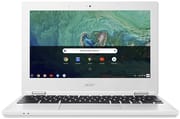 Acer Chromebook 11 (2018) | |
| Price | List Price: $219.99 Amazon Prices: |
| Model number | CB3-132-C4VV / NX.G4XAA.002 |
| Performance Rating | 2.4 |
| Chromebook Plus | No |
| Processor | Dual-core 1.60 Ghz (max 2.48 Ghz) Intel Celeron Processor N3060 |
| RAM | 4 GB |
| Internal Storage | 16 GB |
| Screen Size | 11.6" |
| Screen Resolution | 1366x768 |
| Screen Type | IPS |
| Touch Screen | No |
| Stylus / Pen | No Stylus Support |
| Dimensions width x length x thickness | 11.6 x 8 x 0.7 inches (294.64 x 203.2 x 17.78 mm) |
| Weight | 2.43 lbs (1.1 kg) |
| Backlit Keyboard | No |
| Webcam | 1280x720 |
| WiFi | 802.11ac |
| Bluetooth | Bluetooth 4.0 |
| Ethernet | No |
| Cellular Modem | No |
| HDMI | Full-Size HDMI |
| USB Ports | 1 USB 2.0, 1 USB 3 |
| Thunderbolt Ports | No |
| Card Reader | SD |
| Battery | 3 cell, 3490 mAh, Lithium-ion |
| Battery Life | 10.0 hours |
| Fanless | Yes |
| Auto Update Expiration Date | June, 2022 |
Related Chromebooks
-
 Acer Chromebook 311 (AMD)The Acer Chromebook 311 combines an 11.6-inch ComfyView screen, robust AMD processing, and 10-hour…
 -
 Acer Chromebook Spin 11 CP311The Acer Chromebook Spin 11 combines functionality and portability with its 11.6-inch touch IPS…
 -
 ASUS Chromebook C203XAThe ASUS Chromebook C203XA shines with military-grade durability, an 11.6-inch anti-glare HD…
 -
 Lenovo Flex 3 ChromebookThe Lenovo Flex 3 Chromebook hits the sweet spot with its 11.6-inch IPS touchscreen, 4GB RAM, and…
 -
 Dell Chromebook 3120A rugged and affordable 11.6-inch Chromebook with Intel N100 processor, available in clamshell and…
 -
 Lenovo Chromebook 3 11"The Lenovo Chromebook 3 is a sub-$220 11.6-inch ChromeOS laptop with a Celeron N4020, 4GB of RAM,…
Pros and Cons of the Acer Chromebook 11 (CB3-132)
| Pros | Cons |
|---|---|
| Best-in-class IPS display at the sub-$200 price point | Soft trackpad with a difficult-to-press click |
| Fanless design (silent, no fan dust intake) | 16 GB eMMC fills up fast once Android apps are installed |
| Real-world 8 to 9 hour battery (Lon Seidman testing) | Proprietary barrel charger; no USB-C power option |
| Metal lid plate protects the screen from backpack pressure | 1366x768 resolution looks dated by 2026 standards |
| Light (2.43 lbs) and thin (0.7 inches) | Intel Celeron N3060 stutters with many open tabs |
| Wide port mix for an 11-inch device: HDMI, USB 3.0, USB 2.0, SD | AUE reached in June 2022: no new security updates |
Detailed Insights into the Acer Chromebook 11
The CB3-132’s most impressive feature was its IPS display, which reviewers consistently praised as the best you could find in a sub-$200 laptop at the time. Unlike the TN panels common in budget devices, the IPS screen delivered wider viewing angles, better color accuracy, and improved brightness that made everyday tasks more pleasant. The 1366x768 resolution was standard for this price point and screen size, though modern users accustomed to higher resolutions may find it limiting.
Build quality exceeded expectations for such an affordable device. Acer incorporated a metal plate on the lid to protect the screen from pressure damage, a thoughtful touch that reflected the device’s suitability for students and travelers. The plastic chassis felt solid rather than cheap, with reviewer Lon Seidman noting that it “doesn’t feel all that cheap to me” despite its budget positioning. At just 2.43 pounds and 0.7 inches thick, the Chromebook was genuinely portable and easy to slip into a backpack.
The Intel Celeron N3060 processor handled basic Chrome OS tasks adequately, though it showed its limitations with demanding workloads. Web browsing, document editing in Google Docs, and streaming video all worked smoothly, but users who kept many tabs open might experience occasional slowdowns. The fanless design meant completely silent operation and no heat buildup during use, a genuine advantage for lap use or classroom environments.
Connectivity options were adequate for the era but lacked the USB-C ports that would soon become standard. The single USB 3.0 port, single USB 2.0 port, full-size HDMI output, and SD card reader covered most use cases, though the absence of USB-C charging meant carrying Acer’s proprietary power adapter on the go. Like most Chromebooks of this era, wired networking required a USB Ethernet adapter.
Place in the Budget Chromebook Era
The CB3-132 arrived during the peak of what could fairly be called the classroom Chromebook gold rush. Between 2016 and 2018, every major OEM (Acer, Asus, HP, Lenovo, Samsung, Dell, CTL) was shipping near-identical 11.6-inch plastic clamshells built around the Intel Celeron N2840, N3060, or N3350. The recipe was straightforward: a small TN or IPS panel, 4 GB of soldered RAM, 16 or 32 GB of eMMC storage, a fanless plastic chassis, and a starting price between $179 and $249. Schools bought them by the cart, parents bought them as starter machines for younger kids, and Amazon ran them at $129 to $149 during every major sale.
Acer’s particular contribution to that segment was a focus on screen quality and chassis durability. The CB3-132 was one of the earliest sub-$200 Chromebooks to ship with an IPS panel as standard rather than as a step-up option, and the metal-reinforced lid was unusual at the price. Those two choices made the device stand out in a category where reviewers were otherwise reduced to comparing keyboard travel and trackpad accuracy. Within Acer’s own line the CB3-132 sat between the older Bay Trail-based CB3-131 (which used the Celeron N2840) and the convertible Acer Chromebook R11 (CB5-132T), with which it shares the underlying Braswell platform and update timeline.
That shared platform is why this page now points at a June 2022 AUE date rather than the September 2021 date that applies to the older CB3-131. Google’s Auto Update Policy lists devices by board, and the CB3-132 rides on the same cyan board as the convertible R11 (CB5-132T, C738T) rather than the candy board that powered the prior generation. The two CB3 models look almost identical from across a desk, but they are different platforms with different update windows.
Reviewer Insights on the Acer Chromebook 11
Lon Seidman’s Perspective
Lon Seidman from Lon.TV delivered the most comprehensive review of the CB3-132, calling it “a very good deal” at its ~$189 price point. His hands-on testing revealed strong points including “the nicest display you will find in a sub-$200 laptop” and solid build quality with the ruggedized metal lid plate. He found the device “pretty snappy for basic web browsing” despite the older Celeron processor, and his real-world battery testing showed 8-9 hours of actual use. The main criticisms centered on the trackpad being difficult to click, the limited 16GB storage becoming problematic with Android apps, and the lack of USB-C connectivity that newer devices offered.
Andrew Webb’s Written Review
Andrew Webb at Target-Bravo reviewed the CB3-132 specifically (confirming its Intel Celeron N3060) and found that build quality had “greatly improved” over the netbooks the form factor grew out of. He praised the battery, calling the quoted 10 hours “conservative” with the brightness down, alongside the passive cooling, and recommended the machine for users who work primarily in Chrome and a G-Suite environment. His main gripes were that the trackpad offers no right-click without a mouse and that the power connector is non-standard.
Overall, the reviewers who tested this exact CB3-132 agreed it excelled as a no-frills budget device with a surprisingly good display, while the soft trackpad and limited 16GB storage were the consistent pain points.
Owner Guidance After End of Support
If you still own a working CB3-132, the device has not stopped functioning; it has stopped getting new Chrome OS updates. That distinction matters. The machine will still boot, sign in to a Google account, run installed Android apps, and connect to the internet. What it will not get any more is a security patch when a new browser or kernel vulnerability is disclosed, and that is the reason most guidance (including ours) treats post-AUE Chromebooks as unsuitable for sensitive workloads.
For practical purposes, “sensitive workloads” mostly means accounts where someone else’s money or someone else’s data is at stake: online banking, your primary email account, anything with your home address or payment cards saved, work or school SSO logins. Those should move to a supported machine. Anything that lives entirely inside a sandboxed app (a kids’ game, a streaming video service, a recipe browser, a music client, an offline document editor) is much lower risk and is a reasonable use for a CB3-132 that would otherwise sit in a drawer.
Repurposing the hardware is also an option. The CB3-132 is on the low end for installing a Linux distribution (the 4 GB RAM ceiling and 16 GB eMMC are the binding constraints), but a lightweight desktop environment running off external storage can extend the useful life of the chassis for kiosk-style or read-only tasks. ChromeOS Flex, Google’s own bring-back-old-hardware project, technically supports a range of Intel-based laptops, but it does not formally support post-AUE Chromebooks and tends to perform best on x86 systems with more RAM than the CB3-132 ships with. Owners considering that path should check current ChromeOS Flex certified model list before investing time.
If the device is past its usefulness, treat it like any other end-of-life laptop. The lithium-ion battery means it should not go in normal trash; most US electronics retailers (Best Buy, Staples, Office Depot) take Chromebooks for free recycling, and Acer’s own e-waste program accepts mail-in returns. Wiping the device first is straightforward: a powerwash from the system settings reverts it to factory state and removes your Google account binding so the next user is not locked out.
For anyone shopping for a current device, a budget Chromebook bought today will receive Chrome OS updates well into the 2030s under Google’s extended automatic-update policy, which is the most consequential single difference between a CB3-132 in 2026 and a new sub-$200 Chromebook in 2026.
Conclusion
The Acer Chromebook 11 (CB3-132) served its purpose as an entry-level device that punched above its weight class on display quality and battery life. For students, travelers, and anyone who needed a reliable secondary machine for web-based work, it offered genuine value at its price tag. The fanless operation, lightweight construction, and all-day battery made it practical for mobile use in ways many competing budget laptops could not match.
With its June 2022 AUE date long past, the CB3-132 can no longer receive Chrome OS security updates, so it is no longer suitable for accounts handling sensitive information or for users who want continued feature improvements. Owners can still use it for low-risk offline and entertainment tasks; shoppers looking for a current budget machine should buy one of the sub-$200 Chromebooks currently in production, all of which carry update windows reaching into the 2030s.
Shoppers weighing current options can browse and filter all models side by side in the Chromebook Comparison Chart to find a device with an update window well into the future.
Frequently Asked Questions
Q: When did the Acer Chromebook 11 (CB3-132) reach Auto Update Expiration?
A: The CB3-132 reached its Auto Update Expiration (AUE) in June 2022. It shares the cyan board with the Acer Chromebook R11 (CB5-132T, C738T), and Google’s Auto Update Policy lists that board family together. After June 2022 the device no longer receives Chrome OS security updates, feature updates, or browser engine updates.
Q: Can I still use a CB3-132 in 2026?
A: Yes, the device still boots and runs Chrome OS, but it should not be used for online banking, primary email, or any account holding sensitive personal or payment information. Without security updates, a newly disclosed browser vulnerability will not be patched. The CB3-132 is reasonable for low-stakes use such as streaming video, offline document editing, kids’ games, or as a secondary kitchen browser.
Q: What processor does the Acer Chromebook 11 CB3-132 use?
A: The CB3-132-C4VV ships with an Intel Celeron N3060, a dual-core Braswell-generation chip with a 1.6 GHz base clock and 2.48 GHz burst. It is paired with 4 GB of soldered LPDDR3 memory and 16 GB of eMMC storage. The processor is adequate for single-window web browsing and Google Docs use, but it slows noticeably with many open tabs or with Android apps running in the background.
Q: Is the RAM or storage upgradeable on the CB3-132?
A: No. Both the 4 GB of RAM and the 16 GB of eMMC storage are soldered to the mainboard and are not user-serviceable. The only way to add storage is to use an external SD card (the device has a full-size SD reader) or a USB flash drive. The eMMC chip cannot be swapped with normal tools.
Q: Can I install Linux on the CB3-132 now that it is past AUE?
A: It is technically possible: the CB3-132 is an x86_64 Chromebook based on the cyan board, and Linux installation methods that work on similar Braswell devices apply here too. In practice the 4 GB RAM ceiling and 16 GB internal storage are the binding constraints, so a lightweight desktop environment running off an external SD card or USB drive is the most realistic path. ChromeOS Flex does not formally support post-AUE Chromebooks and is not a guaranteed replacement. See our Chrome OS Linux distro FAQ for more.
Q: Does the CB3-132 have USB-C?
A: No. The CB3-132 predates the USB-C charging transition in Chromebooks. Power comes through a proprietary barrel connector, and the data ports are one USB 3.0 and one USB 2.0, plus a full-size HDMI output and an SD card slot. If you need to charge over USB-C, you would have to choose a newer Chromebook generation.
Q: What was the original MSRP of the CB3-132?
A: The CB3-132-C4VV launched at a US list price of $219.99. Street prices typically ran in the $179 to $199 range, and seasonal sales (Prime Day, back-to-school) saw it drop as low as $140 at major US retailers.
Q: How do I safely retire or recycle a CB3-132?
A: Before disposing of the device, run a powerwash from system settings to revert it to factory state. That removes your Google account binding so the next handler is not locked out. The lithium-ion battery means it should not go in normal household trash; Best Buy, Staples, and Office Depot accept Chromebooks for free recycling in the US, and Acer operates a mail-in e-waste program for its own hardware.