
Acer Chromebook 315 (CB315-7H, CB315-7HT)
Published on

The Acer Chromebook 315 (CB315-7HT) is a big-screen touchscreen Chromebook for documents, email, video calls, and streaming at a desk or on a couch. Its keypad and HDMI port make it easy to use for spreadsheets and for connecting a TV. Intel’s dual-core N50 is a slow chip, so this machine suits people who work in a few tabs at a time. Google supports it with ChromeOS updates through June 2033.
Pros and cons
| Pros | Cons |
|---|---|
| ChromeOS updates through June 2033 | Dual-core N50 scores about half of an Intel N100 |
| 15.6-inch 1080p IPS touchscreen with an anti-glare finish | 45% NTSC color coverage makes the panel a poor fit for photo work |
| Full-size keyboard with a numeric keypad | No keyboard backlight |
| HDMI plus two USB-C ports with display output and charging | Storage is 128GB of eMMC with no microSD slot, and the memory cannot be upgraded |
| 8GB of LPDDR5 keeps a handful of tabs loaded | 720p webcam, below the 1080p camera on the older CB315-5H |
| WiFi 6E and Bluetooth 5.3 | At 3.5 pounds it is more of a desk machine than a commuter |
Acer Chromebook 315 (CB315-7H, CB315-7HT) Comparison Chart
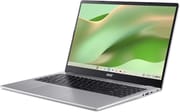 Acer Chromebook 315 (CB315-7HT) 8GB/128GB touch | |
| Price | List Price: $299.00 Amazon Prices: Loading prices... |
| Model number | CB315-7HT-C7GN |
| Performance Rating | 2.6 |
| Chromebook Plus | No |
| Processor | Dual-core 1.00 Ghz (max 3.40 Ghz) Intel Processor N50 |
| RAM | 8 GB |
| Internal Storage | 128 GB eMMC |
| Screen Size | 15.6" |
| Screen Resolution | 1920x1080 |
| Screen Type | IPS |
| Touch Screen | Yes |
| Stylus / Pen | No Stylus Support |
| Dimensions width x length x thickness | 14.1 x 9.3 x 0.73 inches (358.14 x 236.22 x 18.54 mm) |
| Weight | 3.51 lbs (1.6 kg) |
| Backlit Keyboard | No |
| Webcam | 720p |
| WiFi | Wi-Fi 6E (802.11ax) |
| Bluetooth | Bluetooth 5.3 |
| Ethernet | No |
| Cellular Modem | No |
| HDMI | Full-Size HDMI |
| USB Ports | 2 USB 3, 2 USB-C 2x USB-C 3.2 Gen 1 (DP, charging), 2x USB-A 3.2 Gen 1 |
| Thunderbolt Ports | No |
| Card Reader | No Card Reader |
| Battery | 3 cell, 53Wh, Li-ion |
| Battery Life | 15 hours |
| Fanless | No |
| Auto Update Expiration Date | June, 2033 |
Related Chromebooks
-
 Acer Chromebook 15The Acer Chromebook 15 stands out with a 15.6" FHD IPS touch display, backlit keyboard, and up to…
-
 Acer Chromebook 15 315The Acer Chromebook 15 315 combines a comfortable 15.6'' ComfyView display and fanless design for…
-
 Lenovo IdeaPad Flex 3i Chromebook 15.6"The Lenovo IdeaPad Flex 3i Chromebook 15.6" pairs a full-size keyboard with numeric keypad and a…
-
 ASUS Chromebook CM15 (CM1505)The ASUS Chromebook CM15 (CM1505) is a 15.6-inch MediaTek Kompanio 540 Chromebook with a full HD…
-
 ASUS Chromebook CX15 (CX1505CTA)The ASUS Chromebook CX15 (CX1505CTA) is a 15.6-inch Intel N50 Chromebook with a full HD anti-glare…
-
 Lenovo Chromebook m 15A 15.3-inch ChromeOS laptop with a MediaTek Kompanio 540, a 16:10 WUXGA screen, a numeric keypad,…
HDMI, USB-C on both edges, and a matte touchscreen

The left edge has the HDMI 1.4 output, a USB-A port, and a USB-C port; a second USB-A port, a second USB-C port, a 3.5mm combo audio jack, and a lock slot are on the right. All four USB ports run at USB 3.2 Gen 1 speed. Either USB-C port takes the charger or drives a display over DisplayPort, so the cable can come from whichever side the outlet is on. HDMI 1.4 is fine for a 1080p TV or projector, while a higher-resolution monitor should use USB-C.
Acer rates the 15.6-inch 1920x1080 IPS panel at 45% NTSC color, so colors look muted next to a wider-gamut screen. Its matte anti-glare coating and 60 Hz refresh rate work well for documents and video. You can tap and scroll on the screen, but the clamshell hinge does not fold into a tablet.
At about 14.1 by 9.3 by 0.7 inches and 3.5 pounds, the silver chassis is easier to keep on a desk than to carry every day. The keyboard has a numeric keypad but no backlight, and the OceanGlass touchpad sits below the space bar, offset to the left. Two DTS-tuned speakers sit under a grille above the keyboard, and video calls go through a 720p webcam.
Acer claims up to 15 hours from the three-cell battery, with up to 11 hours of video playback and up to 13 hours of web browsing on the full HD model, and it lists a 65W maximum for the charger. Acer’s page for the Chromebook 315 family lists a 53Wh battery and says fast charging can reach up to 50% in 30 minutes or 80% in an hour, with specifications that vary by model and region.
A slower processor than the older CB315-5H

The Intel Processor N50 launched in early 2023 with two efficiency cores, two threads, and a 3.4 GHz boost clock. PassMark puts its CPU Mark at about 2,600, roughly half of the 5,305 scored by the Intel N100 in the Chromebook 315 (CB315-5H), even though this model is the newer of the two. Expect web pages and Android apps to load more slowly when several things are running.
Acer lists 8GB of LPDDR5 as the maximum. The 8GB keeps tabs loaded, but the two cores still limit speed. Apps, downloads, and offline files share 128GB of eMMC storage, and with no card slot, extra space comes from a USB drive or cloud storage.
Neither the N50 nor the 720p webcam meets the Chromebook Plus requirements, so this model does not get that tier’s on-device AI features. Google lists its auto-update expiration as June 2033, the same date as the CB315-5H.
Who should buy it
This Chromebook makes sense when number entry and a touchscreen matter more than speed, such as household budgets or schoolwork on a large screen with one or two apps open and a TV or monitor close by.
Skip it if you keep many tabs open or lean on Android and Linux apps. The Acer CB315-5H has the faster N100, a 1080p webcam, and a microSD slot, though it gives up HDMI. The ASUS Chromebook CX15 (CX1505CTA) uses the same N50 and leaves out the touchscreen, and the ASUS Chromebook Plus CX15 is the step up for heavier work. The Chromebook comparison chart lines these models up spec by spec.
Frequently Asked Questions
How is the CB315-7H different from the CB315-7HT?
The T marks the touchscreen. The US CB315-7HT-C7GN has 8GB of memory and 128GB of storage. Non-touch CB315-7H builds with less storage are sold in other countries, such as the 4GB and 64GB CB315-7H-C9RS in Canada and the 8GB and 64GB CB315-7H-H18P in Japan. Google gives both versions the same June 2033 update date.
Is the CB315-7H the same as the CB315-6H?
No. Acer sells both as the Chromebook 315, but the CB315-7HT-C7GN has the N50 and WiFi 6E, while the CB315-6H-P12B has an Intel N250 and WiFi 7. Google lists the CB315-7H and CB315-7HT through June 2033 and the CB315-6H and CB315-6HT through June 2035. Check the model code before buying.
Can it drive an external monitor?
Yes. The HDMI port takes a standard HDMI cable with no adapter, and either USB-C port can carry the picture with a USB-C display cable or an adapter.
Can I upgrade the memory or storage?
No. The LPDDR5 is not a socketed module, the eMMC storage is not replaceable, and Acer lists 8GB as the maximum memory.
Does it run Linux apps?
The ChromeOS Linux environment is available, and the N50 is an x86 chip, so standard x86 packages install. With two cores it suits light command-line tools and small editors, not IDEs or containers.