
ASUS Chromebook CX15 (CX1505CTA)
Published on

The ASUS Chromebook CX15 (CX1505CTA) is a big-screen ChromeOS laptop for browsing, schoolwork, and video at home, built for one task at a time rather than heavy multitasking. It is the newer version of the Celeron N4500 CX15 in the same chassis, now with Intel’s dual-core Processor N50, a second USB-C port, and no microSD slot. Google supports it with updates through June 2033. The memory is soldered, so buy the 8GB build for anything past light use.
Pros and cons
| Pros | Cons |
|---|---|
| ChromeOS updates through June 2033 | The 4GB model leaves little room for tabs and Android apps |
| 15.6-inch full HD anti-glare screen with thin bezels | Dual-core N50 is a slow chip for multitasking |
| HDMI plus two USB-C ports with display output and charging | Memory and eMMC storage are soldered, and there is no microSD slot |
| Numeric keypad on a quiet full-size keyboard | No keyboard backlight |
| MIL-STD 810H rating and a webcam privacy shutter | Every port is on the left edge |
| Speakers with some mid and low end, better than many cheap Chromebooks | 720p webcam and no touchscreen |
Related Videos
ASUS Chromebook CX15 (CX1505CTA) Comparison Chart
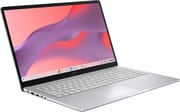 ASUS Chromebook CX15 (CX1505CTA) | ASUS Chromebook CX15 (CX1505CTA) | |
| Price | List Price: $320.00 Amazon Prices: Loading prices... | List Price: $199.00 Amazon Prices: Loading prices... |
| Model number | CX1505CTA-AS88F-PG | CX1505CTA-WS48G |
| Performance Rating | 2.6 | 1.5 |
| Chromebook Plus | No | No |
| Processor | Dual-core 1.00 Ghz (max 3.40 Ghz) Intel Processor N50 | Dual-core 1.00 Ghz (max 3.40 Ghz) Intel Processor N50 |
| RAM | 8 GB | 4 GB |
| Internal Storage | 128 GB eMMC | 128 GB eMMC |
| Screen Size | 15.6" | 15.6" |
| Screen Resolution | 1920x1080 | 1920x1080 |
| Screen Type | IPS | IPS |
| Touch Screen | No | No |
| Stylus / Pen | No Stylus Support | No Stylus Support |
| Dimensions width x length x thickness | 14.15 x 9.14 x 0.79 inches (359.41 x 232.16 x 20.07 mm) | 14.15 x 9.14 x 0.79 inches (359.41 x 232.16 x 20.07 mm) |
| Weight | 3.51 lbs (1.6 kg) | 3.51 lbs (1.6 kg) |
| Backlit Keyboard | No | No |
| Webcam | 720p | 720p |
| WiFi | Wi-Fi 6 (802.11ax) | Wi-Fi 6 (802.11ax) |
| Bluetooth | Bluetooth 5.4 | Bluetooth 5.4 |
| Ethernet | No | No |
| Cellular Modem | No | No |
| HDMI | Full-Size HDMI | Full-Size HDMI |
| USB Ports | 1 USB 3, 2 USB-C 2x USB-C 3.2 Gen 1 (DP, PD), 1x USB-A 3.2 Gen 1, all on the left edge | 1 USB 3, 2 USB-C 2x USB-C 3.2 Gen 1 (DP, PD), 1x USB-A 3.2 Gen 1, all on the left edge |
| Thunderbolt Ports | No | No |
| Card Reader | No Card Reader | No Card Reader |
| Battery | 3 cell, 42Wh, Li-ion | 3 cell, 42Wh, Li-ion |
| Battery Life | Unknown | Unknown |
| Fanless | No | No |
| Auto Update Expiration Date | June, 2033 | June, 2033 |
Related Chromebooks
-
 ASUS Chromebook CM15 (CM1505)The ASUS Chromebook CM15 (CM1505) is a 15.6-inch MediaTek Kompanio 540 Chromebook with a full HD…
 -
 ASUS Chromebook C523The ASUS Chromebook C523 is a fanless 15.6-inch Chromebook with an anti-glare display, an Intel…
 -
 Lenovo Chromebook m 15A 15.3-inch ChromeOS laptop with a MediaTek Kompanio 540, a 16:10 WUXGA screen, a numeric keypad,…
 -
 Acer Chromebook 15 315The Acer Chromebook 15 315 combines a comfortable 15.6'' ComfyView display and fanless design for…
 -
 Acer Chromebook 315The Acer Chromebook 315 (CB315-4H) is a fanless 15.6-inch FHD IPS Chromebook with an Intel Celeron…
 -
 HP Chromebook 15a (15a-nb0013dx)The HP Chromebook 15a (15a-nb0013dx) is a fanless 15.6-inch Chromebook with an Intel N200, 8GB of…
Ports, screen, and build

All of the ports sit on the left edge: two USB 3.2 Gen 1 Type-C ports with DisplayPort output and Power Delivery, one USB 3.2 Gen 1 Type-A port, an HDMI 1.4 output, and a 3.5mm combo audio jack. The right edge carries only a Kensington lock slot. Two USB-C ports mean the charger, an external display, and a USB-A accessory can all stay connected without a hub. HDMI 1.4 drives a 1080p TV or projector but is not meant for a 4K or high-refresh monitor.
ASUS lists WiFi 6 (802.11ax, dual band 2x2) and Bluetooth 5.4. The 15.6-inch 1920x1080 panel is non-touch with an anti-glare finish, rated at 300 nits and 45% NTSC color. The 42Wh three-cell battery charges over USB-C from the included 45W adapter, and ASUS rates it at up to 13 hours on the 4GB model.
The keyboard is a chiclet layout with 1.35mm of key travel, a spill-resistant design, and a numeric keypad on the right, with no backlight. The plastic chassis is rated to MIL-STD 810H, measures about 14.2 by 9.1 by 0.8 inches, and starts at 3.5 pounds. The 720p webcam has a physical privacy shutter, and the board carries a Titan C security chip.
Intel N50 performance and the two memory sizes
The Intel Processor N50 has two efficiency cores and two threads, a 3.4 GHz boost clock, 6MB of cache, and a 6W power rating. Intel launched it in early 2023, and its PassMark CPU Mark of about 2,600 is roughly 45% above the Celeron N4500 in the older CX15, about half of an Intel N150, and about a quarter of the Core 3 N355 in the Chromebook Plus CX15. It handles web browsing, Google Docs, streaming, and video calls when only a few tabs are open at once.
The 4GB model has very little room once ChromeOS, a handful of tabs, and an Android app are running. The 8GB model (CX1505CTA-AS88F-PG) keeps more tabs in memory, though it does not change the two-core processor. The 128GB of eMMC storage is soldered too, and with no microSD slot, extra space comes from a USB drive or cloud storage.
The N50 and the 720p webcam both fall short of the Chromebook Plus requirements, so neither configuration gets that tier’s on-device AI features. Its June 2033 update date is two years past the N4500 CX15’s June 2031 and two years before the Plus model’s June 2035, and the auto-update expiration date marks when security patches stop.
Reviewer Insights

Chrome Unboxed
Chrome Unboxed unboxed the 4GB/128GB model in purple after ASUS offered it a unit, and Robby Payne wrote up the same model in an unboxing article. In the video, the host said “The keyboard actually feels really good,” quiet but with a good click and no mistyping, and found the numeric keypad a little small but wide enough to type on by feel. He called the touchpad smaller than most on 15-inch laptops but usable, and said “I do just really like the build quality here for an all plastic device.” Payne’s article said the plastic chassis “doesn’t feel cheap or flimsy in hand.”
On the screen, the host noted that 300 nits is not bright but that the anti-glare coating worked, text looked sharp, and scrolling was smooth, and he said “I like the screen a lot.” He found the speakers better than those on many cheap Chromebooks, with a little mid and low end and no real bass. The 720p webcam was a little grainy but adjusted well when he pointed it at a dark background.
He expected the 4GB of memory to hurt alongside the two-core processor, and with three tabs open and Android apps turned off he noticed some stuttering, though he said the studio’s slow internet may have played a part and that loaded pages scrolled and zoomed smoothly. He said the N50 is not meant for 20 tabs or several virtual desks, and that it suits a single task with a couple of web pages open: checking social media, banking, simple spreadsheets, and video calls. Payne wrote that the N50 “handles daily web tasks, Google Docs editing, video streaming, and casual web navigation far better than I expected,” but he would not recommend it for people who juggle many tabs, web apps, and Android apps. Battery life was not measured; the host guessed 10 to 12 hours from the 6W chip.
Who it’s for
The CX15 (CX1505CTA) fits browsing, schoolwork, streaming, banking, simple spreadsheets, and video calls with a couple of pages open, the single-task use Chrome Unboxed described. The 15.6-inch anti-glare 1080p screen, the numeric keypad, HDMI plus two USB-C ports, and updates through June 2033 suit a desk at home. Buy the 8GB build, because the soldered 4GB leaves little room once a few tabs and an Android app are running.
Skip it if you keep many tabs open, use several virtual desks, or lean on Android or Linux apps. The ASUS Chromebook CM15 (CM1505) uses the same chassis with a MediaTek Kompanio 540, an ARM chip with about twice the N50’s PassMark score, and Google supports it through June 2036, though it runs only ARM builds of Linux software. The Chromebook Plus CX15 is the step up for heavy tabs, Android apps, or Linux tools. The Chromebook comparison chart lines these models up spec by spec.
Frequently Asked Questions
How is the CX1505CTA different from the CX1505CKA?
The CX1505CKA runs a Celeron N4500 with LPDDR4X memory, while the CX1505CTA runs the Intel N50 with LPDDR5. Compared with the CKA model on our N4500 CX15 page, which has one USB-C port and a microSD slot, the CTA adds a second USB-C port, drops the microSD slot, and gets ChromeOS updates two years longer, through June 2033.
Can it drive an external monitor?
Yes. The HDMI 1.4 port and both USB-C ports carry display output, so a 1080p monitor or TV connects without a dongle. For a higher-resolution monitor, use one of the USB-C ports, which carry DisplayPort output.
Does it run Linux apps?
The ChromeOS Linux environment is available, and because the N50 is an x86 chip, standard x86 Linux packages install. With two cores and 4GB or 8GB of memory, it suits light command-line tools and small editors, not IDEs or containers.
What comes in the box?
The laptop and a 45W USB-C wall-mount charger. Purchases currently include a limited-time three-month Google AI Pro trial.
Is the CX15 (CX1505CTA) a Chromebook Plus?
No. The ASUS Chromebook Plus CX15 shares the CX1505CTA model code but uses an eight-core Core 3 N355 with at least 8GB of memory. Check for “Plus” and the processor name on the listing before buying.