
Acer Chromebook Spin 513
Updated on

The Acer Chromebook Spin 513 runs the Qualcomm Snapdragon 7c Compute Platform, an ARM chip, in a convertible 13.3-inch body. Acer promises battery life exceeding 13 hours. Configurations run from 4GB to 8GB of RAM and 64GB to 128GB of storage, with prices starting around $180 for the base model.
| Pros | Cons |
|---|---|
| Fanless, silent operation | 4GB RAM in base model can cause ChromeOS stuttering with many tabs |
| Battery life over 12 hours in reviewer testing by TechRadar | Glossy display causes significant glare in bright environments |
| Lightweight at 2.65 lbs with slim 0.61” profile | No SD card reader limits expandable storage options |
| 360-degree convertible hinge for tablet and tent modes | WiFi 5 only, no WiFi 6 |
| USB-C ports support DisplayPort and charging | ARM processor trails Intel alternatives in benchmark performance |
| Corning Gorilla Glass over the touchscreen | Grainy 720p webcam, per Chrome Unboxed |
Related Videos
Acer Chromebook Spin 513 Comparison Chart
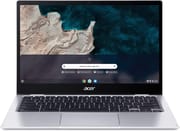 Acer Chromebook Spin 513 | Acer Chromebook Spin 513 | Acer Chromebook Spin 513 | Acer Chromebook Spin 513 | Acer Chromebook Spin 513 | Acer Chromebook Spin 513 | |
| Price | List Price: $529.99 Amazon Prices: Loading prices... | List Price: $799.99 Amazon Prices: Loading prices... | List Price: $799.99 Amazon Prices: | List Price: $599.99 Amazon Prices: Loading prices... | List Price: $459.99 Amazon Prices: Loading prices... | List Price: $285.00 Amazon Prices: Loading prices... |
| Model number | R841T-S4ZG / NX.AA5AA.004 | R841LT-S6DJ / NX.AA6AA.001 | R841LT-S4JQ / NX.AA6AA.002 | CP513-2H-K62Y / NX.K0LAA.001 | CP513-1H-S338 / NX.HWZAA.004 | CP513-1H-S60F |
| Performance Rating | 3.8 | 5.1 | 5.1 | 5.1 | 5.1 | 3.8 |
| Chromebook Plus | No | No | No | No | No | No |
| Processor | Octa-core 2.10 Ghz (max 2.40 Ghz) Qualcomm Snapdragon 7c Compute Platform | Octa-core 2.10 Ghz (max 2.40 Ghz) Qualcomm Snapdragon 7c Compute Platform | Octa-core 2.10 Ghz (max 2.40 Ghz) Qualcomm Snapdragon 7c Compute Platform | Octa-core 2.10 Ghz (max 2.40 Ghz) Qualcomm Snapdragon 7c Compute Platform | Octa-core 2.10 Ghz (max 2.40 Ghz) Qualcomm Snapdragon 7c Compute Platform | Octa-core 2.10 Ghz (max 2.40 Ghz) Qualcomm Snapdragon 7c Compute Platform |
| RAM | 4 GB | 8 GB | 8 GB | 8 GB | 8 GB | 4 GB |
| Internal Storage | 64 GB eMMC | 128 GB eMMC | 128 GB eMMC | 128 GB eMMC | 64 GB eMMC | 64 GB eMMC |
| Screen Size | 13.3" | 13.3" | 13.3" | 13.3" | 13.3" | 13.3" |
| Screen Resolution | 1920x1080 | 1920x1080 | 1920x1080 | 1920x1080 | 1920x1080 | 1920x1080 |
| Screen Type | IPS | IPS | IPS | IPS | IPS | IPS |
| Touch Screen | Yes | Yes | Yes | Yes | Yes | Yes |
| Stylus / Pen | Supported | Supported | Supported | Supported | Supported | Supported |
| Dimensions width x length x thickness | 12.2 x 8.2 x 0.61 inches (309.88 x 208.28 x 15.49 mm) | 12.2 x 8.2 x 0.61 inches (309.88 x 208.28 x 15.49 mm) | 12.2 x 8.2 x 0.61 inches (309.88 x 208.28 x 15.49 mm) | 12.2 x 8.2 x 0.61 inches (309.88 x 208.28 x 15.49 mm) | 12.2 x 8.2 x 0.61 inches (309.88 x 208.28 x 15.49 mm) | 12.2 x 8.2 x 0.61 inches (309.88 x 208.28 x 15.49 mm) |
| Weight | 2.65 lbs (1.2 kg) | 2.65 lbs (1.2 kg) | 2.65 lbs (1.2 kg) | 2.65 lbs (1.2 kg) | 2.65 lbs (1.2 kg) | 2.65 lbs (1.2 kg) |
| Backlit Keyboard | Yes | Yes | Yes | Yes | Yes | Yes |
| Webcam | HD | HD | HD | HD | HD | HD |
| WiFi | WiFi 5 (IEEE 802.11ac) | WiFi 5 (IEEE 802.11ac) | WiFi 5 (IEEE 802.11ac) | WiFi 5 (IEEE 802.11ac) | WiFi 5 (IEEE 802.11ac) | WiFi 5 (IEEE 802.11ac) |
| Bluetooth | Bluetooth 5.0 | Bluetooth 5.0 | Bluetooth 5.0 | Bluetooth 5.0 | Bluetooth 5.0 | Bluetooth 5.0 |
| Ethernet | No | No | No | No | No | No |
| Cellular Modem | No | No | No | No | No | No |
| HDMI | No HDMI | No HDMI | No HDMI | No HDMI | No HDMI | No HDMI |
| USB Ports | 1 USB 2.0, 2 USB-C (with DisplayPort and charging) | 1 USB 2.0, 2 USB-C (with DisplayPort and charging) | 1 USB 2.0, 2 USB-C (with DisplayPort and charging) | 1 USB 2.0, 2 USB-C (with DisplayPort and charging) | 1 USB 2.0, 2 USB-C (with DisplayPort and charging) | 1 USB 2.0, 2 USB-C (with DisplayPort and charging) |
| Thunderbolt Ports | No | No | No | No | No | No |
| Card Reader | No Card Reader | No Card Reader | No Card Reader | No Card Reader | No Card Reader | No Card Reader |
| Battery | 2 cell, 4670 mAh, Lithium Ion | 2 cell, 4670 mAh, Lithium Ion | 2 cell, 4670 mAh, Lithium Ion | 2 cell, 4670 mAh, Lithium Ion | 2 cell, 4670 mAh, Lithium Ion | 2 cell, 4670 mAh, Lithium Ion |
| Battery Life | 13.5 hours | 13.5 hours | 13.5 hours | 13.5 hours | 13.5 hours | 13.5 hours |
| Fanless | Yes | Yes | Yes | Yes | Yes | Yes |
| Auto Update Expiration Date | June, 2031 | June, 2031 | June, 2031 | June, 2031 | June, 2031 | June, 2031 |
Related Chromebooks
-
 Samsung Galaxy Chromebook 2The Samsung Galaxy Chromebook 2 is a 13.3-inch 2-in-1 with a vivid 1080p QLED touchscreen, an…
 -
 Acer Chromebook 314The Acer Chromebook 314 (CB314) is a fanless 14-inch laptop with an Intel Celeron N4000, sold in…
 -
 Acer Chromebook 311An 11.6-inch Chromebook with an Intel Celeron N4000, 4GB of RAM, a fanless chassis, and up to 10…
 -
 Lenovo IdeaPad Slim 3 ChromebookThe Lenovo IdeaPad Slim 3 Chromebook 14 pairs a fanless MediaTek Kompanio 520 processor with a…
 -
 ASUS Chromebook CM14 FlipThe ASUS Chromebook CM14 Flip is a fanless 14-inch convertible Chromebook with a MediaTek Kompanio…
 -
 Lenovo 14e Chromebook (Gen 3)The Lenovo 14e Chromebook Gen 3 is a 14-inch education laptop sold in Intel N100 and N200 builds…
Fanless build and a glossy Gorilla Glass touchscreen

The aluminum chassis holds weight to 2.65 pounds and thickness to 0.61 inches, so carrying it all day costs little. Its 360-degree hinge moves smoothly through every position, from typing in laptop mode to tent mode for a video call to folded flat for touchscreen use. With no fan inside, the machine stays quiet at any workload, which helps in a library or a shared office. The footprint is 12.2 by 8.2 inches, and a two-cell 4670 mAh battery sits inside.
The 13.3-inch Full HD IPS panel holds color and viewing angles well, and Corning Gorilla Glass protects it during tablet use. The panel runs at 1920x1080 and takes touch input in every position the hinge allows. Brightness is adequate indoors but does not overcome reflections in direct sunlight. Touch response is quick, and the panel takes a USI stylus, though none ships in the box.
Two USB-C ports carry DisplayPort output and power delivery, so either one can drive an external monitor or charge the device. A single USB-A port covers older peripherals, and a combo headphone and microphone jack handles audio. An HD webcam and a built-in microphone cover video calls. There is no HDMI port, so an external display needs a USB-C adapter, and there is no SD card reader to supplement the 64GB base storage. WiFi 5 and Bluetooth 5.0 handle wireless, without the speed or network efficiency of WiFi 6. A wired connection is possible with a USB Ethernet adapter on one of the USB-C ports. The R841LT variants offer optional 4G LTE for working away from WiFi, which raises the price.
Reviewer Insights

TechRadar’s Assessment
TechRadar’s Richard Devine reviewed the Snapdragon 7c variant and awarded it 4 out of 5 stars, praising its design and strong battery performance. In their testing, the Spin 513 achieved 12 hours and 26 minutes of continuous use. Devine liked the trackpad quality and the compact form factor, noting that it is “barely larger than a sheet of paper.” His review also said that “a similarly priced Intel-powered Chromebook like the Lenovo Flex 5 is significantly more impressive” in raw performance. Devine wrote, “For most people most of the time it’ll be absolutely perfect.”
Chrome Unboxed’s Perspective
Chrome Unboxed’s Robby Payne tested the MediaTek Kompanio 1380 variant (CP513-2H) and called it “one of the most compelling Chromebooks on the market.” That processor matched 10th-gen Intel Core i3 benchmarks while keeping the battery life and the fanless design. Payne wrote that it “flew through everything I could throw at it, and played Android games very, very well.” He found the keyboard feel mediocre and the 720p webcam grainy.
PCWorld’s Take
PCWorld’s Matthew S. Smith gave the device 3.5 out of 5 stars and measured the battery life at 12 hours and 34 minutes. He praised the keyboard for its “spacious layout and good tactile feedback” and wrote that the device “feels speedy in day-to-day use” and “can handle a dozen open browser tabs with ease.” Smith was less impressed with the build quality at this price point, citing display lid flex and plastic hinge cladding as concerns. He criticized the glossy screen for causing “significant glare and reflections and easily shows fingerprints.”
Customer Reviews
Across 345 ratings on Amazon, the Acer Chromebook Spin 513 averages 4.1 stars, with 62 percent of ratings at five stars and 12 percent at one star. A verified buyer, TJB, wrote “I can tent it to sit on the counter while I follow a recipe, or back to a traditional position to surf while I’m watching TV,” and called the backlit keyboard “a must for me.” A verified buyer named tia tigresa, on her eighth Chromebook, valued the flip-back hinge and the long update window (her unit receives updates until 2031), but flagged “extremely modest battery life.”
This machine ships in more than one version (the 1H and 2H), and that is where the low ratings concentrate. A verified buyer, sjm1203, wrote “This item is falsely advertised… This DOES NOT have a backlit keyboard,” and a verified buyer named Cali Love hit the same issue: “this Chromebook states that there is a backlit keyboard but it does not… they just sent me the exact same model back without the backlit keyboard.” Brian, who rated it four stars, also noted the variant confusion and recommended checking which model you are buying.
Read more owner reviews on Amazon.
Cheap enough to recommend for light everyday work
ChromeOS updates run through June 2031, so a unit bought today has several more years of security patches ahead of it. Prices have dropped a long way from launch, and the base model now sells for under $200.
At that price the Snapdragon 7c covers browsing, document editing, and streaming video, though it trails Intel alternatives in raw benchmark scores and the 4GB configuration will frustrate heavy multitaskers. The Lenovo Flex 5 is the Intel-based alternative at a similar price, and the Chromebook Comparison Chart lines both up against the rest of the lineup.
Frequently Asked Questions
How long does the Acer Chromebook Spin 513 battery last?
TechRadar measured 12 hours 26 minutes and PCWorld 12 hours 34 minutes, both short of Acer’s official 13.5-hour claim. For web browsing, document work, and occasional video streaming, that is a full day of use without charging.
Is the 4GB RAM version sufficient for everyday use?
The 4GB configuration works for email, light web browsing, and Google Docs. It slows noticeably once 10+ browser tabs or several Android apps are open at the same time, so the 8GB versions are worth their price premium for anyone who multitasks.
Can you upgrade the RAM or storage on the Chromebook Spin 513?
No. Both the RAM and the eMMC storage are soldered to the motherboard, so the configuration you buy is the one you keep. Choose the RAM carefully at purchase time; for storage, cloud services or a USB-C flash drive can supplement what is onboard.
Does the Acer Chromebook Spin 513 support stylus input?
The touchscreen takes USI (Universal Stylus Initiative) pens for drawing, note-taking, and precise input. No stylus comes in the box, so budget $30-70 for one from Acer, Penoval, or another maker of USI-compatible pens.
How does the Snapdragon 7c compare to Intel Chromebook processors?
The Qualcomm Snapdragon 7c handles everyday Chromebook tasks and trails Intel alternatives in benchmark tests. TechRadar noted that “a similarly priced Intel-powered Chromebook like the Lenovo Flex 5 is significantly more impressive” for raw performance. The ARM chip brings longer battery life and fanless operation.
When does the Acer Chromebook Spin 513 stop receiving updates?
The CP513-1H, R841T, and R841LT models with Snapdragon 7c receive ChromeOS updates until June 2031. That Auto Update Expiration (AUE) date is when security patches and new features stop arriving. The newer CP513-2H models with MediaTek processors have a longer window, through June 2032.