
ASUS Googlebook 14
Published on

The ASUS Googlebook 14 is a 14-inch laptop for people who live in Google’s apps and carry an Android phone. It is one of the first laptops on Googlebook OS, Google’s new Android-based laptop system, which runs Play Store apps natively and links to an Android phone for app streaming and file sharing. Reviewers rated the hardware highly, especially the 2.2-pound body and the matte OLED touchscreen, and put their complaints on the launch software, where some apps were missing and the phone features failed for several of them. It fits buyers whose work is in Chrome and Google apps and who carry a phone on Android 17; anyone who needs desktop software or a specific Android app should wait.
Pros and cons
| Pros | Cons |
|---|---|
| About 2.2 pounds with a 14-inch screen | Googlebook OS is new, and some Play Store apps are missing |
| Matte 3K 120Hz OLED touchscreen | Phone features failed for some reviewers at launch |
| Two Thunderbolt 4 ports, two USB-A, and HDMI 2.1 | OLED flickers (PWM) below full brightness |
| Large haptic touchpad and backlit keyboard | No full desktop apps such as Photoshop |
| Six-speaker sound system | 16GB of memory is soldered |
| Wi-Fi 7, Bluetooth 6.0, and a fingerprint reader | No card reader and no 5G option |
Related Videos
ASUS Googlebook 14 Comparison Chart
 ASUS Googlebook 14 | ASUS Googlebook 14 | |
| Price | List Price: $1299.00 Amazon Prices: Best Buy: Loading price... | List Price: $1299.00 Amazon Prices: |
| Model number | CX9406CAA-U5_16.512 | CX9406CAA-DH566T |
| Performance Rating | 3.8 | 3.8 |
| Chromebook Plus | No | No |
| Processor | Octa-core 2.10 Ghz (max 4.50 Ghz) Intel Core Ultra 5 325 | Octa-core 2.10 Ghz (max 4.50 Ghz) Intel Core Ultra 5 325 |
| RAM | 16 GB | 16 GB |
| Internal Storage | 512 GB NVMe SSD (upgradable PCIe Gen 4) | 256 GB NVMe SSD (upgradable PCIe Gen 4) |
| Screen Size | 14" | 14" |
| Screen Resolution | 2880x1800 | 2880x1800 |
| Screen Type | OLED | OLED |
| Touch Screen | Yes | Yes |
| Stylus / Pen | No Stylus Support | No Stylus Support |
| Dimensions width x length x thickness | 12.24 x 8.38 x 0.65 inches (310.9 x 212.85 x 16.51 mm) | 12.24 x 8.38 x 0.65 inches (310.9 x 212.85 x 16.51 mm) |
| Weight | 2.18 lbs (0.99 kg) | 2.18 lbs (0.99 kg) |
| Backlit Keyboard | Yes | Yes |
| Webcam | 1080p | 1080p |
| WiFi | Wi-Fi 7 (802.11be) | Wi-Fi 7 (802.11be) |
| Bluetooth | 6.0 | 6.0 |
| Ethernet | No | No |
| Cellular Modem | No | No |
| HDMI | Full-Size HDMI | Full-Size HDMI |
| USB Ports | 2 USB 3, 2 USB-C (2 USB4) 2x Thunderbolt 4 (DP 1.4, PD), 2x USB-A 10Gbps | 2 USB 3, 2 USB-C (2 USB4) 2x Thunderbolt 4 (DP 1.4, PD), 2x USB-A 10Gbps |
| Thunderbolt Ports | 2 | 2 |
| Card Reader | No Card Reader | No Card Reader |
| Battery | 4 cell, 70Wh, Li-ion | 4 cell, 70Wh, Li-ion |
| Battery Life | 18 hours | 18 hours |
| Fanless | No | No |
| Auto Update Expiration Date | Unknown | Unknown |
Related Chromebooks
-
 ASUS Chromebook Flip CX1 (Touchscreen)The ASUS Chromebook Flip CX1 is a 14-inch Full HD convertible with a 360-degree touchscreen, an…
 -
 ASUS Chromebook Vibe CX34 FlipThe ASUS Chromebook Vibe CX34 Flip is a cloud-gaming convertible Chromebook with a 12th Gen Intel…
 -
 HP Googlebook 14HP's first Googlebook: a 14-inch aluminum laptop with a 120Hz 3K OLED touchscreen and a Snapdragon…
 -
 Acer Chromebook Spin 314 (2024)A 14-inch convertible Chromebook with a 16:10 WUXGA touch display, 360-degree hinge, and software…
 -
 Acer Chromebook Spin 314The Acer Chromebook Spin 314 is a budget 14-inch convertible Chromebook with a 360-degree hinge, a…
 -
 Acer Chromebook Vero 514The Acer Chromebook Vero 514 blends sustainability with performance. Sporting a Full HD IPS…
A 2.2-pound magnesium-aluminum laptop with two Thunderbolt ports

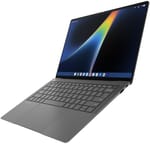
The Googlebook 14 (model CX9406CAA) measures about 12.2 x 8.4 inches and between 0.43 and 0.65 inches thick, and ASUS lists its weight at 2.18 pounds. Andrew Marc David weighed his unit on camera at about 2.1 pounds. The chassis comes from ASUS’s ExpertBook Ultra business laptop, and Pocket-lint describes it as CNC-machined magnesium-aluminum alloy in a dark gray finish ASUS calls Dusk Ash. The hinge opens with one finger and, as Chrome Unboxed showed, pulls the lid shut on its own near the end of its travel. A multicolor light strip on the lid, the Glowbar, marks it as a Googlebook and pulses when Gemini is working.
Ports are split between both sides, so the laptop charges from either edge. The left side has a Thunderbolt 4 port, an HDMI 2.1 port, a USB-A port, and the headphone jack; the right side has a second USB-A port and a second Thunderbolt 4 port. Both Thunderbolt ports are USB4 compliant and carry DisplayPort output and USB-C charging, and both USB-A ports run at 10Gbps. There is no card reader. Wireless is Wi-Fi 7 with Bluetooth 6.0, and the box includes a 65W USB-C charger. The 1080p webcam has a privacy shutter, and the fingerprint reader sits in the power button. ASUS also lists a Titan C2 security chip.
A matte 3K 120Hz OLED touchscreen
The 14-inch OLED panel runs at 2880x1800 in a 16:10 shape, refreshes at 120Hz, and accepts touch through Corning Gorilla Glass Victus with a matte anti-glare surface. ASUS rates it at 450 nits for regular content and 1,000 nits peak in HDR, with full DCI-P3 coverage. Reviewers singled out the matte coating, which cuts reflections near a window that a glossy OLED would show. NotebookCheck measured 540 nits in SDR and 1,266 nits in HDR. Its lab tests also found a raised black level (0.42 nits, for 1,250:1 contrast), inaccurate color calibration, and PWM flicker at 720Hz at 99% brightness and below, a high frequency that NotebookCheck says most PWM-sensitive users should not notice. Andrew Marc David noticed some screen wobble when tapping the touchscreen.
Core Ultra 5 325 performance and Googlebook OS

Both US models use the Intel Core Ultra 5 325, a 2026 Panther Lake chip with four performance cores up to 4.5GHz, four efficiency cores, Intel Graphics with four Xe3 cores, and an NPU rated at 47 TOPS. It scores about 19,500 on PassMark’s CPU benchmark. Memory is 16GB of soldered LPDDR5X, and storage is a 256GB or 512GB M.2 2280 PCIe 4.0 SSD. ASUS also lists a Core Ultra 7 355 configuration, the one NotebookCheck tested. Reviewers found the Ultra 5 quick for everyday work with many browser tabs, and Pocket-lint measured 2,519 single-core and 11,050 multi-core in Geekbench 7.
Googlebook OS is built on Android rather than on ChromeOS, so Android apps from the Play Store run natively in resizable windows next to Chrome. At launch, some Play Store apps are missing or broken on the Intel models. ETA PRIME and How-To Geek could not find Minecraft in the Play Store, Fortnite crashed or would not run for ETA PRIME and MakeUseOf, and full Photoshop does not exist for Android. BGR wrote that more apps run well on the Snapdragon Googlebooks than on Intel ones at launch. The phone features (app streaming, Continue On for picking up a task from the phone, and shared files) need a phone on Android 17, per Dave2D. Dave2D also reports a 10-year software update commitment from Google, which he treated with some skepticism. Because it does not run ChromeOS, it has no ChromeOS Auto Update Expiration date.
ASUS rates the 70Wh battery at up to 18 hours of local 1080p video playback at 50% brightness. NotebookCheck measured 13 hours 20 minutes of Wi-Fi browsing at 150 nits on the Ultra 7 model and about 8 hours at full brightness. Other reviewers reported a full workday or more of light use, though BGR called the battery little more than adequate, and MakeUseOf’s Christine Persaud found it drained faster than she wanted.
Reviewer Insights
NotebookCheck
Andreas Osthoff’s lab review scored it at 87%, and his verdict opened with “The Asus Googlebook 14 feels like a premium business laptop, and considering it is based on the excellent ExpertBook Ultra, this is hardly a surprise.” On his Ultra 7 unit he measured the fan at 24 dB(A) idle and 34.7 dB(A) at its loudest, with surfaces staying under about 102°F under load. The processor ran at about 45W for a few seconds before settling near 18W, and he concluded that the Ultra 7 is not worth the extra money over the Ultra 5 325. He praised the six-speaker audio (“The sound system with six speakers offers excellent sound quality and clearly beats its rivals.”) and noted that “Maintenance is limited to the fan, the battery and the M.2-2280 SSD.” He called it “a very lightweight companion for everyday tasks within the Android ecosystem” and faulted Googlebook OS as limited, along with the lack of a 5G option.
Pocket-lint
John Kanellakos gave it 4 out of 5 in his Pocket-lint review and named the display his favorite hardware feature: “The 3K OLED touchscreen is absolutely gorgeous, with a smooth 120Hz refresh rate, up to 1,000 nits of peak brightness, full 100 percent coverage of the DCI-P3 color gamut, and a 91 percent screen-to-body ratio.” He also liked the rest of the package: “Battery life is more than solid for a full day of work and then some, the port selection is reasonable, and Intel’s latest portable chipset is powerful while maintaining efficiency.” His complaint was the software, where he wrote “There’s simply not enough here yet that takes advantage of the premium hardware under-the-hood.” He called the Glowbar superfluous and got a full day of use with the screen at 120Hz and 90% brightness.
How-To Geek
At How-To Geek, Andrew Heinzman scored it 5 out of 10 in his review. He wrote “I don’t have much to say about the ASUS Googlebook 14 itself, as the hardware is essentially perfect.” and called the haptic trackpad the best he has tested outside a MacBook. He expected over 10 hours of battery from browsing and video. The phone link did not work for him or other early users, Quick Share felt limited, and apps he expected were missing from the Play Store. He blamed Google, not ASUS, for the low score: “Manufacturers like ASUS are going above and beyond to give Googlebook a chance at success while Google sabotages itself by excessively marketing a product that can barely do what it’s supposed to do.”
BGR
In his BGR review, Christian de Looper found the screen excellent and the machine quick: “For everyday tasks, the Googlebook 14 felt quite quick.” He rarely heard the fan. He noticed some flex in the keyboard deck and more in the lid, found the fingerprint reader slow and sometimes inaccurate, and rated the speakers good in the highs but light on bass. He was less happy with endurance, writing “I found the battery life on this machine to be little more than adequate.” For buyers whose apps matter most, he suggested looking at a Snapdragon-based Googlebook instead of an Intel one.
T3
Max Freeman-Mills at T3 praised the anti-reflective screen as possibly the best of the launch Googlebooks. He counted Googlebook OS’s limitations, the high price, and how warm it can get against it. He found apps opened promptly and never hit stutters while multitasking across a large number of Chrome tabs. He wrote that “If you want a Googlebook, this is a terrific option, but the software experience remains a little variable at this early stage.” His closing verdict added that “for now it’s probably quite hard to justify over a more established alternative.”
MakeUseOf
Christine Persaud scored it 7 out of 10 at MakeUseOf and timed a boot at about 12 seconds. She heard the fan during basic word processing, found the battery drained faster than she wanted, and saw a yellow tint on skin tones in one streamed show. She named apps as the obstacle to making it a primary machine: “The biggest issue you’ll run into with the Googlebook and any consideration of using it to replace a main laptop is the lack of app support.”
The Gadgeteer
Vincent Nguyen’s first impressions at The Gadgeteer, before battery testing, rated the hardware highly: “The matte OLED, touchpad, and speakers make a terrific first impression.” He wanted a 1TB storage option and would trade one USB-A port for a third Thunderbolt port. The fan stayed quiet in his early use, though the chassis felt warm later in a session.
Dave2D
In his review, Dave2D said “The hardware is really good. So, this is a better built laptop than I’ve ever expected for the money.” He liked the one-hand hinge, the keyboard, and the quick sleep and wake, and found the Magic Pointer Gemini feature useful but its wiggle-to-activate gesture odd. Phone calls did not reach the laptop at all during his testing. He called it “really good, but only if you’re willing to pay for premium hardware that’s basically a cloud-centric Android experience.” He also noted a Linux environment with terminal access for installing Linux apps.
ETA PRIME
ETA PRIME spent about 72 hours with the laptop in his first-look video. In Geekbench 7 he measured 2,357 single-core, behind a Galaxy S26 Ultra’s 3,135, while the Googlebook led that phone in multi-core and CPU scores; the phone’s GPU was well ahead of the Intel graphics. He praised the hardware (“When it comes to the laptop itself, I mean, the build quality is outstanding.”) and named app support as the weak point: “It’s smooth. It’s very responsive, but the lack of app compatibility is really its downside right now.” In games, Diablo Immortal capped at 30 fps, Asphalt ran at 60 fps, GeForce Now streamed at 1440p and 60 fps, and PSP and GameCube emulators ran well once he switched to OpenGL.
Android Authority
Android Authority’s hands-on praised the weight (“It’s so light it makes my MacBook feel like a tank.”) and the matte touchscreen. Cast My Apps and Continue On, the two phone features the reviewer wanted most, never worked for him, and he called the fingerprint reader annoying during setup and wished for a 5G option. He said “the software, which is what makes this laptop, is kind of letting it down,” and found battery life was not an issue for Chrome, Docs, email, and YouTube.
Chrome Unboxed and Andrew Marc David
Chrome Unboxed’s unboxing covered the 16GB/512GB model, noted that the 65W charger is a two-piece brick, and found that the gritty finish shows skin flakes from dry hands. He rated the upward-firing speakers highly for a laptop this light: “From a from a 2-lb laptop to put out that kind of sound, uh that’s that’s remarkable.” Andrew Marc David’s studio video praised the haptic touchpad (“Touchpad haptic working really great.”) and the split Thunderbolt ports, and pointed out the missing SD card reader.
Should you buy it?
The Googlebook 14 suits someone whose work happens in Chrome, Google Workspace, and Android apps and who carries a phone on Android 17, the version the phone-linking features need. Dave2D called it the thinnest and lightest of the first Googlebooks. The Core Ultra 5 325 had no trouble with heavy tab loads, and both US models list at $1,299.
Skip it for now if you rely on desktop software such as Photoshop, or need a specific Android app or game that is not yet in the Googlebook Play Store. Readers who want an OLED laptop on ChromeOS with a published update date can look at the Lenovo Chromebook Plus 14” OLED, and our explainer on native Android apps on Googlebook covers the platform itself. The Chromebook comparison chart lines it up against other models.
Frequently Asked Questions
Is the ASUS Googlebook 14 a Chromebook?
It runs Googlebook OS, which Google built on Android rather than on ChromeOS, so it is not a Chromebook and carries no Chromebook Plus badge. It still uses the Chrome browser, a Google account, and the Play Store, and ASUS lists the same Titan C2 security chip that recent Chromebooks use.
What is the difference between the two US models?
Model CX9406CAA-U5_16.512 has a 512GB SSD and sells at Best Buy, and model CX9406CAA-DH566T has a 256GB SSD and sells on the ASUS Store, both at a $1,299 list price. Both have the Core Ultra 5 325, 16GB of memory, and the same OLED touchscreen.
Can I upgrade the memory or storage?
The 16GB of LPDDR5X memory is soldered and cannot be changed. The SSD is a standard M.2 2280 PCIe 4.0 drive, and NotebookCheck found it reachable along with the fan and the battery once the bottom cover is off.
Does every Android app work on it?
Not at launch. Many run, such as Asphalt at 60 fps for ETA PRIME, but Minecraft was missing from the Play Store for ETA PRIME and How-To Geek (How-To Geek got it running by sideloading), and Fortnite crashed or would not run for ETA PRIME and MakeUseOf.
Can it drive an external monitor?
Both Thunderbolt 4 ports carry DisplayPort output for a USB-C monitor, and the full-size HDMI 2.1 port connects a monitor or TV without an adapter.