
Dell XPS Googlebook
Published on

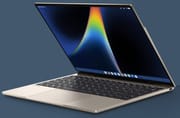
The Dell XPS Googlebook is a 13.4-inch laptop for Android phone owners who want a small, light machine that works with their phone the way a MacBook works with an iPhone. It runs Googlebook OS, Google’s Android-based successor to ChromeOS, so Play Store apps run natively instead of inside the virtual machine today’s Chromebooks use. The hardware is the aluminum chassis of Dell’s 2026 XPS 13 with a Qualcomm Snapdragon X Elite, and Tom’s Guide and Techaeris both found it fast and well built. Googlebook OS is new, it cannot run Windows or Mac desktop programs, and every early review found bugs. Dell and the Google Store sell three configurations; Best Buy carries the 16GB/512GB model.
Pros and cons
| Pros | Cons |
|---|---|
| 12-core Snapdragon X Elite beat the Intel Acer and Lenovo Googlebooks in Tom’s Guide tests | Googlebook OS is new, and reviewers hit bugs and missing apps |
| Native ARM Android apps with no translation layer | Runs no Windows or Mac desktop software |
| 2.2-pound machined aluminum chassis | Two USB-C ports only: no USB-A, HDMI, SD slot, or headphone jack |
| 13.4-inch 2.5K touchscreen at 30 to 120Hz with a matte finish | LCD measured about 408 nits with no HDR; other Googlebooks use OLED |
| Dual fans stayed quiet under benchmark load | Tom’s Guide measured about 10 hours of battery, well below the 18-hour claim |
| Wi-Fi 7 and a fingerprint reader in the power button | Glass touchpad is not haptic, and there is no face unlock |
Related Videos
Dell XPS Googlebook Comparison Chart
 Dell XPS Googlebook | Dell XPS Googlebook | Dell XPS Googlebook | |
| Price | List Price: $999.99 Amazon Prices: Best Buy: Loading price... | List Price: $1,599.99 Amazon Prices: | List Price: $1,799.99 Amazon Prices: |
| Model number | LDX13267-SX12577SHI-PUS | --- | --- |
| Performance Rating | 4.1 | 4.1 | 4.1 |
| Chromebook Plus | No | No | No |
| Processor | Twelve-core 3.40 Ghz (max 4.00 Ghz) Qualcomm Snapdragon X Elite X1E-80-100 | Twelve-core 3.40 Ghz (max 4.00 Ghz) Qualcomm Snapdragon X Elite X1E-80-100 | Twelve-core 3.40 Ghz (max 4.00 Ghz) Qualcomm Snapdragon X Elite X1E-80-100 |
| RAM | 16 GB | 32 GB | 32 GB |
| Internal Storage | 512 GB NVMe SSD (upgradable PCIe Gen 4) | 512 GB NVMe SSD (upgradable PCIe Gen 4) | 1024 GB NVMe SSD (upgradable PCIe Gen 4) |
| Screen Size | 13.4" | 13.4" | 13.4" |
| Screen Resolution | 2560x1600 | 2560x1600 | 2560x1600 |
| Screen Type | IPS | IPS | IPS |
| Touch Screen | Yes | Yes | Yes |
| Stylus / Pen | No Stylus Support | No Stylus Support | No Stylus Support |
| Dimensions width x length x thickness | 11.69 x 7.9 x 0.5 inches (296.93 x 200.66 x 12.7 mm) | 11.69 x 7.9 x 0.5 inches (296.93 x 200.66 x 12.7 mm) | 11.69 x 7.9 x 0.5 inches (296.93 x 200.66 x 12.7 mm) |
| Weight | 2.2 lbs (1 kg) | 2.2 lbs (1 kg) | 2.2 lbs (1 kg) |
| Backlit Keyboard | Yes | Yes | Yes |
| Webcam | 1080p | 1080p | 1080p |
| WiFi | Wi-Fi 7 (802.11be) | Wi-Fi 7 (802.11be) | Wi-Fi 7 (802.11be) |
| Bluetooth | Bluetooth 5.4 | Bluetooth 5.4 | Bluetooth 5.4 |
| Ethernet | No | No | No |
| Cellular Modem | No | No | No |
| HDMI | No HDMI | No HDMI | No HDMI |
| USB Ports | 2 USB-C 2x USB-C 3.2 Gen 2 10Gbps (DP 1.4, PD) | 2 USB-C 2x USB-C 3.2 Gen 2 10Gbps (DP 1.4, PD) | 2 USB-C 2x USB-C 3.2 Gen 2 10Gbps (DP 1.4, PD) |
| Thunderbolt Ports | No | No | No |
| Card Reader | No Card Reader | No Card Reader | No Card Reader |
| Battery | 3 cell, 52Wh, Li-ion | 3 cell, 52Wh, Li-ion | 3 cell, 52Wh, Li-ion |
| Battery Life | 18 hours | 18 hours | 18 hours |
| Fanless | No | No | No |
| Auto Update Expiration Date | Unknown | Unknown | Unknown |
Related Chromebooks
-
 Dell Latitude 3445 ChromebookThe Dell Latitude 3445 Chromebook is a 14-inch 16:10 business Chromebook sold with an AMD Ryzen 5…
 -
 Dell Latitude 5430 Chromebook 2-in-1The Dell Latitude 5430 Chromebook 2-in-1 is a 14-inch business convertible with 12th Gen Intel…
 -
 Acer Chromebook Spin 713The Acer Chromebook Spin 713 boasts a vivid 13.5-inch 2256x1504 IPS touch display, versatile 2-in-1…
 -
 Lenovo IdeaPad Flex 5iThe Lenovo IdeaPad Flex 5i Chromebook is a 13.3-inch convertible with an 11th-gen Intel Core…
 -
 Samsung Galaxy Chromebook 2The Samsung Galaxy Chromebook 2 is a 13.3-inch 2-in-1 with a vivid 1080p QLED touchscreen, an…
 -
 HP Googlebook 14HP's first Googlebook: a 14-inch aluminum laptop with a 120Hz 3K OLED touchscreen and a Snapdragon…
The XPS 13 chassis with two USB-C ports

Dell lists the XPS Googlebook (model DX13267) at about 11.7 x 7.9 x 0.5 inches and 2.2 pounds. Andrew Marc David weighed his review unit at about 2.4 pounds, or about 2.7 pounds with the 65W USB-C charger and cable that come in the box. The body is CNC-machined aluminum in a single color Dell calls Shimmer, a pale champagne silver, and it shares its chassis with the Windows XPS 13. Googlebook additions include a dedicated G key on the keyboard, a multicolor Glowbar on the lid that shows charging and Gemini status, and Google’s Titan C security chip. The lid opens with one finger, and the power button is a fingerprint reader.
It has two USB-C ports, one on each side. Both run at USB 3.2 Gen 2 (10Gbps) with DisplayPort 1.4 output and USB Power Delivery charging, so the laptop charges from either side and drives an external monitor from either port. They are not Thunderbolt or USB4. Dell left out USB-A, HDMI, a card reader, and the headphone jack, so wired headphones need a USB-C adapter. Wi-Fi 7 and Bluetooth 5.4 come from a Qualcomm FastConnect 7800 card that is soldered to the board.
Andrew Marc David opened the bottom panel, which comes off with four T5 screws, and found two fans, the 52Wh battery, and an M.2 2230 SSD that can be replaced. The 16GB or 32GB of LPDDR5X memory is soldered, so choose the memory size at purchase. The keyboard is backlit, and Techaeris found that its edge-to-edge keys, with almost no gap between them, took some retraining. The glass touchpad uses a mechanical click: Andrew Marc David confirmed with Dell that it is not haptic. It is the same touchpad as on the Windows XPS 13, while the ASUS and Lenovo Googlebooks use haptic touchpads.
A 120Hz matte LCD instead of OLED
The 13.4-inch touchscreen is a 2560x1600 IPS LCD with a 16:10 ratio, an anti-glare finish, and a variable 30 to 120Hz refresh rate. Dell rates it at 500 nits. Tom’s Guide measured 408 nits in SDR, 108.1% of sRGB, 76.6% of DCI-P3, and a Delta-E of 0.23, so colors are accurate but the panel is not especially wide-gamut. It does not support HDR. The XPS is the only first-wave Googlebook with an LCD; the HP, Lenovo, ASUS, and Acer models use OLED panels.
9to5Google found that the matte surface does not hold sweat or finger oils after heavy touch use, and Shane Craig noted its glare resistance. Above the screen is a 1080p webcam, which Techaeris called adequate for calls but grainy in dim light, and there is no infrared camera for face unlock. Dell fits four speakers; Tom’s Guide found them comparable in volume and quality to an M4 MacBook Air’s, while Techaeris heard distortion above 80 percent volume.
Snapdragon X Elite performance and battery life

The Snapdragon X Elite X1E-80-100 has 12 CPU cores that run at up to 3.4GHz across all cores and 4.0GHz on two, an Adreno X1-85 GPU, and a 45 TOPS NPU. It scores about 22,900 on PassMark’s CPU benchmark. Qualcomm launched the chip for Windows laptops in 2024. Android apps are built for ARM, so on Googlebook OS they run on it with no instruction translation, which the Intel Googlebooks need. Memory is LPDDR5X-8448 with up to 135 GB/s of bandwidth, and storage is a PCIe Gen 4 NVMe SSD.
In Tom’s Guide testing, the XPS Googlebook scored 2,997 single-core and 14,724 multi-core in Geekbench 6, ahead of the Acer Googlebook 14 (2,465 and 9,960) and close to the Snapdragon HP Googlebook 14 (2,994 and 14,679). It reached 6,688 in 3DMark Wild Life Extreme at an average of 40 frames per second. A 13-inch M5 MacBook Air scored higher on both. Andrew Marc David measured 40.5 in Speedometer 3.1 against 35.2 on the Intel ASUS and Lenovo Googlebooks, and 2,564 single-core and 11,970 multi-core in Geekbench 7, while the fans stayed silent.
Google rates the battery at up to 18 hours of web browsing, and Dell rates it at 16 hours of Netflix streaming at 150 nits. Tom’s Guide measured 10 hours and 4 minutes in its battery test, 21 minutes less than the Acer Googlebook 14 and well short of the 15 hours and 28 minutes it measured on the MacBook Air. Shane Craig, after two weeks of daily use, called the battery life good and the charging fast.
Reviewer Insights
Tom’s Guide
Dave LeClair used the XPS Googlebook for a week for Tom’s Guide, alongside a Pixel phone, and was blunt about the hardware: “This laptop is a powerhouse.” He used it for basic graphic design, writing, and light gaming, and wrote, “In terms of real-world performance, I have exactly zero complaints about the Dell XPS Googlebook.” It stayed cool throughout. “Its Android apps are still mobile apps scaled up to run on a larger laptop display,” he wrote, and he hit occasional crashes and phone-streamed apps that did not scale correctly. He also had trouble with the touchpad’s scrolling, which kept overshooting. The review recommends it to Android users who want handoff with their phone, and tells iPhone owners with no plans to switch to look at a MacBook instead.
Techaeris
Techaeris gave the XPS Googlebook 8.8 out of 10 after a few weeks of use. Alex Hernandez praised the build, the 120Hz display, the phone integration, and the quiet dual-fan cooling, which rarely needed to spin up for office work. His main concern was the operating system: “You are being asked to pay premium laptop money for an operating system that fundamentally cannot do what a traditional desktop computer does.” He also listed the two-port layout, Microsoft 365 work-profile problems, the lack of an OLED option, the webcam, and the speakers as weak points.
9to5Google
Jordan Floyd of 9to5Google unboxed the XPS Googlebook and used it for about a day. It booted in under 20 seconds, his Chrome extensions carried over, and he worked in Google Docs, Photoshop, and CapCut: “I also opened up Cap Cut to test video editing where I was able to add 4K clips to a timeline and export a 30-second 4K video in under a minute.” It drove two external monitors at a coworking space. He counted fewer than 10 “made for desktop” apps in the Play Store, and found that right-click opens a menu in Google’s apps but needs a long press in many third-party ones. On the phone features, he said, “Of course, I would say the integration is awesome in concept, but a bit wonky in execution”: the phone hotspot dropped after about 30 minutes, and a streamed food-delivery app kept closing. He called it an early-adopter device.
Andrew Marc David
Andrew Marc David weighed, benchmarked, and opened the XPS Googlebook, which Dell sent for review. His Speedometer and Geekbench 7 results beat the Intel ASUS and Lenovo Googlebooks he had tested, and he said, “While I’m running the Geekbench 7, I do not hear the fan noise at all.” He typed at 85 words per minute at 97 percent accuracy on the keyboard, which he found unchanged from the Windows XPS 13. He named the build quality as possibly the best of the Googlebooks he had used, and the port count as the drawback some buyers will mind.
Shane Craig
Shane Craig bought an XPS Googlebook and published two videos. In his first impressions, he praised the hardware (“The hardware is not a problem. It’s actually quite good.”) but said, “The software, Googlebook OS, the things that Google is doing with this operating system, it’s just not finished.” Google Authenticator was not available in the Play Store, and Googlebook OS opened YouTube and Gmail as web apps with no option to use the Android apps, which broke his account switching and Gmail notifications: “I literally ended up installing Outlook and signing into my Gmail accounts to get my notifications.” He could sideload other missing apps from APK files.
After two weeks, his full review was warmer. He said, “The Snapdragon X Elite is absolutely chewing through this sort of customized version of Android,” and the laptop did not get warm with split-screen apps open while charging. Notification mirroring and app streaming from his phone worked even with the phone locked in his pocket, but only a handful of Android 17 phones support those features so far.
Our verdict
The XPS Googlebook suits Android phone owners who live in Chrome, Google Docs, and Play Store apps and want the smallest screen of the first-wave Googlebooks, with the Snapdragon X Elite that only it and the HP Googlebook 14 use. Buy it knowing the software is a first version: missing apps, forced web apps, and phone features that work only with recent phones were common complaints, and its battery fell well short of Google’s rating in testing.
Skip it if you need Windows or Mac desktop programs, wired headphones without an adapter, USB-A, or an SD slot, or if you use an iPhone. A ChromeOS laptop such as the Lenovo Chromebook Plus 14 OLED or the Samsung Galaxy Chromebook Plus 15 has a mature operating system and more ports, and our Googlebook explainer covers what changes with Googlebook OS.
Frequently Asked Questions
Is the Dell XPS Googlebook a Chromebook?
No. It runs Googlebook OS, Google’s Android-based operating system for laptops, not ChromeOS. It keeps the desktop Chrome browser with extensions, and Play Store apps run natively instead of in a virtual machine. It is not part of the Chromebook Plus program, and it does not appear on Google’s Auto Update Expiration list, which covers ChromeOS devices. Techaeris reports that Google promises updates for up to ten years.
How long does the battery last?
Expect about 10 hours of web use, not the 18 hours Google quotes. The included 65W charger works in either USB-C port, and Shane Craig found that it charges fast.
Can I upgrade the memory or storage?
You can replace the SSD, a standard M.2 2230 drive under the bottom panel, so a larger one can go in later. Memory is soldered, so buy the 32GB model up front if 16GB may not be enough.
What ports does it have?
It has two USB-C ports and no others. Either one charges the laptop or drives a monitor, so a USB-C hub or dock is the practical fix for USB-A, HDMI, SD cards, and wired headphones.
Do the phone features work with any Android phone?
Not yet. At launch, notification mirroring, app streaming, and the instant hotspot needed a phone on Android 17, and 9to5Google reported that phones on Android 16 or older and Samsung phones were not supported at first. Shane Craig said Pixel 11 phones and some recent Galaxy models support them. iPhones do not get them.
How is it different from the Windows Dell XPS 13?
It shares the Windows model’s hardware and runs Googlebook OS in place of Windows, so Windows desktop programs and PC games do not run, while Android apps run natively and the phone features work with recent Android phones. Andrew Marc David typed on it at 85 words per minute and found the keyboard unchanged from the Windows XPS 13, and the touchpad is the same non-haptic one. If you need Windows software, the Windows XPS 13 is the better buy.