
HP Chromebook 11a (ARM)
Updated on

The HP Chromebook 11a (ARM) is a budget 11.6-inch Chromebook aimed at students and casual users. Released in 2020, it runs on the MediaTek MT8183, an ARM chip whose efficiency gives it long battery life and a fanless design, at the cost of entry-level performance. It weighs 2.36 pounds and came in Snow White, Ash Gray, and Indigo Blue. Its dim TN display and 4GB of RAM are the obvious compromises, but for web browsing and document work it is a solid, no-frills machine that originally sold for under $300.
Note: this is a 2020 model that HP no longer manufactures, so new stock is limited. Its ChromeOS updates run through June 2030, so it is still a supported device, but a current budget Chromebook will be faster and brighter.
| Pros | Cons |
|---|---|
| Long battery life (11-13h real-world per Chrome Unboxed) | TN panel with poor viewing angles and washed-out colors |
| Light (2.36 lb) and fanless, silent operation | 4GB RAM only; limited heavy multitasking |
| Sturdy build for the price | 32-64GB eMMC pushes you to cloud storage |
| ChromeOS updates through June 2030 | No backlit keyboard |
| Was under $300 | Just one USB-A and one USB-C; no HDMI |
| MT8183 fine for browsing and documents | Dim 220-nit screen; hard to use outdoors |
HP Chromebook 11a (ARM) Comparison Chart
 HP Chromebook 11a (ARM) |  HP Chromebook 11a (ARM) | HP Chromebook 11a (ARM) | HP Chromebook 11a (ARM) | HP Chromebook 11a (ARM) | 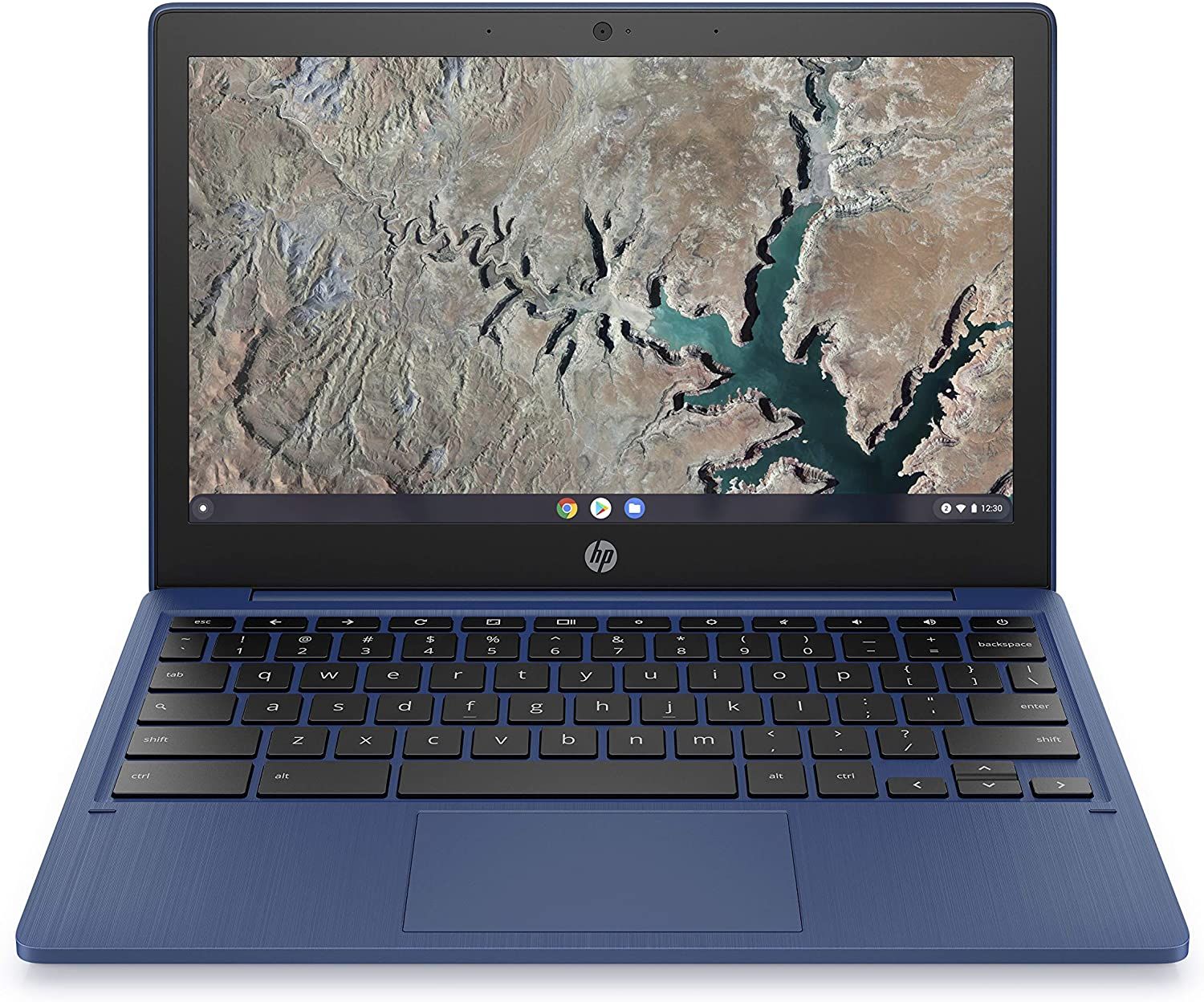 HP Chromebook 11a (ARM) | HP Chromebook 11a (ARM) | HP Chromebook 11a (ARM) | 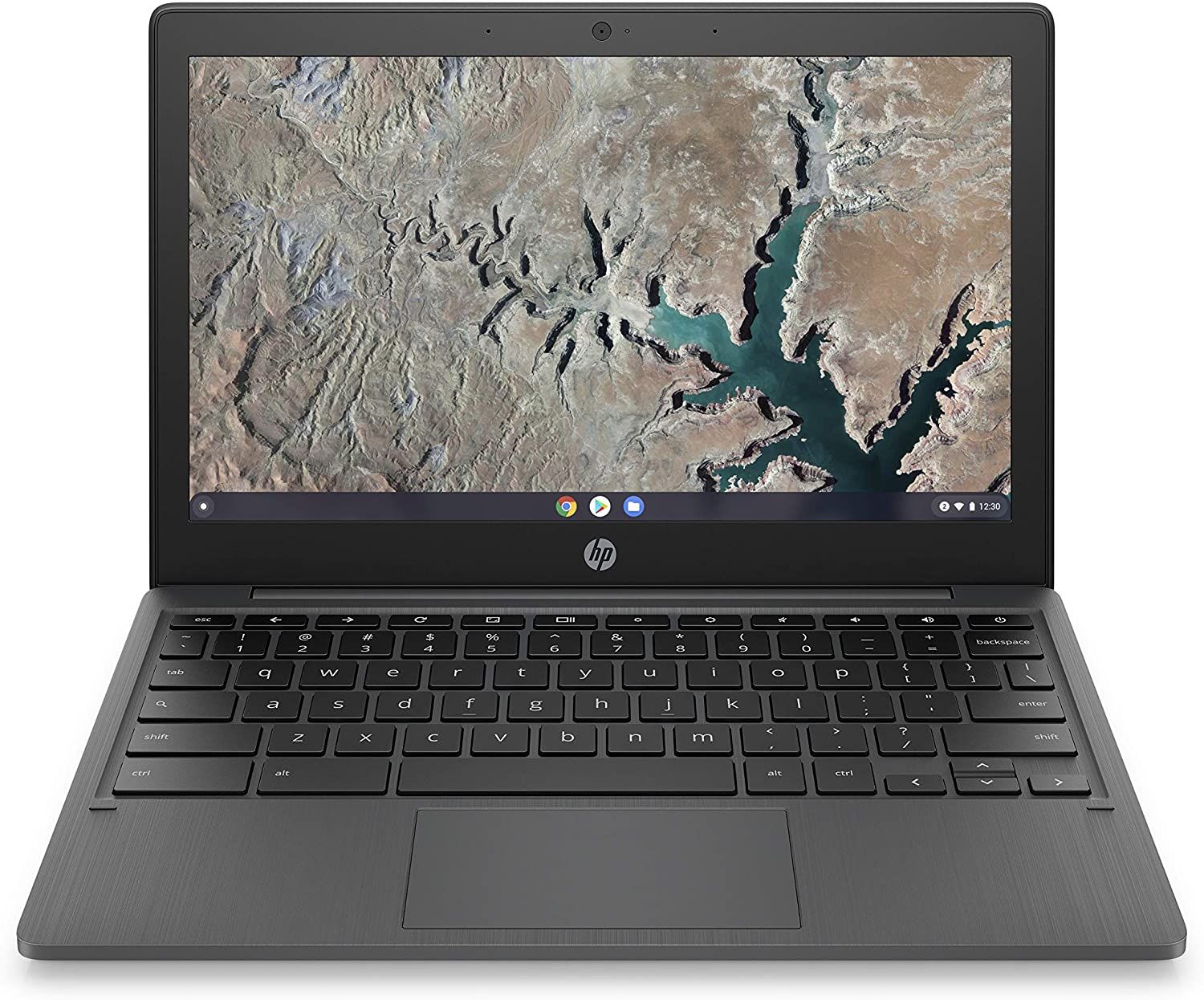 HP Chromebook 11a (ARM) | HP Chromebook 11a (ARM) | HP Chromebook 11a (ARM) | |
| Price | List Price: $329.99 Amazon Prices: | List Price: $329.99 Amazon Prices: Loading prices... | List Price: $269.99 Amazon Prices: Loading prices... | List Price: $269.99 Amazon Prices: Loading prices... | List Price: $259.99 Amazon Prices: Loading prices... | List Price: $219.99 Amazon Prices: Loading prices... | List Price: $259.99 Amazon Prices: Loading prices... | List Price: $269.99 Amazon Prices: Loading prices... | List Price: $219.99 Amazon Prices: Loading prices... | List Price: $259.99 Amazon Prices: Loading prices... | List Price: $249.00 Amazon Prices: Loading prices... |
| Model number | 11a-na0110nr / 60G05UA | 11a-na0100nr / 60G04UA | 11a-na0090nr / 60G03UA | 11a-na0080nr / 60G02UA | 11a-na0050nr / 1F6G1UA#ABA | 11a-na0030nr / 1F6F8UA#ABA | 11a-na0021nr / 241T0UA#ABA | 11a-na0070nr / 60G00UA | 11a-na0010nr / 1F6F4UA#ABA | 11a-na0040nr / 1F6F9UA#ABA | 11a-na0027nr / 657X9UA |
| Performance Rating | 3.8 | 3.8 | 3.8 | 3.8 | 3.8 | 3.8 | 3.8 | 3.8 | 3.8 | 3.8 | 3.8 |
| Chromebook Plus | No | No | No | No | No | No | No | No | No | No | No |
| Processor | Octa-core 2.00 Ghz (max 2.00 Ghz) MediaTek MT8183 | Octa-core 2.00 Ghz (max 2.00 Ghz) MediaTek MT8183 | Octa-core 2.00 Ghz (max 2.00 Ghz) MediaTek MT8183 | Octa-core 2.00 Ghz (max 2.00 Ghz) MediaTek MT8183 | Octa-core 2.00 Ghz (max 2.00 Ghz) MediaTek MT8183 | Octa-core 2.00 Ghz (max 2.00 Ghz) MediaTek MT8183 | Octa-core 2.00 Ghz (max 2.00 Ghz) MediaTek MT8183 | Octa-core 2.00 Ghz (max 2.00 Ghz) MediaTek MT8183 | Octa-core 2.00 Ghz (max 2.00 Ghz) MediaTek MT8183 | Octa-core 2.00 Ghz (max 2.00 Ghz) MediaTek MT8183 | Octa-core 2.00 Ghz (max 2.00 Ghz) MediaTek MT8183 |
| RAM | 4 GB | 4 GB | 4 GB | 4 GB | 4 GB | 4 GB | 4 GB | 4 GB | 4 GB | 4 GB | 4 GB |
| Internal Storage | 64 GB eMMC | 64 GB eMMC | 64 GB eMMC | 64 GB eMMC | 32 GB eMMC | 32 GB eMMC | 32 GB eMMC | 64 GB eMMC | 32 GB eMMC | 32 GB eMMC | 32 GB eMMC |
| Screen Size | 11.6" | 11.6" | 11.6" | 11.6" | 11.6" | 11.6" | 11.6" | 11.6" | 11.6" | 11.6" | 11.6" |
| Screen Resolution | 1366x768 | 1366x768 | 1366x768 | 1366x768 | 1366x768 | 1366x768 | 1366x768 | 1366x768 | 1366x768 | 1366x768 | 1366x768 |
| Screen Type | anti-glare (220 nits, 45% NTSC) | anti-glare (220 nits, 45% NTSC) | anti-glare (220 nits, 45% NTSC) | anti-glare (220 nits, 45% NTSC) | anti-glare (220 nits, 45% NTSC) | anti-glare (220 nits, 45% NTSC) | anti-glare (220 nits, 45% NTSC) | anti-glare (220 nits, 45% NTSC) | anti-glare (220 nits, 45% NTSC) | anti-glare (220 nits, 45% NTSC) | anti-glare (220 nits, 45% NTSC) |
| Touch Screen | No | No | No | No | No | No | No | No | No | No | No |
| Stylus / Pen | No Stylus Support | No Stylus Support | No Stylus Support | No Stylus Support | No Stylus Support | No Stylus Support | No Stylus Support | No Stylus Support | No Stylus Support | No Stylus Support | No Stylus Support |
| Dimensions width x length x thickness | 11.22 x 7.59 x 0.66 inches (284.99 x 192.79 x 16.76 mm) | 11.22 x 7.59 x 0.66 inches (284.99 x 192.79 x 16.76 mm) | 11.22 x 7.59 x 0.66 inches (284.99 x 192.79 x 16.76 mm) | 11.22 x 7.59 x 0.66 inches (284.99 x 192.79 x 16.76 mm) | 11.22 x 7.59 x 0.66 inches (284.99 x 192.79 x 16.76 mm) | 11.22 x 7.59 x 0.66 inches (284.99 x 192.79 x 16.76 mm) | 11.22 x 7.59 x 0.66 inches (284.99 x 192.79 x 16.76 mm) | 11.22 x 7.59 x 0.66 inches (284.99 x 192.79 x 16.76 mm) | 11.22 x 7.59 x 0.66 inches (284.99 x 192.79 x 16.76 mm) | 11.22 x 7.59 x 0.66 inches (284.99 x 192.79 x 16.76 mm) | 11.22 x 7.59 x 0.66 inches (284.99 x 192.79 x 16.76 mm) |
| Weight | 2.36 lbs (1.07 kg) | 2.36 lbs (1.07 kg) | 2.36 lbs (1.07 kg) | 2.36 lbs (1.07 kg) | 2.36 lbs (1.07 kg) | 2.36 lbs (1.07 kg) | 2.36 lbs (1.07 kg) | 2.36 lbs (1.07 kg) | 2.36 lbs (1.07 kg) | 2.36 lbs (1.07 kg) | 2.36 lbs (1.07 kg) |
| Backlit Keyboard | No | No | No | No | No | No | No | No | No | No | No |
| Webcam | 720p HD | 720p HD | 720p HD | 720p HD | 720p HD | 720p HD | 720p HD | 720p HD | 720p HD | 720p HD | 720p HD |
| WiFi | 802.11 a/b/g/n/ac (2x2) | 802.11 a/b/g/n/ac (2x2) | 802.11 a/b/g/n/ac (2x2) | 802.11 a/b/g/n/ac (2x2) | 802.11 a/b/g/n/ac (2x2) | 802.11 a/b/g/n/ac (2x2) | 802.11 a/b/g/n/ac (2x2) | 802.11 a/b/g/n/ac (2x2) | 802.11 a/b/g/n/ac (2x2) | 802.11 a/b/g/n/ac (2x2) | 802.11 a/b/g/n/ac (2x2) |
| Bluetooth | Bluetooth 4.2 | Bluetooth 4.2 | Bluetooth 4.2 | Bluetooth 4.2 | Bluetooth 4.2 | Bluetooth 4.2 | Bluetooth 4.2 | Bluetooth 4.2 | Bluetooth 4.2 | Bluetooth 4.2 | Bluetooth 4.2 |
| Ethernet | No | No | No | No | No | No | No | No | No | No | No |
| Cellular Modem | No | No | No | No | No | No | No | No | No | No | No |
| HDMI | No HDMI | No HDMI | No HDMI | No HDMI | No HDMI | No HDMI | No HDMI | No HDMI | No HDMI | No HDMI | No HDMI |
| USB Ports | 1 USB 3, 1 USB-C (USB-C supports DisplayPort) | 1 USB 3, 1 USB-C (USB-C supports DisplayPort) | 1 USB 3, 1 USB-C (USB-C supports DisplayPort) | 1 USB 3, 1 USB-C (USB-C supports DisplayPort) | 1 USB 3, 1 USB-C (USB-C supports DisplayPort) | 1 USB 3, 1 USB-C (USB-C supports DisplayPort) | 1 USB 3, 1 USB-C (USB-C supports DisplayPort) | 1 USB 3, 1 USB-C (USB-C supports DisplayPort) | 1 USB 3, 1 USB-C (USB-C supports DisplayPort) | 1 USB 3, 1 USB-C (USB-C supports DisplayPort) | 1 USB 3, 1 USB-C (USB-C supports DisplayPort) |
| Thunderbolt Ports | No | No | No | No | No | No | No | No | No | No | No |
| Card Reader | microSD Card Reader | microSD Card Reader | microSD Card Reader | microSD Card Reader | microSD Card Reader | microSD Card Reader | microSD Card Reader | microSD Card Reader | microSD Card Reader | microSD Card Reader | microSD Card Reader |
| Battery | 2 cell, 37Whrs, Li-ion | 2 cell, 37Whrs, Li-ion | 2 cell, 37Whrs, Li-ion | 2 cell, 37Whrs, Li-ion | 2 cell, 37Whrs, Li-ion | 2 cell, 37Whrs, Li-ion | 2 cell, 37Whrs, Li-ion | 2 cell, 37Whrs, Li-ion | 2 cell, 37Whrs, Li-ion | 2 cell, 37Whrs, Li-ion | 2 cell, 37Whrs, Li-ion |
| Battery Life | 15.0 hours | 15.0 hours | 15.0 hours | 15.0 hours | 15.0 hours | 15.0 hours | 15.0 hours | 15.0 hours | 15.0 hours | 15.0 hours | 15.0 hours |
| Fanless | No | No | No | No | No | No | No | No | No | No | No |
| Auto Update Expiration Date | June, 2030 | June, 2030 | June, 2030 | June, 2030 | June, 2030 | June, 2030 | June, 2030 | June, 2030 | June, 2030 | June, 2030 | June, 2030 |
Related Chromebooks
-
 Acer Chromebook 311 C723The Acer Chromebook 311 C723 is an 11.6-inch education Chromebook built to MIL-STD-810H durability,…
 -
 HP Fortis Flip G1m 11 inch ChromebookThe HP Fortis Flip G1m 11 inch Chromebook is a rugged convertible 2-in-1 built for K-12 classrooms,…
 -
 Acer Gateway Chromebook 311The Acer Gateway Chromebook 311 is an 11.6-inch 1366x768 ChromeOS laptop on an Intel Celeron N4500…
 -
 ASUS Chromebook CX1 (CX1101)The ASUS Chromebook CX1 (CX1101) is an 11.6-inch budget Chromebook with an Intel Celeron N4020, an…
 -
 HP Chromebook 14a (14a-nf series)The HP Chromebook 14a (14a-nf series) spans two tiers of the same chassis: an Amazon-exclusive…
 -
 Dell Chromebook 11 (3100)The Dell Chromebook 11 (3100) is a ruggedized 11.6-inch education Chromebook with rubber bumpers, a…
A light plastic 11-incher built around battery life

At 11.22 x 7.59 x 0.66 inches and 2.36 pounds, the chassis slips easily into a bag. The plastic shell (Snow White, Ash Gray, or Indigo Blue) is reasonably rigid for a budget Chromebook and built to take everyday handling rather than to feel premium.
The MediaTek MT8183 (an octa-core ARM chip) with 4GB of LPDDR4x and Mali-G72 graphics runs ChromeOS smoothly for browsing, documents, and media, holding up across a handful of tabs but not heavy multitasking. Chrome Unboxed found the 11a feels snappier than the similarly-specified Lenovo Chromebook Duet, crediting the lower 1366x768 screen, which it estimated has “about a 55% reduction in the actual number of pixels” to push compared with the Duet’s 1920x1200 panel.
For ports it has one USB-C (charging and DisplayPort), one USB-A 3.0, a combo audio jack, and a microSD reader; there is no HDMI, so an external monitor needs a USB-C adapter, and a wired connection needs a USB Ethernet adapter. The 720p webcam is fine for calls. HP rates battery life at up to 15 hours, Chrome Unboxed measured 11-13 hours in real use, and Electronics Critique cites a 15.45-hour figure, helped by the MT8183’s low 6W TDP and the 37Wh battery.
At 220 nits the 11.6-inch TN panel is dim and hard to use outdoors, the viewing angles are poor, and colors look washed out next to an IPS panel. The 1366x768 resolution is still adequate for reading, document work, and streaming, which is most of what this machine is for.
Reviewer Insights

Chrome Unboxed
Chrome Unboxed was positive, asking “Is this Chromebook worth the asking price? 100% it is!” The reviewer liked the Indigo Blue color, noting that “adding a splash of color really does affect the way you perceive a Chromebook,” and found the chassis rigid with little flex. Battery came in at 11-13 hours of real use, short of HP’s 15-hour claim but still all-day, and the trackpad drew praise for its smooth surface and click. He acknowledged the TN display’s poor viewing angles and washed-out colors as the trade-off, concluding: “Whether it acts as a secondary device around the house or a decent performer for the kids, the HP 11a deserves your attention.”
Electronics Critique
Electronics Critique reviewed the 11a-na0021nr and 11a-na0050nr models and cited a 15.45-hour battery figure, crediting the MediaTek MT8183’s low 6W TDP for the efficiency. They noted that the 32GB storage pushes you toward cloud-based workflows, and rated ChromeOS’s automatic updates and ease of use as a good fit for people coming from Windows or macOS.
Better as a hand-me-down than a new buy
Buy it used or as a hand-me-down for a student who needs a full school day on one charge, since Chrome Unboxed’s 11-13 real-world hours and ChromeOS support through June 2030 are the two things this machine still does well. Do not pay new-Chromebook money for it today; the 220-nit TN panel and 4GB of RAM were compromises at launch.
HP discontinued this 2020 model, so it makes the most sense as a hand-me-down or a cheap secondary device rather than a new purchase; current sub-$300 Chromebooks ship with brighter screens and faster chips. If you already have one, it remains a usable everyday machine. To see how it compares with newer models, sort and filter the Chromebook Comparison Chart by the specs that matter to you.
Frequently Asked Questions
How long does the HP Chromebook 11a battery last?
HP claims up to 15 hours. Chrome Unboxed got 11-13 hours with active use, and Electronics Critique cites 15.45 hours. A full school day without the charger is realistic.
Can the HP Chromebook 11a run Android apps?
Yes. The Google Play Store is supported, and the MediaTek MT8183 is an ARM chip, so Android apps run natively. With 4GB of RAM, lightweight apps are fine; demanding games and heavier productivity apps can slow down.
Is the HP Chromebook 11a good for students?
For K-12 work, yes. At 2.36 lb it fits a backpack easily, the battery lasts a full day of classes, and ChromeOS handles Google Classroom and educational apps. The 11.6-inch display feels cramped for long research or writing sessions.
Can I expand the storage on the HP Chromebook 11a?
The internal eMMC storage (32GB or 64GB depending on variant) is not upgradeable. The microSD reader takes cards of 256GB and larger for offline files, photos, and media, and Google Drive is built into ChromeOS for everything else.
How long will the HP Chromebook 11a receive Chrome OS updates?
The 11a-na0 models with the MediaTek MT8183 get Chrome OS automatic updates through June 2030, covering security patches and new features. After that date the Chromebook keeps working but stops receiving updates.
Can I connect the HP Chromebook 11a to an external monitor?
Yes, through the USB-C port, which supports DisplayPort output. There is no HDMI port, so you need a USB-C to HDMI or USB-C to DisplayPort adapter to extend or mirror the screen.