
HP Chromebook 11 (G4)
Updated on

Released in mid-2015, the HP Chromebook 11 G4 went to schools and budget shoppers with a spill-resistant keyboard and reinforced corners built for student handling. The 11.6-inch machine runs an Intel Celeron N2840 dual-core processor at 2.16 GHz, with burst speeds up to 2.58 GHz. It reached its Auto Update Expiration date in September 2021, so the specs below describe a device that no longer gets security patches.
| Pros | Cons |
|---|---|
| Aluminum top cover with a textured matte finish | Battery runs 7-8 hours, short of what rivals managed |
| Island-style keyboard with 2.2mm stroke depth | Display brightness limited to 220 nits |
| Handled 15 open tabs in one reviewer’s test | No touchscreen |
| Weighs 2.83 lbs | 16GB base storage fills quickly |
| USB 3.0 port can charge a phone | No USB-C port |
| Full-size SD card slot for storage expansion | Chrome OS support ended September 2021 |
HP Chromebook 11 (G4) Comparison Chart
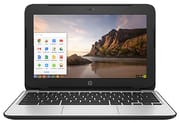 HP Chromebook 11 (G4) | HP Chromebook 11 (G4) | |
| Price | List Price: $199.99 Amazon Prices: | List Price: $229.99 Amazon Prices: |
| Model number | P0B79UT#ABA | P0B78UT#ABA |
| Performance Rating | 1.9 | 2.4 |
| Chromebook Plus | No | No |
| Processor | Dual-core 2.16 Ghz (max 2.58 Ghz) Intel Celeron N2840 | Dual-core 2.16 Ghz (max 2.58 Ghz) Intel Celeron N2840 |
| RAM | 2 GB | 4 GB |
| Internal Storage | 16 GB eMMC | 32 GB eMMC |
| Screen Size | 11.6" | 11.6" |
| Screen Resolution | 1366x768 | 1366x768 |
| Screen Type | SVA WLED anti-glare | SVA WLED anti-glare |
| Touch Screen | No | No |
| Stylus / Pen | No Stylus Support | No Stylus Support |
| Dimensions width x length x thickness | 11.81 x 8.1 x 0.81 inches (299.97 x 205.74 x 20.57 mm) | 11.81 x 8.1 x 0.81 inches (299.97 x 205.74 x 20.57 mm) |
| Weight | 2.83 lbs (1.29 kg) | 2.83 lbs (1.29 kg) |
| Backlit Keyboard | No | No |
| Webcam | 1280x720 | 1280x720 |
| WiFi | 802.11 a/b/g/n/ac | 802.11 a/b/g/n/ac |
| Bluetooth | Bluetooth 4.0 | Bluetooth 4.0 |
| Ethernet | No | No |
| Cellular Modem | No | No |
| HDMI | Full-Size HDMI | Full-Size HDMI |
| USB Ports | 1 USB 2.0, 1 USB 3 | 1 USB 2.0, 1 USB 3 |
| Thunderbolt Ports | No | No |
| Card Reader | SD | SD |
| Battery | 3 cell, 36 WHr, Lithium-ion | 3 cell, 36 WHr, Lithium-ion |
| Battery Life | 8.0 hours | 8.0 hours |
| Fanless | No | No |
| Auto Update Expiration Date | September, 2021 | September, 2021 |
Related Chromebooks
-
 HP Chromebook 11a (ARM)The HP Chromebook 11a offers an 11.6-inch anti-glare display, 720p HD webcam, and up to 15 hours of…
 -
 Acer Chromebook 311 (AMD)The Acer Chromebook 311 (CB311-10H) is an 11.6-inch ChromeOS laptop on an AMD A4-9120C with 4GB of…
 -
 ASUS Chromebook C203XAThe ASUS Chromebook C203XA is a rugged 11.6-inch education laptop with a MediaTek MT8173C, an…
 -
 HP Chromebook 14 (AMD)The HP Chromebook 14 (AMD) is a fanless 14-inch Chromebook built on the AMD A4-9120C APU with…
 -
 Acer Chromebook 311 (CO731)The Acer Chromebook 311 (CO731) is a fanless 11.6-inch Chromebook with an Intel Celeron N4500, 4GB…
 -
 ASUS Chromebook Flip CR1The ASUS Chromebook Flip CR1 (CR1100FKA) is a rugged 11.6-inch education convertible on an Intel…
A tough shell and adequate web speed, undercut by the screen and battery
The aluminum top cover has a textured matte finish that resists fingerprints and minor scratches, and the hinges are reinforced for a laptop that lives in a backpack. The chassis measures 11.81 x 8.1 x 0.81 inches and weighs 2.83 pounds, light enough for students to carry between classes. An anti-glare SVA WLED display cuts reflections in bright classrooms, though 220 nits of brightness and narrow viewing angles mean the screen works best straight-on in moderate light.
The USB 3.0 port handles high-speed transfers and can charge a phone while the Chromebook itself is plugged in. A full-size HDMI port reaches classroom projectors and external monitors without an adapter, and the SD card reader takes full-size cards for extra photos, documents, or media. Wireless covers dual-band 802.11ac WiFi and Bluetooth 4.0 for peripherals. The 720p webcam is serviceable on video calls but goes grainy in low light, as most Chromebook cameras of this era did.
The Intel Celeron N2840 keeps up with the web work Chrome OS is built around. The dual-core chip, paired with 2GB of RAM on the base model or 4GB on the step-up, holds a dozen or more browser tabs open without a stall. In ClintonFitch.com’s testing the G4 scored 8555 on the Google Octane JavaScript benchmark, placing it competitively among budget Chromebooks of its generation. The 36 WHr battery runs roughly 7-8 hours depending on workload, enough for a school day but behind rivals that reached 10+ hours on similar hardware.
Reviewer Insights
ClintonFitch.com kept 15 tabs open and measured about 8 hours
Clinton at ClintonFitch.com praised the HP Chromebook 11 G4’s premium build quality and responsive input devices, noting the aluminum top cover used “instead of plastic.” His hands-on testing highlighted the keyboard as a particular standout, with island-style keys providing satisfying tactile feedback for extended typing sessions, and the touchpad earned similar praise for its accurate tracking.
Clinton reported that with 15 tabs open in Chrome he “was easily able to use Google Docs, Sheets and Slides simultaneously with no issues while watching a video on YouTube.” He described the 11.6-inch panel as a 1366x768 UWVA display running at 220 nits (HP’s own spec sheet lists the panel as SVA).
His primary criticism centered on battery life, which he measured at approximately 8 hours during normal use. That runtime trailed competitors in the same category that achieved 11-12 hours. Clinton concluded that the build quality and performance justified the asking price, recommending the G4 for users who prioritized typing comfort and construction durability over marathon battery life.
Laptop Mag: 7 hours 10 minutes of battery and a washed-out panel
Andrew E. Freedman at Laptop Mag scored the device 3 out of 5 stars and characterized it as “adequate” for light computing tasks. A Browsermark score of 2,362 and a SunSpider completion time of 556.7 milliseconds placed the G4 competitively among its peers. Graphics performance during WebGL testing showed the device handling 50 animated fish at 53-57 frames per second, and basic visual content posed no challenges.
The Laptop Mag review identified the display as a notable weakness, with Freedman describing it as dim and producing washed-out colors compared to premium alternatives. His battery testing under controlled conditions (100 nits brightness, automated web surfing) yielded 7 hours and 10 minutes, falling below the ultraportable category average of 8 hours and 10 minutes that existed at the time. On the positive side, he praised the keyboard’s comfortable feel for extended typing and the audio quality from the built-in speakers, which produced fuller sound than expected from such a compact device.
Freedman positioned the G4 as a sensible choice for budget shoppers who understood Chrome OS limitations and needed a reliable device for browsing, email, and document work. The solid keyboard and trackpad combination, combined with reasonable audio performance, offset the display and battery shortcomings enough to earn a cautious recommendation.
Keep it off banking sites now that updates stopped in September 2021
Schools took to the spill-resistant keyboard, the reinforced construction, and Chrome OS management that cut their IT support work. For a student it was a 2.83-pound laptop with enough battery for a normal class schedule; at home it served as a second machine for browsing, homework, and video streaming.
Anyone still running one should avoid banking, shopping, and other sensitive tasks, because the September 2021 Auto Update Expiration ended security updates. For the same size with current software support, the HP Chromebook 11MK G9 continues HP’s education-focused 11.6-inch line with modern specifications and extended update support. Those weighing multiple models at once can browse the full Chromebook Comparison Chart to see specs side by side.
Frequently Asked Questions
Is the HP Chromebook 11 G4 still receiving Chrome OS updates?
No. Updates stopped at the Auto Update Expiration (AUE) date in September 2021, so Google ships no more Chrome OS features or security patches for it. The device still boots and works, but banking and online shopping on unpatched software are not advisable.
Can I upgrade the RAM or storage on the 11 G4?
Neither one. The memory and the eMMC storage are soldered directly to the motherboard. The full-size SD card slot is the only expansion route, and it takes cards for photos, documents, and media files without an adapter.
What is the difference between the 2GB and 4GB RAM versions?
Two configurations shipped: a 2GB RAM model (P0B79UT#ABA) with 16GB storage originally priced at $199.99, and a 4GB RAM model (P0B78UT#ABA) with 32GB storage originally priced at $229.99. The 4GB version handles multitasking better and keeps more browser tabs open without slowing down. Processors, displays, and connectivity are identical across both.
Does the 11 G4 have a touchscreen?
No. The 11.6-inch display is a standard non-touch panel with an SVA WLED anti-glare coating, so the keyboard and touchpad are the only input.
How long does the HP Chromebook 11 G4 battery last?
HP rated it at approximately 8 hours. Reviewer testing landed between 7 and 8 hours depending on usage: Clinton measured about 8 hours in normal use, and Laptop Mag’s controlled run returned 7 hours and 10 minutes. The 36 WHr lithium-ion battery covers a typical school or work day, and video playback or heavy multitasking cuts that short.
Can the 11 G4 connect to an external monitor?
Yes. The full-size HDMI port connects directly to external monitors, TVs, or projectors with no adapter needed, at resolutions up to 1920x1080. That covers classroom presentations as well as a larger screen at a desk at home.
What modern alternative should I consider instead of the 11 G4?
For a similar form factor with current software support, consider the HP Chromebook 11MK G9 or the HP Chromebook 11a G8. Both maintain HP’s education-focused design philosophy with 11.6-inch displays while offering modern processors, USB-C connectivity, and Auto Update Expiration dates extending to 2028 or beyond. For general consumers, the Lenovo Chromebook Duet Gen 9 offers excellent portability with touchscreen support.