
HP Chromebook Plus x360 14c
Updated on

The HP Chromebook Plus x360 14c pairs a 12th-generation Intel Core i3-1215U, six cores and eight threads, with a 14-inch 16:10 touchscreen and an aluminum lid and deck. Chromebook Plus certification sets a hardware floor for the chip and memory, and this configuration clears it with room for Android and Linux apps running alongside browser tabs.
Pros and Cons
| Pros | Cons |
|---|---|
| 16:10 aspect ratio display provides extra vertical screen space | Limited 250-nit brightness makes outdoor use difficult |
| Aluminum lid and deck instead of all-plastic construction | Plastic bottom chassis shows some flex when held |
| Strong 12th-gen Core i3 performance for ChromeOS tasks | $699 launch price is steep for the configuration |
| 5MP webcam is a step up from the usual 720p sensor | No fingerprint reader |
| Bang & Olufsen tuned speakers suit casual listening | 3.34 lbs is manageable to carry but not ultralight |
| Wi-Fi 6E on the 6GHz band, plus Bluetooth 5.3 | Corning Gorilla Glass 5 adds reflections to the display |
HP Chromebook Plus x360 14c Comparison Chart
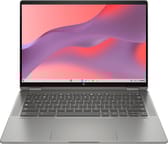 HP Chromebook Plus x360 14c | |
| Price | List Price: $699.00 Amazon Prices: |
| Model number | 14c-cd0053dx |
| Performance Rating | 8.5 |
| Chromebook Plus | Yes |
| Processor | Hexa-core 3.30 Ghz (max 4.40 Ghz) Intel Core i3-1215U Processor |
| RAM | 8 GB |
| Internal Storage | 256 GB NVMe SSD |
| Screen Size | 14" |
| Screen Resolution | 1920x1200 |
| Screen Type | IPS |
| Touch Screen | Yes |
| Stylus / Pen | Supported |
| Dimensions width x length x thickness | 12.33 x 8.68 x 0.71 inches (313.18 x 220.47 x 18.03 mm) |
| Weight | 3.34 lbs (1.52 kg) |
| Backlit Keyboard | Yes |
| Webcam | HP True Vision 5MP |
| WiFi | Intel Wi-Fi 6E AX211 (2x2) |
| Bluetooth | Bluetooth 5.3 |
| Ethernet | No |
| Cellular Modem | No |
| HDMI | No HDMI |
| USB Ports | 1 USB 3, 2 USB-C USB-C with DisplayPort and Power Delivery |
| Thunderbolt Ports | No |
| Card Reader | microSD Card Reader |
| Battery | 3 cell, 58 Wh, Li-ion polymer |
| Battery Life | 10.5 hours |
| Fanless | No |
| Auto Update Expiration Date | June, 2032 |
Related Chromebooks
-
 Acer Chromebook Plus 514A 14-inch Chromebook Plus line sold in three board configurations: the AMD Ryzen 3 7320C CB514-3H,…
 -
 Acer Chromebook Spin 714The 2023 Acer Chromebook Plus Spin 714 (CP714-2WN) is a 14-inch convertible built on a 13th-gen…
 -
 Lenovo Chromebook Plus 2-in-1 14The Lenovo Chromebook Plus 2-in-1 14 is an aluminum 360-degree convertible with an Intel Core 3…
 -
 Lenovo IdeaPad Flex 5i Chromebook PlusThe Lenovo IdeaPad Flex 5i Chromebook Plus is a 14-inch convertible Chromebook Plus on Intel's Core…
 -
 ASUS Chromebook Plus CX34 (CX3402)The ASUS Chromebook Plus CX34 balance power and affordability, featuring an Intel Core i3, 8GB RAM,…
 -
 ASUS ExpertBook CX54 Chromebook PlusThe ASUS ExpertBook CX54 Chromebook Plus pairs an Intel Core Ultra 5 processor with a 14-inch…
A 16:10 touchscreen held back by 250 nits
The 14-inch panel runs 1920x1200 in a 16:10 aspect ratio, which gives more vertical room than the 16:9 screens common at this price. Chrome Unboxed’s review praised the “upgraded 16:10 screen” as one of the device’s standout features, noting that it combines with the excellent keyboard and trackpad to make the Chromebook “a real treat” to use.
The IPS touchscreen carries Corning Gorilla Glass 5 for scratch resistance, and that glass adds reflections. HP rates the panel at 250 nits, and XDA Developers identified that brightness as the only significant weakness in their otherwise positive review. Indoor use is fine; working near a window or outdoors will challenge the display.
The lid and keyboard deck are aluminum and the bottom panel is plastic, and Chrome Unboxed’s testing found “some flex when you hold it up or grab it from a single corner.” At 0.71 inches thick and 3.34 pounds, the 14-inch convertible is manageable to carry without being ultralight. A 360-degree hinge adds tablet, tent, and presentation modes to the usual laptop layout.
The Core i3-1215U runs Android and Linux apps without strain
The 12th-gen Core i3-1215U uses Intel’s hybrid architecture, with two performance cores and four efficiency cores for eight threads. That chip is what carries the Chromebook Plus certification from Google, and it leaves headroom past a stack of browser tabs.
XDA Developers’ review found “the performance is superb for everyday web browsing and using Android or Linux apps.” The reviewer tested the Chromebook with an external QHD 120Hz display and reported it “handled [the external screen] with no problems at all and at no point was there any indication that this Chromebook couldn’t keep up.”
The 8GB of LPDDR4x memory and 256GB NVMe SSD cover a normal ChromeOS workload, and the NVMe interface keeps boot times and file access quick. RAM is soldered and cannot be upgraded, so 8GB is what the machine has for its whole life.
HP fitted a 5MP webcam with temporal noise reduction rather than the 720p sensor most Chromebooks use, which helps on video calls and in dim rooms. The speakers are tuned by Bang & Olufsen, enough for casual listening or for music production on a Chromebook.
Wi-Fi 6E wireless and a workday of battery
Intel Wi-Fi 6E handles the wireless side, with Bluetooth 5.3 alongside it, and the 6E support opens the 6GHz band where a router offers it. Two USB-C ports carry data and DisplayPort output, and one USB-A port covers older peripherals. A USB Ethernet adapter can provide a stable wired network connection through either the USB-A or USB-C ports.
HP claims 10.5 hours of battery life. Chrome Unboxed’s hands-on experience found “8-9 hours” of actual use, which still covers a workday away from an outlet. The 58Wh 3-cell lithium-ion battery charges from either USB-C port with the included 45W adapter.
The price has to drop before this one makes sense
HP launched the x360 14c at $699, and both reviewers pushed back on that figure. Chrome Unboxed called it “a solid Chromebook that becomes a spectacular value when the price dips below $500.” XDA Developers awarded it 9 out of 10 but specifically noted finding it on sale at Best Buy for as low as $379, calling it worth buying at that price.
At full price, alternatives may offer better value, but discounted pricing transforms it into one of the stronger mid-range Chromebook options available.
Google guarantees ChromeOS automatic updates, security patches included, through June 2032.
Our Chromebook Comparison Chart lines it up against the other Chromebook Plus convertibles.
Frequently Asked Questions
What processor does the HP Chromebook Plus x360 14c have?
The HP Chromebook Plus x360 14c features a 12th-generation Intel Core i3-1215U processor with 6 cores (2 performance + 4 efficiency) and 8 threads. It runs at a base speed of 3.3GHz and can boost up to 4.4GHz.
How long does the HP Chromebook Plus x360 14c battery last?
HP rates the battery at 10.5 hours, though real-world testing by reviewers found approximately 8-9 hours of actual use. The 58Wh battery charges via USB-C with the included 45W adapter.
Does the HP Chromebook Plus x360 14c support a stylus?
Yes, the HP Chromebook Plus x360 14c supports USI (Universal Stylus Initiative) pens. However, a stylus is not included and must be purchased separately.
What is the screen resolution on the HP Chromebook Plus x360 14c?
The 14-inch display features a 1920x1200 (WUXGA) resolution with a 16:10 aspect ratio. This provides more vertical screen space compared to standard 1080p displays with 16:9 aspect ratios.
When will the HP Chromebook Plus x360 14c stop receiving updates?
Google guarantees ChromeOS automatic updates for the HP Chromebook Plus x360 14c through June 2032, providing security patches and new features.
Can I upgrade the RAM or storage on the HP Chromebook Plus x360 14c?
No, both the 8GB RAM and 256GB NVMe SSD are soldered to the motherboard and cannot be upgraded. Choose your configuration carefully at purchase time.
Is the HP Chromebook Plus x360 14c good for students?
Yes, the HP Chromebook Plus x360 14c is well-suited for students. It offers strong performance for schoolwork, a convertible design for note-taking with a USI stylus, a quality 5MP webcam for video classes, and Google’s Chromebook Plus features including enhanced video calling and AI capabilities.