
Lenovo 300e Yoga Chromebook Gen 4
Updated on

The Lenovo 300e Yoga Chromebook Gen 4 is a rugged 11.6-inch convertible built for education and everyday use. It runs on the MediaTek Kompanio 520, an 8-core ARM chip that covers web browsing, document work, and streaming, and pairs it with a battery rated up to 16 hours. The 360-degree hinge flips the device into tablet, tent, or presentation modes, which suits a classroom where the same machine is a notebook one period and a reading tablet the next.
It weighs just under 3 pounds. The semi-rugged design adds reinforced corners, a spill-resistant keyboard with internal drainage channels, and a chassis that meets the MIL-STD-810G military standard for shock resistance. The 10-point multitouch IPS display takes USI pen input, so a student can annotate a worksheet or take handwritten notes on the screen.
| Pros | Cons |
|---|---|
| 16 hours of rated battery life | 32GB of eMMC storage pushes files to the cloud |
| Rugged MIL-STD-810G construction withstands drops and bumps | HD resolution (1366x768) adequate but not sharp for media |
| 360-degree hinge with four usage modes | 4GB of RAM slows down past a dozen browser tabs |
| Spill-resistant keyboard with drainage channels | No backlit keyboard for low-light typing |
| Wi-Fi 6 and Bluetooth 5.1 | Webcam tops out at 720p |
| Chrome OS support through June 2033 (10+ years of updates) | No SD card reader for expandable storage |
Lenovo 300e Yoga Chromebook Gen 4 Comparison Chart
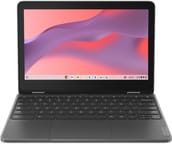 Lenovo 300e Yoga Chromebook Gen 4 | Lenovo 300e Yoga Chromebook Gen 4 | |
| Price | List Price: $329.00 Amazon Prices: Loading prices... | List Price: $364.00 Amazon Prices: Loading prices... |
| Model number | 82W20003US | 82W20002US |
| Performance Rating | 3.8 | 3.8 |
| Chromebook Plus | No | No |
| Processor | Octa-core 2.00 Ghz MediaTek Kompanio 520 | Octa-core 2.00 Ghz MediaTek Kompanio 520 |
| RAM | 4 GB | 4 GB |
| Internal Storage | 32 GB eMMC | 32 GB eMMC |
| Screen Size | 11.6" | 11.6" |
| Screen Resolution | 1366x768 | 1366x768 |
| Screen Type | IPS | IPS |
| Touch Screen | Yes | Yes |
| Stylus / Pen | Supported | Supported |
| Dimensions width x length x thickness | 11.3 x 7.9 x 0.73 inches (287.02 x 200.66 x 18.54 mm) | 11.3 x 7.9 x 0.73 inches (287.02 x 200.66 x 18.54 mm) |
| Weight | 2.93 lbs (1.33 kg) | 2.93 lbs (1.33 kg) |
| Backlit Keyboard | No | No |
| Webcam | 720p HD | 720p HD |
| WiFi | Wi-Fi 6 (802.11ax) | Wi-Fi 6 (802.11ax) |
| Bluetooth | Bluetooth 5.1 | Bluetooth 5.1 |
| Ethernet | No | No |
| Cellular Modem | No | No |
| HDMI | Full-Size HDMI | Full-Size HDMI |
| USB Ports | 2 USB 3, 1 USB-C (USB-C port supports data transfer, Power Delivery and DisplayPort) | 2 USB 3, 1 USB-C (USB-C port supports data transfer, Power Delivery and DisplayPort) |
| Thunderbolt Ports | No | No |
| Card Reader | No Card Reader | No Card Reader |
| Battery | 47Wh, Li-Polymer | 47Wh, Li-Polymer |
| Battery Life | 16.0 hours | 16.0 hours |
| Fanless | Yes | Yes |
| Auto Update Expiration Date | June, 2033 | June, 2033 |
Related Chromebooks
-
 Lenovo 100e Chromebook Gen 4The Lenovo 100e Chromebook Gen 4 is a rugged, fanless 11.6 inch ARM Chromebook built for K-12…
 -
 Acer Chromebook Spin 311The Acer Chromebook Spin 311 (CP311-3H) is an 11.6-inch convertible on an eight-core MediaTek…
 -
 Lenovo Chromebook 3 11"The Lenovo Chromebook 3 11 is a fanless 11.6-inch Chromebook with an Intel Celeron N4020, 4GB of…
 -
 Acer Chromebook 311An 11.6-inch Chromebook with an Intel Celeron N4000, 4GB of RAM, a fanless chassis, and up to 10…
 -
 ASUS Chromebook Flip C214The ASUS Chromebook Flip C214 is a rugged 11.6-inch education convertible with an Intel Celeron…
 -
 HP Fortis Flip G1m 11 inch ChromebookThe HP Fortis Flip G1m 11 inch Chromebook is a rugged convertible 2-in-1 built for K-12 classrooms,…
A sturdy shell and a full-size HDMI port for classroom projectors

The textured finish grips well and hides fingerprints better than a glossy shell would, and the reinforced plastic chassis holds firm without adding much weight. The keyboard deck stays firm under pressure, and the chiclet keys have enough travel for a long typing session. The compact 11.6-inch frame does mean narrower key spacing than a full-size keyboard, and there is no backlighting behind the keys.
The MediaTek Kompanio 520 covers the Chrome OS workloads this machine is built for. The octa-core ARM chip pairs two Cortex-A76 cores running at 2.05 GHz with six efficiency-focused Cortex-A55 cores, which is enough for web browsing, document editing, video streaming, and classroom apps. The integrated Mali-G52 GPU runs 1080p video playback and casual gaming. The 4GB of LPDDR4X memory keeps several browser tabs and Google Workspace apps open at once, though pushing beyond a dozen tabs brings occasional slowdowns.
Two USB 3.2 Gen 1 Type-A ports take mice, keyboards, and flash drives, while the single USB-C 3.2 Gen 1 port handles charging, data transfer, and DisplayPort video output to an external monitor. The full-size HDMI 1.4b port plugs into a classroom projector or a desk monitor without an adapter. Wi-Fi 6 (802.11ax) holds a connection in congested network environments, and Bluetooth 5.1 covers wireless peripherals and audio devices. There is no built-in Ethernet port, but a USB Ethernet adapter can be connected through the USB-A ports for wired networking in lab environments.
Customer Reviews

Across 18 ratings on Amazon, the Lenovo 300e Yoga Chromebook Gen 4 averages 4.1 stars, and the spread is wide: about 70 percent of raters left five stars while roughly 20 percent left one. Mingo, a verified buyer who described himself as a senior citizen replacing a nine-year-old machine, called it an “Amazing little dude” and wrote that it was “so easy to use and syncing was flawless and fast.” Another verified buyer, just1opinion, bought three for grandkids and said they “are perfect with a flip keyboard and lots of gb for school work. I would buy these again in a heartbeat.”
The low ratings cluster around one recurring complaint: a listing that some buyers read as offering far more storage than the unit has. Verified buyer Alison Harrington wrote, “This is advertised to have 512GB of storage but only actually has 32GB. Very misleading,” and another verified buyer, Jenn, returned hers over the same issue, saying her two students “can not use a computer with 4gb and 32gb.” A later reviewer, ChadWiccc, pushed back, arguing the device “CAN STORE as much as advertised, with portable storage tools, i.e usb thumbdrives.” Treat the 4GB of RAM and 32GB of storage as the shipping spec, and confirm the configuration before you buy. Read more owner reviews on Amazon.
Long support and a tough shell make up for 4GB of RAM
A classroom is where the MIL-STD-810G build, the 360-degree hinge, the full-size HDMI port, and USI pen support all get used, and the 16-hour battery rating covers a school day with margin. The MediaTek Kompanio 520 is adequate for Chrome OS workloads.
The 32GB of storage and 4GB of RAM push document and photo storage onto Google Drive instead of the local disk. The 1366x768 display is fine for coursework and web pages, and the touchscreen responds well enough to use the tablet mode for reading. Chrome OS updates run through June 2033. To see how it stacks up against other models side by side, visit our Chromebook Comparison Chart.
Frequently Asked Questions
How long does the Lenovo 300e Yoga Chromebook Gen 4 battery last?
Lenovo rates it at up to 16 hours. In practice the 47Wh battery runs 10-14 hours of web browsing, document editing, and video streaming, which covers a full school or work day without a charge.
Can I upgrade the RAM or storage on the 300e Yoga Gen 4?
No. The 4GB of LPDDR4X RAM is soldered to the motherboard, and the 32GB eMMC storage is not user-replaceable either. For more room, use Google Drive or a USB drive on the USB-A or USB-C ports.
Does the 300e Yoga Gen 4 include a stylus?
It works with USI (Universal Stylus Initiative) pens, and not every configuration ships with one. Education SKUs may include a garaged stylus, while retail versions usually leave you to buy a compatible USI pen separately.
How long will the 300e Yoga Gen 4 receive Chrome OS updates?
Google’s Auto Update Expiration (AUE) date for this model is June 2033, roughly 10 years of automatic Chrome OS and security updates from its release.
Can the 300e Yoga Gen 4 connect to an external monitor?
Two ports can drive one. The built-in HDMI 1.4b port connects to monitors, TVs, and projectors without adapters, supporting resolutions up to 4K at 30Hz. The USB-C port carries DisplayPort output for USB-C monitors or for USB-C to HDMI/DisplayPort adapters.
Is the 300e Yoga Gen 4 good for students?
It was built for students and classrooms. The MIL-STD-810G construction survives drops and daily wear, the spill-resistant keyboard shrugs off a knocked-over drink, and the battery lasts through a day of classes. The 360-degree hinge folds it flat into a tablet for reading. Chrome OS also stays easy for a school or a parent to manage.