
Lenovo Googlebook 15
Published on

The Lenovo Googlebook 15 is a 15.3-inch laptop for people who live in Google’s apps and an Android phone and want a big OLED screen in a body under 3 pounds. It runs Googlebook OS, Google’s new Android-based operating system, on an Intel Core Ultra 5 325 with 16GB of memory. Reviewers praised the build and the OLED screen, and Tom’s Guide, How-To Geek, and Gizmodo all hit bugs in the new operating system. Buying it now means accepting software that Google is still finishing.
Hardware strengths and Googlebook OS gaps
| Pros | Cons |
|---|---|
| 15.3-inch 2.8K OLED touchscreen at 120Hz | Tom’s Guide, How-To Geek, and Gizmodo hit Googlebook OS bugs |
| 2.84 pounds with a silk-touch metal and carbon fiber chassis | Battery life fell short of Lenovo’s rating in testing |
| Two Thunderbolt 4 ports, one on each side, plus HDMI and USB-A | Glossy panel picks up reflections |
| Face login and a fingerprint reader | Best phone features need an Android 17 phone |
| Quad speakers and a large haptic touchpad | No card reader, and memory is soldered |
| Replaceable M.2 2242 SSD | Google has not published an update support window |
Related Videos
Lenovo Googlebook 15 Comparison Chart
 Lenovo Googlebook 15 | Lenovo Googlebook 15 | |
| Price | List Price: $1,099.99 Amazon Prices: | List Price: $1,149.99 Amazon Prices: Best Buy: Loading price... |
| Model number | 83W60009US | 83W6000EUS |
| Performance Rating | 3.8 | 3.8 |
| Chromebook Plus | No | No |
| Processor | Octa-core 2.10 Ghz (max 4.50 Ghz) Intel Core Ultra 5 325 | Octa-core 2.10 Ghz (max 4.50 Ghz) Intel Core Ultra 5 325 |
| RAM | 16 GB | 16 GB |
| Internal Storage | 256 GB NVMe SSD (upgradable M.2 2242 PCIe 4.0 x4) | 512 GB NVMe SSD (upgradable M.2 2242 PCIe 4.0 x4) |
| Screen Size | 15.3" | 15.3" |
| Screen Resolution | 2880x1800 | 2880x1800 |
| Screen Type | OLED | OLED |
| Touch Screen | Yes | Yes |
| Stylus / Pen | No Stylus Support | No Stylus Support |
| Dimensions width x length x thickness | 13.42 x 9.29 x 0.63 inches (340.87 x 235.97 x 16 mm) | 13.42 x 9.29 x 0.63 inches (340.87 x 235.97 x 16 mm) |
| Weight | 2.84 lbs (1.29 kg) | 2.84 lbs (1.29 kg) |
| Backlit Keyboard | Yes | Yes |
| Webcam | 5MP | 5MP |
| WiFi | Wi-Fi 7 (802.11be) | Wi-Fi 7 (802.11be) |
| Bluetooth | 6.0 | 6.0 |
| Ethernet | No | No |
| Cellular Modem | No | No |
| HDMI | Full-Size HDMI | Full-Size HDMI |
| USB Ports | 1 USB 3, 2 USB-C 2x Thunderbolt 4 (DP 2.1, 45-65W PD), 1x USB-A 5Gbps | 1 USB 3, 2 USB-C 2x Thunderbolt 4 (DP 2.1, 45-65W PD), 1x USB-A 5Gbps |
| Thunderbolt Ports | 2 | 2 |
| Card Reader | No Card Reader | No Card Reader |
| Battery | 4 cell, 70Wh, Li-ion | 4 cell, 70Wh, Li-ion |
| Battery Life | 12.5 hours | 12.5 hours |
| Fanless | No | No |
| Auto Update Expiration Date | Unknown | Unknown |
Related Chromebooks
-
 Lenovo IdeaPad Flex 3i Chromebook 15.6"The Lenovo IdeaPad Flex 3i Chromebook 15.6" pairs a full-size keyboard with numeric keypad and a…
 -
 Lenovo IdeaPad 3i ChromebookThe Lenovo IdeaPad 3i Chromebook is a 15.6-inch Full HD Chromebook with an Intel Celeron N4500 and…
 -
 Acer Chromebook 15The Acer Chromebook 15 stands out with a 15.6" FHD IPS touch display, backlit keyboard, and up to…
 -
 Acer Chromebook 315 (CB315-5H/5HT)A budget-friendly 15.6-inch Chromebook with Intel N100 processor, FHD IPS display, WiFi 6E, and…
 -
 HP Chromebook x360 14 (N150)The HP Chromebook x360 14 (N150) is the 2026 non-Plus convertible in HP's 14b-ce0 line, with a…
 -
 HP Chromebook x360 14aThe HP Chromebook x360 14a is a 14-inch convertible Chromebook with an Intel Celeron N4020, a…
A light 15-inch chassis with a glossy OLED panel

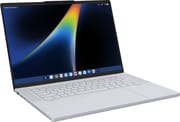
The Googlebook 15 measures about 13.4 x 9.3 x 0.63 inches and starts at 2.84 pounds, according to Lenovo. The lid is magnesium-aluminum and the bottom is polycarbonate with 20% carbon fiber, both in Cloud Grey with a silk-touch coating that Lenovo says resists fingerprints, and the chassis passed MIL-STD-810H testing. A Glowbar on the lid lights up in Google’s colors, shows the battery level when you plug in, and moves with Gemini responses. The keyboard is a backlit six-row layout with 1.3mm of travel, and below it sits a buttonless glass haptic touchpad about 5.9 x 3.7 inches. Four speakers (two 2W woofers and two 2W tweeters) flank the keyboard.
The screen is a 15.3-inch 2880x1800 OLED touch panel at 120Hz, rated for 500 nits, 100% DCI-P3, and HDR True Black 1000, with a glossy glass surface. In Tom’s Guide’s lab it measured 451.8 nits in SDR, 1,009 nits peak in HDR, 112.8% of sRGB, and a Delta-E of 0.21. The 5MP webcam sits in a raised notch at the top of the bezel with a privacy shutter and supports Google facial authentication, and a touch fingerprint reader sits in the corner of the keyboard deck.
The left edge has a full-size HDMI port, a Thunderbolt 4 port, and the headphone jack. The right edge has the second Thunderbolt 4 port, a USB-A port, and the power button. Both Thunderbolt 4 ports carry DisplayPort 2.1 and 45W to 65W charging, so the laptop charges from either side, and Lenovo rates them for up to 8K at 60Hz. The HDMI 2.1 port tops out at 4K at 60Hz, and Lenovo supports three external monitors. The USB-A port runs at 5Gbps. There is no card reader and no Ethernet, and wireless is Wi-Fi 7 (2x2) with Bluetooth 6.0.
Fast for tabs and Android games, short of its battery rating
The Intel Core Ultra 5 325 is a 2026 Panther Lake chip with four performance cores, four low-power efficiency cores, Intel Graphics, and an NPU rated at up to 47 TOPS. It scores about 19,500 on PassMark’s CPU benchmark, roughly twice the Intel Core 3 N355 in Lenovo’s Chromebook Plus i 15. Tom’s Guide measured 2,463 single-core and 9,956 multi-core in Geekbench 6, ahead of the MediaTek Kompanio Ultra 910 in Lenovo’s Chromebook Plus 14 but well behind an M5 MacBook Air. How-To Geek recorded 2,401 single-core and 11,213 multi-core in Geekbench 7. Tom’s Guide found it smooth for browsing, shared work documents and spreadsheets, Android apps, and racing games such as Asphalt Legends. Bytes & Bets found general navigation responsive but heard the fan during light use, and LinuxBTW saw the fans come on more often than on his Linux machines while running Android apps.

Both US configurations have 16GB of LPDDR5X-7467 memory soldered to the board, and Lenovo also builds 32GB configurations. Storage is a single M.2 2242 PCIe 4.0 x4 SSD at 256GB or 512GB, and it sits in a socket rather than on the board: Andrew Marc David’s look inside shows the 2242 drive, a single cooling fan, and the 70Wh battery.
The 70Wh battery is rated for 12.5 hours of video playback, and Lenovo rates the included 65W USB-C adapter at 13.5Wh in 15 minutes. Real-world results fell short of that. Tom’s Guide’s battery test, which browses 30 websites at 150 nits until shutdown, ran 10 hours and 25 minutes, and the reviewer’s workday dropped the battery to 43% in five hours at 79% brightness. How-To Geek got 6 to 12 hours depending on use and saw the laptop drain to a critical level overnight in standby. Gizmodo’s Kyle Barr reached 40% after about four hours of typing.
Googlebook OS
Googlebook OS is built on Android rather than ChromeOS. The Chrome browser, the Play Store, and Android apps run on the desktop, and Google sorts Play Store apps with badges that say whether each one is made for desktop or built for mobile. Gemini features include Magic Pointer, which looks up whatever you point at, and Rambler, which turns rambling dictation into clean text. Phone features such as Continue On, app casting, file access, and notification sync need an Android phone on Android 17 or newer.
How-To Geek listed touch input that stopped working, an app drawer that froze until a restart, Microsoft Edge stuck on its launch screen, broken cross-device services, and random restarts in standby. Gizmodo’s unit developed touchscreen ghosting within a week, which the reviewer said could be specific to that device. Tom’s Guide found that some games, including Fortnite and Call of Duty: Mobile, were not available, and that it could not sign in to a work Google account, likely because of an IT policy. LinuxBTW could not get his own Thunderbolt dock or a CalDigit TS4 to work with the laptop.
Reviewer Insights
Tom’s Guide
Arif Bacchus at Tom’s Guide reviewed the 512GB model and called it “a great showcase for Google’s new laptop platform.” “Between its sleek Cloud Grey design, 15.3-inch OLED display, and snappy everyday performance, it is hard not to enjoy,” he wrote of the design and screen. He also liked the Android integration and the AI tools: “Meanwhile, practical AI tools like Magic Pointer and Rambler make daily tasks easier without feeling gimmicky.” He named two downsides: “The power-hungry OLED display and early bugs in Googlebook OS are the only downers.” The lab measured 10 hours and 25 minutes of battery life, against 15 hours and 37 minutes for the 15-inch MacBook Air.
How-To Geek
How-To Geek gave it 6 out of 10. The review praised the build: “Construction is tight and polished; every angle is sleek and appealing, culminating in a laptop that feels even more premium than its $1,100 price point would suggest.” It put the problems on the software: “Googlebook OS is without a shadow of a doubt the worst part about this laptop, and that’s a shame.” It ended on this: “Googlebook OS will almost certainly improve by leaps and bounds over the next couple of years, but I do or do not recommend products based on what they are today, and the Lenovo Googlebook 15 is a great laptop that you probably shouldn’t buy.” The review also found the Linux Terminal prone to slowdowns and crashes.
Gizmodo
Kyle Barr at Gizmodo liked the solid shell, the bright OLED panel, and Rambler, but listed touchscreen ghosting, missing OS features at launch, and disappointing battery life as cons. He wrote, “The $1,150 Lenovo Googlebook 15 would be a fine laptop with any other operating system,” and summed it up in the subheading: “Buying a Googlebook now, even a laptop as quality as the Lenovo Googlebook 15, is an exercise in waiting and hoping for something better.” In Geekbench 6, he measured the Googlebook 15 about 17% ahead of a Dell XPS 13 with a Core 5 320.
MakeUseOf
Rob LeFebvre at MakeUseOf gave it 7 out of 10. “The keyboard is fantastic, too, making long writing sessions a breeze,” he wrote, and “The best reason to grab one of these, though, is the stunning OLED screen.” His cons were inconsistent palm rejection on the touchpad, limits with ultrawide monitors, Play Store apps that work and feel like phone apps, and a touchscreen and Glowbar he found more decorative than useful. On battery, he got through a full workday of web-based writing and editing on one charge.
Thurrott
Paul Thurrott’s first impressions praised the look: “It’s overtly premium-looking and not at all downmarket like so many Chromebooks.” He was also upbeat about the chip, writing that “Panther Lake is incredibly powerful, and Lenovo seems to have a unique ability to rein in Intel’s bugs.” He questioned the added Caps Lock key, the Glowbar that the owner rarely sees, and a touchscreen on a clamshell laptop.
Bytes & Bets
Travis at Bytes & Bets bought a Core Ultra 300 series unit with his own money and tested it as a programmer. “I like the design. The finish feels smooth and comfortable,” he said, and he called the ports good, the screen good for the price, and the speakers and camera mediocre. He had two hardware complaints. The first was the fan: “First, the fan keeps running. On my unit, it was audible even during light use.” The second was the haptic touchpad: “Cursor precision feels noticeably worse than my MacBooks and Surface laptops.” He found text sizes, spacing, and icons inconsistent across the interface: “Compared with the Windows and Mac OS machines I use, this feels much less polished.” His own Android recording app ran fine, but the Android version of Microsoft Office felt so limited that he preferred the web version, and he could not get a usable VS Code desktop editor running from the Linux virtual machine. Google’s Antigravity coding tool worked well, and he used it to build a birthday invitation website. His verdict: “So, for now, I wouldn’t recommend this first generation to someone who simply wants a dependable main computer.”
LinuxBTW
LinuxBTW bought the 512GB model at Best Buy and used it at his desk with a 4K external monitor. He said “the keyboard is actually really nice,” typed 94 words per minute on his first attempt, and found that the Dolby Atmos speakers sounded pretty good. The glossy OLED showed glare, he found its 500 nits not bright enough for some environments, and the screen wobbled when he touched it. Neither his own dock nor a CalDigit TS4 worked with the laptop: “While it says Thunderbolt 4, it doesn’t work with this dock.” Android apps such as CapCut loaded slowly and ran as mobile apps, Pocket Casts opened in a stretched layout, and at one point Chrome stopped accepting typing in the address bar. A GeForce Now game took about three minutes to load, and he estimated the input lag at around 500 milliseconds. Of the webcam he said, “It’s not actually a bad camera,” though face unlock showed a blank screen when he tried to demonstrate it. He liked the build, screen, keyboard, and touchpad, but concluded, “I would say I don’t currently recommend this system,” and pointed shoppers to Apple’s cheaper laptop: “I would highly recommend looking at the MacBook Neo.”
Chrome Unboxed
Chrome Unboxed unboxed the Googlebook 15 and came back to the finish several times, remembering the texture from the launch event as “just so buttery smooth.” The presenter praised the touchpad (“You have a massive haptic trackpad. You can hear it making the click sound, but it, you know, nothing’s moving in it, which I love that.”) but noted that it makes an odd, almost hollow sound. He said the screen “looks just absolutely incredible” and the speakers sounded very good in a playback test. He was less impressed by the webcam: “The camera works for video calls and the stuff you need to do online. That’s going to be about it.” He also found the power button on the side, away from the fingerprint reader, an odd choice.
Andrew Marc David
Andrew Marc David bought his unit at Best Buy and compared it with the ASUS Googlebook 14. He called it “Pretty light for a 15.3 in device” and said of the finish, “it’s got a nice soft touch finish. This feels fantastic.” He mentioned face login alongside the fingerprint reader: “One difference I think is that this has a fingerprint scanner, but I think it also has face recognition to log you in as well.” He found the glossy OLED more saturated than the ASUS’s anti-reflective panel but noted it shows more glare and reflections, and he worried that the white backlight under the light keys could make the legends hard to read. He typed 74 words per minute at 93% accuracy on his first test and liked the split Thunderbolt 4 ports, one on each side.
Conclusion
The Googlebook 15 suits Android phone owners and Chromebook users who want a large laptop under 3 pounds with a 120Hz 2.8K OLED screen, Thunderbolt 4 on both sides, and a Core Ultra 5 325. The 256GB model is the cheaper way in, and the SSD can be replaced later.
Google has not published how many years of updates Googlebooks get. If you want a ChromeOS laptop with a published update date, the Lenovo Chromebook Plus 14 has an OLED screen and updates through June 2035, and the Chromebook Plus i 15 is a 15-inch option for less. Our guide to native Android apps on Googlebooks covers the software, and the Chromebook comparison chart compares specs side by side.
Frequently Asked Questions
How long will the Googlebook 15 get software updates?
Google has not published an update end date for Googlebooks, and the Googlebook 15 is not on Google’s Chromebook Auto Update Expiration list.
Is the Googlebook 15 a Chromebook?
No. It runs Googlebook OS, which is built on Android instead of ChromeOS. It keeps the Chrome browser and a Chromebook-style keyboard layout, runs Android apps from the Play Store, and adds Gemini features and deeper links to Android phones.
Can I upgrade the memory or storage?
The 16GB of LPDDR5X memory is soldered and cannot be upgraded. The SSD is a single M.2 2242 PCIe 4.0 drive in a socket, and Lenovo has tested drives up to 512GB.
Do I need an Android phone?
No, but the phone features need an Android phone on Android 17 or newer. Tom’s Guide paired an iPhone through the Link to Googlebook app and could read recent iMessages, but the other phone features were missing.
How many external monitors does it support?
Three, alongside the built-in screen, through the two Thunderbolt 4 ports and the HDMI port. MakeUseOf found that ultrawide monitors have some limits in Googlebook OS.
What comes in the box?
US models ship with a 65W USB-C wall charger. Lenovo’s store configurations include the Lenovo AI Mouse for Googlebook, and Paul Thurrott’s Best Buy unit had one in the box; Chrome Unboxed’s box had what looked like an empty slot for the mouse.