

The Lenovo Chromebook Plus 14” OLED is the best Chromebook for most college students in 2026, chosen for its 15+ hour real-world battery life, MediaTek Kompanio Ultra 910 processor, and software support through June 2035. Budget-conscious students should look at the ASUS Chromebook CX14 (CX1405) at $239-279 with the same 2035 AUE date and MIL-STD 810H durability. Students who take handwritten notes want the ASUS Chromebook Plus CM34 Flip for its garaged USI stylus and 360-degree hinge, and STEM majors needing Thunderbolt 4, a 120Hz 2560x1600 display, and an x86 processor for Linux tools that lack ARM builds should consider the ASUS ExpertBook CX54 Chromebook Plus. Every pick has AUE at least through June 2033, covering a four-year degree plus grad school. Picks come from 240+ Chromebooks we actively track, filtered to Chromebook Plus certification where relevant and Starry Hope editorial ratings of 4.0 stars or higher.
Best Overall: Lenovo Chromebook Plus 14” OLED
Lenovo Chromebook Plus 14" OLED
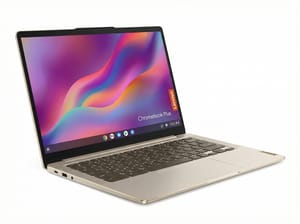
At 2.78 pounds with battery life that routinely exceeds 15 hours in real-world use, the Lenovo Chromebook Plus 14” OLED lasts through a full day of classes without a charger. The OLED display with 100% DCI-P3 color coverage is easy on the eyes for reading PDFs and watching lecture recordings. The MediaTek Kompanio Ultra 910 processor runs multiple Android apps alongside dozens of browser tabs. With software support through June 2035, this Chromebook will outlast your college career.
Best Budget Chromebook: ASUS Chromebook CX14 (CX1405)
ASUS Chromebook CX14 (CX1405)
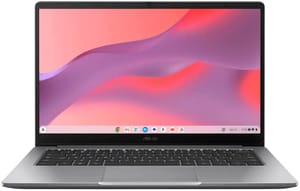
Not every student needs a premium laptop, and the ASUS Chromebook CX14 doesn’t compromise on longevity or reliability. The textured plastic chassis handles everyday bumps better than glossy laptops. At 3.04 pounds with a 14-inch display, it offers a practical balance of screen real estate and portability. Both the Celeron and Core 3 variants share the June 2035 AUE date.
Best for Note-Taking: ASUS Chromebook Plus CM34 Flip
ASUS Chromebook Plus CM34 Flip (CM3401)
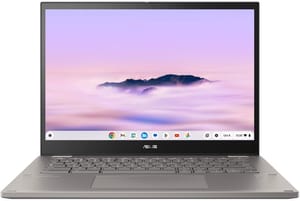
For students who learn better through handwritten notes or need to sketch diagrams and equations, the ASUS Chromebook Plus CM34 Flip delivers everything you need without extra accessories. The included garaged stylus charges automatically inside the device. The build may add some weight at 4.08 pounds, but that durability translates to a laptop that can handle four years of daily use. The 14-inch touchscreen with 16:10 aspect ratio provides extra vertical space for document work, while the fingerprint reader speeds up secure logins between classes.
Best for STEM Students: ASUS ExpertBook CX54 Chromebook Plus
ASUS ExpertBook CX54 Chromebook Plus
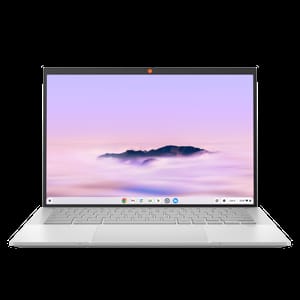
The ASUS ExpertBook CX54 ships with Intel’s Core Ultra processor, dual Thunderbolt 4 ports for connecting to lab equipment or external GPUs, and a 2560x1600 display at 120Hz that makes coding comfortable for extended sessions. The Linux development environment runs smoothly for programming coursework in Python, Java, or any language your CS curriculum requires. The 500-nit display brightness means you can work outdoors between classes without squinting, and the aluminum chassis provides the durability a laptop needs moving between dorm rooms, labs, and libraries.
Best Battery Life: Lenovo Chromebook Plus 14” OLED
Lenovo Chromebook Plus 14" OLED
The efficient MediaTek Kompanio Ultra 910 processor and the 60Wh battery together deliver real-world usage exceeding 15 hours. For students who move between lectures, study sessions, and coffee shops without reliable access to outlets, this Chromebook removes the need to plan your day around charging opportunities.
Best Portable Option: Samsung Galaxy Chromebook Plus 15.6”
Samsung Galaxy Chromebook Plus 15.6"
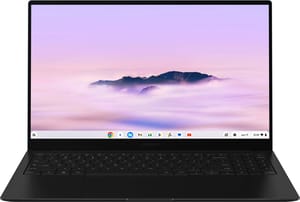
Samsung packed a 15.6-inch AMOLED display into a chassis 11.8mm thick that weighs 2.58 pounds, less than many 14-inch laptops. The larger display makes working on research papers, spreadsheets, and online textbooks more comfortable than smaller laptops. The full keyboard with number pad accelerates data entry for economics or statistics coursework, while the AMOLED panel makes those late-night study sessions easier on your eyes.
Chromebook Plus Guarantees 8GB RAM, 128GB Storage, and AI Tools
Google introduced the certification in 2023 and enhanced it in 2024. The hardware minimums also include a 1080p webcam, and the AI features are exclusive to certified models. Help Me Write generates first drafts of emails, essays, and responses directly in Chrome, useful for overcoming writer’s block or drafting professional communications to professors and potential employers. With Help Me Read, lengthy articles, research papers, and web pages come back as summaries while you work through multiple sources for a research paper. Magic Editor removes unwanted objects from photos in Google Photos, which cleans up documentation images for lab reports or presentations. AI-powered background blur, lighting correction, and noise cancellation work across Zoom, Google Meet, and Microsoft Teams without requiring a premium subscription.
Auto Update Expiration Dates Run to June 2033 or Later
Every Chromebook has an Auto Update Expiration (AUE) date, after which Google stops providing security updates and new features. A Chromebook bought in 2026 with a 2028 AUE date would become unsupported before you graduate.
| Chromebook | AUE Date | Support Remaining |
|---|---|---|
| Lenovo Chromebook Plus 14” OLED | June 2035 | 9+ years |
| ASUS Chromebook CX14 (CX1405) | June 2035 | 9+ years |
| ASUS ExpertBook CX54 Chromebook Plus | June 2034 | 8+ years |
| Samsung Galaxy Chromebook Plus 15.6” | June 2034 | 8+ years |
| ASUS Chromebook Plus CM34 Flip | June 2033 | 7+ years |
Education Discounts for College Students Can Cut 5 to 15 Percent
Retailers, manufacturers, and campus bookstores each run their own program, so there are four places worth checking before you buy.
Amazon Prime Student, free for six months and then half the regular price, often includes exclusive Chromebook deals, particularly during back-to-school season in August. Best Buy’s student discount program offers periodic Chromebook sales, and their price-match guarantee means you can get Amazon’s prices with in-store pickup convenience. Lenovo, Samsung, ASUS, and Acer all maintain education storefronts with verified student discounts, and these often bundle accessories or extended warranties at reduced prices. Some universities negotiate bulk pricing through the campus bookstore on specific Chromebook models, particularly those used in campus labs or recommended by IT departments.
Online Classes and Learning Management Systems Run in Chrome
Every Chromebook in this guide includes a quality webcam (1080p minimum), integrated microphone, and the processing power to handle Zoom, Google Meet, or Microsoft Teams without stuttering. The tight integration with Google Workspace means accessing Google Classroom, submitting assignments to Google Drive, and collaborating on Google Docs.
Canvas, Blackboard, and other learning management systems are browser-based and run in Chrome. For proctored exams using services like Respondus or Proctorio, most now fully support ChromeOS, though you should verify compatibility with your specific institution.
Web Apps and Linux Tools Run, Adobe and MATLAB Do Not
Web Apps That Cover Coursework
Everything here runs in the browser on any Chromebook, not just a Chromebook Plus:
- Google Workspace (Docs, Sheets, Slides)
- Microsoft 365 online
- Zoom
- Canvas and Blackboard
- Research databases
- Web-based programming environments like GitHub Codespaces and Repl.it
- Most statistical software with web versions (JASP, Jamovi)
Linux Runs Python, R, Java, and VS Code
Node.js and most command-line development tools run there too, in the Linux development environment that every Chromebook Plus model includes.
Software That Does Not Run on ChromeOS
- Full Adobe Creative Suite (Photoshop, Premiere Pro)
- MATLAB desktop
- AutoCAD
- Specialized engineering software
- Most video games requiring Windows
If your major requires specific Windows or Mac software, a Chromebook may need to be supplemented with campus computer lab access or a secondary Windows or Mac laptop. Check with your department’s tech support before committing.
Frequently Asked Questions
Can I use Microsoft Office on a Chromebook?
Yes, and the experience has improved. Microsoft 365 web apps (Word, Excel, PowerPoint, OneNote) work fully in Chrome and integrate with OneDrive for cloud storage. For most college assignments, the web versions provide all necessary features. You can also install Microsoft Office Android apps from the Google Play Store for offline access, though these have some feature limitations compared to desktop versions.
Can Chromebooks run Adobe Photoshop?
The full desktop version of Photoshop doesn’t run on Chromebooks. However, Adobe Express (formerly Spark) and Photoshop on the web provide many editing features and run in Chrome. For basic photo editing, Google Photos includes AI-assisted tools. Students in graphic design programs typically need access to full Creative Suite applications through campus labs or a separate Windows/Mac machine.
Is a Chromebook sufficient for computer science students?
For many CS programs, yes. The Linux development environment on Chromebook Plus models runs VS Code, Python, Java, Node.js, Git, and most command-line tools. Cloud-based development environments like GitHub Codespaces provide remote development. However, if your curriculum requires specific IDEs like Visual Studio (not Code) or development for Windows/Mac platforms, you may need supplemental access to campus labs. Check your program’s requirements before your first semester.
Can a Chromebook replace a laptop?
For most college students, a Chromebook Plus can serve as your primary and only laptop. The combination of web apps, Android apps, and Linux support covers typical academic needs including writing papers, creating presentations, conducting research, video conferencing, and programming. The main exceptions are students in programs requiring specific Windows or Mac software. If you’re uncertain, check with your department or plan to use campus computer labs for specialized software.
How long does the battery of a Chromebook typically last?
Modern Chromebook Plus models typically deliver 10-12 hours of real-world battery life, with standouts like the Lenovo Chromebook Plus 14” OLED exceeding 15 hours. Budget Chromebooks generally offer 8-10 hours. These figures represent actual usage with web browsing, document editing, and video streaming, not manufacturer claims based on video playback loops. For most students, any current Chromebook Plus will last through a full day of classes without needing a charge.
Are Chromebooks good for gaming?
Chromebooks aren’t designed for traditional PC gaming. However, cloud gaming services like GeForce NOW, Xbox Cloud Gaming, and Amazon Luna work well on any Chromebook with a good internet connection, providing access to AAA titles streamed from remote servers. Android games from the Play Store also run on Chromebooks. For serious gaming, consider a dedicated gaming laptop or use cloud gaming services during downtime between study sessions.
How much storage do I need on a Chromebook for college?
For cloud-centric workflows using Google Drive or OneDrive, 64GB is workable but tight. We recommend 128GB minimum for college use, which allows comfortable offline storage of documents, Android apps, and Linux applications without constant storage management. If you plan to store media files locally or use the Linux environment extensively, 256GB provides more breathing room. All Chromebook Plus models include at least 128GB, meeting this recommendation.
Can I use a Chromebook offline?
Yes, though functionality varies by application. Google Docs, Sheets, and Slides work fully offline when enabled in settings, syncing changes when you reconnect. Gmail can be read and composed offline. Many Android apps work without connectivity. However, web-based services like research databases, most learning management systems, and cloud-specific features require internet access. On campus with ubiquitous WiFi, offline capability is rarely a concern, but plan ahead for travel or areas with limited connectivity.
Is a Chromebook secure for online banking and sensitive tasks?
ChromeOS uses verified boot to ensure system integrity, sandboxes each browser tab and app, encrypts user data by default, and updates automatically every four weeks. Those layers leave traditional malware and viruses largely ineffective. For college students managing financial aid, banking, and personal information, a Chromebook’s security architecture provides strong protection with no additional software required.
Do Chromebooks have a headphone jack?
Most Chromebooks retain a 3.5mm headphone jack, including all models recommended in this guide. This is important for college students who may use wired headphones for quiet study or prefer the reliability of wired audio during exams or proctored tests where Bluetooth connections might be prohibited. When evaluating any Chromebook, check the specifications to confirm jack availability if this matters to you.
Can I install software on a Chromebook like on a regular laptop?
Chromebooks don’t run the traditional Windows or Mac applications you would install on other laptops. Instead, you can install Android apps from the Google Play Store, Linux applications through the development environment (on Chromebook Plus models), Chrome extensions, and progressive web apps. For most productivity tasks, this ecosystem provides equivalent functionality. The tradeoff is improved security and performance compared to traditional operating systems, with limitations for specialized professional software.
Can I connect my Chromebook to an external monitor?
Yes, all modern Chromebooks support external displays through USB-C (with DisplayPort Alternate Mode) or dedicated HDMI ports. Many Chromebook Plus models include full-size HDMI, eliminating the need for adapters. You can extend your desktop across multiple monitors or mirror your display for presentations. In a dorm room setup, connecting to a larger external monitor transforms your portable Chromebook into a more comfortable workstation for extended essay writing or research sessions.
Which Chromebooks are the most durable?
The ASUS Chromebook CX14 and the CM34 Flip both carry military durability certifications. The specification to look for is MIL-STD 810H, which indicates testing against drops, vibration, and temperature extremes. Models aimed at education markets also tend to add spill-resistant keyboards, reinforced hinges, and rubber bumpers.
Can a Chromebook handle video editing?
For basic video editing of class presentations or social media content, Android apps like KineMaster and PowerDirector work on Chromebooks. Web-based editors like Clipchamp (now part of Microsoft 365) and Kapwing handle simple projects. However, Chromebooks aren’t suited for professional video editing or complex projects with 4K footage and multiple effect layers. Film students or content creators requiring advanced video editing should consider dedicated editing laptops or use campus resources.


