

The best Chromebook under $200 in 2026 is the Samsung Galaxy Chromebook Go 14, which frequently sells well below its $299-$349 MSRP on sale. It earns the top spot for a durable 14-inch build and long battery life, and it sells below $200 often enough to count on. Buyers who want the largest screen their budget can stretch to should look at the Acer Chromebook 15 (CB315-4H), a 15.6-inch laptop that drops as low as $159 on sale. If a Full HD display matters more than screen size, the HP Chromebook 14 G6 is the rare sub-$200 Chromebook with a 1080p panel. Those three come from 240+ Chromebooks we actively track, filtered to AUE dates at least two years out and Starry Hope editorial ratings of 4.0 stars or higher. Two Lenovo models round out the list: the IdeaPad Slim 3 Chromebook for a more modern chassis, and the 11.6-inch Lenovo Chromebook 3 11 for buyers who want the smallest, lightest option.
MSRP prices are shown for reference. These models regularly sell below $200 through sales and retailer pricing. Current prices are on each product page.
As an Amazon Associate, we earn from qualifying purchases.
Why Choose a Low-Cost Chromebook?
Chromebooks are generally more affordable than their Mac and Windows-based counterparts, and these models still give you easy access to Google apps. Their compact design and lightweight construction make them easy to carry.
Chrome OS is simple for casual use, such as web browsing, word processing, and streaming movies. Chromebooks come with built-in virus protection and automatic updates.
Top Chromebooks Under $200
Check current prices by clicking through to see today’s deals.
Samsung Galaxy Chromebook Go 14"
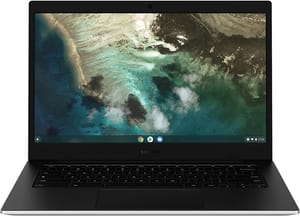
- ✓14-inch display
- ✓long battery life
- ✓durable design
- ✓Intel Celeron processor
- ✗HD resolution instead of Full HD
- ✗basic performance for demanding tasks
Acer Chromebook 315
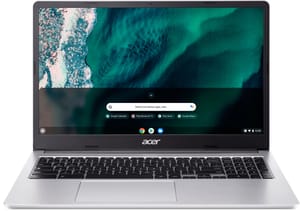
- ✓Large 15.6-inch display
- ✓comfortable full-size keyboard
- ✗Basic HD resolution
- ✗limited storage
HP Chromebook 14a
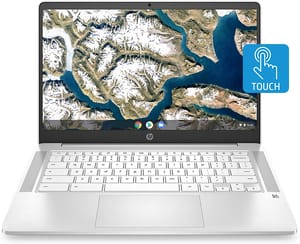
- ✓14-inch full-HD display
- ✓good performance
- ✓long battery life
- ✗Limited storage space
- ✗basic processor
Lenovo IdeaPad Slim 3 Chromebook
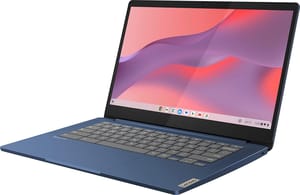
- ✓Modern design
- ✓good keyboard
- ✓reliable performance
- ✓solid build quality
- ✗Limited storage
- ✗standard HD display
Lenovo Chromebook 3 11"
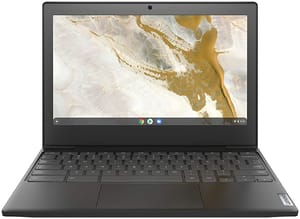
- ✓Compact and portable
- ✓solid build quality
- ✓comfortable keyboard
- ✓loud speakers
- ✗Small 11.6-inch display
- ✗limited battery life compared to larger models
What is a Chromebook?
A Chromebook is a laptop or tablet that runs on Google’s Chrome OS operating system. This type of device is for users who primarily need a computer for web browsing, sending emails, streaming videos, and using cloud services like Google Drive. Chrome OS itself is lightweight.
Chromebooks are also well-known for their affordable prices. While high-end laptops can cost well over a thousand dollars, many Chromebooks are available for just a few hundred dollars. This lets budget-conscious consumers buy a reliable device.
If you don’t like fussing with technology and want a computer that just works, a Chromebook may be the perfect fit.
How to Pick a Budget Chromebook
Battery Life
Look for a Chromebook with around 10 hours of battery life or more. That covers a full day of work or school without worrying about finding an outlet.
Performance
For everyday tasks like web browsing, document editing, and video streaming, opt for a model with an Intel, AMD, or ARM-based processor and at least 4GB of RAM. That is enough to handle multitasking and run essential applications.
While budget Chromebooks may not have the same processing power as their high-end counterparts, they still handle browsing, docs, and video. However, if you plan to use your Chromebook for more demanding activities like gaming or heavy multitasking, you may want to step up to one of our best Chromebooks under $300, where 8GB of RAM and faster processors become the norm.
Storage Space
Most budget Chromebooks come with 32GB to 128GB of storage. While that may seem small, Chrome OS is designed to rely heavily on cloud services like Google Drive for files and documents. This means that you may not need as much local space as you would on a traditional laptop.
If you find that you need more space for offline files, consider purchasing an external hard drive or SD card to expand your storage capacity.
Screen Size
Budget models run from 11.6 inches on the Lenovo Chromebook 3 11 up to 15.6 inches on the Acer Chromebook 15. The right screen size for you will depend on your personal preferences and intended use for the device. Smaller models are typically more portable and lightweight for on-the-go use. In contrast, larger models offer more screen real estate, which can be beneficial for productivity tasks, watching videos, and browsing the web.
When considering screen size, also pay attention to the display’s resolution and quality. A higher resolution will result in sharper images and text, while a better-quality display will offer more accurate color reproduction and wider viewing angles.
Touchscreen Chromebooks
Kids and older students get the most out of a touch panel. With a touchscreen, you can easily navigate web pages, play games, and interact with apps using your fingers, much like you would on a smartphone or tablet. This can be particularly useful for educational applications, where students can engage with the material more directly.
However, touchscreen models can be slightly more expensive than non-touchscreen counterparts. If a touchscreen is not a priority for you, a non-touchscreen model usually costs less.
Convertible Laptop
Convertible laptops, also known as 2-in-1 devices, can be used as both a laptop and a tablet. These versatile devices typically feature a touchscreen and a hinge that allows the screen to fold back or detach from the keyboard. This functionality lets you use your Chromebook in tablet mode for browsing, tent mode for watching videos, or laptop mode for typing and productivity tasks.
A convertible may cost a little more than a standard model.
Update Support and Ports
Operating System Updates
Chrome OS, the operating system that powers Chromebooks, receives regular updates to ensure your device remains secure and up-to-date. These updates bring new features, bug fixes, and security patches, making it essential to choose a Chromebook that will continue receiving updates for an extended period.
Before purchasing a Chromebook, research the device’s Auto Update Expiration (AUE) date, which indicates when it will stop receiving Chrome OS updates. Chromebooks released from 2021 onwards receive 10 years of automatic updates from their release date, which provide long-term support and security. Always verify the AUE date to ensure you get the most out of your device.
Ports
Depending on your needs, you’ll want to ensure that the Chromebook you choose has the necessary ports, such as USB, HDMI, and headphone jacks.
- USB ports: these connect peripherals like mice, keyboards, and external hard drives. Many Chromebooks come with both USB-A and USB-C ports, offering flexibility for connecting different devices.
- HDMI port: if you plan to connect your Chromebook to an external monitor or TV, you need an HDMI port. Some Chromebooks may use a USB-C port for video output, in which case you’ll need an adapter.
- Headphone jack: a headphone jack allows you to use wired headphones or speakers with your Chromebook. Some devices are phasing out the headphone jack in favor of wireless audio options.
Frequently Asked Questions
How much should I spend on a Chromebook?
For most users, spending between $150-$200 offers the best value in the Chromebook market. This price range gets you reliable performance for everyday tasks, adequate storage, and decent build quality. While you can find Chromebooks for less than $150, they often compromise on screen quality, processor speed, or build materials. Unless you have very basic needs or are buying for a young child, staying in the $150-$200 range usually gets you a device that will serve you well for several years.
Can a Chromebook under $200 handle video calls and online meetings?
Yes. Every Chromebook on this page has a built-in webcam and microphone, and all of them handle a standard Google Meet, Zoom, or Microsoft Teams call. They are 4GB dual-core or entry-level quad-core machines, though, so expect the call to stutter if you run it alongside a stack of other tabs. Chrome OS is optimized for web-based applications, which is exactly what these video calling platforms are.
How long will a budget Chromebook receive Chrome OS updates?
Most Chromebooks now receive Chrome OS updates for 10 years from their release date for devices released from 2021 onwards. This is significantly longer than many Windows laptops receive support. You can check the specific Auto Update Expiration (AUE) date for any Chromebook on Google’s official support page. Even budget models under $200 receive the same update schedule as premium Chromebooks, which means you’ll get security patches, new features, and bug fixes throughout the device’s supported lifetime.
Is 32GB or 64GB storage enough for a Chromebook?
For most users, 32GB or 64GB of storage is sufficient on a Chromebook because Chrome OS is designed to work primarily with cloud storage through Google Drive. Your files, photos, and documents can be stored in the cloud and accessed from anywhere with an internet connection. The operating system itself only takes up about 10-15GB. If you need more offline storage, you can always add an SD card or external USB drive inexpensively.
What’s the difference between a cheap Chromebook and an expensive one?
The main differences between budget Chromebooks under $200 and premium models are build materials, screen resolution, processor speed, and special features. Budget models typically have plastic construction, HD (1366x768) screens, and Intel Celeron or MediaTek processors. Premium Chromebooks often feature aluminum bodies, Full HD or higher resolution displays, faster Intel Core processors, backlit keyboards, and touchscreens. However, for basic tasks, budget Chromebooks perform nearly as well as expensive models.


