
ACEMAGIC G3A
Published on

The ACEMAGIC G3A is a 3.5-liter workstation for CAD, 3D modeling, video editing, and local AI work, built around two desktop parts: a socketed Intel Core i9-13900F and a low-profile NVIDIA RTX 2000 Ada card with 16GB of VRAM. The RTX card runs NVIDIA’s professional drivers rather than the gaming ones, and it drives four monitors from its own Mini DisplayPort outputs. ACEMAGIC holds the 24-core CPU to 65 watts so it fits the small case. The 13900F also has no integrated graphics, so the rear HDMI and DisplayPort sockets go unused on the shipping build. A second configuration swaps in the newer RTX PRO 4000 Blackwell SFF card.
Pros and Cons
| Pros | Cons |
|---|---|
| Socketed desktop Core i9 and a swappable low-profile GPU | Rear HDMI 2.0 and DisplayPort 1.4 do not work with the 13900F |
| RTX 2000 Ada with 16GB of VRAM and NVIDIA professional drivers | CPU power is locked at 65W in the BIOS |
| Four Mini DisplayPort 1.4a outputs from the GPU | About 20W at idle and audible fan noise when idle |
| Held 65W in repeated Cinebench runs without throttling | No USB4 or Thunderbolt; the USB-C port is 10Gbps |
| Two M.2 NVMe slots, a 2.5-inch SATA bay, and up to 96GB DDR5 | The i9-13900F dates from early 2023 |
| Dual Ethernet (2.5GbE + 1GbE) and two RS-232 COM ports | At 3.46 liters, it is large for a mini PC |
Related Videos
ACEMAGIC G3A Comparison Chart
 ACEMAGIC G3A | ACEMAGIC G3A | |
| Price | List Price: $2,299.00 Amazon Prices: Loading prices... | List Price: $3,699.00 Amazon Prices: |
| Version | 32GB/1TB/RTX 2000 Ada | 32GB/1TB/RTX PRO 4000 Blackwell SFF |
| Performance Rating | 7.5 | 7.5 |
| Operating System | Windows 11 Pro | Windows 11 Pro |
| Processor | Twenty-four-core Intel Core i9-13900F | Twenty-four-core Intel Core i9-13900F |
| GPU | Dedicated NVIDIA RTX 2000 Ada Generation | Dedicated NVIDIA RTX PRO 4000 Blackwell SFF Edition |
| RAM | 32 GB DDR5 SO-DIMM, 2-channel (Up to 96GB, 2x SO-DIMM) | 32 GB DDR5 SO-DIMM, 2-channel (Up to 96GB, 2x SO-DIMM) |
| Internal Storage | 1 TB NVMe PCIe 4.0 SSD | 1 TB NVMe PCIe 4.0 SSD |
| Dimensions width x length x thickness | 8.35 x 7.48 x 3.39 inches (212.09 x 189.99 x 86.11 mm) | 8.35 x 7.48 x 3.39 inches (212.09 x 189.99 x 86.11 mm) |
| Weight | 5.95 lbs (2.7 kg) | 5.95 lbs (2.7 kg) |
| WiFi | Wi-Fi 6E (802.11ax) | Wi-Fi 6E (802.11ax) |
| Bluetooth | Bluetooth 5.2 | Bluetooth 5.2 |
| Ethernet | 2 Ethernet ports at 2.5 Gbps | 2 Ethernet ports at 2.5 Gbps |
| HDMI | No HDMI | No HDMI |
| DisplayPort | 4 DisplayPorts (4x Mini DP 1.4a on the GPU; rear HDMI and DP need a CPU with graphics) | 4 DisplayPorts (4x Mini DP 1.4a on the GPU; rear HDMI and DP need a CPU with graphics) |
| VGA | No VGA Ports | No VGA Ports |
| USB Ports | 2 USB 2.0, 4 USB 3, 1 USB-C Front: 2x USB-A 10Gbps, USB-C 10Gbps. Rear: 2x USB-A 5Gbps, 2x USB 2.0 | 2 USB 2.0, 4 USB 3, 1 USB-C Front: 2x USB-A 10Gbps, USB-C 10Gbps. Rear: 2x USB-A 5Gbps, 2x USB 2.0 |
| Thunderbolt Ports | No | No |
| OCuLink | No | No |
| Internal SATA Ports | 1 SATA port, includes 2.5" drive bay (Quick-release 2.5-inch bay) | 1 SATA port, includes 2.5" drive bay (Quick-release 2.5-inch bay) |
| Card Reader | No Card Reader | No Card Reader |
| Headphone Jack | front | front |
| Fanless | No | No |
| VESA Mount | No | No |
| In the Box | Main unit, 230W power adapter, Mini DP to HDMI cable, screws, manual | Main unit, 230W power adapter, Mini DP to HDMI cable, screws, manual |
| Expandability | Up to 96GB DDR5-5600 (2x SO-DIMM). 2x M.2 NVMe plus a 2.5-inch SATA bay. Socketed LGA 1700 CPU; slot-powered low-profile GPU. | Up to 96GB DDR5-5600 (2x SO-DIMM). 2x M.2 NVMe plus a 2.5-inch SATA bay. Socketed LGA 1700 CPU; slot-powered low-profile GPU. |
Related Mini PCs
-
 ACEMAGIC M1A Pro+Cube-shaped Strix Halo mini PC with the AMD Ryzen AI Max+ 395, Radeon 8060S, and 128GB of soldered…
 -
 ASUS ROG GR70The ASUS ROG GR70 packs an AMD Ryzen 9 9955HX3D with 3D V-Cache and an NVIDIA GeForce RTX 5070…
 -
 ASUS ROG NUC 16The ASUS ROG NUC 16 packs a refreshed Intel Core Ultra 9 290HX Plus and an NVIDIA RTX 5080 or RTX…
 -
 MINISFORUM 139D7An 8.5-liter upright desktop with a 24-core Core i9-13900HX, a PCIe 5.0 x16 slot, and an internal…
 -
 MINISFORUM 895D7An 8.5-liter upright desktop with a 16-core Ryzen 9 8945HX, a PCIe 5.0 x16 slot, and an internal…
 -
 ACEMAGIC F2AA 5-inch-square ACEMAGIC mini PC sold with either Intel's Core Ultra X7 358H and Arc B390 graphics…
Ports, cooling, and the display outputs

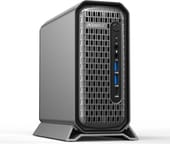
The G3A is an upright metal box about 8.3 x 7.5 x 3.4 inches that stands on a foot. ACEMAGIC rates it at 3.46 liters. The front carries the power button, separate 3.5mm microphone and headphone jacks, two USB-A ports at 10Gbps, and a 10Gbps USB-C port. The rear has two more USB-A ports at 5Gbps, two USB 2.0 ports, a 2.5GbE and a 1GbE Ethernet port, two COM ports, and a round four-pin power socket for the 20V, 230W adapter. The COM ports are standard serial ports that ACEMAGIC pitches for PLCs, CNC machines, and other industrial controllers.
Video comes from the graphics card: four Mini DisplayPort 1.4a outputs, and ACEMAGIC puts a Mini DisplayPort to HDMI cable in the box. The motherboard also has an HDMI 2.0 port and a DisplayPort 1.4 port, but those carry the processor’s own graphics, and Intel’s spec page lists no processor graphics for the 13900F. Both hands-on reviewers below say those two sockets stay dark with this CPU.
A dedicated fan and a large heatsink with heat pipes cool the CPU, and the GPU’s own blower pulls air in through the front mesh and pushes it out the back. ACEMAGIC describes it as a 135W thermal design covering the 65W CPU and the 70W GPU. The RTX 2000 Ada draws all of its power from the PCIe slot, so the case needs no separate GPU power cable. ACEMAGIC also lists AC power recovery, scheduled power-on, and diskless UEFI boot for unattended installs.
A 65W desktop Core i9 and a 16GB workstation GPU
The Core i9-13900F is a Raptor Lake desktop chip that Intel launched in early 2023, with 8 performance cores, 16 efficient cores, 32 threads, and a 5.6GHz peak boost. In a full desktop it can draw up to 219W; in the G3A, ACEMAGIC locks both power limits at 65W. That costs multi-core speed against the same chip in a tower: PassMark rates the 13900F at about 48,000 in a desktop, while the reviewers below measured roughly 20,000 to 21,800 points in Cinebench multi-core tests on the G3A. Notebookcheck’s launch coverage notes the chip is over three years old but still keeps pace with a current Ryzen 7 9700X in synthetic multi-threaded tests.
The NVIDIA RTX 2000 Ada is a 70W low-profile workstation card with 16GB of GDDR6 ECC memory and 2,816 CUDA cores. Notebookcheck expects it to land near an RTX 3060 12GB in raw performance and points out that its drivers are certified by vendors such as SolidWorks, Catia, Autodesk, and Siemens. For local AI, ACEMAGIC lists Llama and Qwen language models and Stable Diffusion as targets and says 7B to 13B models fit in the 16GB of VRAM. The RTX PRO 4000 Blackwell SFF configuration moves to 24GB of GDDR7 at the same 70W.
Memory is 32GB of DDR5-5600 in two SO-DIMM slots, with up to 96GB supported. Storage is a 1TB PCIe 4.0 NVMe SSD with a second M.2 2280 slot free (both slots take NVMe only, and ACEMAGIC lists support up to 4TB), plus a quick-release bay for a 2.5-inch SATA SSD or hard drive. ACEMAGIC also sells a barebones version with no CPU, GPU, memory, or SSD.
Reviewer Insights

Tech Guy Beau
Tech Guy Beau used a loaned G3A for about a week before filming. He opened it up and called it “really, really well built,” pointing to the slide-out internal frame, the name-brand Kingston memory, and the socketed CPU under a thick cold plate with heat pipes. On the rear video sockets he said, “You’re not going to use these if you have the F chip,” while noting a CPU swap could enable them later.
The system averaged about 20W at idle and drew 110W at the wall under a CPU-only Cinebench load, with the CPU staying under 70 degrees. “They have tuned this specifically to run at 65 watts from start to finish indefinitely,” he said, and a full Cinebench run matched a single burst run. Noise stayed under 40 dB at full load, and he concluded that “once you start running the machine under full load, it’s actually quieter, at most equal if not quieter than a standard mini PC.” At idle he could hear it running and called it slightly more audible at rest than mini PCs built on laptop chips.
In his video editing test, he expected a 10-minute 4K60 project with transitions to finish exporting in about six to seven minutes on the GPU’s NVENC encoders, with the whole system under 100W at the wall during the export. Gaming was not the point of the machine (“it appeals more towards professionals, I would say, more than gaming”), but Pragmata ran at about 60fps at native 1440p, 76fps at 1440p with DLSS Quality, and about 30fps at native 4K, with the GPU under 80 degrees.
Fix64
Fix64 reviewed a G3A that ACEMAGIC sent on loan. The box includes a Mini DisplayPort to HDMI cable, which he was glad to see because the RTX card has only Mini DisplayPort outputs, and he found the case “very easy” to open: press the button and slide the internals out. Out of the box the system spent a couple of hours on Windows updates, and Forza Horizon 6 would not start until he updated the NVIDIA driver. “Once you get it updated, it’s rocking,” he said, and the game then held “a constant 60 frames per second,” which he suspected was the game’s own frame cap.
In Geekbench the RTX 2000 Ada scored 82,731 in OpenCL, which he called close to his base M4 Max Mac Studio. CrystalDiskMark showed a fast PCIe 4.0 SSD, and GPU-Z reported the graphics card on a PCIe 4.0 x8 link. He closed with “if you want to get some work done, this is the way to go,” adding that “the fans don’t ramp up very much.”
Duvenox
Duvenox took the G3A apart down to the CPU socket and found a 40mm ball-bearing fan for airflow and an FSP-branded 230W power adapter in the box. In the BIOS, nearly every option is open except the CPU power limits, which are fixed at 65W. With that cap the CPU scored about 20,000 multi-core and 1,500 single-core in Cinebench R23, and temperatures sat around 70 degrees under load with peaks near 80. The reviewer also confirmed that the motherboard HDMI and DisplayPort do not work because the F-series CPU has no integrated graphics, and that the four Mini DisplayPorts on the RTX card are enough to use the machine fully.
The GPU ran FurMark at around 75 degrees with peaks near 80. For local AI, a 4-billion-parameter Gemma model ran entirely on the RTX 2000 Ada, and a quantized 12-billion-parameter model ran as well. In Cyberpunk 2077 at 2K with DLSS, frame generation, and ray tracing, the CPU drew about 50W and the GPU its full 70W.
Who it’s for
The G3A fits someone who runs CAD, BIM, or 3D modeling software that wants a certified NVIDIA workstation driver, edits video, or experiments with local AI models that fit in 16GB of VRAM, and who wants that in a box that sits beside a monitor instead of under the desk. The four Mini DisplayPorts, dual Ethernet, and serial COM ports also suit control rooms, labs, and shop-floor machines.
Skip it if you want USB4 or Thunderbolt, a quiet idle, or the most AI memory per dollar: a Ryzen AI Max+ 395 box with 128GB of unified memory, such as the HP Z2 Mini G1a or the ACEMAGIC M1A Pro+, holds much larger models, and the MINISFORUM MS-02 Ultra takes a half-height GPU alongside 25GbE networking. To line it up against other models, use the Mini PC Comparison Chart.
Frequently Asked Questions
Do the HDMI and DisplayPort on the back of the ACEMAGIC G3A work?
Not with the Core i9-13900F it ships with. Those two motherboard ports carry the processor’s integrated graphics, and the 13900F has none. Plug monitors into the four Mini DisplayPort outputs on the RTX card instead; a Mini DisplayPort to HDMI cable comes in the box.
How many monitors can the ACEMAGIC G3A drive?
Four. The RTX 2000 Ada card has four Mini DisplayPort 1.4a outputs, and ACEMAGIC rates each for an independent 4K display.
Is the Core i9-13900F in the G3A as fast as in a desktop tower?
No. A tower can feed the same chip up to 219W, more than three times the G3A’s limit. Reviewers measured about 20,000 to 21,800 points in Cinebench multi-core tests, and the chip held that level through long runs without throttling.
Can I upgrade the CPU and graphics card in the ACEMAGIC G3A?
Yes. The CPU sits in a standard desktop socket, and the GPU is a removable low-profile card powered from the PCIe slot. ACEMAGIC sells the G3A with an RTX PRO 4000 Blackwell SFF card as a second configuration, which shows the class of card that fits.
How much memory and storage does the ACEMAGIC G3A support?
It ships with 32GB of DDR5-5600 in two SO-DIMM slots and supports up to 96GB. For storage there are two M.2 2280 NVMe slots (PCIe 4.0, one filled with a 1TB SSD) and a quick-release bay for a 2.5-inch SATA drive.
Can the ACEMAGIC G3A run local AI models?
Yes, within the 16GB of VRAM on the RTX 2000 Ada. ACEMAGIC says 7B to 13B models fit, and one reviewer ran a 4-billion-parameter Gemma model and a quantized 12-billion-parameter model on the GPU. Larger models need more memory, such as the 24GB RTX PRO 4000 configuration or a machine with a large unified memory pool.
How loud is the ACEMAGIC G3A?
One reviewer measured under 40 dB at full CPU load against a 34 dB room. It is audible at idle, a little more so than mini PCs built on laptop chips, but it does not get much louder under load.