
ACEMAGICIAN W1
Updated on

The ACEMAGICIAN W1, also marketed as the “Warlord,” represents a compelling entry in the budget gaming mini PC segment. Powered by the AMD Ryzen 7 H 255 processor (essentially a rebranded Ryzen 7 8745HS) and its integrated Radeon 780M graphics, this compact system delivers performance comparable to a dedicated GTX 1060 graphics card in a package that fits in the palm of your hand. At around $519 for the fully configured 32GB/1TB model, it positions itself as one of the most affordable ways to get AMD’s powerful 780M iGPU, making it attractive for users who want to game, edit 4K video, or handle demanding productivity tasks without the bulk of a traditional desktop.
Pros and Cons of the ACEMAGICIAN W1
| Pros | Cons |
|---|---|
| Excellent price-to-performance ratio at $519 | All-plastic construction that creaks under pressure |
| AMD Radeon 780M delivers GTX 1060-level gaming | Difficult to open for upgrades (adhesive rubber feet) |
| Exceptional WiFi 6 and Bluetooth 5.2 range | Fan noise reaches 44 dBA under heavy load |
| USB4 port with 40Gbps and DisplayPort Alt Mode | Conservative thermal throttling at 85C limits peak performance |
| Dual M.2 NVMe slots and dual RAM slots for upgrades | Only one USB-C port |
| 2.5 Gigabit Ethernet for fast file transfers | Short internal cables make maintenance tricky |
Related Videos
ACEMAGICIAN W1 Comparison Chart
 ACEMAGICIAN W1 | |
| Price | List Price: $519.00 Amazon Prices: Loading prices... |
| Version | 32GB/1TB/Ryzen 7 H 255 |
| Performance Rating | 9.0 |
| Operating System | Windows 11 Pro |
| Processor | Octa-core 3.80 Ghz (max 4.90 Ghz) AMD Ryzen 7 H 255 |
| GPU | Integrated AMD Radeon 780M |
| RAM | 32 GB |
| Internal Storage | 1 TB |
| Dimensions width x length x thickness | 5 x 5 x 1.6 inches (127 x 127 x 40.64 mm) |
| Weight | unknown |
| WiFi | Wi-Fi 6 (802.11ax) |
| Bluetooth | Bluetooth 5.2 |
| Ethernet | 1 Ethernet port at 2 Gbps |
| HDMI | 1 HDMI Port |
| DisplayPort | 1 DisplayPort |
| VGA | No VGA Ports |
| USB Ports | 6 USB 3, 1 USB 4, 1 USB-C |
| Thunderbolt Ports | No |
| Internal SATA Ports | No SATA ports |
| Card Reader | No Card Reader |
| Headphone Jack | combo |
| Fanless | No |
| VESA Mount | Yes |
| In the Box | Power adapter (120W, 19V 6.32A), VESA wall-mount bracket, HDMI cable, user manual, Windows 11 Pro pre-installed |
| Expandability | 2x DDR5 SO-DIMM slots (supports up to 64GB DDR5-5600MHz dual channel); 2x M.2 2280 PCIe 4.0 NVMe slots |
Related Mini PCs
-
 Beelink SER9 Max H 255The Beelink SER9 Max H 255 delivers workstation-class performance in a compact 5.31-inch chassis.…
 -
 Chatreey IT13-13900HThe Chatreey IT13-13900H Mini PC delivers impressive productivity performance with its i9-13900H…
 -
 GEEKOM GT15 Max AIThe GEEKOM GT15 Max AI packs Intel's Core Ultra 9 285H processor with 99 TOPS of combined AI…
 -
 KAMRUI AM21The KAMRUI AM21 packs desktop-class performance into a 0.5-liter chassis. With an AMD Ryzen 7…
 -
 KAMRUI Hyper H2The KAMRUI Hyper H2 packs an 8-core Intel Core i9-11900H processor into a compact 5-inch form…
 -
 Lenovo ThinkCentre M70q Gen 5The Lenovo ThinkCentre M70q Gen 5 is a business-focused mini PC featuring Intel's 14th Gen Core…
Detailed Insights into the ACEMAGICIAN W1

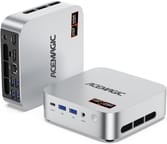
The ACEMAGICIAN W1 measures roughly 5 x 5 x 1.6 inches, making it one of the more compact gaming-capable mini PCs on the market. The chassis features an all-plastic silver shell that several reviewers noted feels a bit cheap and creaks when pressure is applied, though build quality on the inside tells a different story. Internally, the W1 uses quality components including Crucial-branded DDR5 RAM and a fast PCIe 4.0 NVMe SSD. The port selection is generous with six USB 3.2 Type-A ports (two 10Gbps on the front, four 5Gbps on the rear), a single USB4 Type-C with DisplayPort Alt Mode, HDMI 2.0, DisplayPort 2.0, and 2.5 Gigabit Ethernet.
Performance from the AMD Ryzen 7 H 255 is impressive for a mini PC of this size and price point. The 8-core, 16-thread processor based on Zen 4 architecture can boost up to 4.9GHz and delivers Geekbench 6 multi-core scores around 12,880. The integrated Radeon 780M graphics handles 1080p gaming surprisingly well, running eSports titles like Apex Legends and Call of Duty smoothly, while even demanding AAA games remain playable at lower settings. Video editors will appreciate that 4K timeline scrubbing and exports work without hiccups in Adobe Premiere Pro and DaVinci Resolve.
Connectivity options position the W1 well for modern workflows, including emerging AI agent workloads that benefit from compact always-on hardware. The USB4 port enables eGPU connectivity for users who want dedicated graphics power, while WiFi 6 delivers excellent range that multiple reviewers praised. With support for triple 8K displays through its HDMI, DisplayPort, and USB-C outputs, the W1 works well for productivity users running multiple monitors. The dual M.2 2280 PCIe 4.0 slots and two DDR5 SO-DIMM slots (supporting up to 64GB) provide solid upgrade paths for users who want to expand storage or memory down the road.
Reviewer Insights on the ACEMAGICIAN W1

Robtech’s Perspective
Robtech conducted a thorough review with detailed fan noise measurements and thermal testing. He found the W1 to be competitively priced with excellent wireless range, noting that “it’s pretty competitively priced and has excellent wireless and Bluetooth range.” However, he was critical of the difficult disassembly process, stating that “opening it is a real chore… it’s a pain in the ass” due to the adhesive rubber feet that must be removed. His noise measurements showed 29 dBA at idle rising to a noticeable 44 dBA under load, and he observed thermal throttling at 85C during sustained workloads. Despite these concerns, he considered it a decent choice for users prioritizing compact power and connectivity.
SomeGadgetGuy’s Perspective
SomeGadgetGuy (Juan Bagnell) focused on the value proposition, calling it “one of the more cost-effective ways to get a punchy powerful mini PC.” He appreciated the high-quality internal components from Crucial and the dual M.2 slots for expandability. His testing confirmed the 780M GPU is “roughly as powerful as an old GTX 1060 graphics card,” making it suitable for 4K video editing and moderate AAA gaming. Like Robtech, he criticized the plastic shell and difficult internal access, noting “it is a flexy plastic shell, and I really do not like having to rip off adhesive feet to get inside the box.” He highly recommended it for performance-focused users on a budget, especially during sales.
BasicDad Tech’s Perspective
BasicDad Tech offered a more recent gaming-focused review and was enthusiastic about the performance, stating that “on paper, this might be one of the best mini PCs I’ve ever got my hands on so far.” His gaming tests showed modern AAA titles running better than expected at 1080p, and he found thermal management effective with the system staying “mostly quiet” during gameplay. Unlike other reviewers, he felt the build quality “seems good, doesn’t feel cheap or anything.” He did note the brand’s history with malware concerns and recommended users scan the system after purchase, though he found no bloatware on his unit.
Written Reviews
According to TechXReviews, the W1 stands out as “the cheapest device on the market rocking the AMD 780M iGPU” at $399 for the barebone configuration. Their thermal testing revealed impressive results with the CPU reaching only 61C during single-core tests and 78C under multi-core loads while maintaining approximately 30dB noise levels. They praised the dual copper tube cooling system as a standout engineering achievement for the compact form factor.
The Gadgeteer described it as “a fairly powerful little PC that takes up only a few square inches of desk space” and noted zero issues during their test period. They highlighted the milled aluminum appearance and 54-watt cooling system with visible fins.
The reviewer consensus points to the ACEMAGICIAN W1 as an excellent value for users who prioritize performance over premium build quality. All sources agree the Radeon 780M graphics deliver impressive gaming and content creation capabilities, while concerns center on the plastic construction, fan noise under load, and the awkward upgrade process.
Customer Reviews of the ACEMAGICIAN W1
Amazon customers have given the ACEMAGICIAN W1 a solid 4.4-star rating based on 61 reviews, indicating strong overall satisfaction. Buyers frequently praise the performance-to-price ratio, with many expressing surprise at how well the compact system handles gaming and video editing tasks they previously thought required larger desktops. The 32GB DDR5 RAM and 1TB NVMe storage configuration receives positive mentions for providing ample headroom for multitasking.
Common concerns in customer reviews echo professional reviewers’ observations about fan noise and the plastic construction. Some users note the system runs louder than expected during gaming sessions, though most consider it acceptable given the performance level. A few reviews mention the difficulty of accessing internals for upgrades, suggesting ACEMAGICIAN could improve the user experience by using traditional screws instead of adhesive feet.
Overall, customers view the W1 as delivering on its promise of compact gaming performance at a budget-friendly price, even as DRAM prices continue to climb industry-wide. Those coming from aging laptops or basic desktops report significant performance improvements, while users with previous mini PC experience appreciate the step up in GPU capability that the Radeon 780M provides compared to Intel UHD graphics or older AMD APUs.
Conclusion
The ACEMAGICIAN W1 carves out a compelling niche as an affordable gateway to AMD’s Radeon 780M graphics in a mini PC form factor. For content creators who need to edit 4K video, casual gamers who want to play modern titles at 1080p, or productivity users who appreciate fast DDR5 memory and USB4 connectivity, the W1 delivers genuine value at its $519 price point. The performance-per-dollar proposition becomes even more attractive during sales when prices dip below $400.
That said, the W1 isn’t for everyone. Users who prioritize premium build quality, quiet operation under load, or easy access to internals for upgrades should consider alternatives like the GMKtec K12 or Beelink SER9 series. The plastic construction and difficult disassembly process may frustrate power users who plan to swap RAM or add storage. The thermal throttling behavior, while keeping temperatures safe, does limit sustained performance in extended workloads.
For those looking to compare options, Starry Hope’s Mini PC Comparison Chart provides a valuable resource for evaluating the W1 against similar systems. If you need compact gaming capability without breaking the bank and can accept the trade-offs in build quality, the ACEMAGICIAN W1 represents one of the best values in the current mini PC market.
Frequently Asked Questions
Can the ACEMAGICIAN W1 run modern games?
Yes, the AMD Radeon 780M integrated graphics delivers performance roughly equivalent to an NVIDIA GTX 1060. The W1 can run eSports titles like Apex Legends and Valorant smoothly at 1080p, and even handles demanding AAA games at lower settings. For best results, enable AMD FSR upscaling when available.
How much RAM and storage can I upgrade to?
The W1 supports up to 64GB of DDR5-5600MHz RAM via its two SO-DIMM slots. For storage, it has two M.2 2280 PCIe 4.0 NVMe slots, allowing up to 4TB of total SSD capacity. Note that opening the case requires removing adhesive rubber feet, so plan upgrades carefully.
Is the ACEMAGICIAN W1 loud during normal use?
At idle or during light tasks like web browsing and document editing, the W1 operates quietly at around 29 dBA. Under heavy gaming or sustained CPU loads, fan noise increases to approximately 44 dBA, which is noticeable but typical for high-performance mini PCs in this price range.
What displays can I connect to the ACEMAGICIAN W1?
The W1 supports up to three displays simultaneously through its HDMI 2.0, DisplayPort 2.0, and USB4 Type-C with DisplayPort Alt Mode. All three outputs support up to 8K resolution, making it suitable for multi-monitor productivity setups or high-resolution content creation.
Can I use an external graphics card with the W1?
Yes, the USB4 port supports external GPU enclosures for users who want dedicated graphics performance. This allows you to connect desktop-class graphics cards when gaming or running GPU-accelerated workloads, while still enjoying the W1’s compact form factor for everyday use.
What is the AMD Ryzen 7 H 255 processor?
The AMD Ryzen 7 H 255 is essentially a rebranded Ryzen 7 8745HS, featuring 8 Zen 4 cores, 16 threads, and boost speeds up to 4.9GHz. It includes the powerful Radeon 780M integrated graphics with 12 RDNA 3 compute units. The different naming is an OEM variant designation and does not indicate different specifications.
Does the ACEMAGICIAN W1 come with Windows pre-installed?
Yes, the W1 ships with Windows 11 Pro pre-installed and activated. Multiple reviewers reported no bloatware on their units, though some recommend running a security scan after initial setup given the brand’s past issues with pre-installed software on other models.