
ASUS NUC 14 Essential
Updated on

The ASUS NUC 14 Essential represents the continuation of Intel’s beloved NUC line, now under ASUS’s capable management. This compact mini PC packs an Intel N150 processor into a chassis that measures just 5.3 x 4.5 x 1.4 inches and weighs barely over a pound. With its 6W TDP processor, this machine prioritizes energy efficiency and quiet operation over raw power, making it an excellent choice for basic productivity tasks, digital signage applications, or as a lightweight home office computer. The included VESA bracket means you can mount it behind a monitor for a completely clean desk setup.
Pros and Cons of the ASUS NUC 14 Essential
| Pros | Cons |
|---|---|
| Extremely compact 0.56L chassis | Limited to single SO-DIMM slot (max 16GB RAM) |
| Energy-efficient Intel N150 with 6W TDP | Low 3D graphics performance |
| Triple 4K display support via HDMI 2.1 and dual DisplayPort | Only one M.2 storage slot |
| 2.5G Ethernet with Realtek controller | No SD card reader |
| Wi-Fi 6E and Bluetooth 5.3 connectivity | Not suitable for gaming or heavy workloads |
| 3-year warranty included | High DPC latencies reported in reviews |
ASUS NUC 14 Essential Comparison Chart
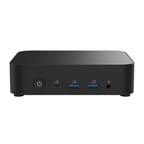 ASUS NUC 14 Essential | |
| Price | List Price: $359.99 Amazon Prices: Loading prices... |
| Version | 16GB/512GB/Intel N150 |
| Performance Rating | 4.9 |
| Operating System | Windows 11 Pro |
| Processor | Quad-core 3.60 Ghz Intel Processor N150 |
| GPU | Integrated Intel UHD Graphics |
| RAM | 16 GB DDR5 SO-DIMM |
| Internal Storage | 512 GB |
| Dimensions width x length x thickness | 4.53 x 5.31 x 1.42 inches (115.06 x 134.87 x 36.07 mm) |
| Weight | 1.04 lbs (0.47 kg) |
| WiFi | Wi-Fi 6E (802.11ax) |
| Bluetooth | Bluetooth 5.3 |
| Ethernet | 1 Ethernet port at 2.5 Gbps |
| HDMI | 1 HDMI Port |
| DisplayPort | 1 DisplayPort (1x DP 1.4 port, plus 1x USB-C with DP 1.4 support) |
| VGA | No VGA Ports |
| USB Ports | 1 USB 2.0, 4 USB 3, 2 USB-C 4x USB 3.2 Gen2 Type-A, 2x USB 3.2 Gen2 Type-C (one with DisplayPort 1.4) |
| Thunderbolt Ports | No |
| Internal SATA Ports | No SATA ports |
| Card Reader | No Card Reader |
| Headphone Jack | combo |
| Fanless | No |
| VESA Mount | Yes |
| In the Box | 65W AC Adapter with power cord, VESA bracket with screws, safety/regulatory documentation, warranty card |
| Expandability | 1x SO-DIMM DDR5-4800 slot (max 16GB), 1x M.2 2280/2242 slot (NVMe PCIe 3.0 x4 or SATA) |
Related Mini PCs
-
 KAMRUI Pinova P1The KAMRUI Pinova P1 packs an AMD Ryzen 3 3250U processor into a palm-sized 5-inch-square chassis…
 -
 DreamQuest Q5The DreamQuest Q5 is a compact mini PC featuring Intel's 12th Gen N95 processor with high-speed…
 -
 Beelink SER3The Beelink SER3 offers a compact form factor with AMD Ryzen 3 3200U power, dual 4K HDMI output,…
 -
 Bmax B4 PlusThe BMAX B4 Plus Mini PC delivers Intel N100 performance with a unique 2.5-inch SATA expansion bay…
 -
 Bmax B4 UltraThe Bmax B4 Ultra is an ultra-compact mini PC featuring Intel's N150 processor, 12GB LPDDR5 RAM,…
 -
 BOSGAME B100Compact yet powerful, the BOSGAME B100 features Intel UHD Graphics for 4K playback, dual HDMI for…
Detailed Insights into the ASUS NUC 14 Essential

The ASUS NUC 14 Essential features a sturdy, all-black chassis that ASUS designed for durability and practicality. At just 470 grams, you can easily hold it in one hand, and the included VESA mounting bracket lets you attach it directly behind a monitor to create an all-in-one-style setup. The case opens easily for access to the RAM and storage slots, though you only get one SO-DIMM slot and one M.2 slot to work with. This limited expandability is a trade-off for the ultra-compact form factor, but 16GB of DDR5-4800 RAM and up to 2TB of NVMe storage should handle most office and home productivity needs. With DDR5 prices rising significantly, buying a pre-configured model with RAM already installed is often the smarter value play.
The Intel N150 processor at the heart of this system runs at up to 3.6GHz across its four cores and offers integrated Intel UHD Graphics. This is not a powerhouse by any means, but it handles everyday tasks like web browsing, document editing, video streaming, and even light photo editing without breaking a sweat. NotebookCheck’s testing of the similar Core 3 N355 variant showed quiet operation under load, with the cooling system keeping noise levels low even during extended use sessions. The 6W TDP means this system sips power rather than gulping it, which translates to lower electricity bills and cooler operation.
Connectivity is a genuine strong point for the NUC 14 Essential. You get six USB ports in total, including four USB 3.2 Gen2 Type-A ports and two USB-C ports, one of which supports DisplayPort output. The dedicated HDMI 2.1 port and DisplayPort 1.4 port, combined with the USB-C video output, enable triple 4K display configurations for expanded productivity. The 2.5G Ethernet port powered by a Realtek RTL8125BG-CG controller offers faster wired networking than typical Gigabit connections, while Intel Wi-Fi 6E AX211 and Bluetooth 5.3 handle wireless duties.
Reviewer Insights on the ASUS NUC 14 Essential

NotebookCheck’s Perspective
NotebookCheck tested the higher-end Core 3 N355 variant and came away impressed with the overall package. They noted that “the Asus NUC 14 Essential offers a good total package for anyone looking for small, quiet and energy-saving computer.” The review highlighted the stable and robust case construction, easy access for upgrades, and quiet operation under load as particular strengths. However, they did note high DPC latencies, which could be a concern for audio production work, and the expected low 3D performance. The 36-month warranty was called out as a significant value-add compared to typical one-year warranties.
Gadgets Middle East
According to Gadgets Middle East, the NUC 14 Essential offers compelling value as an affordable barebones platform. Their review praised the “great port selection” and “triple 4K display support,” noting that “it’s a practical solution for home offices, schools, retail kiosks, and digital signage.” They awarded the system an 8.5/10, emphasizing that for streaming, media consumption, and basic graphics tasks, the NUC 14 Essential is perfectly capable. The main caveats they mentioned were that this isn’t suitable for heavy workloads or gaming, and buyers need to be comfortable installing their own RAM and SSD in barebone versions.
Both reviewers agreed that the ASUS NUC 14 Essential excels in its intended role as an efficient, compact system for everyday computing tasks, with the caveat that users should not expect gaming or content creation performance.
Customer Reviews of the ASUS NUC 14 Essential
Amazon customers have given the ASUS NUC 14 Essential positive marks, with early reviews highlighting the compact size and reliable performance for office tasks. Users appreciate the pre-configured versions that come with Windows 11 Pro, 16GB RAM, and 512GB SSD already installed, eliminating the need to source and install components separately. The 3-year warranty from authorized sellers provides additional peace of mind.
Common praise centers on the quiet operation and minimal footprint, with multiple reviewers noting that the system essentially disappears when mounted behind a monitor. The 2.5G Ethernet and Wi-Fi 6E connectivity receive positive mentions from users who need reliable network performance. Some users note the limited upgrade options as a minor drawback, but most accept this as the trade-off for such a compact design.
Conclusion
The ASUS NUC 14 Essential is an excellent choice for anyone seeking a compact, energy-efficient mini PC for basic productivity, digital signage, or home office use. The Intel N150 processor delivers sufficient performance for everyday tasks while maintaining low power consumption and quiet operation. With its comprehensive port selection including 2.5G Ethernet, Wi-Fi 6E, and triple 4K display support, this tiny system punches well above its weight in connectivity.
This mini PC is ideal for office workers, students, digital signage deployments, retail kiosks, and anyone who values desk space over raw computing power. It’s not the right choice for gamers, video editors, or anyone with demanding multitasking needs, as the single RAM slot and modest processor will hit their limits quickly under heavy loads. At prices starting around $359 for the pre-configured 16GB/512GB model, it offers solid value compared to larger desktop systems.
For those looking to compare options, Starry Hope’s Mini PC Comparison Chart provides a valuable resource for evaluating the NUC 14 Essential against other compact systems in its class.
Frequently Asked Questions
What is the difference between the ASUS NUC 14 Essential and NUC 14 Pro?
The NUC 14 Essential is the entry-level model featuring Intel N-series processors (N150, N250, N355, N97) with lower power consumption and modest performance. The NUC 14 Pro is the high-performance model with Intel Core Ultra processors, Thunderbolt 4 connectivity, and significantly more processing power. The Essential is designed for basic productivity and digital signage, while the Pro targets power users and professionals.
Can I upgrade the RAM in the ASUS NUC 14 Essential?
Yes, but the NUC 14 Essential has only one SO-DIMM slot supporting DDR5-4800 memory with a maximum capacity of 16GB. The case opens easily for access to the RAM slot, making upgrades straightforward if you purchase the barebone version. Pre-configured models typically come with 16GB already installed.
How many monitors can I connect to the ASUS NUC 14 Essential?
The NUC 14 Essential supports up to three displays simultaneously. It has one HDMI 2.1 port, one DisplayPort 1.4 port, and one USB-C port with DisplayPort 1.4 support. All three outputs can drive 4K resolution displays, making it excellent for multi-monitor productivity setups.
Is the ASUS NUC 14 Essential fanless?
No, the NUC 14 Essential includes an active cooling fan. However, reviewers note that it operates very quietly even under load, making it suitable for noise-sensitive environments like home offices or living rooms.
What operating systems does the ASUS NUC 14 Essential support?
Pre-configured models come with Windows 11 Pro installed. Barebone/kit versions support Windows 11, Red Hat Enterprise Linux, and Ubuntu 24.04 LTS. The system uses standard DDR5 SO-DIMM memory and M.2 NVMe storage, so Linux compatibility is generally excellent.
Can I mount the ASUS NUC 14 Essential behind a monitor?
Yes, ASUS includes a VESA mounting bracket and screws in the box. The ultra-compact design at just 135 x 115 x 36mm and 470g makes it ideal for mounting behind VESA-compatible monitors, creating an all-in-one style setup while keeping your desk completely clear.
What is the warranty on the ASUS NUC 14 Essential?
Authorized sellers typically provide a 3-year global warranty with the ASUS NUC 14 Essential, which is longer than the standard 1-year warranty offered with many competing mini PCs. This extended warranty coverage adds significant value, especially for business deployments.