
Beelink GTi13
Updated on

The Beelink GTi13 is built around Intel’s Core i9-13900HK, a 14-core, 20-thread chip that boosts to 5.4GHz. A 145W power supply sits inside the chassis rather than in an external brick, and a proprietary PCIe 4.0 x8 slot on the bottom connects to Beelink’s EX docking station for a desktop graphics card. The port and memory layout is dense for the size: dual 2.5G Ethernet, Thunderbolt 4, WiFi 6, and two SO-DIMM slots that take up to 96GB of DDR5. It is aimed at video editing, 3D rendering, and software development rather than out-of-the-box gaming.
Pros and Cons
| Pros | Cons |
|---|---|
| Desktop-class Intel Core i9-13900HK with 14 cores/20 threads | Integrated Iris Xe graphics limit AAA gaming without external GPU |
| Integrated 145W power supply eliminates external power brick | No VESA mount support due to chassis design |
| PCIe 4.0 x8 slot enables desktop GPU via EX docking station | Proprietary dock connector limits eGPU options |
| Dual 2.5G Ethernet and Thunderbolt 4 connectivity | WiFi 6 performance underperforms (tested at 40% of theoretical max) |
| Quiet operation (32dB at idle) | Heavier than typical mini PCs at 2.84 lbs |
| Upgradeable to 96GB DDR5 RAM and 8TB storage | Not Copilot+ capable per Windows Central |
Related Videos
Beelink GTi13 Comparison Chart
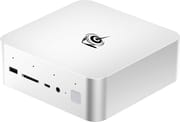 Beelink GTi13 | Beelink GTi13 | |
| Price | List Price: $809.00 Amazon Prices: Loading prices... | List Price: $1099.00 Amazon Prices: |
| Version | 32GB/1TB/Intel Core i9-13900HK | 96GB/2TB/Intel Core i9-13900HK |
| Performance Rating | 5.7 | 5.8 |
| Operating System | Windows 11 Pro | Windows 11 Pro |
| Processor | Fourteen-core 2.60 Ghz (max 5.40 Ghz) Intel Core i9-13900HK | Fourteen-core 2.60 Ghz (max 5.40 Ghz) Intel Core i9-13900HK |
| GPU | Integrated Intel UHD Graphics | Integrated Intel UHD Graphics |
| RAM | 32 GB | 96 GB |
| Internal Storage | 1 TB | 2 TB |
| Dimensions width x length x thickness | 6.22 x 6.22 x 2.2 inches (157.99 x 157.99 x 55.88 mm) | 6.22 x 6.22 x 2.2 inches (157.99 x 157.99 x 55.88 mm) |
| Weight | 2.84 lbs (1.29 kg) | 2.84 lbs (1.29 kg) |
| WiFi | Wi-Fi 6 (802.11ax) | Wi-Fi 6 (802.11ax) |
| Bluetooth | Bluetooth 5.2 | Bluetooth 5.2 |
| Ethernet | 2 Ethernet ports at 2.5 Gbps | 2 Ethernet ports at 2.5 Gbps |
| HDMI | 1 Full-Size HDMI Port | 1 Full-Size HDMI Port |
| DisplayPort | 1 DisplayPort | 1 DisplayPort |
| VGA | No VGA Ports | No VGA Ports |
| USB Ports | 5 USB 3, 1 USB-C Front: 1 USB-A 3.0, 1 USB-C 10Gbps, SD card reader. Rear: 4 USB-A 3.0, 1 Thunderbolt 4 | 5 USB 3, 1 USB-C Front: 1 USB-A 3.0, 1 USB-C 10Gbps, SD card reader. Rear: 4 USB-A 3.0, 1 Thunderbolt 4 |
| Thunderbolt Ports | 1 | 1 |
| OCuLink | No | No |
| Internal SATA Ports | No SATA ports | No SATA ports |
| Card Reader | SD Card Reader | SD Card Reader |
| Headphone Jack | combo | combo |
| Fanless | No | No |
| VESA Mount | No | No |
| In the Box | GTi13 Mini PC, Power Cord, User Manual, 2x HDMI cables | GTi13 Mini PC, Power Cord, User Manual, 2x HDMI cables |
| Expandability | 2x SO-DIMM DDR5-5200 slots (up to 96GB), 2x M.2 2280 PCIe 4.0 x4 (up to 8TB total), PCIe 4.0 x8 slot for EX docking station with desktop GPU support | 2x SO-DIMM DDR5-5200 slots (up to 96GB), 2x M.2 2280 PCIe 4.0 x4 (up to 8TB total), PCIe 4.0 x8 slot for EX docking station with desktop GPU support |
Related Mini PCs
-
 Beelink EQI13 PROThe Beelink EQI13 PRO pairs an Intel Core i7-13620H (10 cores, 16 threads) with 32GB of DDR4 and a…
 -
 Beelink GTi14The Beelink GTi14 pairs an Intel Core Ultra (9 185H or 7 155H) and Arc graphics with up to 96GB…
 -
 AOOSTAR MACOThe AOOSTAR MACO is a 5.9-inch aluminum mini PC with OCuLink, two USB4 ports, two 2.5GbE ports and…
 -
 GEEKOM A7The GEEKOM A7 runs an AMD Ryzen 9 7940HS or Ryzen 7 7840HS with Radeon 780M graphics in a 0.5-liter…
 -
 GEEKOM XT12 ProThe GEEKOM XT12 Pro is a compact aluminum mini PC with an Intel Core i9-12900H (or i7-12650H), 32GB…
 -
 GMKtec NucBox K11The GMKtec NucBox K11 is a Ryzen 9 8945HS mini PC with Radeon 780M graphics, two DDR5 slots (96GB…
An Internal Power Supply, a Vapor Chamber, and a Slow WiFi Module

The aluminum chassis measures 6.22 x 6.22 x 2.20 inches and weighs 2.84 lbs, a larger footprint than entry-level mini PCs carry because the 145W power supply lives inside the unit. Nothing hangs off the back of the desk as a result. The build quality has impressed reviewers, with TechMishka calling it “probably the nicest feeling Beelink model I’ve ever tried.” The chassis also carries a 360-degree AI microphone, dual built-in speakers, and a fingerprint sensor, which suits a home office or a professional environment.
The Core i9-13900HK turned in Cinebench R23 multi-core scores of 15,570 to 15,677 across multiple reviewer tests. Its hybrid layout pairs 6 performance cores with 8 efficiency cores, which suits video editing and software development. The MSC 2.0 vapor chamber cooling system holds noise to 32 to 34dB under load. The integrated Intel Iris Xe graphics leave modern AAA titles dependent on the optional EX docking station and a discrete GPU.
Five USB 3.0 Type-A ports (four rear, one front), a 10Gbps USB-C port on the front, Thunderbolt 4 at the rear, dual 2.5G Ethernet ports, and a full-size SD card reader cover the connections. The two 2.5G LAN ports suit network-intensive workloads or a redundant link. Storage runs to 8TB across two M.2 2280 PCIe 4.0 x4 slots, and the dual SO-DIMM slots take up to 96GB of DDR5-5200. Basic Tutorials measured about 202 Mbps from the WiFi 6 module, which uses Intel’s AX200 chipset, roughly 40% of its theoretical maximum.
Reviewer Insights

TechMishka’s Perspective
TechMishka reviewed the GTi13 on video and said “this mini PC supports docking station for external graphics card and promises to be as good as a desktop computer,” noting that the proprietary PCIe x8 connection to the EX dock provides near-lossless GPU bandwidth unlike Thunderbolt-based alternatives. Testing confirmed Cinebench R23 scores of 15,570 and quiet cooling at approximately 34dB under load. TechMishka was particularly impressed by the integrated power supply design and the premium aluminum construction, stating “The Beelink GTi13 Ultra is probably the nicest feeling Beelink model I’ve ever tried.” The main criticisms centered on the lack of VESA mounting support and the proprietary nature of the dock connector.
Wicked Gamer & Collector’s Perspective
Wicked Gamer & Collector focused on the GTi13’s gaming and emulation capabilities, noting “There is no external adapter. Nope, because the power supply is built inside of the machine.” Benchmark testing showed Cinebench R23 scores of 15,677 multi-core and 1,729 single-core. The reviewer demonstrated strong emulation performance across PS3 and Nintendo Switch titles. However, they noted that the integrated Iris Xe graphics create limitations: “With an built-in GPU, the Iris is not super bad… but it is also not like an super powerhouse.” The reviewer also read the machine’s weight as a sign of solid construction.
NotebookCheck Review
According to NotebookCheck, the GTi13 earns an 80% rating and offers “incredible bang for the buck at $600 with standard 32GB RAM, 1TB SSD” and features lacking in competing mini PCs at this price point. The review praised the PCIe x8 eGPU expansion support through the EX Docking Station as unique in this category. However, they noted that “integrated graphics performance is poor by today’s standards” and “the Core i9-13900HK processor is only marginally faster than last year’s Core i9-12900HK” found in the Beelink GTi12 Ultra. NotebookCheck also listed the Mac mini-style design and the low fan noise among its strengths.
Windows Central Review
Windows Central awarded the GTi13 a 4/5 rating, recommending it for users seeking a compact system with desktop GPU expansion capabilities. They emphasized: “If you like the idea of a mini PC but absolutely need a clean setup that also includes support for desktop-class dedicated GPU cards, the Beelink GTi13 Ultra might be a great choice.” Windows Central liked the fast fingerprint reader and the easy access to RAM and storage, and noted the system is not Copilot+ capable.
Basic Tutorials Review
Basic Tutorials gave an 89/100 score, providing comprehensive benchmark data. Their testing revealed “Performance loss vs. gaming PC only differs marginally when used with essentially equivalent hardware,” demonstrating only 2-3% performance loss with an external RTX 5070 Ti compared to a desktop configuration. They achieved 174 FPS in F1 24 with DLSS and 79 FPS in Black Myth: Wukong at 4K. However, they identified WiFi performance as a weakness, testing at only 202 Mbps despite the WiFi 6 capability, roughly 40% of theoretical maximum speeds.
Tech Notice
Tech Notice covered the integrated 145W power supply with no external brick, and a proprietary PCIe x8 slot on the underside (under a rubber cover) for docking a dedicated eGPU at far higher bandwidth than Thunderbolt or USB4 can manage. He also noted the fingerprint sensor for Windows Hello and dual 2.5GbE LAN. His framing was a mini PC built to break the usual eGPU bandwidth ceiling.
Customer Reviews
The Beelink GTi13 has only a handful of ratings on Amazon so far: 5 ratings, all 5 stars, for a 5.0 average. That is a small sample, so treat it as early signal rather than a settled verdict. The reviews that include written feedback are positive and focus on setup and everyday performance. Greg, a verified buyer, wrote: “Setup was a breeze. Windows 11 Pro installed without a glitch. Once setup, the miniPC performs well. It’s quiet and quick. I appreciate the speed of the Thunderbolt 4 interface.” Another verified buyer, Spencer Duclos, kept it brief and called it an “Awesome product with the extension base.” A third verified review, from a buyer in Mexico, was also favorable on price and features. No negative reviews have been posted yet, and with only five ratings there is not enough volume to surface any recurring complaints.
Read more owner reviews on Amazon.
A Quiet Workstation Box That Needs the EX Dock to Game
The Beelink GTi13 fits video editing, 3D rendering, and software development, the work its 14-core chip and 96GB memory ceiling are sized for. The internal power supply, the aluminum shell, and 32 to 34dB cooling keep it usable on a desk in a quiet room, and the dual 2.5G Ethernet plus Thunderbolt 4 cover wired networking and fast external storage. Mini PCs are also being dedicated as 24/7 AI agents, a role this one has the memory and always-on cooling for.
For buyers focused on productivity, the integrated Iris Xe handles display output and light graphics work. A gamer or GPU-compute buyer has to add the cost of the EX docking station and a discrete card on top of the machine. Anyone who wants Intel Core Ultra silicon and WiFi 7 instead should look at the newer Beelink GTi14. The Mini PC Comparison Chart lines these options up side by side.
Frequently Asked Questions
What is the difference between the Beelink GTi13 and GTi13 Ultra?
The GTi13 and GTi13 Ultra share the same Intel Core i9-13900HK processor and core specifications. Both feature the integrated 145W power supply, dual 2.5G Ethernet, Thunderbolt 4, and the PCIe x8 slot for the EX docking station. The Ultra branding appears in some regional markets but refers to the same high-end product line with identical capabilities.
Can I use any external GPU with the Beelink GTi13?
The GTi13 uses a proprietary PCIe 4.0 x8 connector on the bottom of the unit that only works with Beelink’s EX docking station. Standard Thunderbolt eGPU enclosures will not provide the same near-lossless bandwidth. The EX dock supports dual-slot desktop GPUs with two 8-pin power connectors and includes a 600W power supply.
How quiet is the Beelink GTi13 during operation?
Approximately 32dB at idle and 34dB under full load, according to multiple reviewer tests. The MSC 2.0 vapor chamber cooling system does that work, which is quiet for a 45W TDP processor and leaves the machine usable in a home office or studio.
What RAM and storage upgrades does the GTi13 support?
The GTi13 supports up to 96GB of DDR5-5200 RAM across two SO-DIMM slots. Storage can be expanded to 8TB total using two M.2 2280 PCIe 4.0 x4 SSD slots. Reviewers note that accessing internal components for upgrades requires removing the speakers and PSU assembly, making it more involved than some competitors.
Does the Beelink GTi13 support VESA mounting?
No, the GTi13 does not include VESA mounting support. This is due to the PCIe x8 connector on the bottom of the chassis that’s used for the EX docking station connection. The unit is designed to sit on a desk or shelf rather than be mounted behind a monitor.
Is the Beelink GTi13 good for gaming?
With integrated Intel Iris Xe graphics, the GTi13 handles older games, emulation, and lighter titles well, but struggles with modern AAA games at high settings. For serious gaming, the optional EX docking station with a discrete GPU is recommended. Testing with an RTX 5070 Ti showed only 2-3% performance loss compared to a desktop PC, with games like Cyberpunk 2077 achieving playable framerates at high settings.
What ports does the Beelink GTi13 have?
The GTi13 features five USB 3.0 Type-A ports (10Gbps), one front USB-C (10Gbps), one Thunderbolt 4 (40Gbps with PD and DP1.4), one HDMI 2.0, one DisplayPort 1.4a (4K@144Hz), dual 2.5G Ethernet ports, a full-size SD card reader, and combo audio jack. The front also includes a fingerprint sensor.
Does the GTi13 have built-in speakers and microphone?
Yes, the GTi13 includes dual built-in speakers with DSP and a professional amplifier, plus a 360-degree AI omnidirectional microphone with a 5-meter range. These features, powered by an integrated B1 AI chip, support video calls and voice commands without additional peripherals, though the speaker output is described as modest by reviewers.