
BOSGAME E2
Updated on

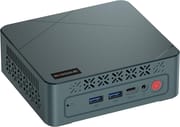
The BOSGAME E2 is a budget mini PC built on the AMD Ryzen 5 3550H, a 2019-vintage quad-core (8-thread) chip with Radeon Vega 8 graphics. At its $219 list price it is enough for office work, web browsing, media, and light or older games, and it ships with Windows 11. It is a small 4.37-inch-square box, cheap enough to keep as a second desktop or leave running as a home server.
It comes with 16GB of DDR4 (on two SODIMM slots, expandable to 32GB) and a 512GB NVMe SSD upgradable to 2TB, both user-accessible. Connectivity is Wi-Fi 5, Bluetooth 5.0, and Gigabit Ethernet, with two HDMI ports for dual monitors plus a USB-C that BOSGAME lists as a third display output, two USB 3.0, and two USB 2.0 ports.
| Pros | Cons |
|---|---|
| Very low price (around $219) | 2019-era Ryzen 5 3550H; not for demanding work or AAA gaming |
| 16GB DDR4 on two SODIMM slots, expandable to 32GB | Wi-Fi 5 and Bluetooth 5.0, not the current Wi-Fi 6 |
| 512GB NVMe SSD, upgradable to 2TB; tool-free access | Gigabit (not 2.5GbE) Ethernet |
| Dual HDMI plus a USB-C listed for a third display | No SD card reader and no VESA mount |
| Runs Windows 11 | Has a fan; audible under sustained load |
| Compact 4.37-inch-square footprint | Cheap plastic chassis |
Related Videos
BOSGAME E2 Comparison Chart
 BOSGAME E2 | |
| Price | List Price: $219.00 Amazon Prices: Loading prices... |
| Version | 16GB/512GB/Ryzen 5 3550H |
| Performance Rating | 5.4 |
| Operating System | Windows 11 |
| Processor | Quad-core 2.10 Ghz (max 3.70 Ghz) AMD Ryzen 5 3550H |
| GPU | Integrated Radeon RX Vega8 Graphics |
| RAM | 16 GB |
| Internal Storage | 512 GB |
| Dimensions width x length x thickness | 4.37 x 4.37 x 1.57 inches (111 x 111 x 39.88 mm) |
| Weight | unknown |
| WiFi | Wi-Fi 5 (802.11ac) |
| Bluetooth | Bluetooth 5.0 |
| Ethernet | 1 Ethernet port at 1 Gbps |
| HDMI | 2 Full-Size HDMI Ports |
| DisplayPort | No DisplayPort |
| VGA | No VGA Ports |
| USB Ports | 2 USB 2.0, 2 USB 3, 1 USB-C (USB 3.0 ports support 5Gbps; BOSGAME lists USB-C as a third display output) |
| Thunderbolt Ports | No |
| OCuLink | No |
| Internal SATA Ports | No SATA ports |
| Card Reader | No Card Reader |
| Headphone Jack | combo |
| Fanless | No |
| VESA Mount | No |
| In the Box | E2 Mini PC, Power adapter, HDMI cable, User manual. |
| Expandability | RAM expandable to 32GB, SSD upgradable to 2TB. Supports dual-channel DDR4 SODIMM RAM and M.2 2280 NVMe SSD. |
Related Mini PCs
-
 BOSGAME B100The BOSGAME B100 is a budget Intel N100 mini PC with 16GB of DDR4, a 512GB NVMe SSD, dual HDMI plus…
 -
 BOSGAME B95The BOSGAME B95 is a low-cost Intel N95 mini PC with 16GB of DDR4, a 512GB M.2 SSD, 2.5Gb Ethernet,…
 -
 Beelink EQ14The Beelink EQ14 is a budget Intel N150 mini PC with 16GB of DDR4, two M.2 slots (up to 8TB), dual…
 -
 CHUWI LarkBox X (2023)The CHUWI LarkBox X (2023) is an ultra-compact Intel N100 mini PC with 12GB of soldered LPDDR5, a…
 -
 FREAPP M6GE
 -
 HIGOLE GOLE 2 PROThe HIGOLE GOLE 2 PRO is a Celeron N5095 mini PC with a built-in 5.5-inch touchscreen and battery,…
Easy-access memory and storage, with no card reader or VESA mount
The Ryzen 5 3550H is a 4-core, 8-thread chip (2.1 GHz base, up to 3.7 GHz) with Radeon Vega 8 graphics, paired here with dual-channel 16GB DDR4 and a 512GB NVMe SSD. Both the two SODIMM slots and the M.2 2280 slot are reachable without prying, so RAM (to 32GB) and storage (to 2TB) are easy to upgrade later. For ports, the box has two HDMI for dual monitors plus a USB-C that BOSGAME’s listing advertises as a third display, two USB 3.0, two USB 2.0, a combo audio jack, and Gigabit Ethernet. There is no SD card reader and no VESA mount, so it lives on the desk instead of behind the screen.
Solid Geekbench and SSD numbers, a cheap plastic shell
Independent reviews of the E2 are thin on the ground, since it is a budget box sold mostly through Amazon listings with few press samples. DevWithZachary’s 15-minute teardown and benchmark run is the most thorough look we found. He measured Geekbench 6 scores of 1087 single-core and 3183 multi-core, plus CrystalDiskMark numbers around 2738 MB/s read and 2287 MB/s write on the bundled NVMe SSD, respectable for a $219 machine running a 2019-vintage chip. Half-Life 2 held above 80 fps at 1080p, Fortnite stayed playable at 720p low, and Doom Eternal hovered around 30 fps with reduced settings. Cyberpunk 2077, predictably, was a slideshow.
He calls the chassis “very cheap plastic” and notes power draw around 40W under load (higher than ARM single-board alternatives like the Raspberry Pi 5, which he was comparing against). His teardown shows two DDR4 SODIMM slots and one M.2 2280 NVMe slot, both user-accessible. Socketed memory is what keeps a cheap box useful past its launch configuration, and our guide to soldered versus socketed RAM explains the difference.
A cheap second desktop you can upgrade later
The socketed RAM and M.2 storage mean you are not locked into the launch config. Anyone cross-shopping a Raspberry Pi for a low-cost desktop will find our list of the mini PCs that replace the delayed Pi 6 a useful comparison, though as DevWithZachary noted, the Pi wins on power efficiency while the E2 wins on raw speed.
The 3550H is a 2019 part, so demanding work and AAA gaming are out of reach, the wireless stops at Wi-Fi 5, and the chassis is plastic with a fan you can hear under sustained load. If you need a VESA mount, the BOSGAME E4 adds one; if your workload has outgrown the 3550H, the Ryzen 7 8845HS mid-tier boxes (around $650) deliver far more headroom. To compare it with other models, use Starry Hope’s Mini PC Comparison Chart.
Frequently Asked Questions
Can the E2 handle gaming?
Light and older titles run fine on the Ryzen 5 3550H and its Radeon Vega 8 graphics, and Half-Life 2 held above 80 fps at 1080p in the one teardown we found. Demanding AAA games at high settings are beyond it.
Is the RAM and storage upgradable?
Yes. The two SODIMM slots take up to 32GB of DDR4, and the M.2 2280 slot accepts an NVMe SSD of up to 2TB in place of the 512GB drive it ships with. Both are reachable without prying the case apart.
Does the USB-C port support video output?
BOSGAME’s listing advertises a third display over USB-C alongside the two HDMI ports. If a third monitor is important to you, confirm USB-C video with the seller before buying, since white-label listings are not always precise.
Is this Mini PC fanless?
No. Cooling is active, and the fan is audible under sustained load.
Can I mount the E2 to the back of a monitor?
There is no VESA mount support, so it cannot hang off the back of a screen. The 4.37-inch-square footprint takes little desk space wherever you set it down.
What’s included in the box?
The mini PC, a power adapter, an HDMI cable, and a user manual. No VESA mount is included, and the machine does not support VESA mounting.
Does it have an SD card reader?
No SD card reader is fitted. You will need an external reader on one of the USB ports to read cards.
What is the E2 best suited for?
Office and web work, media streaming, and light gaming all sit inside the Ryzen 5 3550H’s range. It fits a home-office desk or a secondary machine alongside a main PC.