
BOSGAME M4
Updated on

The BOSGAME M4 represents a compelling option for users seeking serious computing power in a compact package. Built around the AMD Ryzen 7 8745HS processor with its 8 cores and 16 threads boosting up to 5.1GHz, this mini PC delivers performance that rivals many full-sized desktop systems. What sets the M4 apart from the crowded mini PC market is its inclusion of an OCuLink port, which provides a direct PCIe 4.0 x4 connection for external GPUs without the bandwidth limitations of Thunderbolt or USB4. Combined with dual 2.5-gigabit Ethernet ports, USB4 connectivity, and support for four simultaneous 4K displays, the M4 targets gamers, content creators, and professionals who refuse to compromise on performance despite space constraints.
Pros and Cons of the BOSGAME M4
| Pros | Cons |
|---|---|
| OCuLink port enables full-speed eGPU connectivity | Stock rubber feet too short, causing thermal issues |
| Dual 2.5 Gigabit Ethernet ports | Second M.2 slot conflicts with WiFi when populated |
| Quiet operation at 46dB under load | All-plastic construction |
| USB4 with 40Gbps bandwidth | Subpar thermal performance during extended gaming |
| Easy RAM and storage upgrades | No Thunderbolt support |
| Supports four 4K displays simultaneously | Only 12-month warranty |
BOSGAME M4 Comparison Chart
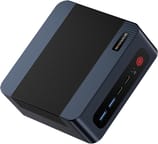 BOSGAME M4 | BOSGAME M4 | |
| Price | List Price: $499 Amazon Prices: Loading prices... | List Price: $569.99 Amazon Prices: Loading prices... |
| Version | 32GB/1TB/Ryzen 7 8745HS | 32GB/1TB/Ryzen 7 7840HS |
| Performance Rating | 9.1 | 9.0 |
| Operating System | Windows 11 Pro | Windows 11 Pro |
| Processor | Octa-core 3.80 Ghz (max 5.10 Ghz) AMD Ryzen 7 8745HS | Octa-core 3.80 Ghz (max 5.10 Ghz) AMD Ryzen 7 7840HS |
| GPU | Integrated AMD Radeon 780M | Integrated AMD Radeon 780M |
| RAM | 32 GB | 32 GB |
| Internal Storage | 1 TB | 1 TB |
| Dimensions width x length x thickness | 5.12 x 5.08 x 1.81 inches (130.05 x 129.03 x 45.97 mm) | 5.12 x 5.08 x 1.81 inches (130.05 x 129.03 x 45.97 mm) |
| Weight | 1.23 lbs (0.56 kg) | 1.23 lbs (0.56 kg) |
| WiFi | Wi-Fi 6E (802.11ax) | Wi-Fi 6E (802.11ax) |
| Bluetooth | Bluetooth 5.2 | Bluetooth 5.2 |
| Ethernet | 2 Ethernet ports at 2.5 Gbps | 2 Ethernet ports at 2.5 Gbps |
| HDMI | 1 HDMI Port | 1 HDMI Port |
| DisplayPort | 1 DisplayPort | 1 DisplayPort |
| VGA | No VGA Ports | No VGA Ports |
| USB Ports | 2 USB 2.0, 2 USB 3, 1 USB 4, 1 USB-C | 2 USB 2.0, 2 USB 3, 1 USB 4, 1 USB-C |
| Thunderbolt Ports | No | No |
| Internal SATA Ports | No SATA ports | No SATA ports |
| Card Reader | No Card Reader | No Card Reader |
| Headphone Jack | combo | combo |
| Fanless | No | No |
| VESA Mount | Yes | Yes |
| In the Box | Mini PC, 120W power adapter, VESA bracket, HDMI cable, user manual | Mini PC, 120W power adapter, VESA bracket, HDMI cable, user manual |
| Expandability | RAM: 2x SO-DIMM DDR5-4800 slots (up to 64GB). Storage: 2x M.2 2280 PCIe 4.0 slots with active SSD cooling. | RAM: 2x SO-DIMM DDR5-4800 slots (up to 64GB). Storage: 2x M.2 2280 PCIe 4.0 slots with active SSD cooling. |
Related Mini PCs
-
 BOSGAME P3 LiteThe BOSGAME P3 Lite packs AMD Ryzen 7 6800H power with Radeon 680M graphics into a compact…
 -
 BOSGAME P5 Mini PCThe BOSGAME P5 Mini PC, featuring an AMD Ryzen 7 6800H with Radeon 680M graphics, 32GB DDR5 RAM,…
 -
 Beelink EQR7The Beelink EQR7 combines AMD Ryzen 7 7735HS power with a unique built-in PSU design, dual Gigabit…
 -
 Beelink SER5 MAX Mini PCPowered by an AMD Ryzen, the Beelink SER5 MAX Mini PC offers top-tier performance in a compact…
 -
 GMKtec Nucbox K2Packing an AMD Ryzen 7 7735HS, Radeon 680M graphics, and up to 64GB DDR5 RAM, the GMKtec Nucbox K2…
 -
 GMKtec NucBox K3 ProPacking a punch in a surprisingly small footprint, the GMKtec NucBox K3 Pro Mini PC features a…
Detailed Insights into the BOSGAME M4

The BOSGAME M4 measures 5.12 x 5.08 x 1.81 inches and weighs just 1.23 pounds, making it one of the more compact options in its performance class. The all-plastic construction keeps costs down while still providing a functional design with good port accessibility on both front and rear panels. The front panel features the USB4 Type-C port and headphone jack for convenient access, while the rear accommodates the dual 2.5GbE ports, HDMI 2.0, DisplayPort 1.4, OCuLink, and additional USB ports. TechRadar’s review notes that while it lacks the premium feel of metal-encased competitors, the M4 ticks every other box for a successful NUC design. With its ability to support up to four displays simultaneously, the M4 is well-suited for multi-monitor productivity setups.
Performance from the Ryzen 7 8745HS impresses across productivity and creative workloads, with the integrated Radeon 780M graphics handling casual gaming and 4K video editing. The 12 RDNA 3 compute units clocked at 2700MHz deliver desktop-level graphics performance for a mini PC, though the OCuLink port opens up true gaming potential when paired with an external GPU enclosure. Benchmark scores from Wccftech’s testing show Cinebench R23 multi-core scores around 15,186 and Geekbench 6 scores of 12,749, putting it in league with many gaming laptops. The 32GB of DDR5-4800 memory in dual-channel configuration ensures no bottlenecks for demanding applications.
Connectivity options on the M4 are genuinely impressive for the price point. The dual 2.5-gigabit Ethernet ports using Realtek RTL8125 chipsets provide fast wired networking with redundancy for NAS or homelab setups. WiFi 6E via the Intel AX210 chipset delivers strong wireless performance with support for the 6GHz band, and Bluetooth 5.2 handles peripherals reliably. The inclusion of both USB4 at 40Gbps and OCuLink sets the M4 apart from competitors that often force users to choose between these standards. Storage expansion includes two M.2 2280 PCIe 4.0 slots, though Team Pandory’s teardown revealed the second slot shares PCIe lanes with the WiFi card, causing connection issues when both are populated.
Reviewer Insights on the BOSGAME M4

Tek Syndicate’s Perspective
Tek Syndicate conducted comprehensive thermal and acoustic testing on the M4, finding it to be one of the quietest mini PCs they’ve tested at just 46dB under sustained load. Their benchmarking showed strong performance for the class, with the Ryzen 7 8745HS trading blows with comparable laptop processors in both single and multi-threaded workloads. The review highlighted the OCuLink port as the standout feature for anyone considering external GPU connectivity, noting its superior bandwidth compared to Thunderbolt alternatives.
Team Pandory’s Perspective
Team Pandory performed a detailed teardown of the M4 and discovered a critical thermal issue that affects out-of-box performance. The stock rubber feet are too short to provide adequate airflow underneath the chassis, resulting in RAM temperatures reaching 80 degrees Celsius under load. They recommend a simple fix of adding taller aftermarket feet to restore proper thermal performance. The teardown also revealed that while the unit features active SSD cooling, the thermal pad only covers half the drive, leaving the Kingston SSD running warm at around 60 degrees Celsius even at idle.
TechRadar’s Assessment
According to TechRadar, the M4 delivers plenty of performance for a modest price, earning a 4.5 out of 5 rating. Their review emphasized the easy upgrade path for memory and storage, with accessible SO-DIMM slots and M.2 drives. While the all-plastic construction lacks premium appeal, the overall value proposition impressed reviewers who found it ticked every box for a successful compact desktop replacement.
Wccftech’s Findings
Wccftech awarded the M4 an impressive 8.8 out of 10, calling it strong value in the mini PC segment. Their testing highlighted the versatile connectivity options and appealing industrial design, though they noted subpar thermal performance during extended gaming sessions aligns with Team Pandory’s airflow findings. The OCuLink and USB4 combination earned particular praise for enabling flexible expansion options that many competitors lack.
Customer Reviews of the BOSGAME M4
Amazon customers have given the BOSGAME M4 a solid 4.4-star rating across 287 reviews, reflecting general satisfaction with its performance and feature set. Many buyers praise the system’s ability to handle demanding workloads like video editing and 3D rendering while remaining surprisingly quiet during operation. The inclusion of OCuLink connectivity has attracted a dedicated subset of users who appreciate the ability to add a full desktop graphics card without the typical limitations of USB-based enclosures.
Common complaints in customer reviews center around the thermal performance issues that professional reviewers also identified. Several users report higher than expected temperatures during sustained workloads, with some implementing their own cooling solutions like elevated stands or additional ventilation. A few reviewers note disappointment with the 12-month warranty period, especially compared to competitors offering longer coverage on similar hardware.
Overall, customers view the M4 as an excellent value proposition for its price point, with most agreeing that the combination of Ryzen 7 power, extensive connectivity, and compact footprint outweighs the thermal quirks. The upgrade path for RAM and storage receives consistent praise from buyers who appreciate not being locked into a fixed configuration.
Conclusion
The BOSGAME M4 stands out as a compelling choice for power users who need desktop-class performance in a tiny footprint. The AMD Ryzen 7 8745HS delivers impressive processing power with excellent Linux compatibility, and features like OCuLink, dual 2.5GbE, and USB4 provide connectivity options typically reserved for much larger systems. At its current price point of around $600 for the 32GB/1TB configuration, it represents strong value for gamers looking to add an external GPU or professionals needing a capable compact workstation.
That said, prospective buyers should be aware of the thermal management quirks that require simple aftermarket fixes. Adding taller feet to improve airflow should be considered essential for anyone planning sustained heavy workloads. The 12-month warranty may also give pause to buyers expecting longer coverage. For those who can work around these limitations, the M4 offers an excellent balance of performance, expandability, and compact design.
For those looking to compare options, Starry Hope’s Mini PC Comparison Chart provides a valuable resource for evaluating the M4 against other compact desktop alternatives in its class.
Frequently Asked Questions
What processor does the BOSGAME M4 actually use?
The BOSGAME M4 uses the AMD Ryzen 7 8745HS processor with 8 cores, 16 threads, and boost clocks up to 5.1GHz. Some Amazon listings incorrectly show the Ryzen 9 7940HS, but multiple professional reviews confirm the actual processor is the 8745HS variant.
Can I connect an external GPU to the BOSGAME M4?
Yes, the M4 features an OCuLink port that provides a direct PCIe 4.0 x4 connection for external GPUs. This offers superior bandwidth compared to Thunderbolt or USB4 eGPU solutions, making it ideal for gaming or professional graphics work.
How many displays can the BOSGAME M4 support simultaneously?
The BOSGAME M4 supports up to four 4K displays simultaneously using the HDMI 2.0, DisplayPort 1.4, USB4, and OCuLink ports. This makes it suitable for multi-monitor productivity setups or complex display configurations.
Is the RAM in the BOSGAME M4 upgradeable?
Yes, the M4 features two SO-DIMM DDR5-4800 slots that are easily accessible for upgrades. The system ships with 32GB but likely supports up to 64GB maximum capacity. The teardown process is straightforward according to reviewer assessments.
Does the BOSGAME M4 have any known thermal issues?
Yes, reviewers have identified that the stock rubber feet are too short, causing insufficient airflow and elevated RAM temperatures up to 80 degrees Celsius under load. The simple fix is to replace them with taller aftermarket feet to restore proper cooling. Additionally, the second M.2 slot shares PCIe lanes with WiFi, so using both simultaneously can cause connectivity issues.
What networking options does the BOSGAME M4 offer?
The M4 includes dual 2.5-gigabit Ethernet ports using Realtek RTL8125 chipsets, WiFi 6E via Intel AX210 with support for the 6GHz band, and Bluetooth 5.2. The dual Ethernet ports are particularly useful for NAS setups, network redundancy, or router configurations.
How loud is the BOSGAME M4 during operation?
Tek Syndicate measured the M4 at 46dB under sustained load, making it one of the quieter mini PCs in its performance class. This is roughly equivalent to a quiet office environment, so it should be suitable for desk placement without becoming distracting during intensive workloads.