
GEEKOM A9 Mega
Updated on

The GEEKOM A9 Mega is a small aluminum desktop for people who want to run large AI models on their own hardware, with enough graphics power left over for 3D work and games. Every build uses AMD’s Radeon 8060S graphics and a 256-bit memory bus. You can get 64GB with the 8-core Ryzen AI Max+ 388 or 128GB with the 16-core Ryzen AI Max+ 395. GameStar’s 395 test unit measured over 40 decibels with the machine doing nothing, and the reviewer named the noise and the price as its two flaws.
Pros and Cons
| Pros | Cons |
|---|---|
| Radeon 8060S beat the same chip in an Asus ROG Flow Z13 by 23 percent in GameStar’s Geekbench GPU run | GameStar measured 40.3 decibels at idle and 54 under load |
| Held 120 watts under full load in GameStar’s test | BIOS fan profiles from Silent to Enthusiast made no difference in GameStar’s test |
| Up to 96GB of the 128GB pool can go to the GPU | Memory is soldered, so buy the size you will need |
| Dual USB4, dual HDMI 2.1, and four front USB ports plus SD | The two front USB-C ports carry data only |
| Two M.2 slots with RAID 0 or RAID 1 | No OCuLink port for an external graphics dock |
| Dual 10GbE on most builds | Two builds stop at dual 2.5GbE |
GEEKOM A9 Mega Comparison Chart
5 configurations
| Configuration | Processor | RAM | Storage | Performance | List price | Amazon price | Compare |
|---|---|---|---|---|---|---|---|
| 64GB/1TB/Ryzen AI Max+ 388/Dual 2.5GbE | Ryzen AI Max+ 388CPU Mark 32,820 | 64 GB | 1 TB SSD | 6.1 | $2,400.00 | Loading... | Details
|
| 64GB/1TB/Ryzen AI Max+ 388/Dual 10GbE | Ryzen AI Max+ 388CPU Mark 32,820 | 64 GB | 1 TB SSD | 6.1 | $2,499.00 | Details
| |
| 64GB/2TB/Ryzen AI Max+ 388/Dual 10GbE | Ryzen AI Max+ 388CPU Mark 32,820 | 64 GB | 2 TB SSD | 6.1 | $2,599.00 | Loading... | Details
|
| 128GB/2TB/Ryzen AI Max+ 395/Dual 2.5GbE | Ryzen AI Max+ 395CPU Mark 54,677 | 128 GB | 2 TB SSD | 8.0 | $3,799.00 | Loading... | Details
|
| 128GB/2TB/Ryzen AI Max+ 395/Dual 10GbE | Ryzen AI Max+ 395CPU Mark 54,677 | 128 GB | 2 TB SSD | 8.0 | $3,999.00 | Loading... | Details
|
Specs shared by every configuration
| Operating System | Windows 11 Pro |
|---|---|
| GPU | Integrated AMD Radeon 8060S |
| Dimensions width x length x thickness | 6.73 x 6.73 x 2.79 inches (170.94 x 170.94 x 70.87 mm) |
| Weight | 2.65 lbs (1.2 kg) |
| WiFi | Wi-Fi 7 (802.11be) |
| Bluetooth | Bluetooth 5.4 |
| HDMI | 2 Full-Size HDMI Ports |
| DisplayPort | DisplayPort 2.1 through both rear USB4 ports |
| VGA | No VGA Ports |
| USB Ports | 1 USB 2.0, 3 USB 3, 4 USB-C (2 USB4) Front: 2x USB-A 10Gbps, 2x USB-C 10Gbps (data only). Rear: 2x USB4, USB-A 10Gbps, USB 2.0 |
| Thunderbolt Ports | No |
| OCuLink | No |
| Internal SATA Ports | No SATA ports |
| Card Reader | SDXC |
| Headphone Jack | combo |
| Fanless | No |
| VESA Mount | No |
| In the Box | Main unit, 330W power adapter, HDMI cable, user manual |
| Expandability | RAM soldered, not upgradeable. Two M.2 2280 PCIe 4.0 slots, up to 8TB total. |
See every AMD Ryzen AI Max+ 388 configuration in the chartSee every AMD Ryzen AI Max+ 395 configuration in the chart
Related Mini PCs
-
 GEEKOM XT1 MegaThe GEEKOM XT1 Mega is a compact Meteor Lake mini PC (Intel Core Ultra 5 125H or Ultra 9 185H,…
-
 GEEKOM A7The GEEKOM A7 runs an AMD Ryzen 9 7940HS or Ryzen 7 7840HS with Radeon 780M graphics in a 0.5-liter…
-
 Beelink GTi15 UltraA high-end mini PC with Intel Core Ultra 9 285H, dual 10GbE networking, built-in 145W power supply,…
-
 MINISFORUM NAD9The MINISFORUM NAD9 is a Core i9-12900H mini PC with two 2.5-inch SATA bays plus an M.2 NVMe slot,…
-
 Beelink GTi12 UltraThe Beelink GTi12 Ultra is a Core i9-12900H mini PC with two DDR5 slots (64GB max), two PCIe 4.0…
-
 ACEMAGIC M1A Pro+Cube-shaped Strix Halo mini PC with the AMD Ryzen AI Max+ 395, Radeon 8060S, and 128GB of soldered…
Memory and CPU cores separate the builds

The Ryzen AI Max+ 395 has 16 Zen 5 cores and 32 threads, while the Ryzen AI Max+ 388 has 8 cores and 16 threads. Both carry the same 40-compute-unit Radeon 8060S, so graphics hardware does not separate them. PassMark’s CPU Mark puts the 395 at about 55,000 and the 388 at about 32,800, which matters for compiling and rendering on the CPU. GEEKOM rates memory bandwidth at up to 256GB/s on both.
Memory is the larger difference, and it cannot be changed later because the LPDDR5X is soldered to the board. GEEKOM allows up to 48GB for the GPU on a 64GB machine and up to 96GB on a 128GB machine. It says the 64GB build suits compatible quantized models of 35 billion to 72 billion parameters, and the 128GB build suits select 4-bit models up to 128 billion parameters.
GEEKOM’s store sells the 388 builds with dual 10GbE and the 395 with either dual 2.5GbE or dual 10GbE, while the 1TB 388 sold on Amazon has dual 2.5GbE, so check the speed named on the configuration before you buy. 10GbE shortens transfers of model files or video to a fast NAS.
USB4 and HDMI 2.1 on the back, two fans in a 2-liter case

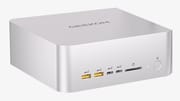
The front carries two 10Gbps USB-A ports, two 10Gbps USB-C ports that handle data only, a full-size SD slot, and a power button with a fingerprint sensor. The back has two 40Gbps USB4 ports with DisplayPort 2.1, two HDMI 2.1 ports, a 10Gbps USB-A port, a USB 2.0 port, two Ethernet jacks, and a headset jack. GEEKOM rates the machine for four displays at once and up to 8K. Wireless is Wi-Fi 7 with Bluetooth 5.4. A dedicated TPM 2.0 chip is on board, and the limited warranty runs 3 years.
GEEKOM’s IceBlast 5.0 cooler pairs a full-coverage vapor chamber with two fans. Air enters through a round intake on the bottom and leaves through a large grille on the back. The cooler is rated for 120 watts of sustained CPU power and up to 140 watts of total heat output, and the box includes a 330-watt external adapter.
The case measures about 6.7 x 6.7 x 2.8 inches including its feet, close to 2 liters, so it takes up more desk than the smaller A9 Max. GEEKOM specifies 4.2 pounds with the adapter. Laurent’s Choice lists about 2.6 pounds, which we take to be the unit alone. There is no VESA bracket in the box. Windows 11 Pro comes installed, and GEEKOM says Ubuntu and Debian are compatible.
GameStar measured strong graphics and loud fans
Sven Scharpe at GameStar tested the 128GB Ryzen AI Max+ 395 build with dual 2.5GbE in a German-language review from April 2026, on a unit GEEKOM supplied. He praised the aluminum case, calling the finish nearly perfect, and listed the price and the noise as the two cons.
The machine scored 2871 single-core and 17103 multi-core in Geekbench’s CPU test, slightly behind an Asus ROG Flow Z13 with the same chip. The gap reversed on graphics and in Cinebench 2024 multi-core: 98165 against 79738 in Geekbench’s GPU test, and 1839 against 1492 in Cinebench. In 3DMark Time Spy it reached 11263 overall against the Z13’s 9145. Cyberpunk 2077 at QHD ran 35 percent faster than on the Z13.
The CPU reached 89.1 C under load and the SSD 37 C, and the case surface stayed at 34.6 C in a 19.8 C room. Scharpe confirmed the 120-watt sustained figure under full load. The machine measured 40.3 decibels at idle, which he called clearly too much, and 54 decibels under load, which he compared to many powerful gaming laptops. Switching the BIOS fan profile between Silent and Enthusiast changed neither the noise nor the temperatures on his unit. He read that as a fan control fault that a BIOS update should fix quickly, since the low idle temperatures leave room for slower fans. The Fan Control app could not see the fans in Windows, and GEEKOM’s own fan tool was available only in Chinese.
Model size sets the speed in GEEKOM’s local AI tests
GEEKOM ran and published its own local AI benchmark records for both configurations, on Ubuntu 26.04 with llama.cpp on AMD’s ROCm software. A 111.4GB quantized model on the 128GB build generated 32.43 tokens per second with a short prompt and 15.45 with a 128K-token input. GEEKOM’s write-up says that run offloaded part of the model to system RAM, which can use swap, with a combined footprint of about 132 to 135GB against 128GB of physical memory. It reads the result as running with offloading, not as fitting in 128GB. At the 128K input length, the wait for the first token was about 720 seconds, so very long contexts are slow to start.
That 111.4GB model does not run on a single 64GB machine. The 64GB build runs smaller models faster: a 22.7GB model with 35 billion parameters generated 68.03 tokens per second with a short prompt, and a 1.56GB model reached 103.10. GEEKOM’s own conclusion is that fitting the model to the memory matters more than raw model size for day-to-day speed.
Who it’s for
The A9 Mega suits a buyer who wants to run large models locally on Windows or Linux and also wants strong integrated graphics for 3D work, video, and QHD games, in a case far smaller than a tower. Models too large for 64GB need the 128GB build. Anyone working with smaller models can take the 64GB build, which has the same graphics and half the CPU cores. GameStar’s reviewer called it a great machine that suits local AI models well, though too expensive to be a PC for everyone.
Skip it if the machine will sit near you in a quiet room, since the one 395 unit GameStar tested was loud even at idle. The Beelink GTR9 Pro also pairs the 395 with dual 10GbE, and ServeTheHome recorded 39 to 41 dBA under load on it, though its Amazon reviews include network and firmware complaints. The GMKtec EVO-X2 offers the 16-core 395 in 64GB builds and has a physical button for fan profiles, but only one 2.5GbE port. Memory you can upgrade later comes with GEEKOM’s smaller A9 Max, which gives up the large unified pool. The Mini PC Comparison Chart lists these side by side.
Frequently Asked Questions
Is the GEEKOM A9 Mega loud?
Yes on GameStar’s 395 test unit, which read about 40 decibels with nothing running and 54 under load. Changing the BIOS fan profile made no difference, and the reviewer expected a firmware update to address that.
Can I upgrade the memory in the GEEKOM A9 Mega?
No. The LPDDR5X is soldered, so a 64GB machine stays at 64GB. Storage can grow through two M.2 2280 PCIe 4.0 slots, up to 4TB each.
What is the difference between the Ryzen AI Max+ 388 and 395 builds?
The 395 has 16 CPU cores and comes with 128GB of memory. The 388 has 8 cores and comes with 64GB. Both use the same Radeon 8060S graphics, so the 395 adds room for larger AI models and a CPU Mark score about two-thirds higher.
Does the GEEKOM A9 Mega have 10GbE?
Three of the five builds do. The 64GB/1TB build on Amazon and one 128GB build have dual 2.5GbE instead.
Does the GEEKOM A9 Mega run Linux?
Yes, according to GEEKOM, which lists Ubuntu and Debian as compatible and ran its published local AI benchmarks on Ubuntu 26.04. The machine ships with Windows 11 Pro.
How many displays can the GEEKOM A9 Mega drive?
Four, through the two HDMI 2.1 ports and two USB4 ports on the back. GEEKOM rates HDMI at up to 8K at 60Hz.