
GEEKOM IT13 MAX
Published on

The GEEKOM IT13 MAX is a compact workstation-style mini PC built around Intel’s Core Ultra 9 185H, a 16-core (22-thread) Meteor Lake chip with integrated Arc graphics and a dedicated AI Boost NPU. GEEKOM positions it above the standard 13th-gen Mini IT13, and the differences are on the outside, with dual 2.5GbE LAN, two USB4 (40Gbps) ports, dual HDMI 2.0, an SD reader, Wi-Fi 7, and Bluetooth 5.4, all in a roughly 0.9-liter aluminum enclosure with a 3-year warranty. It ships with Windows 11 Pro and GEEKOM lists Ubuntu, Debian, and CentOS as supported, so it aims at developers and home-lab users who want desktop-class multitasking and heavy networking in something that mounts behind a monitor.
Dense I/O and a generation-old chip
| Pros | Cons |
|---|---|
| 16-core Core Ultra 9 185H with integrated Arc graphics and an AI NPU | Meteor Lake silicon is a generation behind current Core Ultra 200 parts |
| Dual 2.5GbE LAN in a 0.9-liter chassis | Base configuration ships with only 16GB for a Core Ultra 9 |
| Two USB4 (40Gbps) plus dual HDMI 2.0 for up to four displays or 8K | The 24GB configuration uses soldered LPDDR5 that cannot be upgraded |
| Wi-Fi 7 and Bluetooth 5.4 | Second M.2 slot is SATA, not PCIe, so slower than the primary bay |
| DDR5 SO-DIMM upgradeable to 96GB on the 16GB model | Integrated Arc graphics suits light gaming only; demanding titles need an eGPU |
| Windows 11 Pro plus documented Linux support and a 3-year warranty | Robtech’s testing found high CPU temperatures and loud fan noise under load |
Related Videos
GEEKOM IT13 MAX Comparison Chart
 GEEKOM IT13 MAX | GEEKOM IT13 MAX | |
| Price | List Price: $719.00 Amazon Prices: Loading prices... | List Price: $799.00 Amazon Prices: Loading prices... |
| Version | 16GB/1TB/Core Ultra 9 185H | 24GB/500GB/Core Ultra 9 185H (LPDDR5) |
| Performance Rating | 5.5 | 5.8 |
| Operating System | Windows 11 Pro | Windows 11 Pro |
| Processor | Sixteen-core 2.30 Ghz (max 5.10 Ghz) Intel Core Ultra 9 Processor 185H | Sixteen-core 2.30 Ghz (max 5.10 Ghz) Intel Core Ultra 9 Processor 185H |
| GPU | Integrated Intel Arc graphics | Integrated Intel Arc graphics |
| RAM | 16 GB DDR5 SO-DIMM (DDR5-5600 SO-DIMM, up to 96GB) | 24 GB LPDDR5 (LPDDR5-5600, soldered (not upgradeable)) |
| Internal Storage | 1 TB NVMe PCIe Gen4 | 500 GB NVMe PCIe Gen4 |
| Dimensions width x length x thickness | 5.35 x 5.2 x 1.97 inches (135.89 x 132.08 x 50.04 mm) | 5.35 x 5.2 x 1.97 inches (135.89 x 132.08 x 50.04 mm) |
| Weight | unknown | unknown |
| WiFi | Wi-Fi 7 (802.11be) | Wi-Fi 7 (802.11be) |
| Bluetooth | Bluetooth 5.4 | Bluetooth 5.4 |
| Ethernet | 2 Ethernet ports at 2.5 Gbps | 2 Ethernet ports at 2.5 Gbps |
| HDMI | 2 Full-Size HDMI Ports | 2 Full-Size HDMI Ports |
| DisplayPort | No DisplayPort | No DisplayPort |
| VGA | No VGA Ports | No VGA Ports |
| USB Ports | 1 USB 2.0, 5 USB 3, 2 USB-C (2 USB4) 2x USB4 (40Gbps), 5x USB-A 3.2 Gen 2, 1x USB-A 2.0 | 1 USB 2.0, 5 USB 3, 2 USB-C (2 USB4) 2x USB4 (40Gbps), 5x USB-A 3.2 Gen 2, 1x USB-A 2.0 |
| Thunderbolt Ports | No | No |
| OCuLink | No | No |
| Internal SATA Ports | No SATA ports | No SATA ports |
| Card Reader | SD Card Reader | SD Card Reader |
| Headphone Jack | combo | combo |
| Fanless | No | No |
| VESA Mount | Yes | Yes |
| In the Box | IT13 MAX Mini PC, power adapter, HDMI cable, VESA mount, user manual | IT13 MAX Mini PC, power adapter, HDMI cable, VESA mount, user manual |
| Expandability | DDR5 SO-DIMM to 96GB on the 16GB model; dual M.2 (2280 PCIe Gen4 + 2242 SATA) | DDR5 SO-DIMM to 96GB on the 16GB model; dual M.2 (2280 PCIe Gen4 + 2242 SATA) |
Related Mini PCs
-
 GEEKOM A7 MaxThe GEEKOM A7 Max pairs an AMD Ryzen 9 7940HS with dual USB4, dual 2.5GbE, one filled DDR5 slot…
 -
 GEEKOM A8 MaxThe GEEKOM A8 Max adds dual 2.5G Ethernet ports to the A8 platform, with dual USB4 and up to 64GB…
 -
 ACEMAGIC K1 (Intel Core i5-12600H)The Intel version of ACEMAGIC's K1 pairs the 12-core Core i5-12600H with triple 4K output, seven…
 -
 ACEMAGIC K5 (Ryzen 5 PRO 7640HS)The AMD build of ACEMAGIC's 5-inch K5 chassis pairs a six-core Zen 4 Ryzen 5 PRO 7640HS and Radeon…
 -
 ASUS NUC 14 ProThe ASUS NUC 14 Pro pairs Intel Core Ultra processors with a toolless chassis, two DDR5 SODIMM…
 -
 FIREBAT F1The FIREBAT F1 puts an 8-core Ryzen 7 H 255 and Radeon 780M graphics in a 5-inch square chassis…
Eight USB ports and two wired network jacks in 0.9 liters
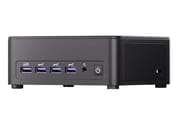
The IT13 MAX measures 5.35 x 5.20 x 1.97 inches, a taller box than GEEKOM’s standard IT13 chassis, and the extra volume buys a denser I/O layout. The front panel carries the SD 4.0 card slot, four USB 3.2 Gen 2 Type-A ports, a combo audio jack, and the power button. The rear adds the two USB4 Type-C ports (DisplayPort Alt Mode), one more USB 3.2 Gen 2 Type-A, a USB 2.0 Type-A, both HDMI 2.0 outputs, both 2.5GbE RJ45 jacks, the DC input, and a Kensington lock slot. That works out to eight USB ports total and four display outputs (two USB-C plus two HDMI), which GEEKOM rates for four 4K screens or a single 8K panel.
Two independent 2.5-gigabit NICs let you split a work network from an IoT or lab network, run link aggregation, or set up failover. Wi-Fi 7 (802.11be) and Bluetooth 5.4 cover the wireless side. If you plan to drive more than integrated graphics can handle, the two USB4 ports double as an external-GPU link; it is worth understanding the tradeoffs between USB4 and OCuLink before committing to an eGPU, since the IT13 MAX uses USB4 rather than a dedicated OCuLink port.
Sixteen cores for compilation, containers, and CPU-side video work
The Core Ultra 9 185H is Intel’s flagship Meteor Lake mobile chip, with 6 performance cores, 8 efficient cores, and 2 low-power efficient cores for 16 cores and 22 threads, boosting to 5.1GHz. Its PassMark CPU Mark sits around 29,400, enough for heavy multitasking, code compilation, containers and VMs, and CPU-side video work in DaVinci Resolve or Premiere. Graphics come from the integrated Intel Arc GPU (8 Xe cores), which is a clear step up from the Iris Xe in the older Mini IT13 for media decode and light gaming, but it is still integrated graphics: older and less demanding titles run at reduced settings, and anything modern and heavy wants an external GPU over USB4.
Meteor Lake launched in late 2023, so by mid-2026 the 185H is a generation behind Intel’s Core Ultra 200 (Arrow Lake-H) parts, and GEEKOM’s own IT15 with the Core Ultra 9 285H carries the newer chip in the same lineup. The 185H’s AI Boost NPU is useful for on-device inference, but it predates Microsoft’s 40-TOPS Copilot+ bar, so GEEKOM’s “2 to 3 times the AI power” framing is a marketing comparison against older i9 silicon rather than a claim that this box clears the current Copilot+ threshold.
Two memory configurations that are not interchangeable
The 16GB model uses DDR5-5600 in SO-DIMM slots and is user-upgradeable up to 96GB, which is the version to buy if you care about adding RAM later. The 24GB model instead uses soldered LPDDR5-5600 for a bit more bandwidth out of the box, and that memory is fixed. For a Core Ultra 9 aimed at developers, starting at 16GB is the clearest weak spot, so budget for a memory upgrade on the SO-DIMM model or size the 24GB LPDDR5 unit to your actual needs from day one.
Storage is dual M.2. The primary slot is an M.2 2280 running PCIe Gen4 x4 (GEEKOM lists up to 4TB), and the second is an M.2 2242 on the slower SATA III interface. That second SATA slot is handy for bulk or backup storage but will not match the primary NVMe bay for speed, so keep your OS and working data on the Gen4 slot. Combined with dual 2.5GbE and Windows 11 Pro (or the Linux distributions GEEKOM lists), the expandability leans toward always-on home-server and self-hosting roles as much as a desktop replacement.
The fan gets loud and the CPU throttles near 103C
GEEKOM cools it with what it calls the IceBlast 3.0 system: dual copper heat pipes and a high-efficiency fan sized for the chip’s 65W sustained power target. GEEKOM markets it as delivering that full 65W without giving up quiet operation, pairing noise-sensing fan control with cooling it describes as whisper-quiet. Robtech recorded high temperatures and noise: “The maximum CPU temp is high with thermal throttling kicking in at around 103C,” and “fan noise under load is also high with this being the loudest mini PC out of the box from this selection of units,” with the BIOS performance mode “a little noisier” still. The cooler keeps the flagship chip fed, but under sustained load it is not the quiet box GEEKOM describes.
Reviewer Insights
Robtech’s Perspective
Robtech ran the IT13 MAX (the 24GB LPDDR5 configuration) through a teardown, benchmarks, and thermal testing in July 2026. He called it “a very solidly built mini PC,” with “a metal frame reinforcing the plastic shell and the bottom plate is also made of metal.” Performance landed mid-pack. Against GEEKOM’s own GT1 Mega, which runs the same chip, the IT13 MAX “trails the GT1 Mega in every metric, but not by a huge amount. A few percent here and there,” and his blunt read on the silicon was that “Intel’s flagship Meteor Lake chip isn’t very impressive in 2026.”
On the 24GB model he warned: “be aware that the LPDDR5 model does not max out the chip. It’s the same 5600MT/s as the DDR5 SODIMM. So, a missed opportunity.” GEEKOM’s spec sheet lists the second M.2 slot as SATA, but a Gen4 NVMe drive he installed there ran at x2 speed, which he called “a classic case of underpromising and overdelivering” while noting the official specs should be updated. Ubuntu was “tested and everything worked fine”. Bluetooth range was “excellent”. USB-C power delivery from his 90W monitor did not work, so plan on the included power supply.
The IT15 and Mini IT13 are the closest GEEKOM alternatives
Robtech called it “an okay mini PC, which has room for improvements,” where “the build quality and three-year warranty are the standouts.” The dual 2.5GbE networking, the four-display output, and the USB4 expansion carry more weight on this machine than its single-threaded speed, and it comes with last-generation Intel silicon and fan noise under load.
The IT15 is the newest chip in the same chassis family, and the GEEKOM Mini IT13 is the cheaper 13th-gen option with a similar port set.
Worth it for the ports and the warranty if the chip age does not bother you
The dual 2.5GbE, two USB4 ports, and 96GB memory ceiling make it a tidy fit for developers, home labs, multi-monitor desks, and always-on self-hosting, and the 3-year warranty covers the aluminum build. The Core Ultra 9 185H is a generation behind current parts, so a buyer who needs the newest silicon should look at the IT15 instead. To line it up against other models, use Starry Hope’s Mini PC Comparison Chart.
Frequently Asked Questions
How is the GEEKOM IT13 MAX different from the GEEKOM Mini IT13?
They are different generations. The Mini IT13 uses 13th-gen Intel Core (Raptor Lake) chips such as the i9-13900H, while the IT13 MAX steps up to the Core Ultra 9 185H (Meteor Lake) with an integrated Arc GPU and an AI NPU. The MAX also adds a second 2.5GbE port, Wi-Fi 7, and a larger chassis with more front USB ports.
Can I upgrade the RAM in the IT13 MAX?
On the 16GB model, yes: it uses DDR5-5600 SO-DIMM slots and takes up to 96GB. The 24GB model uses soldered LPDDR5-5600 memory that cannot be upgraded, so choose that capacity carefully if you pick the LPDDR5 unit.
How many displays can the IT13 MAX drive?
Up to four. It has two USB4 Type-C ports with DisplayPort Alt Mode and two HDMI 2.0 outputs, which GEEKOM rates for four 4K displays or a single 8K panel.
Is the IT13 MAX good for gaming?
Only lightly on its own. The integrated Intel Arc graphics handles older and less demanding titles at reduced settings and is fine for media, but modern games need more. The two USB4 (40Gbps) ports let you attach an external GPU, which is the recommended path for demanding gaming.
What storage does the IT13 MAX support?
Two M.2 slots: a primary M.2 2280 running PCIe Gen4 x4 (up to 4TB) and a secondary M.2 2242 on the SATA III interface. Keep your OS and active files on the faster Gen4 slot and use the SATA slot for bulk or backup storage.
What operating systems does the IT13 MAX run?
It ships with Windows 11 Pro pre-installed. GEEKOM also lists support for major Linux distributions including Ubuntu, Debian, and CentOS, which suits it to Docker, home-lab, and self-hosting use.