
GMKtec K10
Updated on

The GMKtec K10 represents a compelling option for users who need serious processing power in a compact form factor. Powered by the 13th Gen Intel Core i9-13900HK processor with 14 cores and 20 threads capable of reaching 5.4GHz, this mini PC positions itself as a workstation-class machine rather than a casual desktop replacement. The K10 ships with 32GB of DDR5 RAM and includes three M.2 NVMe slots for extensive storage expansion, making it particularly appealing for content creators, developers, and professionals who work with large files. At prices starting around $600, it offers significant processing power that rivals many full-sized desktop systems while maintaining a footprint small enough to mount behind a monitor.
Pros and Cons of the GMKtec K10
| Pros | Cons |
|---|---|
| Powerful 14-core Intel Core i9-13900HK processor with 5.4GHz turbo | Integrated Iris Xe GPU unsuitable for modern gaming |
| Three M.2 NVMe slots supporting up to 24TB total storage | No USB-C Power Delivery or USB4 support |
| Tool-less access for easy RAM and storage upgrades | No external GPU options (no Oculink or Thunderbolt) |
| Supports up to 96GB DDR5 RAM for demanding workloads | Larger footprint than typical mini PCs (7.4 x 7 x 1.5 inches) |
| Quiet operation at 30dB idle, 39dB under load | SSD lacks thermal pad (can reach 79C under heavy use) |
| Extensive port selection with 8 USB ports and COM port | Power consumption reaches 84W under full load |
Related Videos
GMKtec K10 Comparison Chart
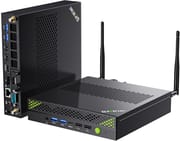 GMKtec K10 | GMKtec K10 | |
| Price | List Price: $599.99 Amazon Prices: Loading prices... | List Price: $659.99 Amazon Prices: Loading prices... |
| Version | --- | --- |
| Perfomance Rating | 9.1 | 9.1 |
| Operating System | Windows 11 Pro | Windows 11 Pro |
| Processor | Fourteen-core 2.60 Ghz (max 5.40 Ghz) Intel Core i9-13900HK | Fourteen-core 2.60 Ghz (max 5.40 Ghz) Intel Core i9-13900HK |
| GPU | Integrated Intel UHD Graphics | Integrated Intel UHD Graphics |
| RAM | 32 GB DDR5 | 32 GB DDR5 |
| Internal Storage | 1 TB | 2 TB |
| Dimensions width x length x thickness | 7.42 x 7.01 x 1.53 inches (188.47 x 178.05 x 38.86 mm) | 7.42 x 7.01 x 1.53 inches (188.47 x 178.05 x 38.86 mm) |
| Weight | 2.35 lbs (1.07 kg) | 2.35 lbs (1.07 kg) |
| WiFi | Wi-Fi 6 (802.11ax) | Wi-Fi 6 (802.11ax) |
| Bluetooth | Bluetooth 5.2 | Bluetooth 5.2 |
| Ethernet | 1 Ethernet port at 2.5 Gbps | 1 Ethernet port at 2.5 Gbps |
| HDMI | 2 Full-Size HDMI Ports | 2 Full-Size HDMI Ports |
| DisplayPort | 1 DisplayPort (1.4 (8K @ 60Hz)) | 1 DisplayPort (1.4 (8K @ 60Hz)) |
| VGA | No VGA Ports | No VGA Ports |
| USB Ports | 4 USB 2.0, 4 USB 3, 1 USB-C | 4 USB 2.0, 4 USB 3, 1 USB-C |
| Thunderbolt Ports | No | No |
| Internal SATA Ports | No SATA ports | No SATA ports |
| Card Reader | No Card Reader | No Card Reader |
| Headphone Jack | 3.5mm combo | 3.5mm combo |
| Fanless | No | No |
| VESA Mount | Yes | Yes |
| In the Box | -- | -- |
| Expandability | -- | -- |
Related Mini PCs
-
 GEEKOM AX8 MaxThe GEEKOM AX8 Max packs AMD's Ryzen 7 8745HS and Radeon 780M graphics into a premium…
 -
 GMKtec Nucbox K8 PLUSCompact yet powerful, the GMKtec Nucbox K8 PLUS boasts an AMD Ryzen 7 8845HS processor, Radeon 780M…
 -
 GMKtec Nuxbox M7 ProCompact yet powerful, the GMKtec Nuxbox M7 Pro features an AMD Ryzen 7 7735HS processor, up to 64GB…
 -
 GEEKOM A8 MaxThe GEEKOM A8 Max builds on the popular A8 platform with dual 2.5G Ethernet ports, dual USB4, and…
 -
 ACEMAGICIAN W1The ACEMAGICIAN W1 delivers gaming-capable performance in a compact 5-inch form factor, powered by…
 -
 Beelink SER9 Max H 255The Beelink SER9 Max H 255 delivers workstation-class performance in a compact 5.31-inch chassis.…
Detailed Insights into the GMKtec K10
The build quality of the GMKtec K10 reflects its workstation aspirations with a sturdy metal chassis that feels premium despite its modest price point. The unit measures 188.6 x 178 x 38.9mm (roughly 7.4 x 7 x 1.5 inches) and weighs just over a kilogram, making it larger than typical ultra-compact mini PCs but still small enough to mount behind a monitor using the included VESA bracket. The port layout is generous and well-organized, with the front panel featuring USB ports and the audio jack for easy access, while the rear hosts dual HDMI 2.0 ports, DisplayPort 1.4 (capable of 8K output), 2.5 Gigabit Ethernet, and external WiFi antenna connections. A notable inclusion is the COM port, which opens up industrial and embedded system applications that many consumer-focused mini PCs cannot address.
The Intel Core i9-13900HK processor delivers substantial computing power, benchmarking with a PassMark CPU score around 27,000 and handling video editing in DaVinci Resolve without breaking a sweat. Multiple reviewers confirmed that the K10 passes audio latency tests with flying colors, making it suitable for audio production work where real-time processing matters. The cooling system employs dual fans with a turbofan design, and reviewers consistently noted that the machine runs remarkably quiet for its performance level, measuring around 30dB at idle and climbing to only 39-43dB under sustained load. However, the SSD can reach 79C during extended operations since GMKtec did not include a thermal pad on the drive slot.
Connectivity options position the K10 as a versatile workstation. The inclusion of WiFi 6 via an Intel AX201 module with external antennas ensures reliable wireless performance, while the 2.5G Ethernet port provides ample bandwidth for network-intensive tasks. The triple M.2 slot configuration stands out, with two slots supporting PCIe Gen 4 x4 speeds and a third offering Gen 3 x3, theoretically allowing up to 24TB of NVMe storage. The dual-channel DDR5 RAM runs at 5200MHz, and users can upgrade to 96GB maximum, though the included 32GB should satisfy most workloads. The system arrives with a clean Windows 11 installation free of bloatware, which multiple reviewers appreciated.
Reviewer Insights on the GMKtec K10
ETA PRIME’s Perspective
ETA PRIME provided a comprehensive look at the K10’s performance across productivity and entertainment scenarios. His testing revealed that while the Core i9-13900HK delivers excellent CPU performance, the Iris Xe integrated graphics show their limitations in demanding games. As he noted, “Still a good performer on the CPU side, but the Iris XE integrated graphics, not so much.” The benchmarks demonstrated strong Cinebench and Geekbench scores, placing the K10 solidly in workstation territory. His testing of audio latency and video editing confirmed the machine’s suitability for content creation, and he concluded that the K10 represents “a pretty impressive mini PC” for users focused on CPU-intensive tasks rather than gaming.
Last Rax’s Perspective
Last Rax emphasized the K10’s practical appeal for home lab enthusiasts and media center applications. He appreciated the tool-less access panel that makes upgrading RAM and storage straightforward, commenting that “the top cover is also really easy to remove with a single thumb screw securing it.” His thermal testing showed the system maintaining reasonable temperatures with measured fan noise at 30dB idle and 39dB under full load. He specifically highlighted the clean Windows installation and extensive I/O connectivity as major selling points. His final assessment praised the K10 as “good value if you’re looking for a powerful, quiet, and compact system” that would fit well in a home lab or serve as a capable media center.
TechRadar’s Assessment
According to TechRadar, the GMKtec NucBox K10 earns a 4.25 out of 5 rating for its balance of processing power and price. Alastair Jennings noted that “as a powerful workplace mini PC, there’s a lot to like about the GMKtec NucBox K10,” highlighting its suitability for office tasks and multimedia work. The review praised the tool-less upgradability, quiet operation, and extensive storage expansion options while acknowledging limitations like the lack of USB-C Power Delivery and the weaker integrated graphics. The consensus across written reviews positions the K10 as an excellent choice for productivity-focused users who don’t require dedicated graphics.
Customer Reviews of the GMKtec K10
Amazon customers have given the GMKtec K10 a solid 4.4 out of 5 stars based on over 335 reviews, indicating broad satisfaction with the product. The most common praise centers on the impressive processing power relative to the compact size, with many users noting successful deployments as home servers, development machines, and media centers. Customers frequently mention the quiet operation and clean Windows installation as pleasant surprises compared to competitors who bundle bloatware.
The negative feedback primarily focuses on the integrated graphics limitations, with gaming-oriented buyers expressing disappointment that the Iris Xe cannot handle modern titles despite the powerful CPU. Some users have noted that the unit runs warmer than expected under sustained loads, though this appears manageable with adequate ventilation. A few reviews mention the larger-than-expected footprint compared to the smallest mini PCs on the market, though most acknowledge this as a reasonable trade-off for the extensive port selection and cooling capacity.
Conclusion
The GMKtec K10 positions itself as a workstation-class mini PC that delivers on its processing power promises while making sensible compromises for its price point. Users seeking a compact machine for content creation, software development, home lab experimentation, or general productivity will find the Core i9-13900HK processor more than capable of handling demanding workloads. The extensive storage expansion options, upgradeable RAM to 96GB, and comprehensive port selection including the unusual COM port make it versatile enough for both professional and enthusiast applications.
However, potential buyers should understand that this is fundamentally a productivity machine rather than a gaming system. The integrated Iris Xe graphics cannot handle modern AAA titles, and the lack of USB4, Oculink, or Thunderbolt means there is no path to adding external graphics acceleration. Users who want both workstation-class CPU performance and gaming capability should consider the GMKtec K12, which offers an OCuLink port for external GPU connectivity. Those exploring local AI and LLM inference may want to look at AMD Strix Halo systems with 128GB of unified memory for running larger models on-device. For those who prioritize CPU performance and quiet operation over gaming capability, the K10 represents genuine value in the $600-700 price range. For those looking to compare options, Starry Hope’s Mini PC Comparison Chart provides a valuable resource for evaluating alternatives.
Frequently Asked Questions
Can the GMKtec K10 be used for gaming?
The K10’s Intel Iris Xe integrated graphics can handle older titles and esports games at lower settings, but it cannot run modern AAA games like Cyberpunk 2077 at playable framerates. Reviewers achieved around 75fps in Counter-Strike 2 at 1080p medium settings, dropping to 30fps at higher settings. It’s designed as a workstation, not a gaming PC. For gaming, consider GMKtec’s newer models like the NucBox K11 which features an AMD Radeon 780M GPU.
How much RAM can the GMKtec K10 support?
The K10 supports up to 96GB of DDR5 RAM across its two SO-DIMM slots. It ships with 32GB of DDR5-5200 dual-channel memory, which provides ample capacity for most productivity workloads. The tool-less access panel makes RAM upgrades straightforward.
What storage expansion options does the K10 offer?
The K10 includes three M.2 2280 NVMe slots. Two slots support PCIe Gen 4 x4 speeds, while the third runs at Gen 3 x3. This configuration allows for up to 24TB of total NVMe storage. The included SSD (1TB or 2TB depending on configuration) occupies one slot, leaving two available for expansion.
How loud is the GMKtec K10 during operation?
Multiple reviewers measured the K10 at approximately 30dB at idle, which is barely audible in a typical room environment. Under full CPU load, noise levels climb to 39-43dB, which remains relatively quiet for a system with this level of performance. The dual-fan cooling system with turbofan design balances thermal management with acoustic comfort.
Does the GMKtec K10 support multiple monitors?
Yes, the K10 supports up to four displays simultaneously using its dual HDMI 2.0 ports (4K @ 60Hz), DisplayPort 1.4 (8K @ 60Hz), and USB-C with DisplayPort Alt Mode. This makes it well-suited for productivity setups requiring multiple monitors or ultrawide displays.
What is the purpose of the COM port on the K10?
The RS-232 COM port enables connectivity with industrial equipment, laboratory instruments, embedded systems, and legacy hardware that still relies on serial communication. This makes the K10 suitable for industrial automation, data acquisition systems, and IoT development applications where most consumer mini PCs would require external adapters.
Is the GMKtec K10 suitable for video editing?
Yes, the K10 excels at video editing tasks. Multiple reviewers tested DaVinci Resolve and confirmed smooth, flawless performance for editing and color grading workflows. The 14-core i9-13900HK processor handles encoding and rendering efficiently, and the support for up to 96GB RAM allows for complex projects with multiple 4K timelines. Audio latency tests also passed with flying colors, making it suitable for multimedia production.