
GMKtec M3 Pro S
Published on

The GMKtec M3 Pro S is a palm-sized Windows desktop for office work, browsing, and video calls on up to three 4K monitors. It is the same size as the GMKtec NucBox M3 Pro, but GMKtec fits a slower 8-core Intel Core i5-13420H in place of the M3 Pro’s 12-core i5-13500H and solders 16GB of LPDDR4 memory to the board. The 16GB covers office work today, but it is soldered and can never be raised. It has three M.2 slots for adding drives later.
Pros and cons
| Pros | Cons |
|---|---|
| 8-core, 12-thread Core i5-13420H boosts to 4.6GHz | 16GB of LPDDR4 is soldered, with no memory slot |
| Three M.2 slots: one PCIe 4.0 x4 NVMe plus two SATA | Two of the three M.2 slots are SATA only, capped at 1TB each |
| Triple 4K60 output from two HDMI 2.0 ports and USB-C | Intel UHD graphics with 48 execution units, weak for 3D games |
| 2.5GbE wired networking, Wi-Fi 6, and Bluetooth 5.2 | No USB4 or Thunderbolt, so no external GPU path |
| Four 10Gbps USB-A ports, two on the front | The only USB-C port is on the back and carries 5Gbps data |
| Rear USB-C rated for DisplayPort 4K60 and USB PD 3.0 at 100W | A 2023 processor with no NPU |
GMKtec M3 Pro S Comparison Chart
 GMKtec M3 Pro S | |
| Price | List Price: $460.00 Amazon Prices: Loading prices... |
| Version | 16GB/512GB/Core i5-13420H |
| Performance Rating | 4.3 |
| CPU Mark | 16,727 |
| Operating System | Windows 11 Pro |
| Processor | Octa-core 2.10 Ghz (max 4.60 Ghz) Intel Core i5-13420H |
| GPU | Integrated Intel UHD Graphics |
| RAM | 16 GB LPDDR4 (LPDDR4-3200, soldered) |
| Internal Storage | 512 GB NVMe SSD |
| Dimensions width x length x thickness | 4.49 x 4.17 x 1.67 inches (114.05 x 105.92 x 42.42 mm) |
| Weight | 0.95 lbs (0.43 kg) |
| WiFi | Wi-Fi 6 (802.11ax) |
| Bluetooth | Bluetooth 5.2 |
| Ethernet | 1 Ethernet port at 2.5 Gbps |
| HDMI | 2 Full-Size HDMI Ports |
| DisplayPort | DP Alt Mode via rear USB-C (4K60) |
| VGA | No VGA Ports |
| USB Ports | 4 USB 3, 1 USB-C Front: 2x USB-A 10Gbps. Rear: 2x USB-A 10Gbps, USB-C (DP) |
| Thunderbolt Ports | No |
| OCuLink | No |
| Internal SATA Ports | No SATA ports |
| Card Reader | No Card Reader |
| Headphone Jack | 3.5mm |
| Fanless | No |
| VESA Mount | Yes |
| In the Box | Mini PC, power adapter, HDMI cable, VESA mount, manual |
| Expandability | 16GB LPDDR4 soldered, no RAM upgrade. M.2 2280 PCIe 4.0 x4 plus M.2 2242 SATA and M.2 2280 SATA, up to 10TB total. |
See every Intel Core i5-13420H configuration in the chart
Related Mini PCs
-
 GMKtec NucBox M6The GMKtec NucBox M6 pairs an AMD Ryzen 5 6600H with Radeon 660M graphics, up to 32GB of DDR5, two…
-
 GMKtec M8The GMKtec M8 is a compact mini PC with an AMD Ryzen 5 PRO 6650H, an OCuLink port for an external…
-
 Beelink SER5 (5500U)The Beelink SER5 (5500U) is a Ryzen 5 5500U mini PC with 16GB of DDR4 in two slots (64GB max), a…
-
 Beelink SER5 Pro Mini PCThe Beelink SER5 Pro Mini PC packs a powerful AMD Ryzen 7 punch with 16GB RAM and a 1TB SSD. Ideal…
-
 Blackview MP100 (Ryzen 5 7430U)A 5-inch-square Ryzen 5 7430U mini PC with 16GB of DDR4, a 512GB SSD, room for two more drives, and…
-
 Bmax MaxMini B11 ProA palm-sized office mini PC with an Intel Core Ultra 5 115U, 16GB of soldered LPDDR5, a 512GB SSD…
Four fast USB-A ports, three M.2 slots, and memory that cannot be upgraded

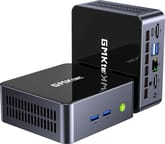
The M3 Pro S measures about 4.5 x 4.2 x 1.7 inches and weighs a little under a pound. It has dark grey sides with slotted vents and a glossy black lid with the GMKtec logo. GMKtec describes a copper heat-pipe cooler with a fan, and a VESA mount comes in the box for mounting it behind a monitor.
The front holds the power button and two 10Gbps USB-A ports. The back has the DC input, two HDMI 2.0 ports, the 2.5GbE port, two more 10Gbps USB-A ports, a 3.5mm audio jack, and a USB-C port. GMKtec rates the USB-C port for 4K60 DisplayPort output, 5Gbps data, and USB PD 3.0 at up to 100W. With both HDMI ports and the USB-C port in use, the box drives three 4K displays at 60Hz. Wireless is Wi-Fi 6 with Bluetooth 5.2.
The 16GB of LPDDR4-3200 is soldered to the board, and GMKtec lists 16GB as the maximum. That is the main difference from the M3 Pro, which has two DDR4 SO-DIMM slots that take up to 64GB. Running several virtual machines at once can use up 16GB.
Storage has three M.2 positions on the US model: a 2280 slot at PCIe 4.0 x4 that takes drives up to 8TB, a 2242 SATA slot, and a 2280 SATA slot, each SATA slot rated for drives up to 1TB. The installed 512GB drive is an NVMe SSD. GMKtec’s Hong Kong distributor lists only the two SATA slots for its market and says PCIe drives are not supported there, so buyers outside the US should check the spec sheet for their region. SATA M.2 drives top out near 550MB/s, so the two extra slots suit bulk storage such as media and backups rather than a second fast system drive.
Core i5-13420H performance and graphics

The Intel Core i5-13420H is a 13th Gen Raptor Lake laptop chip that Intel launched in early 2023. It has four performance cores and four efficient cores for 12 threads, 12MB of cache, and a 4.6GHz top boost. It scores about 16,700 on PassMark’s CPU Mark, against about 20,900 for the 12-core Core i5-13500H in the M3 Pro. GMKtec quotes a Geekbench 6 single-core score of 2,186 for the chip. The box has three power modes at 28W, 35W, and 45W.
The integrated graphics are Intel UHD Graphics with 48 execution units and a top clock of 1.4GHz. That handles 4K video playback, three office displays, and older or light games, but it is a step down from the Iris Xe graphics in the M3 Pro, and current 3D games are out of reach. There is no NPU.
How the M3 Pro S differs from the M3 Pro
The two models share the case size, the triple 4K output, the 2.5GbE port, and Wi-Fi 6. The M3 Pro has the faster 12-core Core i5-13500H with Iris Xe graphics, two DDR4 SO-DIMM slots for up to 64GB, two M.2 slots, and a barebone version for buyers who bring their own parts. The M3 Pro S trades the memory slots for soldered LPDDR4, drops to the 8-core i5-13420H with UHD graphics, swaps the rear USB 2.0 port for a fourth 10Gbps USB-A port, and adds a third M.2 slot. The Getorli AT103 uses the same Core i5-13420H with two DDR4 SO-DIMM slots, if upgradeable memory on this chip matters more than a third drive slot.
Who should buy it
The M3 Pro S fits an office or home desk where the work is documents, browsing, email, and video calls across two or three monitors, and where 16GB will cover the life of the machine. The three M.2 slots and 2.5GbE port also make it workable as a small file or media box that collects drives over time.
Skip it if you expect to need more than 16GB of memory, since the soldered LPDDR4 cannot be changed. The GMKtec NucBox M3 Pro takes up to 64GB in a case of the same size with a faster chip, and the GMKtec K12 adds USB4 and two DDR5 SO-DIMM slots. Gamers and anyone planning local AI work should look at Ryzen or Core Ultra models with stronger graphics, which the Mini PC Comparison Chart can filter for.
Frequently Asked Questions
Can I upgrade the RAM in the GMKtec M3 Pro S?
No. The memory is soldered with no slot, so 16GB is what the machine will always have. Buyers who want room to grow can look at the GMKtec M3 Pro, which takes up to 64GB in a case of the same size.
How is the M3 Pro S different from the GMKtec M3 Pro?
The M3 Pro is faster and easier to upgrade: its 12-core chip has Iris Xe graphics, and its memory goes up to 64GB. The M3 Pro S has a slower 8-core chip and fixed 16GB, and in exchange it takes one more M.2 drive.
What storage can I add to the M3 Pro S?
Two SATA M.2 drives of up to 1TB each, and the 512GB NVMe drive can be swapped for one of up to 8TB, for 10TB in total on the US model. There is no 2.5-inch drive bay.
Can the M3 Pro S drive three monitors?
Yes, up to three 4K screens at 60Hz at the same time; the third one connects over USB-C.
Is the GMKtec M3 Pro S good for gaming?
Not for current 3D titles. Older and lighter games run on the integrated graphics, and without USB4 or Thunderbolt there is no way to add an external GPU later.
What ports does the M3 Pro S have?
Five USB ports (four 10Gbps USB-A and one USB-C), two HDMI outputs, 2.5GbE, and a headphone jack. There is no SD card reader, and no USB4 or Thunderbolt.
What comes in the box with the M3 Pro S?
The mini PC, a power adapter, an HDMI cable, a VESA mount, and a user manual.