
GMKtec NucBox M6
Updated on

The GMKtec NucBox M6 runs an AMD Ryzen 5 6600H with Radeon 660M integrated graphics in a chassis measuring 4.5” x 4.5” x 2”. It sells in 16GB and 32GB DDR5 configurations, both with a 1TB NVMe drive, and a barebones version ships without memory, storage, or an operating system. The port set carries the machine: USB 4, dual 2.5Gb Ethernet, HDMI, and DisplayPort.
Pros and Cons
| Pros | Cons |
|---|---|
| Six cores and 12 threads, boosting to 4.5GHz | Six cores against an eight-core norm |
| USB 4 port with DisplayPort and Power Delivery, plus Wi-Fi 6E and Bluetooth 5.2 | Fan becomes audible under heavy load |
| Dual 2.5Gb Ethernet ports | 4K gaming and 4K video editing sit past its ceiling |
| Two M.2 NVMe slots at PCIe Gen 4, up to 4TB | Bundled Airdisk NVMe drive drew reviewer criticism |
| Barebones option for your own RAM, SSD, and OS | External GPU over USB 4 failed in testing |
Related Videos
GMKtec NucBox M6 Comparison Chart
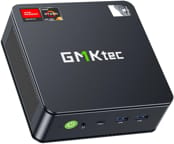 GMKtec NucBox M6 | GMKtec NucBox M6 | |
| Price | List Price: $399.99 Amazon Prices: | List Price: $469.98 Amazon Prices: |
| Version | 16GB/1TB/AMD Ryzen 5 6600H | 32GB/1TB/AMD Ryzen 5 6600H |
| Performance Rating | 4.4 | 4.8 |
| Operating System | Windows 11 Pro | Windows 11 Pro |
| Processor | Hexa-core 3.30 Ghz (max 4.50 Ghz) AMD Ryzen 5 6600H | Hexa-core 3.30 Ghz (max 4.50 Ghz) AMD Ryzen 5 6600H |
| GPU | Integrated AMD Radeon 660M | Integrated AMD Radeon 660M |
| RAM | 16 GB | 32 GB |
| Internal Storage | 1 TB | 1 TB |
| Dimensions width x length x thickness | 4.5 x 4.5 x 2 inches (114.3 x 114.3 x 50.8 mm) | 4.5 x 4.5 x 2 inches (114.3 x 114.3 x 50.8 mm) |
| Weight | unknown | unknown |
| WiFi | Wi-Fi 6E (802.11ax) | Wi-Fi 6E (802.11ax) |
| Bluetooth | Bluetooth 5.2 | Bluetooth 5.2 |
| Ethernet | 2 Ethernet ports at 2.5 Gbps | 2 Ethernet ports at 2.5 Gbps |
| HDMI | 1 Full-Size HDMI Port | 1 Full-Size HDMI Port |
| DisplayPort | 1 DisplayPort | 1 DisplayPort |
| VGA | No VGA Ports | No VGA Ports |
| USB Ports | 1 USB 2.0, 3 USB 3, 1 USB-C (1 USB4) (USB-C port supports USB 4.0, PD, DisplayPort, and data transfer) | 1 USB 2.0, 3 USB 3, 1 USB-C (1 USB4) (USB-C port supports USB 4.0, PD, DisplayPort, and data transfer) |
| Thunderbolt Ports | No | No |
| OCuLink | No | No |
| Internal SATA Ports | No SATA ports | No SATA ports |
| Card Reader | No Card Reader | No Card Reader |
| Headphone Jack | combo | combo |
| Fanless | No | No |
| VESA Mount | Yes | Yes |
| In the Box | Nucbox M6 Mini PC, Power Supply & Cable, User Manual, HDMI Cable, VESA Mount with Screws, Warranty Card | Nucbox M6 Mini PC, Power Supply & Cable, User Manual, HDMI Cable, VESA Mount with Screws, Warranty Card |
| Expandability | Barebones option available for adding your own memory, storage, and OS. Supports PCIe 4.0 SSD. | Barebones option available for adding your own memory, storage, and OS. Supports PCIe 4.0 SSD. |
Related Mini PCs
-
 GMKtec M8The GMKtec M8 is a compact mini PC with an AMD Ryzen 5 PRO 6650H, an OCuLink port for an external…
 -
 GMKtec NucBox M2The GMKtec NucBox M2 pairs an Intel Core i7-11390H with Iris Xe graphics, 1TB of NVMe storage,…
 -
 ACEMAGICIAN AM06 Pro Mini PCThe ACEMAGICIAN AM06 Pro is a compact AMD Ryzen mini PC (Ryzen 7 5700U or 5800U) with Radeon Vega…
 -
 Beelink SER3The Beelink SER3 pairs an AMD Ryzen 7 3750H (Radeon Vega 10) with dual 4K HDMI output and extensive…
 -
 Beelink SER5 (5500U)The Beelink SER5 (5500U) is a Ryzen 5 5500U mini PC with 16GB of DDR4 in two slots (64GB max), a…
 -
 BOSGAME E7The BOSGAME E7 pairs a 6-core Intel Core 3 100U with two Gigabit Ethernet ports and triple 4K@60Hz…
Six cores, USB 4, and two Gen 4 NVMe slots
The AMD Ryzen 5 6600H offers six cores and 12 threads, with base and boost clocks of 3.3GHz and 4.5GHz. It is paired with AMD’s Radeon 660M integrated graphics, a Zen 3+ era part.
The rear and front panels carry a USB 4 port that supports DisplayPort and Power Delivery, three USB 3.2 Type-A ports, and one USB 2.0 port. Two 2.5Gb Ethernet jacks handle wired networking, and wireless is Wi-Fi 6E with Bluetooth 5.2. Display outputs are HDMI 2.0 and DisplayPort 1.4, enough for multiple 4K displays alongside the USB 4 port. The USB4 port does not include OCuLink, so buyers interested in attaching an external GPU should review the eGPU connector options before assuming the upgrade path is straightforward.
Inside are two M.2 NVMe slots running at PCIe Gen 4 speeds, supporting up to 4TB of storage, and DDR5 memory upgradeable to 64GB. The 4.5-inch-square chassis still finds room for a secondary fan, which improves cooling at the cost of noise under heavy loads. A VESA mount and screws come in the box for hanging the unit behind a display.
Reviewer Insights
The Ryzen 5 6600H is a 2022-era Zen 3+ part (PassMark multi-thread around 18,866) that sits in budget territory by 2026. Two hands-on video reviews cover this machine and measured its efficiency and thermals.
Robtech
In his YouTube review, Robtech tested the M6 (priced at the time around $290 for the 16GB/512GB configuration, or $230 barebones from GMKtec) against his existing mini PC charts. He was surprised a sub-$300 machine shipped with a USB 4 port: “I did not expect a mini PC under $300 to come with a USB 4 port and I was able to power and get display from the mini using my USB-C monitor.” In his benchmarks the 6600H landed in the middle of the stack for multi-core, even matching a GMKtec K3 Pro running a 12th-gen Core i7, while single-core sat near the bottom of his chart.
Idle power draw was, in his words, “on the higher side,” and the maximum was “around what the top CPUs come back with,” so he concluded that efficiency “is certainly not its strong point.” The BIOS performance mode raised the power limit but, on the AMD side, only lifted multi-core scores; his take was that “the extra fan noise and temps are not worth a trade-off for the slight performance increase,” and he saw the chip thermal throttle under a four-core load. The bundled Gen 4 NVMe drive topped out at 58C under load, which he called “a decent result” given its heatsink and fan. He measured Bluetooth range at roughly 11 feet (about 3.5 meters) through a wall.
For gaming he stuck to the integrated Radeon 660M. Esports titles held up: Counter-Strike 2 stayed “nicely above 100 FPS,” Dota 2 ran “easily over 100 FPS,” and League of Legends held above 200. Heavier games needed help, with Hellblade 2 requiring FSR 3 Performance mode just to approach a console-like frame rate. Emulation was strong for the tier, with Breath of the Wild on Wii U “hitting almost 40 FPS.” In creative work, scrubbing a 4K timeline produced “stutters and frame drops” as the CPU spiked to 100%, and he noted an Intel i7-1255U “handles 4K video editing much better at much lower power” thanks to Quick Sync. He also could not get an external GPU running over USB 4, with his Razer Core X throwing a code 10 error before he gave up after an hour. He summed the M6 up as living “up to its promise as the best value Mini PC out there.”
Team Pandory
Team Pandory reviewed the 32GB/1TB model (then $340, with the 16GB/512GB at $299 and barebones at $230), confirming the 120W power brick (19V, 6.32A) and DDR5 running at 4,800 MT/s. They framed the 6-core chip directly against the 8-core norm: “Even with 6 cores, it can compete against the 5800H, besting its score in multiple situations.”
At idle the system pulled 10 watts on their wall meter and ran “around 42 degrees,” which they called “very quiet.” Under the Grid Auto Sport benchmark at 1080p medium it drew around 80 watts and maxed “around 86 degrees C without any thermal throttling,” getting “a bit louder.” Switching to the BIOS performance mode made little difference: a few more watts, a faster fan, and a slightly cooler 84 degrees. Wi-Fi held a 75 percent signal with no connection drops. On storage they flagged the bundled “Airdisk” NVMe as a weak point, saying they would have preferred a Lexar or MSI drive.
On gaming and emulation they set expectations by resolution: “We still need to remember that this is a budget mini-PC, so in 4K resolution we don’t get full speed in Dave the Diver.” Emulation fared better, with Tekken Tag 2 on Wii U holding “stable 60 FPS,” though PlayStation 3 showed slight frame drops under OpenGL after Vulkan crashed the emulator. Batocera Linux booted from a USB SSD with no Wi-Fi or Bluetooth issues. Their verdict: “The GMK Tech M6 is a feature-packed Ryzen solution at a budget price, and while you may need to lower graphic options in games, it can play many, including Counter-Strike 2.”
Robtech’s throttling note and Team Pandory’s 86C load reading describe the same behavior, with fan noise and power draw both climbing once the chip is held at full load.
Customer Reviews
Across 143 ratings on Amazon, the GMKtec NucBox M6 averages 4.4 stars, with 70 percent of reviewers leaving five stars and roughly 9 percent landing at one or two. Most owners run it as a small, low-power second machine, such as a kitchen-table PC or a living-room emulation and light-gaming box. Several mention the included VESA mount for hanging it behind a monitor or TV, the pre-installed and activated Windows 11 Pro, and a fan that is quiet at idle but audible under load (Boheeber, a verified buyer, noted the fan noise “is noticeable, but there’s no whining or unusual sounds”). Julie M., a verified buyer who runs it for video work and streaming, measured the power consumption herself: “Power draw is 8w idle, 21 at load streaming 2 OBS streams.”
Two verified buyers reported hardware failures. scsnails found the unit would no longer connect to the internet after months unused, and Ashley wrote that it “Worked well for a few months and then it won’t load!” Both were working through GMKtec’s one-year warranty for a fix or replacement at the time of their reviews.
Read more owner reviews on Amazon.
A six-core value pick for office work and esports
This machine fits a buyer who wants a compact desktop for office work and 1080p esports, and who cares more about the port selection and the two Gen 4 NVMe slots than about clock speed. Editing 4K footage, playing recent AAA titles at high settings, and running a system that stays silent under sustained load all sit outside what the 6600H and its cooling can do.
For those workloads, look at more powerful alternatives like the GMKtec M6 Ultra. To compare mini PCs across the catalog on specs and price, use Starry Hope’s Mini PC Comparison Tool.