
GMKtec Nucbox G2 Plus
Updated on

The GMKtec Nucbox G2 Plus is a 3.42-inch-square Windows 11 Pro desktop built around the quad-core Intel Processor N150, which has four threads and a 3.6GHz ceiling. Memory is 12GB of LPDDR5 soldered to the board, and builds ship with either a 256GB or a 512GB M.2 SATA SSD that can be swapped for a drive up to 2TB. That combination covers web browsing, office work, and media playback without stretching to sustained heavy workloads.
The case measures 3.42 x 3.42 x 1.55 inches and comes with a VESA mount, so it can sit behind a monitor instead of on the desk. Video output covers two HDMI ports and a DisplayPort, and there are three USB 3.0 ports for peripherals. Networking runs over Wi-Fi 6, Bluetooth 5.2, and two Gigabit Ethernet jacks.
| Pros | Cons |
|---|---|
| Very compact (3.42 inches square) with a VESA mount | Runs hot under load (reviewers saw 96 to 97C) |
| Dual HDMI plus DisplayPort for up to three displays | Soldered single-channel LPDDR5 RAM |
| Dual Gigabit Ethernet for wired setups | USB-C is power-input only (no data) |
| M.2 2242 slot takes an NVMe drive up to 2TB | Dual 1GbE, not 2.5GbE; no card reader |
| Wi-Fi 6, Bluetooth 5.2, three USB 3.0 ports | Entry-level N150; not for gaming or heavy work |
| Windows 11 Pro pre-installed; Wake-on-LAN, PXE | C-States disabled by default (a BIOS visit helps) |
Related Videos
GMKtec Nucbox G2 Plus Comparison Chart
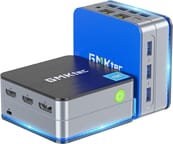 GMKtec Nucbox G2 Plus | GMKtec Nucbox G2 Plus | |
| Price | List Price: $209.99 Amazon Prices: | List Price: $229.99 Amazon Prices: |
| Version | 12GB/256GB/Intel N150 | 12GB/512GB/Intel N150 |
| Performance Rating | 2.8 | 2.8 |
| Operating System | Windows 11 Pro | Windows 11 Pro |
| Processor | Quad-core 3.60 Ghz Intel Processor N150 | Quad-core 3.60 Ghz Intel Processor N150 |
| GPU | Integrated Intel UHD Graphics | Integrated Intel UHD Graphics |
| RAM | 12 GB | 12 GB |
| Internal Storage | 256 GB | 512 GB |
| Dimensions width x length x thickness | 3.42 x 3.42 x 1.55 inches (86.87 x 86.87 x 39.37 mm) | 3.42 x 3.42 x 1.55 inches (86.87 x 86.87 x 39.37 mm) |
| Weight | unknown | unknown |
| WiFi | Wi-Fi 6 (802.11ax) | Wi-Fi 6 (802.11ax) |
| Bluetooth | Bluetooth 5.2 | Bluetooth 5.2 |
| Ethernet | 2 Ethernet ports at 1 Gbps | 2 Ethernet ports at 1 Gbps |
| HDMI | 2 Full-Size HDMI Ports | 2 Full-Size HDMI Ports |
| DisplayPort | 1 DisplayPort | 1 DisplayPort |
| VGA | No VGA Ports | No VGA Ports |
| USB Ports | 3 USB 3, 1 USB-C (USB-C port for power delivery only) | 3 USB 3, 1 USB-C (USB-C port for power delivery only) |
| Thunderbolt Ports | No | No |
| OCuLink | No | No |
| Internal SATA Ports | No SATA ports | No SATA ports |
| Card Reader | No Card Reader | No Card Reader |
| Headphone Jack | combo | combo |
| Fanless | No | No |
| VESA Mount | Yes | Yes |
| In the Box | 1 x GMKtec Nucbox G2 Plus Mini PC, 1 x Power Adapter, 1 x VESA Mount with Screws, 1 x Blue Mini PC Cover Lid, 1 x HDMI Cable, 1 x User Manual | 1 x GMKtec Nucbox G2 Plus Mini PC, 1 x Power Adapter, 1 x VESA Mount with Screws, 1 x Blue Mini PC Cover Lid, 1 x HDMI Cable, 1 x User Manual |
| Expandability | Supports Wake On LAN, PXE Boot, RTC Wake, Auto Power On, and expandable storage via M.2 2242 SATA SSD slot up to 2TB. | Supports Wake On LAN, PXE Boot, RTC Wake, Auto Power On, and expandable storage via M.2 2242 SATA SSD slot up to 2TB. |
Related Mini PCs
-
 GMKtec G10The GMKtec G10 is a budget mini PC with an AMD Ryzen 5 3500U, two M.2 slots, 2.5G Ethernet, three…
 -
 GMKtec G11Budget AMD Ryzen Embedded mini PC built for 24/7 duty, with dual 2.5GbE, WiFi 6E, dual M.2 slots,…
 -
 Bmax B4 PlusThe BMAX B4 Plus is an Intel N100 mini PC with a 2.5-inch SATA drive bay next to its M.2 slot, so a…
 -
 Bmax B4 UltraThe Bmax B4 Ultra is an ultra-compact mini PC featuring Intel's N150 processor, 12GB LPDDR5 RAM,…
 -
 BOSGAME B100The BOSGAME B100 is a budget Intel N100 mini PC with 16GB of DDR4, a 512GB NVMe SSD, dual HDMI plus…
 -
 BOSGAME B95The BOSGAME B95 is a low-cost Intel N95 mini PC with 16GB of DDR4, a 512GB M.2 SSD, 2.5Gb Ethernet,…
Dual Ethernet and three display outputs in a 3.42-inch box
The 3.42 x 3.42 x 1.55-inch case VESA-mounts behind a monitor and still carries dual HDMI plus a DisplayPort for up to three monitors, three USB 3.0 ports, and dual Gigabit Ethernet, which suits a home office or a small home-lab setup.
The quad-core Intel N150 runs up to 3.6GHz and handles everyday work, web browsing, and streaming, though heavy workloads sit outside its range. The 12GB of LPDDR5 is soldered and single-channel, which holds back the integrated graphics and heavier multitasking. Storage is one M.2 2242 slot carrying the bundled 256GB or 512GB SATA module, and the slot can be upgraded. The bundled drive is SATA, but reviewer Robtech confirmed it also accepts an NVMe Gen 3 x2 drive (good for roughly 1.8 GB/s), up to 2TB.
Wireless is Wi-Fi 6 and Bluetooth 5.2, and the BIOS adds Wake-on-LAN, PXE Boot, and Auto Power On. The USB-C port is power-input only, so it cannot be used for data or peripherals.
Reviewer Insights
The G2 Plus is the Intel N150 refresh of the older N100-based Nucbox G2. The Intel Processor N150 carries a PassMark multi-thread score near 5,343 and is Intel’s “Twin Lake” update to the Alder Lake-N N100: the same four cores and four threads with a marginally higher 3.6 GHz ceiling. In 2026 it sits at the entry level of the mini PC market.
Robtech reviewed the G2 Plus on video and described it as “an update to the G2” in which the “N150 refresh replaces the previous n100.” His wall meter put idle draw at around 9 watts, which he called “pretty average,” with peak draw depending on which power-limit profile you pick in the BIOS. He found that “whatever mode you use the CPU runs hot and the maximum reached was 96c,” higher than the older G2. C-States are disabled by default, which holds back single-core speed until you switch them on, and there is an unusual user-adjustable power-limit option he noted is “uncommon on the budget end.” Single-core scores were “not great out of the box” but improved once C-States were enabled, while multi-core performance “does okay” yet still trailed the best N150 results he had on hand. Valorant only ran with Secure Boot enabled, and raising the power limit was “the difference between a stutter Fest and something that was playable.” For upgraders, he confirmed the M.2 2242 slot accepts an NVMe Gen 3 x2 drive good for “around 1.8 GB per second sequential read and write,” a clear step up from the bundled SATA module.
Gough’s Tech Zone (reviewer lui_gough) bought the 12GB/256GB unit and ran a teardown plus bench testing. His CPU-Z run scored “1294.8 multi-threaded and 317.8 single-threaded,” and measured against an N100/DDR4 machine that scored “1196.2 and 308.2” he judged “the difference is nearly negligible.” Compression tasks showed a wider gap. WinRAR throughput “reached 3955kB/s” and the “7-zip benchmark returned a final result of 18.19GIPS,” which he logged as a “+9.6%” bump over the N100. He recorded 9.49W at the wall with peripherals attached and 7.80W headless, and under “a Prime95 load, the power can be seen to hover aboout 26-28W.” The SoC “peaked at about 16W consumption and in doing so, managed to reach a package temperature of 97 degrees C,” matching Robtech’s hot-running finding. Although it “terminates into a USB-C plug, it is in-fact not USB or USB-PD compliant. It does no PD negotiation and just outputs a fixed 12V,” so that brick should never be plugged into another USB-C device. He also documented that the included storage is a DRAM-less “SATA-based 2242” drive and that “both GbE ports are Realtek based, as is the Wi-Fi.”
On real-world use, John’s Tech Blog (John Hagensieker) reported swapping the bundled 512GB drive for a 2TB M.2 and installing Linux, where “Everything worked out of the box” on Ubuntu and Linux Mint. He skips formal benchmarks (“I don’t really do benchmarks”), but his wish list lines up with the spec sheet’s limits: 2.5GbE rather than dual 1GbE, one more USB 3 port, and upgradeable instead of soldered RAM.
Roughly 9W at idle makes this a home-lab and office machine
The dual Ethernet, three display outputs, VESA mount, and idle draw near 9W fit an office desk or a small home lab; the N150 stops short of heavy workloads. Both Robtech and Gough’s Tech Zone measured package temperatures in the mid-90s C under sustained load, so the fan will be audible when the chip is working, and the BIOS trip to enable C-States is worth the few minutes it takes. If you are deciding whether to keep the OEM Windows install, wipe it, or try Linux, the Windows, wipe, or Linux guide walks through it.
The N150, single-channel RAM, and UHD graphics cap it at light tasks, so gaming, video editing, or other resource-intensive work belongs on a larger machine. For more power, step up to a model like the GMKtec Nucbox K6. Spec-by-spec comparisons against other small desktops live in Starry Hope’s Mini PC Comparison Chart.
Frequently Asked Questions
Can the GMKtec Nucbox G2 Plus handle gaming?
Intel UHD Graphics covers video playback and light photo editing. Modern games are beyond it: Robtech got Valorant running only after enabling Secure Boot and raising the BIOS power limit.
Is the RAM upgradeable on this Mini PC?
No. The 12GB of LPDDR5 is soldered to the motherboard and runs single-channel, which limits the integrated graphics. For web browsing, office work, and media streaming, 12GB is enough.
What type of storage expandability does it offer?
There is one M.2 2242 slot, filled from the factory with a 256GB or 512GB SATA module depending on the build. Swapping that drive takes capacity to 2TB, and the slot also accepts an NVMe Gen 3 x2 SSD. No 2.5-inch SATA bay and no card reader.
Does it support dual monitors?
Three screens run at once, using the two HDMI ports and the DisplayPort together. The USB-C port carries power only, so it adds no fourth output.
Is the USB-C port usable for data transfer?
The port takes power in and nothing else, so it cannot move data or drive peripherals. Gough’s Tech Zone also found the bundled adapter outputs a fixed 12V with no PD negotiation, so it should not be plugged into other USB-C hardware.
Does it come with a fan, and is it noisy?
It is not fanless. An active cooler handles the N150, and noise stays minimal during normal use, though the chip reaching 96 to 97C under sustained load will spin the fan up.
What’s included in the box?
A power adapter, a VESA mount with screws, a blue cover lid, an HDMI cable, and a user manual ship with the machine. The mount and the HDMI cable cover a behind-the-monitor setup without a trip to the parts drawer.
Can it be mounted to a monitor?
Yes. The included VESA mount and screws attach it to the back of a monitor or another flat surface, which is the point of the 3.42-inch chassis.
What operating system does it run?
Windows 11 Pro is pre-installed. Linux works too: John Hagensieker reported Ubuntu and Linux Mint both running out of the box after he fitted a larger drive.