
GMKtec Nucbox K6
Updated on

The GMKtec Nucbox K6 is a compact mini PC built on AMD’s Ryzen 7 7840HS, an eight-core, 16-thread chip with Radeon 780M integrated graphics and support for a triple 4K display setup. It ships with Windows 11 Pro and takes up to 64GB of DDR5 RAM, which covers home and office workloads. Dual M.2 2280 PCIe 4.0 slots leave room for substantial storage upgrades, and the case now comes in new color options.
| Pros | Cons |
|---|---|
| Ryzen 7 7840HS runs 1080p games on the integrated Radeon 780M | Plastic case instead of metal |
| Up to 64GB DDR5 RAM and dual M.2 SSD slots | Noticeable fan noise under load |
| Windows 11 Pro pre-installed | Lacks HDMI 2.1 for 4K at 144Hz |
| USB 4.0 Type-C and dual 2.5Gb LAN ports | BIOS has no fan-profile control |
| Triple 4K display support |
Related Videos
GMKtec Nucbox K6 Comparison Chart
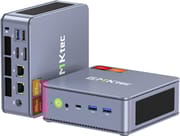 GMKtec Nucbox K6 | GMKtec Nucbox K6 | |
| Price | List Price: $569.99 Amazon Prices: | List Price: $749.99 Amazon Prices: |
| Version | 32GB/1TB/Ryzen 7 7840HS/Space Blue | 32GB/1TB/Ryzen 7 7840HS/Grey |
| Performance Rating | 9.0 | 9.0 |
| Operating System | Windows 11 Pro | Windows 11 Pro |
| Processor | Octa-core 3.80 Ghz (max 5.10 Ghz) AMD Ryzen 7 7840HS | Octa-core 3.80 Ghz (max 5.10 Ghz) AMD Ryzen 7 7840HS |
| GPU | Integrated AMD Radeon 780M | Integrated AMD Radeon 780M |
| RAM | 32 GB | 32 GB |
| Internal Storage | 1 TB | 1 TB |
| Dimensions width x length x thickness | 5 x 5 x 2 inches (127 x 127 x 50.8 mm) | 5 x 5 x 2 inches (127 x 127 x 50.8 mm) |
| Weight | 1.17 lbs (0.53 kg) | 1.17 lbs (0.53 kg) |
| WiFi | Wi-Fi 6E (802.11ax) | Wi-Fi 6E (802.11ax) |
| Bluetooth | Bluetooth 5.2 | Bluetooth 5.2 |
| Ethernet | 2 Ethernet ports at 2.5 Gbps | 2 Ethernet ports at 2.5 Gbps |
| HDMI | 1 Full-Size HDMI Port | 1 Full-Size HDMI Port |
| DisplayPort | 1 DisplayPort | 1 DisplayPort |
| VGA | No VGA Ports | No VGA Ports |
| USB Ports | 1 USB 2.0, 3 USB 3, 1 USB-C (1 USB4) (USB 4.0 Type-C with 40Gbps speed and DisplayPort | 1 USB 2.0, 3 USB 3, 1 USB-C (1 USB4) (USB 4.0 Type-C with 40Gbps speed and DisplayPort |
| Thunderbolt Ports | No | No |
| OCuLink | No | No |
| Internal SATA Ports | No SATA ports | No SATA ports |
| Card Reader | No Card Reader | No Card Reader |
| Headphone Jack | combo | combo |
| Fanless | No | No |
| VESA Mount | Yes | Yes |
| In the Box | GMKtec Mini PC, VESA Bracket, Screw Kit, Power Adapter (19V/6.32A), HDMI Cable, User Manual | GMKtec Mini PC, VESA Bracket, Screw Kit, Power Adapter (19V/6.32A), HDMI Cable, User Manual |
| Expandability | Supports up to 64GB DDR5 RAM, dual M.2 SSD slots for storage expansion | Supports up to 64GB DDR5 RAM, dual M.2 SSD slots for storage expansion |
Related Mini PCs
-
 GMKtec NucBox K16The GMKtec NucBox K16 is a CNC-aluminium mini PC on the AMD Ryzen 7 7735HS with Radeon 680M…
 -
 GMKtec Nucbox K2The GMKtec Nucbox K2 is a compact AMD Ryzen 7 7735HS mini PC with Radeon 680M graphics, DDR5 to…
 -
 Beelink EQR7The Beelink EQR7 pairs an AMD Ryzen 7 7735U with a built-in power supply, dual Gigabit Ethernet,…
 -
 Beelink SER5 MAX (Ryzen 7 7735HS)The Beelink SER5 MAX pairs an 8-core Ryzen 7 7735HS and Radeon 680M graphics with 24GB of LPDDR5,…
 -
 BOSGAME M4The BOSGAME M4 pairs an AMD Ryzen 7 8745HS with 32GB of DDR5, an OCuLink port for an external GPU,…
 -
 BOSGAME P3 LiteThe BOSGAME P3 Lite pairs an AMD Ryzen 7 6800H and Radeon 680M graphics with dual 2.5G Ethernet,…
Design, ports, and expansion
DDR5 memory gives the K6 faster transfers and lower power draw, and the two M.2 2280 PCIe 4.0 slots take a pair of drives rather than one.
The USB 4.0 Type-C port runs at 40Gbps and carries DisplayPort, which covers both high-speed transfers and peripherals. Two Realtek 2.5Gb LAN ports handle networking, though not every setup will use both.
GMKtec chose plastic for the Steel Blue case to help Wi-Fi and Bluetooth signal reception. Some buyers will still prefer metal.
The Ryzen 7 7840HS handles demanding applications and heavy multitasking, and its Radeon 780M graphics drive multiple 4K displays.
The K6 uses standard DDR5 SODIMM slots rather than soldered memory, so upgrading to 64GB later is straightforward; the soldered RAM guide covers why that distinction matters.
Reviewer Insights
Four reviewers tested the same AMD Ryzen 7 7840HS configuration, so the power, thermal, and frame-rate numbers below are comparable.
ETA Prime: power scaling and benchmark numbers
ETA Prime is the most thorough on what the chip does at different power limits. Out of the box the K6’s package power settled at 54W under a combined CPU and GPU stress, and he noted it “stay[s] like this all day cooling system is handling it just fine.” Using the x86 tuning utility he stepped through the Eco, Balanced, Performance, and Extreme presets, with Performance landing around 65W and Extreme reaching 70W. In Extreme mode Geekbench 6 returned 2,465 single-core and 12,774 multi-core (the run itself never pulled more than about 63W), 3DMark Fire Strike scored 7,972, which he called “about 200 points more than most of these other mini PCs that I test with this same chip,” and Time Spy hit 3,347, just shy of the roughly 3,400 he had ever pulled from an RDNA3 iGPU on a 7940HS.
In his 1080p gaming runs in Extreme mode, Forza Horizon 5 averaged 116 FPS on medium with vsync at 120, Cyberpunk 2077 averaged about 79 FPS on low with FSR performance, Shadow of the Tomb Raider managed 77 FPS on low (falling to about 62 on medium), God of War averaged 68 FPS with FSR performance, and Mortal Kombat 1 held a steady 60 FPS at 900p with FSR balanced. On a kilowatt meter at the wall in Extreme mode he logged about 14W at idle, 71W average while gaming, and a 93W maximum.
Robtech: head to head with the Beelink SER7
Robtech’s review benchmarks the K6 against a Beelink SER7 running the same 7840HS. In single-core Cinebench the K6 came in 3% behind the SER7 at the default Balance mode and edged ahead once switched to Performance; multi-core ran almost 4% behind at default and about 1% ahead with the power limit raised; video encoding favored the K6 by 1% in Balance and 3% in Performance, and the integrated-graphics test was within the margin of error. On the 780M he then ran 4K against 1080p: Dota 2 held just over 100 FPS at 4K versus 155 at 1080p, Valorant dropped under 100 FPS at 4K versus over 200 at 1080p, and GTA V “still can’t be played at 4k on integrated Graphics at a good frame rate.” Plugging an RTX 3070 eGPU into the USB4 port let him run Starfield at 4K with DLSS.
On thermals and acoustics he measured the CPU peaking at 87C at default and into the low 90s in maximum performance, idle power slightly higher than the SER7 but a maximum draw about 10W lower at default. Fan noise was higher than the SER7 at both idle and load; he was blunt that “it’s not a quiet mini and it is one of the noisier ones under load.” The Lexar 1TB Gen4 drive ran “above gen 3 speeds” but was not the fastest he had tested. He still rated the K6 a clear step up from previous models thanks to the added SSD and RAM cooling and the tool-included, easy-open design, with the plastic midsection and fan noise his main reservations.
Team Pandory: power at the wall and the K4 comparison
Team Pandory’s review covers the 32GB/1TB Steel Blue unit, which they clocked at 530g, “one of gmk Tech’s heaviest mini PCS.” The BIOS exposes a Quiet 45W and a Performance 65W limit. At the wall the K6 idled around 9W and was “completely silent,” pulled about 59W in Tekken 8, and about 67W in Cyberpunk 2077. Their 1080p gaming came in at roughly 70 FPS in Counter-Strike 2 on high, a steady 60 FPS in Forza Horizon 5 on high, and around 40 FPS in Cyberpunk 2077 on medium (rising into the high 60s with FSR set to ultra performance). The teardown showed two sticks of Crucial DDR5 and a 1TB Lexar NM7A1 (the OEM version of the NM710).
Against the older NucBox K4 (a 7940HS), the K6 ran with “temperatures dropping from 10 to 20°,” and where the K4 starts to thermal-throttle the K6 holds. The downsides they flagged were a lackluster BIOS with no fan-profile control and no HDMI 2.1 for 4K above 120Hz. Asked which of the two to buy, their answer was “hands down the k6.”
TechMishka: the 780M versus a discrete card
TechMishka framed the K6 around its graphics, noting the Radeon 780M can match or beat a discrete GTX 1650 while the whole mini PC stays under the roughly 70W that the 1650 alone needs. Counter-Strike 2 was “super smooth” even at 4K, and he found the machine handled 4K video footage well enough to consider it a backup editing station. His unit shipped with a value “Mason semi” NVMe rather than the usual Lexar, which he said performed “much better than expected especially concerning consistency,” and the MediaTek Wi-Fi 6E adapter neared 70 MB/s on his home network, “among the fastest adapters I’ve seen on a Mini PC.” Connecting an RTX 2060 eGPU over USB4 was, in his words, “not that much quicker than the embedded 780m.” His reservations were the plastic case and the absence of OCuLink and USB-C power delivery.
The 7840HS is still a capable 1080p chip in 2026
The Ryzen 7 7840HS is a 2023-era Zen4 mobile chip: eight cores, sixteen threads, with a PassMark multi-thread score around 28,870 and the Radeon 780M (RDNA3, 12 compute units) that was the strongest integrated mobile graphics of its generation. That is still a capable chip in 2026 for everyday Windows, multi-monitor productivity, 4K video playback, and the 1080p gaming and emulation these reviewers demonstrated. Newer Ryzen AI 300 chips pull ahead on both CPU and iGPU, so buy the K6 as an upgradeable 1080p performer rather than a current flagship.
Customer Reviews
Across 963 ratings on Amazon, the GMKtec Nucbox K6 averages 4.5 stars, with 79% of buyers leaving five stars and 11% four. Positive reviews keep landing on the small footprint, the performance for the size, and how easy the case is to open for adding RAM or a second NVMe drive. Bill, a verified buyer who replaced an aging Intel NUC, called out the “small footprint, supports 3 monitors, option to upgrade/replace components as needed with 2 user-serviceable slots for both m.2 drives ram.” A verified buyer writing as Filtered listed the “Sturdy build (metal casing, hard plastic top and bottom)” and that it is “Very easy to open to upgrade RAM and/or NVMe SSD” among the things they liked.
The same Filtered review flags heat on the stock thermal paste, noting temperatures “can reach 91c on “Performance” mode,” and that the RGB fan on top is static and cannot be turned off. The bluntest negative comes from a verified buyer, Raltar, whose unit shipped with a non-new SSD: “out of the box I noticed that the 1TB SSD that was included in this GMKtek K6 mini PC had logged about 86 hours of usage in SMART, as well as over 8TB written and 7TB read.” That appears to be a one-off rather than a pattern, though the distribution still carries a 7% one-star share.
An openable Ryzen 7 box for productivity, editing, and gaming
The K6 fits buyers who want Ryzen 7 7840HS and Radeon 780M performance in a box they can open, with up to 64GB of DDR5 RAM and dual M.2 SSD slots to grow into. It covers daily productivity, video editing, and gaming.
Fan noise under load, the plastic chassis, and the absence of HDMI 2.1 for the highest resolutions and refresh rates are the reasons to buy something quieter or newer instead. The mid-tier mini PC comparison covers the 7840HS generation alongside newer alternatives.
Starry Hope’s Mini PC Comparison App puts the K6 side by side with other mini PCs.
Frequently Asked Questions
What operating system comes pre-installed on the GMKtec Nucbox K6?
Windows 11 Pro, pre-installed on every configuration except the barebones version.
Can the GMKtec Nucbox K6 support multiple monitors?
The Nucbox K6 can support up to three 4K displays using its HDMI 2.0, DisplayPort 1.4, and USB 4.0 Type-C ports.
Is the RAM and storage expandable on the GMKtec Nucbox K6?
Yes. It takes up to 64GB of DDR5 RAM, and the dual M.2 2280 PCIe 4.0 slots hold up to 4TB (2TB*2).
Does the GMKtec Nucbox K6 have a fanless design?
No. The cooling system is active, with fans over the memory and storage components.
What type of ports are available on the GMKtec Nucbox K6?
USB 4.0 Type-C with 40Gbps speed, USB 3.2 Gen 2, USB 2.0, DisplayPort 1.4, HDMI 2.0, dual Realtek 2.5Gb LAN ports, and a combo headphone jack.
Can I use an eGPU with the GMKtec Nucbox K6?
Yes. The USB 4.0 Type-C port supports an eGPU for more gaming and graphics performance.
Can I mount the GMKtec Nucbox K6 behind a monitor?
Yes. A VESA bracket ships in the box for mounting behind a compatible monitor.
What comes in the box with the GMKtec Nucbox K6?
The mini PC, a VESA bracket, a screw kit, a power adapter (19V/6.32A), an HDMI cable, and a user manual.
Is there an option for a barebones version of the GMKtec Nucbox K6?
Yes, a barebones version is available for those who prefer to install their own memory, storage, and operating system.